
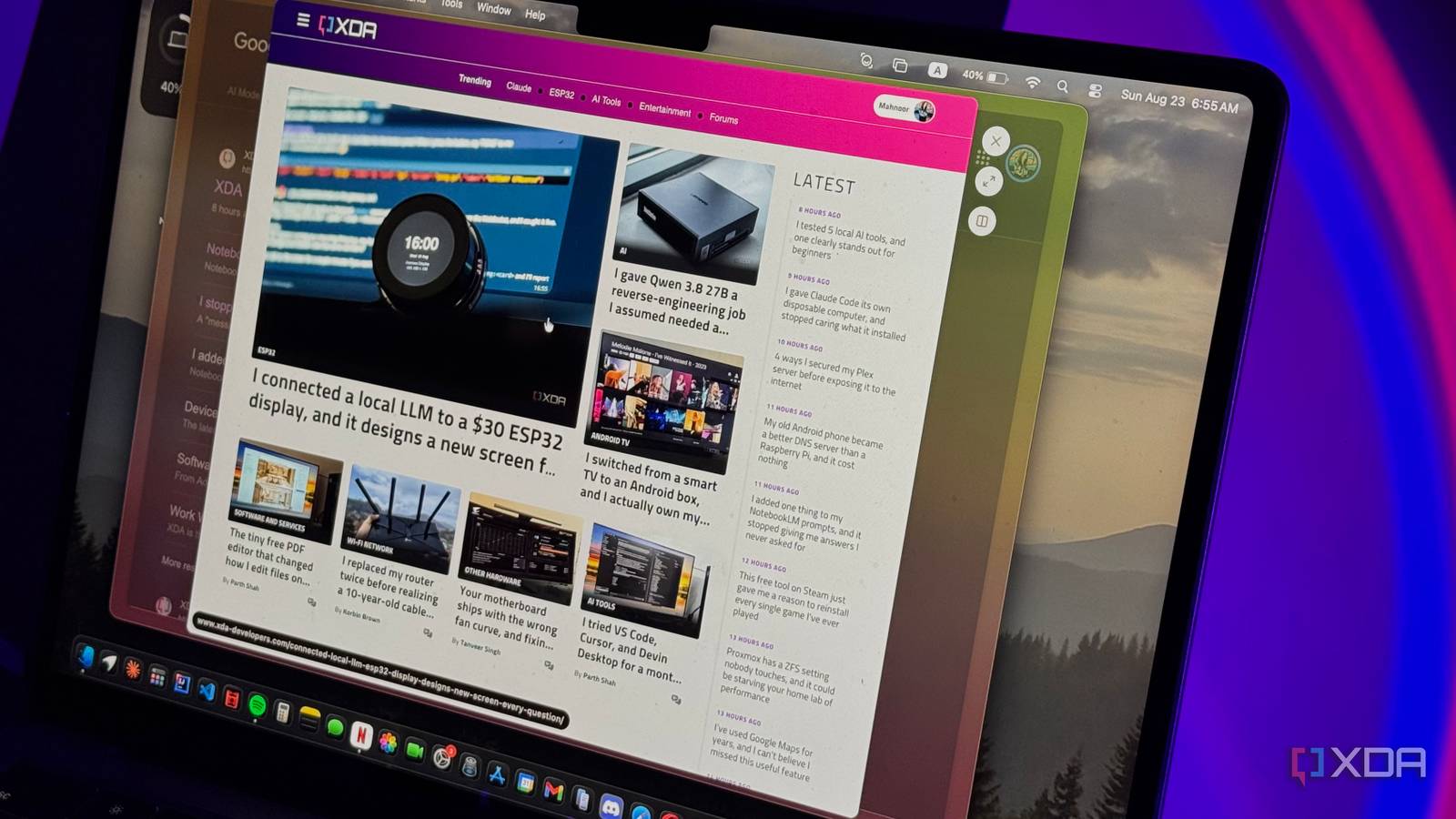
Published Aug 24, 2026, 10:30 AM EDT Mahnoor Faisal is a tech journalist covering AI and productivity tools with bylines at XDA, SlashGear, MakeUseOf, Laptop Mag, and Android Police. She's been writing professionally since she was sixteen, and has since penned hundreds of articles. This includes in-depth coverage of AI tools like NotebookLM to breaking news across the AI space. Her passion for technology started when she received her first iPod Touch (4th generation) on her 8th birthday, and she's been deep in the tech world ever since. Currently pursuing a degree in computer science, Mahnoor brings both a journalist's eye and a technical foundation to her coverage of how AI is reshaping the way we work and learn. Like many people, I used to once think the browser I used didn’t really matter. At the end of the day, I just needed somewhere to open a ridiculous number of tabs, Google whatever I was looking for, and get on with my work. I started with Chrome, then would occasionally bounce between Edge, Opera, and Brave whenever one of them introduced a feature that caught my attention. However, I never really stuck with any of them for that reason, since all the browsers felt more or less the same once the novelty of whatever was new wore off. It wasn’t until I started using Zen Browser that I came across a feature that finally gave me a reason to ditch every other browser I’d used in the past. Funnily enough, the feature I'm referring to isn't even Zen's flashiest! My tab problem was worse than I realized I was hoarding tabs without realizing it If you're reading this article, you've likely realized that I work as a journalist. You'd be mistaken if you think my job starts and begins with typing words into Google Docs, though. A huge chunk of my day is spent researching. In fact, I'd say that I spend more time researching and brainstorming than actually writing! While the research bit involves a lot of reading, it also involves opening link after link after link. I'll click through search results, jump into Reddit threads, open documentation, check a source someone else has linked to, and occasionally open something only to realize within a few seconds that it isn't useful at all. The problem is that almost every one of those clicks ends up becoming yet another tab. By the time I'm halfway through researching an article, I'll often have hundreds of tabs open. Not only does this make my workspace far more cluttered than it needs to be, it also makes finding the few tabs I actually care about much harder than it should be. Zen Glance fixed the problem at the source Turns out, opening fewer tabs was the fix I initially thought all I needed to fix this problem was some sort of tab organization feature. All major browsers have some version of tab groups, so I assumed the solution was simply to get better at sorting everything I opened. In practice, though, that only made the mess more organized. I was still opening far more tabs than I actually needed in the first place. I then tried Zen after noticing how impressed my colleagues were by it, and the browser's Glance feature ended up being exactly what solved the problem I described above. The feature tackles the problem from the opposite direction. Instead of helping me organize all those tabs after I've opened them, it gives me a way to avoid opening many of them in the first place. Glance does exactly what its name suggests: it lets you quickly glance at the tab you'd like to open. With Glance, I can preview a link in a floating window on top of the page I'm already viewing. I can trigger it with Alt + click on Windows/Linux or Option + click on macOS, then scroll through the page, click around, and read whatever I need without fully committing to opening it as another tab. Once I'm done, I can simply dismiss the preview, and I'm right back where I started. I now preview first and open later Some links only deserve a quick look That sounds like an incredibly small change, and that's exactly why I didn't expect it to make much of a difference at first. But a huge portion of the links I open while researching are only useful for a few seconds. Maybe I'm checking a statistic, verifying a date, reading one paragraph from a source, or deciding whether a search result is even relevant. Those pages never really needed permanent spots in my tab bar to begin with! If something happens to be worth keeping, I can turn it into a regular tab and continue from there. So, rather than opening everything first and deciding what to close later (which is what I've been doing for years), I now do the opposite. I preview links first and only keep the ones that actually deserve a tab! This one change has done more for my tab problem than any tab group or organization system I've tried. In fact, it's also helped me wrap up my research a lot faster, since I spend less time digging through a sea of tabs trying to remember which ones were actually useful! Other browsers still don’t come close Zen has plenty of other features that make it an impressive browser on its own. Its vertical tabs are much easier for me to manage than a traditional tab bar, Workspaces let me separate different parts of my browsing, and its overall interface is far more minimal than most browsers I've used. However, Glance is definitely the feature I'd miss most if I were to ditch Zen. At this point, whenever I use another browser and have to open a link in yet another tab just to check something for a few seconds, it feels strangely outdated!
This one browser feature convinced me to ditch Chrome, Edge, Opera, and Brave
Full Article
Original Source
Read the full article at Xda-developers →KhanList aggregates and links to publicly available news content. We do not host full articles from third-party sources. Always verify important information with original sources.