
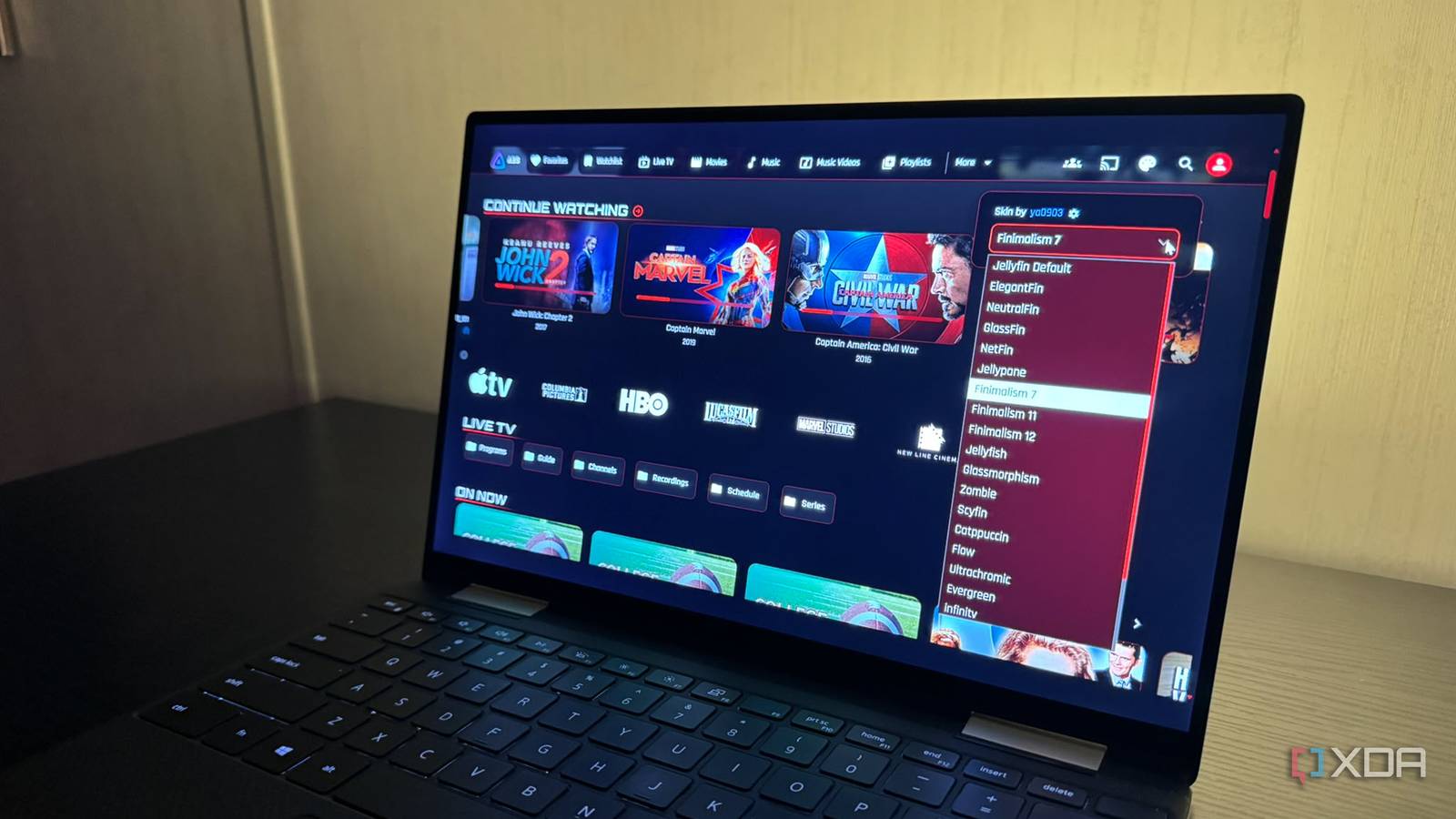
Published Nov 2, 2026, 3:00 PM EST Based in rural Minnesota, Brian Burgess worked in IT for 10 years before finding his passion for writing about consumer technology. Brian earned his degree in computer and network technology in 2000. He held various IT positions, including help desk support, router installations for IBM, database administration, and other associate network administration roles. He's been a personal technology journalist for 18 years and has written thousands of articles about Microsoft products and services, Android, iOS, streaming, and more. He has written for notable tech sites including XDA, InformationWeek, How-To Geek, Byte, groovyPost, and others. When he is away from the keyboard, you will hear him playing guitar, working outdoors, and watching Star Trek. Jellyfin is a great open-source self-hosted media server that lets you do a lot with your media. It has a huge community of enthusiasts and developers who keep adding great tools and features. A new project seems to come up daily, from new clients on every modern streaming platform to plugins that make customization and management easier. KefinTweaks is a front-end plugin for the server that provides customization and functionality in one place. You can add different skins and themes through compatible clients on different devices. It has a lot going on, but is straightforward to configure and use for a better Jellyfin experience. Installing the plugin is straightforward But some prerequisites are required Before installing the KefinTweaks plugin, you'll need a couple of plugins. You might already have them installed on your Jellyfin server, especially if you've installed other plugins like VideoOSD Tweaks & Candy. You will need the JavaScript Installer and File Transformations plugins installed and active before starting. Once those are installed, input the JavaScript code listed on the plugin's GitHub page in the Installer plugin and save it. Then, restart your server. Once the server is back up, the KefinTweaks plugin should appear at the bottom under the Front End Plugins section. When it appears, enable the correct build to start using it. I didn't see it right away, and this has been common for several other users. I verified I had the JavaScript code entered correctly, completely stopped my server, and started it back up. I went back to the Plugins page, hit Ctrl+F5 to hard-refresh the page, and it showed up. Then I selected it and chose the latest version, which works with my Jellyfin 12.1 server. I was able to turn on many cards, skins, and other features. Customizing the Jellyfin experience There are a lot of possibilities with this front-end plugin This isn't a plugin that just slaps new skins on Jellyfin, although that's part of it; it also offers functional tweaks that make viewing and managing media more enjoyable. The skins are easy to use; I select one and then customize it further. I like the watchlists to track content I plan to view, and the series progress feature for a visual representation of where I'm at in a show, so I don't lose my spot. I also use it to select a show I'll have time to finish. KefinTweaks is a Swiss Army Knife-style plugin that also lets me add home-screen features like infinite-scroll discovery, which is nice for large libraries. I can also add new sections like seasonal content, playlists, collections, and more. I've found playlists and collections helpful for managing shows, shorter videos, and my ripped CD collection. I also appreciate other cool features, like being able to remove content from the Continue Watching section by closing the item. I've never been a fan of watching something for two minutes and having it show up in that row. I can also hide section titles that get in my way. It also lets me search for subtitles from providers directly from the interface. Putting "tweaks" in the name is appropriate here since it has a ton of them. I've been customizing my Jellyfin experience with tons of different settings and have barely scratched the surface. What works and looks good on my computer might not be ideal for my phone, and vice versa. Luckily, there are so many combination possibilities that I've had a great time getting everything just right for clients running on my devices. I can change the settings for each phone or computer. I'm not stuck with the same theme or feature set everywhere. It keeps things interesting. Multiple platform support Tweak Jellyfin at home or on the go The plugin works with compatible clients that use Jellyfin Web to access the server. For instance, I can access it from a web browser, Jellyfin Media Player on a computer, or the official Android and iOS clients on my phones. But it doesn't work natively on Android TV yet. Development is also underway for other Smart TV platforms like LG webOS and Samsung Tizen. The plugin is installed on my server and available to compatible clients across platforms. However, the KefinTweaks plugin isn't a skin or feature set that every client can see and use. But certain apps like Streamyfin and Pelagica can share the watchlist, as it is an integrated feature in both. Popular third-party clients like Moonfin and Findroid retain their own interface, so the plugin isn't compatible. Jellyfin your way with the KefinTweaks plugin The plugin offers so much that you'll find weeks of enjoyment just changing options and tweaking the tweaks. What's more, I can apply a skin, then add or remove CSS modules to configure it further. Plus, I can adjust every KefinTweaks setting that I implement. With so much going on, it adds even more depth to what I can do to make my home screen functional with my media. Plus, with the right skin combination, it looks good — all while I have fun making changes. KefinTweaks
This Jellyfin plugin just got the overhaul I've been waiting years for, and now it's even more useful
Full Article
Original Source
Read the full article at Xda-developers →KhanList aggregates and links to publicly available news content. We do not host full articles from third-party sources. Always verify important information with original sources.