
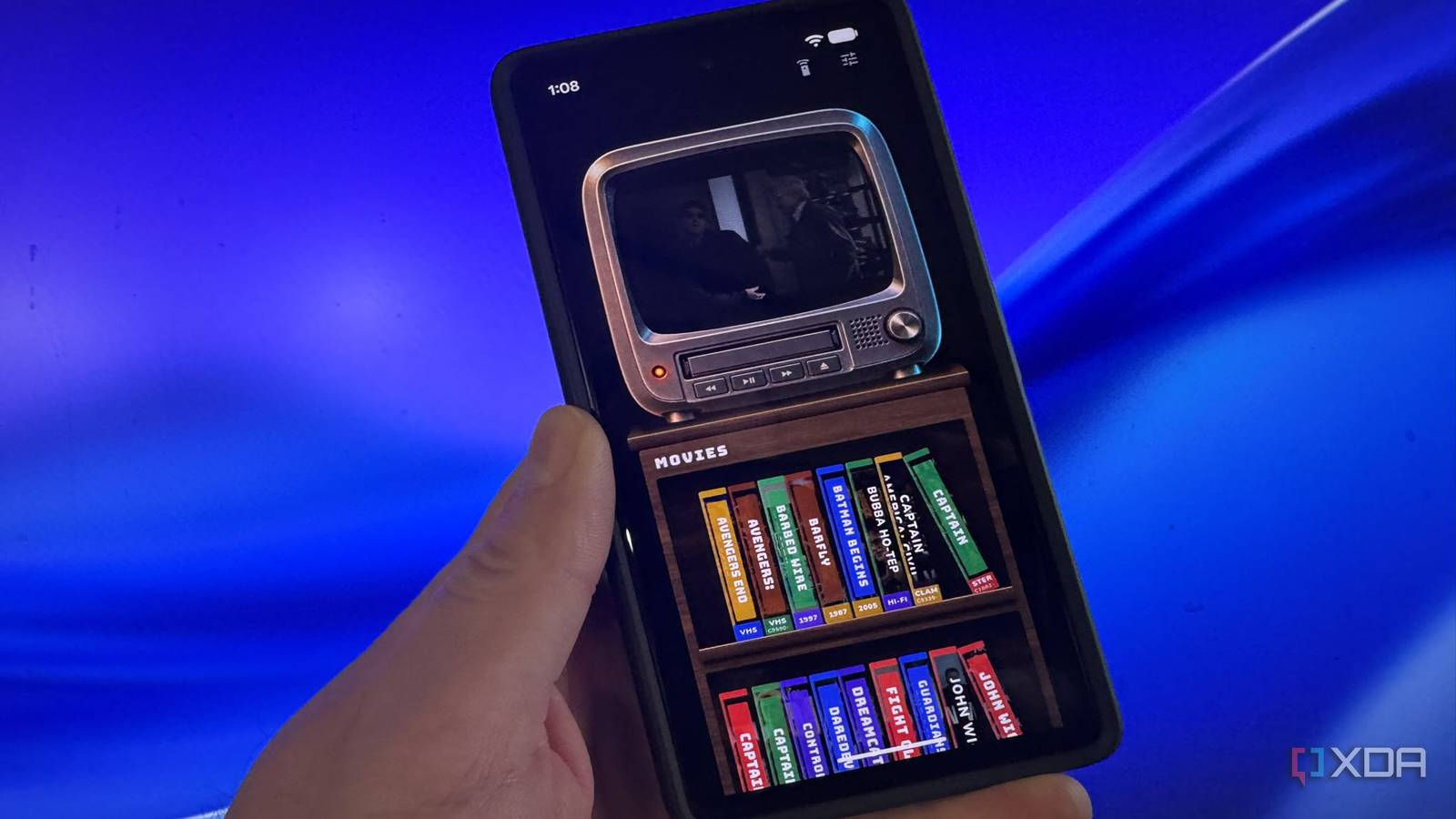
Published Nov 17, 2026, 11:30 AM EST Based in rural Minnesota, Brian Burgess worked in IT for 10 years before finding his passion for writing about consumer technology. Brian earned his degree in computer and network technology in 2000. He held various IT positions, including help desk support, router installations for IBM, database administration, and other associate network administration roles. He's been a personal technology journalist for 18 years and has written thousands of articles about Microsoft products and services, Android, iOS, streaming, and more. He has written for notable tech sites including XDA, InformationWeek, How-To Geek, Byte, groovyPost, and others. When he is away from the keyboard, you will hear him playing guitar, working outdoors, and watching Star Trek. One thing that excites me about tech is combining the old and the new. Whether it is retro gaming, repurposing an old server, or creating nostalgic looks for modern media, I'm into it. A new app is on the scene that gives your modern self-hosted library a nostalgic VHS look that you never knew you wanted. VHSFin adds your Jellyfin library to a VHS tape collection you can watch on an old-school CRT television set. The app turns a modern collection of DVD, standard Blu-ray, and 4K Blu-ray rips into a virtual shelf of VHS tapes you can play in a VCR. It works on your phone and simulates the playback experience of fast-forwarding and rewinding movies. It was how we got to the good parts before we could instantly scrub to a movie's location. Relive the VHS, VCR, and CRT televisions with your Jellyfin library View modern digital media like it's the 90s If you are old enough to remember the VHS tape-and-player experience, you will love to play with the VHSFin apps. It lets you connect your Jellyfin media library and turn movies and shows into old tapes. Pop in your movie or show's tape, and you can watch it on an old-school television set. The app also lets you change the type of television you watch your content on. The TV set selection reminds me of the hand-me-down sets I had in my room as a kid. You might not be old enough to remember VHS tapes and VCRs. If you don't recall going to Blockbuster to rent movies on tape and being charged an extra fee if you didn't rewind them, you'll have a brand-new experience. This app lets you virtually relive the movie experience your parents or grandparents had before streaming or self-hosted media servers. Set up your VHS experience for modern 4K movies DVD rips work too You can install the VHSFin app on your Android phone or on iPhone from the App Store. Type in your server's address and sign in to your admin account. Then wait while it loads your movies and adds them to the VHS tape shelf. The movie's VHS box art is pulled from the Internet Archive, and the dev is reaching out to VHSCollector to scrape art there, but you can add your own to your server. Once the tapes were added to the shelf, I only had to tap a movie to see its description and insert it into the on-screen VCR, which includes sound effects of adding a tape. The customizable CRT TV will display static until the tape is inserted and after it is ejected. The sounds, visual effects, and tape shelves add to the nostalgia of the experience. If you don't see your entire collection right away, open settings and toggle off the VHS Only switch. The client works the same on Android and iPhone. The app can also be run in a web browser, but that route requires downloading the source code, setting up Flutter on your PC, and further configuration rather than simply opening a website. The instructions are on the VHSFin GitHub. Watch movies in an old-school or modern experience Change TVs, shelves, and more Once a movie is playing, tap the TV to pause it or press the play button on the VCR. To get to a specific spot, press the fast-forward button, which is slower than on real VCRs. Or, you can cheat by tapping the remote icon in the top-right corner and selecting the full-screen button. That takes you to a modern player on your phone where you can watch the content in landscape view as you're used to. Open the app's settings to show more movies (modern movies without VHS art), change the TV you watch on, choose tap shelves, and customize other settings. It lets you switch between the walnut-looking tape shelves and the solid black ones that were more popular throughout the 90s. It also includes a selection of different TV styles to watch the movies on. It also lets you save your spot when you hit the eject button so that you can keep your place in the movie. It also lets you create individual shelves for specific collections, like all the John Wick movies or Star Trek films. I can turn off sound effects, shrink tape shelves, and sort my movies alphabetically or by release year. VHSFin brings VCR, VHS tape, and CRT television nostalgia to a modern Jellyfin movie library This growing project lets you relive or rediscover the way movies were watched with modern server technology and NAS movie setups. It introduces some cool nostalgic times. The developer says there is more to come, and many are asking for a true server plugin that brings the experience to all screens. I would also like to see an APK that works natively with Android TV boxes. In the meantime, you'll have a lot of fun with this app on your phone. VHSFin
This Jellyfin plugin gave my media library the nostalgic VHS makeover I never knew it needed
Full Article
Original Source
Read the full article at Xda-developers →KhanList aggregates and links to publicly available news content. We do not host full articles from third-party sources. Always verify important information with original sources.