
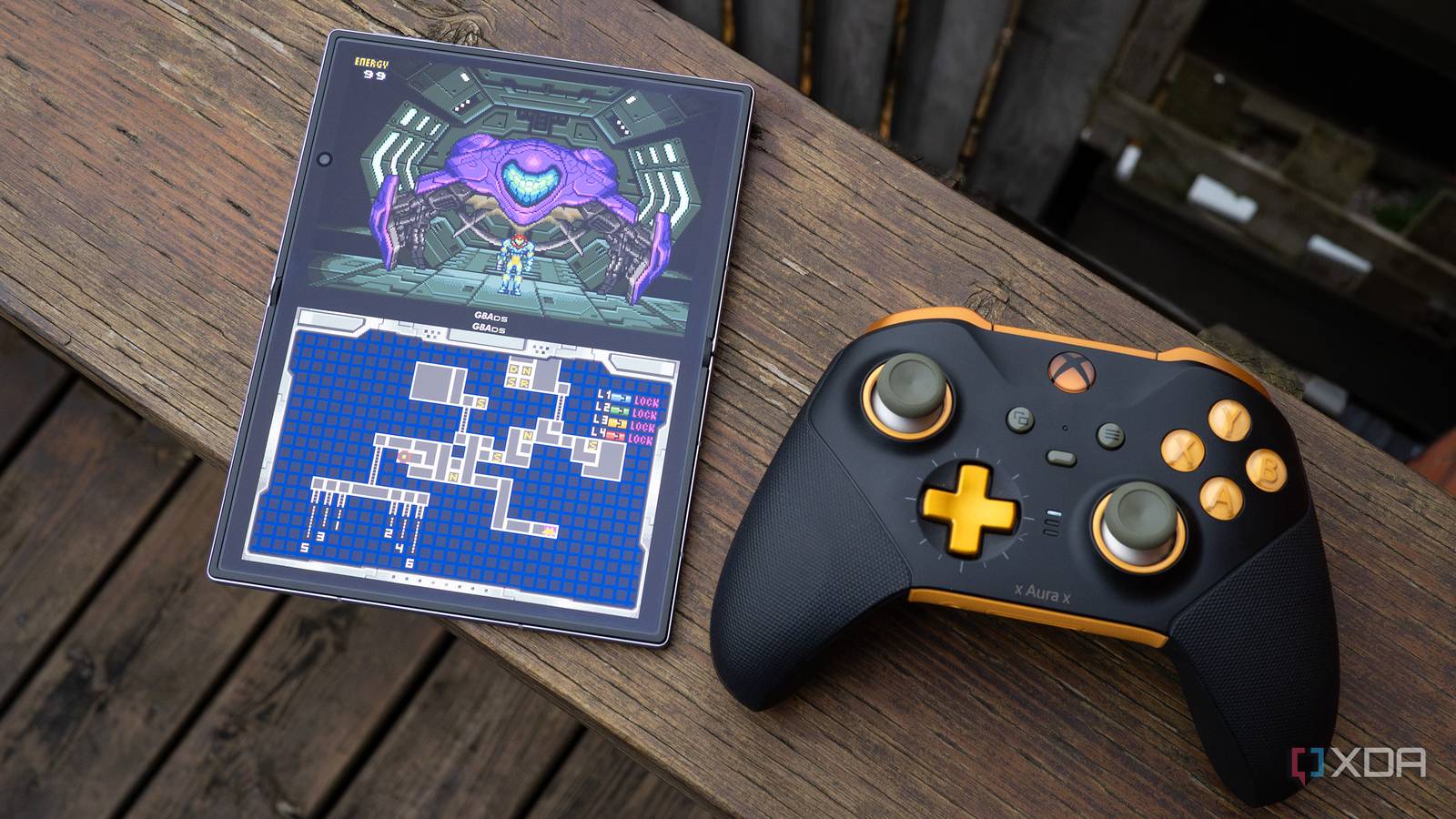
Published Nov 27, 2026, 11:31 AM EST Patrick O'Rourke is XDA's News Editor and Entertainment Segment Lead. Previously, he was Pocket-lint's Editor-in-Chief, the Editor-in-Chief of Canadian tech publication MobileSyrup, and earlier in his career, he worked as the technology editor at the Financial Post and Postmedia. He's based in Toronto. Over the past 15 years, he's written thousands of articles. Patrick has also interviewed dozens of tech industry executives and covered GDC, E3, Gamescom, WWDC, Apple keynotes, Samsung Unpacked events and more. Patrick has a BA in journalism from Toronto Metropolitan University. The other day, I was playing Final Fantasy Tactics Advance on my Anbernic 34XXSP, and a random thought popped into my head: "this Game Boy Advance game would be so much better if there was a DS version." You could pick commands specifically from the bottom screen, leaving the top display wide open for the actual game. Then, I thought about how great that setup would be for the other GBA games that I played so much as a kid, like Metroid Fusion or Castlevania: Circle of the Moon. Well, it turns out that exact thing already exists. GBA DS takes 77 Game Boy Advance games, including Advance Wars, Advance Wars 2, all the GBA Castlevania titles, F-Zero, Fire Emblem, Final Fantasy Tactics, and dozens more, and adds a second-screen experience, whether it's the ability to view your inventory, items, or other useful in-game information. GBA DS adds a second-screen to classic Game Boy Advance Games The setup process is very simple The emulator comes from Kyannon, who has also released a dual-screen adaptation of the SNES game Super Metroid and another two-screen project for Zelda: The Minish Cap. Behind the scenes, GBA DS uses mGBA (libmgba). It runs a secondary, silent instance of that emulator alongside the primary one. Roughly once per second and following room transitions, GBA DS copies the active game's state to the secondary instance, opens the in-game map, and captures a short sequence of frames. This preserves in-game animations like blinking icons and player markers. If a game doesn't have a map screen, like Mario Kart Super Circuit, for example, it creates two frames: one with the HUD and one without. It then shifts that information to the bottom of the screen. It's a straightforward, practical solution that brings dual-screen support to GBA games. The result is a surprisingly polished dual-screen experience that makes some supported Game Boy Advance games feel like they were actually designed for the Nintendo DS. You can even customize the emulator's bezels, apply custom patches to games, and change hotkeys. Of course, like most fan-made retro and modern gaming projects released lately, GBA DS is AI-assisted, with Claude listed as a contributor on GitHub. While the project is designed for dual-screen, DS-like handhelds like the Anbernic RG DS Plus, there's also an Android version of GBA DS, along with Linux support. There's even a beta web browser version of GBA DS that works on desktop, tablet, or even a phone. In my particular case, I set it up to run on the foldable Galaxy Z Fold 8. The setup process is pretty straightforward. I headed over to GBA DS' GitHub page and downloaded the APK. Next, I had to give GBA DS access to my Android device's file system by pressing Continue and toggling on Allow Permission. All ROMs are located in /store/emulated/0/ROMs/gba. After that, I dug into my library of GBA ROMs, which are, of course, all legally obtained. As I often do with stories like this, I stuck to games that I actually thought would benefit from having access to a second screen, including Castlevania: Aria of Sorrow, Final Fantasy Tactics, The Legend of Zelda: A Link To the Past (I've been thinking of revisiting A Link to the Past for years), Tony Hawk's Pro Skater 2, and Metroid Fusion. I then sent these ROMs from my MacBook Pro over to my Galaxy Z Fold 8 with LocalSend. Next, I moved all the files into the appropriate GBA DS folder on the Galaxy Z Fold 8. You can change the source folder in the emulator's settings if you want (I eventually did this to keep things a bit more organized). What's most impressive about GBA SP is how it just works right away. The only thing I changed was turning on Scanlines to give games a slightly more authentic, pixelated look. This is also when I realized that GBA DS doesn't support on-screen controls, which is weird since the browser version of the emulator seems to (hopefully this is a feature that comes in the future). With this in mind, I picked up my Xbox Elite Series 2 controller, connected it via Bluetooth to the Galaxy Z Fold 8, and remapped a few controls within GBA SP's settings (make sure you select the option to do this across all games to save time). The addition of dual-screen gameplay is only useful in some games With certain supported GBA games, having two screens doesn't do much First up, I booted Castlevania: Aria of Sorrow, a side-scrolling metroidvania I always wanted to play back in the GBA's prime. The game looks great running on GBA DS, with the bottom screen being used as a map you can constantly see. Next, I tried Final Fantasy Tactics Advance, one of my favorite GBA games. This second screen isn't as useful as I expected and just shows what abilities and items you have equipped on characters (I thought the second screen would show available attacks and moves). Thankfully, The Legend of Zelda: A Link to the Past's second-screen experience is far more useful. On a side note, I know the beginning of the game really well because I used to play it constantly as a kid, even though I didn't really know what was going on (my older brothers told me I couldn't overwrite their saved files). With A Link to the Past, the bottom screen turns into a map, which is useful for navigating the expansive overworld. I also tried Tony Hawk's Pro Skater 2, a true graphical marvel on the GBA thanks to its 3D isometric graphics. In this extreme sports title, the list of in-game tasks is displayed on the bottom screen, so you don't have to pause to check it all the time. I remember doing this a lot as a kid, and it got frustrating pretty quickly. Last up was Metroid Fusion, which is the best example of GBA DS' magic in action that I've come across. When playing the game through the dual-screen emulator, you get an always-visible second-screen map that shows you exactly where you are, which is endlessly useful given how much backtracking you need to do in Metroid Fusion as you unlock new abilities. After spending time with GBA DS, it's pretty clear that not every second-screen experience feels genuinely worthwhile. In exploration-focused GBA titles like Metroid Fusion or Castevania: Aria of Sorrow, a second display makes a lot of sense because it gives you a clear view of the game's map at all times, making it easier to navigate. But in other games, like Final Fantasy Tactics Advance, for example, the second screen doesn't really add much. Still, it's hard not to be impressed by GBA DS and the way it puts a slightly more modern spin on some of the Game Boy Advanced's best games.
This GBA emulator gives the games I grew up with a Nintendo DS-style dual-screen upgrade
Full Article
Original Source
Read the full article at Xda-developers →KhanList aggregates and links to publicly available news content. We do not host full articles from third-party sources. Always verify important information with original sources.