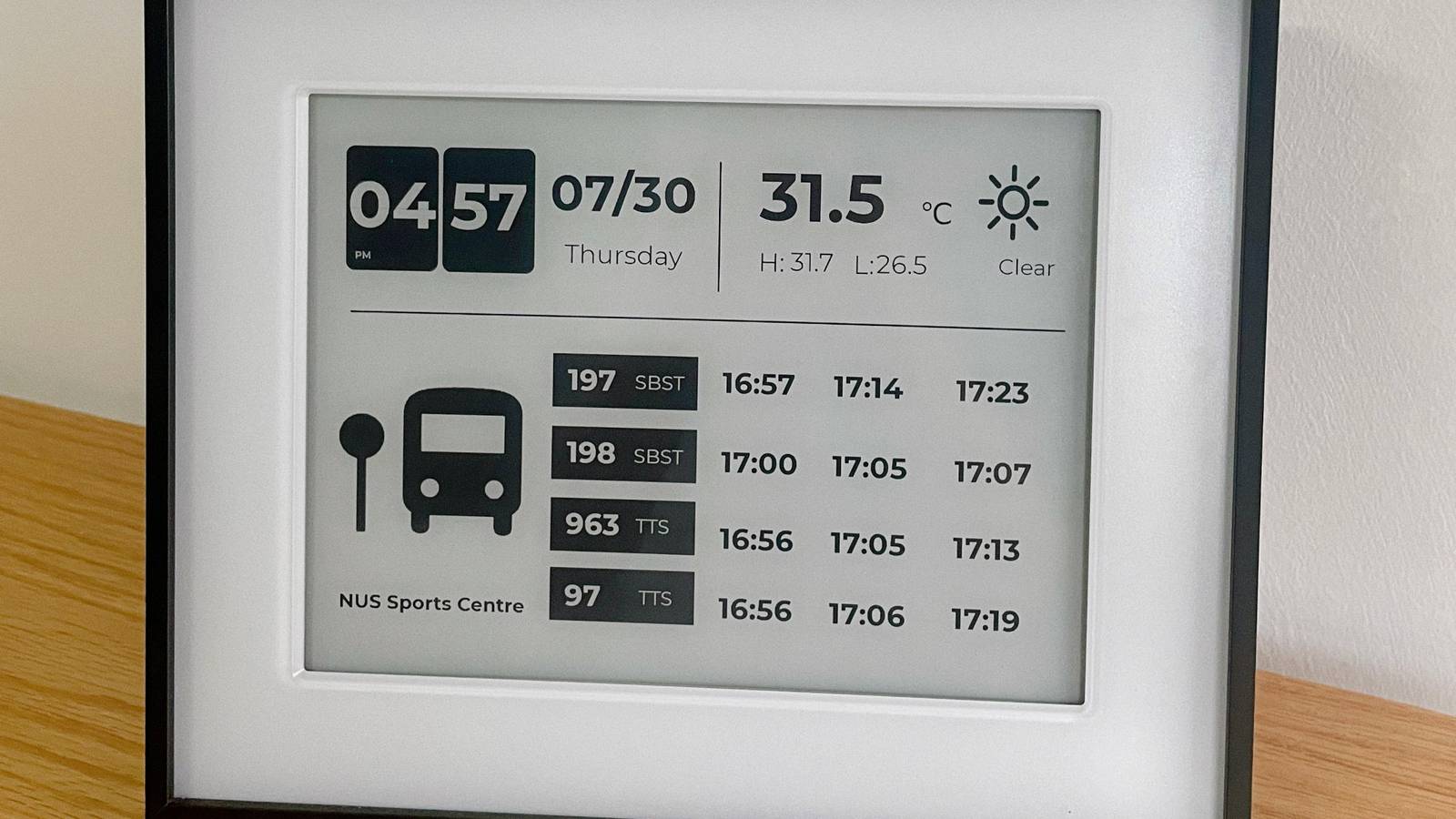
Credit: meililiy Published Jul 31, 2026, 2:38 AM EDT Simon is a Computer Science BSc graduate who has been writing about technology since 2014, and using Windows machines since 3.1. After working for an indie game studio and acting as the family's go-to technician for all computer issues, he found his passion for writing and decided to use his skill set to write about all things tech. Since beginning his writing career, he has written for many different publications such as WorldStart, Listverse, and MakeTechEasier. However, after finding his home at MakeUseOf in February 2019, he would eventually move on to its sister site, XDA, to bring the latest and greatest in Windows, Linux, and DIY electronics. Sign in to your XDA account Summary This e-ink day planner shows the time, weather, and nearby bus arrivals for quick morning checks. It was built using an reTerminal ePaper and SenseCraft Seeedash, no coding required. The included template works as-is in Singapore, but you can tweak APIs for other locales. What's better than a cool ESP32 project you can make at home? One which doesn't require any code, that's what. Someone created a handy day planner for their niece, and the best part is, everything is based on a template, meaning you don't have to do any coding to get this project running. This daily planner gives you everything you need to know at a glance And it didn't require any programming Over on the e-ink subreddit, user meililiy shared what they've been working on. What started off as a nice gift for their niece ended up developing into something genuinely helpful: "This is a little e‑ink display I built for my niece — she's moving to Singapore for her studies at NUS. It's a quiet little dashboard that sits by the entrance. It shows time, weather, and bus arrival times for the stop near NUS Sports Centre. Just a glance in the morning and she knows if she's on time, if she needs an umbrella, or if she can take it slow." Meililiy seemingly didn't expect the positive reception they got, because they updated their post saying they're working on a how-to guide after people in the Reddit thread asked for one. The good news is that meililiy shared enough to get the foundation up and running while they worked on their guide. For the hardware, they used the reTerminal E1003 ePaper Display and Frame Bundle from the Seeed Studio store. The software is the clever part: they used SenseCraft Seeedash to create a UI that taps into APIs without needing to code anything. They also shared the exact template they made for this project. The template works out-of-the-box for Singapore transit, but anyone else can easily swap in their local city's transit API to show their own bus or train schedules.
This ESP32 e-ink project helps you start your day right, and it requires zero code to set up
Full Article
Original Source
Read the full article at Xda-developers →KhanList aggregates and links to publicly available news content. We do not host full articles from third-party sources. Always verify important information with original sources.