
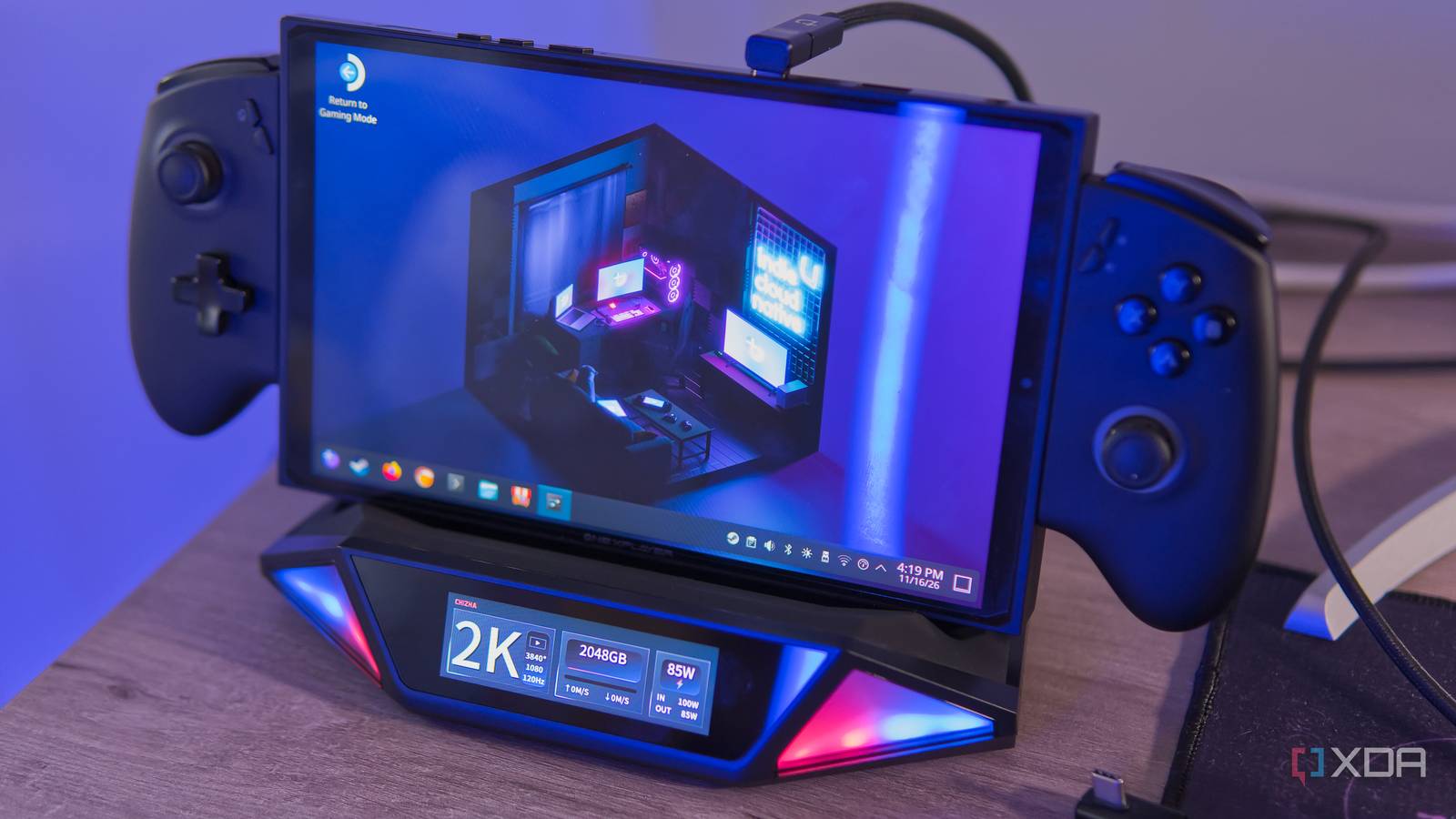
Published Nov 17, 2026, 7:00 AM EST João has been covering the tech world for over 7 years, with a heavy focus on laptops and the Windows ecosystem. I also love all things tech and videogames, especially Nintendo, which he's always happy to talk about. Prior to joining XDA in 2021, he worked at Neowin: https://www.neowin.net/news/poster/jo%C3%A3o-carrasqueira/ Sign in to your XDA account On paper, the Chizha Mount Ling 2 Pro dock is everything I had dreamed of. It lets me unify my Nintendo Switch 2 dock and a capture card into a single device, making it easier than every to record or stream footage without the hassle or clutter. It should have been a slam dunk. Instead, the many limitations of this dock make it a hard sell, which is a huge shame for how excited I was to try it. It may be suitable for a specific subset of users, but it's not great for all the users it's trying to market itself to. About this review: Dockcase sent me the Mount Ling 2 Pro dock for the purposes of this review. The company had no input on — nor early access to — its contents, nor did it provide any compensation for the coverage. Chizha Mount Ling 2 Pro Great features, poorly implemented 4/10 Ports 1x USB-C PD in, 1x USB-C (capture), 1x USB-C (host), 2x USB 3.2 Gen 2 Type-A, 1x HDMI, 1x 1Gbps Ethernet, 1x Optical audio out USB Power Delivery Yes, 100W Power supply included No The Chizha Mount Ling 2 Pro is a promising gaming handheld dock, able to add more ports, display output, and even external storage, on top of doubling as a capture card. Unfortunately, the execution falls short in too many ways to be a desirable product. Pros & Cons A genius idea It works in some cases Switch 2 video output is incredibly low quality Setting up is unnecessarily complicated Poor ultrawide monitor support Specifications and availability The Mount Ling 2 Pro comes to us from Dockcase, and as is typical for the company, it launched on Kickstarter first. At writing time, there are still 17 days left in the campaign, you can get it for just $109, which is doing from an official price of $199. That's fairly expensive for a normal dock, but when you consider the capture card functionality, it's actually much more reasonable. Capture cards can be pricy. Specifications Ports 1x USB-C PD in, 1x USB-C (capture), 1x USB-C (host), 2x USB 3.2 Gen 2 Type-A, 1x HDMI, 1x 1Gbps Ethernet, 1x Optical audio out USB Power Delivery Yes, 100W Power supply included No Max display res. 4K 60Hz (with HDR) Supported SSD sizes Up to 4TB HDMI Yes Ethernet Yes A brilliant concept A dock and a capture card all in one Let's start with the positives here because the idea of a dock and a capture card all in one device is absolutely brilliant. I'm somewhat paradoxical in that my desk setup has quite a few devices I need, yet I like to keep things as clean as possible, while also still having the flexibility to change things up if needed. For years now, I've had to keep a separate Switch dock and capture card near my desk, and it looks unsightly, to say the least. The Mount Ling 2 Pro promises to finally fix that, and this alone is incredibly exciting. It's a regular dock for any PC gaming handheld or a Switch 2 — the original Switch should also be supported, but I'm told my unit doesn't support it due to a firmware limitation which will be fixed for the final units — but among its ports is a dedicated USB-C port just for a capture card output. You can connect this port directly to your PC, and the video output will be recognized as a video device in software like OBS. Since I stream myself gaming on my personal YouTube channel, I've tested this a couple of times, and it does work. The last two streams I did feature footage of The Legend of Zelda: Ocarina of Time captured this way. Don't make quality judgements too quickly based on those streams, though, since I only stream at 1080p. In addition to this, the Mount Ling 2 Pro also includes a built-in SSD enclosure, allowing you to add up to 4TB of storage to a PC gaming handheld. Nintendo's consoles are not supported for this feature, which is to be expected since they don't support USB storage expansion in general. Finally, the dock has a touchscreen, which you can use to monitor things like power and display output from the dock, as well as information about the connected SSD. There are also various menus you can navigate to adjust RGB lighting and so on. It's a hassle to use Things shouldn't be this hard The problems start when I actually try to use the Mount Ling 2 Pro. For a product whose Kickstarter page is so focused on how technology should get out of your way and let you be in the moment, it's frustratingly picky when it comes to setting up, particularly with the Switch 2. Unlike a typical Switch 2 dock, you can't just connect the console while it's off and expect it to output to your monitor. The only way to get any video output is to connect and power on the dock (and all the ports it needs), wake up your Switch 2 from sleep, and then connect the Switch 2 to the dock. If your Switch 2 ever goes to sleep, you need to unplug it and plug it into the dock again, or there will be no video output. Not just for capturing, but for a standard output, too. On top of that, the dock's touchscreen serves as an example of even more of its problems. In the HDMI settings, you can change options for Transfer Mode, where you can choose between Normal and Compatibility, and Display mode, where you can choose between Normal and Legacy. When I connected my Switch 2 for the first time, it didn't work at all, and after contacting Dockcase — since no documentation was provided on this — I was told to switch Display mode to Legacy, and that worked. Similarly, the Power Delivery section lets you choose between PD3.0 and PD2.0 modes, but here you at least have something you can look up. The larger problem is why are these options even here and necessary for me to learn in the first place? A docking station should never be so hard to figure out, and it should automatically adapt to the device it's connected to. Alas, none of this is new for Dockcase, and I've had numerous similar issues with other docks the company has sent me. It's been a few years, so I thought it would be better by now, especially on such an expensive product, but that doesn't seem to be the case. It works, with issues Quality is subpar Once you get past the hassle of setting everything up correctly, the Mount Ling 2 Pro does work as a dock and capture card, and the convenience factor is definitely worth highlighting here. I do love being able to bring these two devices into one, and at first glance, you wouldn't think anything was being sacrificed, or at least I didn't. But then I decided to properly test it and compare it with my usual setup, using a cheap off-brand dock I got from Amazon and a Razer Ripsaw X capture card, and the difference is huge. I launched The Legend of Zelda: Ocarina of Time on the Switch 2, and using the Mount Ling 2 Pro resulted in incredibly jagged edges and a loss of detail I've never seen before. Both the dock and Switch 2 claim to be outputting the same resolution across both setups, but the difference is night and day. Just take a look below —the Mount Ling 2 Pro is on the left. Even through a photo, the difference is noticeable, and it's even worse in real life. And keep in mind, I'm using a capture card for the comparison setup, but on the Mount Ling 2 Pro, the capture card is totally independent from the display output, so there should be no extra processing here. It almost looks like the render settings are turned down in a PC game, but there are no such options on this console, so I don't know how it's possible. It's better as a PC dock But issues strike again I've mostly been talking about using the Mount Ling 2 Pro as a Switch 2 dock since that was my primary use case for it, but I did try it out with a PC gaming handheld running Bazzite, just using it as a normal dock. For that purpose, it does seem to work well enough. It gives me HDMI out, I can use the USB ports for peripherals, and so on. Notably, the storage expansion also does work, and the dock's screen shows me the capacity of the SSD and real-time information about data being written to or read from the SSD. You can also go into the menu for more detailed stats like power-on hours, total reads and writes from the drive, and more. Still, this functionality isn't without issues. In another classic issue for Dockcase, this dock was not able to output at the full resolution of my monitor, which is admittedly an unusual one. It's this LG monitor with a 32:9 aspect ratio and 5120x1440 resolution, but my options were to either output at a standard 16:9 aspect ratio or, to use 32:9, I'd have to settle for 3840x1080 resolution, which is significantly less sharp. Most people won't have a monitor like this, so it's probably not as big of a deal to you as it is to me, but it's still a big problem to have. Should you buy the Chizha Mount Ling 2 Pro? If it's not obvious already, I have a hard time recommending anyone buy this dock. The concept is fantastic, and it should be so easy to win with an idea like this, but the Mount Ling 2 Pro falls short in just enough ways that it becomes impossible to recommend unless you have a single, very specific use case in mind. And at that point, there are probably better options out there. You should buy the Mount Ling 2 Pro if: You need a PC gaming handheld dock with SSD expansion and money is no object The unified capture card and dock design is enough to overlook the poor image quality You should NOT buy the Mount Ling 2 Pro if: You can afford a dock and capture card separately You're planning to use it with a Switch 2 You want to use it with an ultrawide monitor for the video output Chizha Mount Ling 2 Pro Ports 1x USB-C PD in, 1x USB-C (capture), 1x USB-C (host), 2x USB 3.2 Gen 2 Type-A, 1x HDMI, 1x 1Gbps Ethernet, 1x Optical audio out USB Power Delivery Yes, 100W Power supply included No Max display res. 4K 60Hz (with HDR) Supported SSD sizes Up to 4TB HDMI Yes Despite a compelling premise, the Mount Ling 2 Pro fails to deliver on too much of what it attempts to do, making it hard to recommend to almost anyone.
This dock simplified my streaming setup until I realized how terrible it looked
Full Article
Original Source
Read the full article at Xda-developers →KhanList aggregates and links to publicly available news content. We do not host full articles from third-party sources. Always verify important information with original sources.