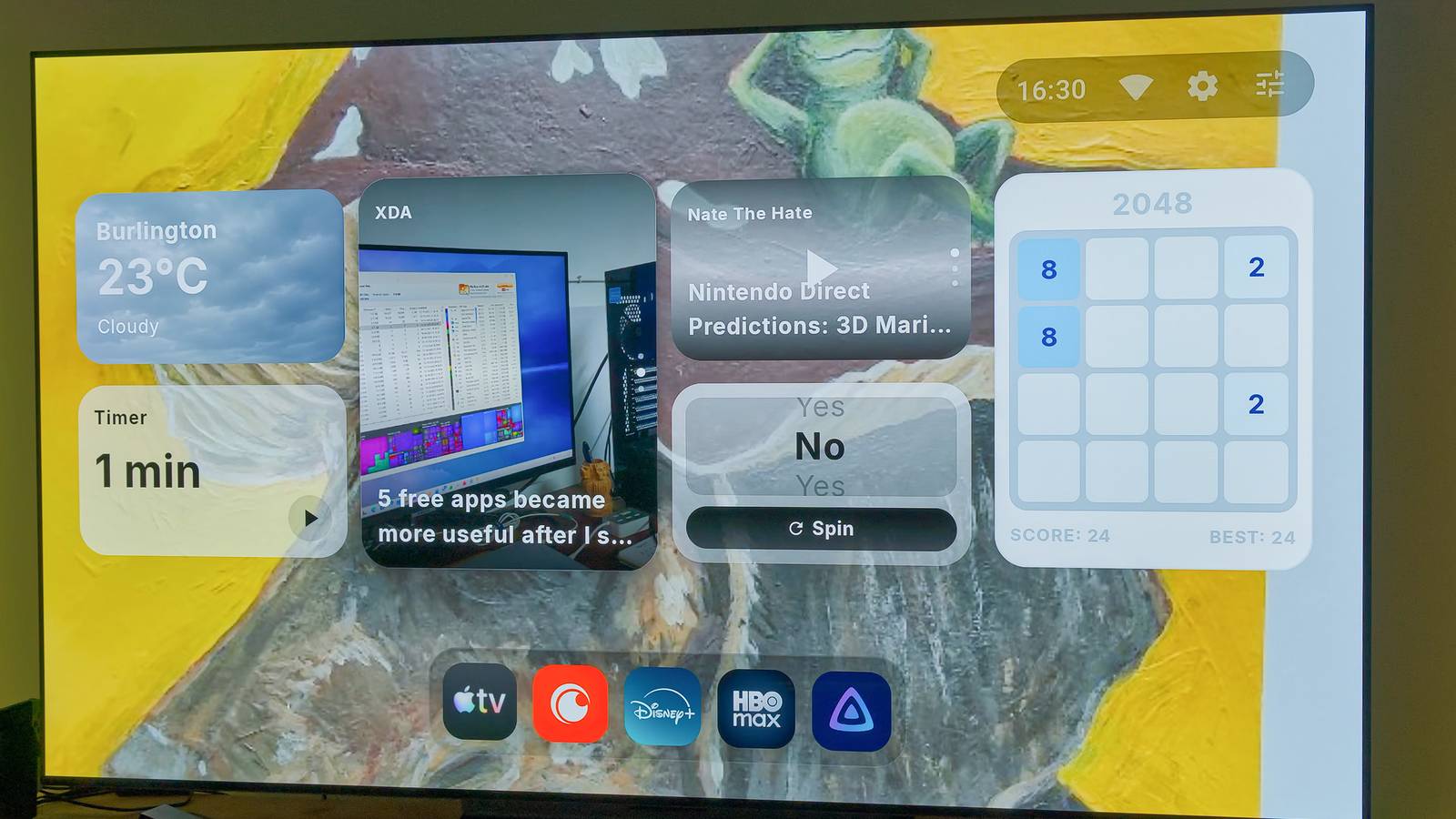
Published Aug 12, 2026, 11:30 AM EDT João has been covering the tech world for over 7 years, with a heavy focus on laptops and the Windows ecosystem. I also love all things tech and videogames, especially Nintendo, which he's always happy to talk about. Prior to joining XDA in 2021, he worked at Neowin: https://www.neowin.net/news/poster/jo%C3%A3o-carrasqueira/ I've complained before about how Android TV, especially on the Chromecast with Google TV, has a pretty frustrating launcher. It's bloated, slow, and wastes my time. Previously, I had replaced it with Kyu Launcher, which I absolutely love. But then I learned the developer of Kyu actually has another Android TV launcher called AT4K. Clearly more meant to mimic the style of Apple's tvOS, AT4K Launcher is now one of my favorite alternatives to the stock software, owing to the great customization options it offers. It feels like an Apple TV But it's so customizable AT4K seems to stand for "Apple TV 4K", which should indicate how closely this launcher is meant to replicate that of Apple's own operating system, tvOS, which powers the Apple TV 4K streaming box. I've never owned one of these, but I have seen the UI here and there, so I know AT4K feels pretty similar out of the box. The default layout puts recommended content on top of the screen, with your favorite apps lined up below it. You can move your favorite apps to see recommended content from them, which makes it a bit easier to find what you're looking for more quickly. Below that sit the rest of your apps in a five-column grid, though you can go up to seven columns if you pay for the premium version of the app. This still feels pretty good, though, and I always appreciate being able to see all my apps quickly. What truly helps AT4K stand out is the customization options. There are so many things you can change in the app's settings. Don't care for the recommended content cards? You can remove them. Want to emphasize them even more? "Big picture" mode makes the recommended content turn into a wallpaper spanning the entire screen. You can even minimize your favorites bar so it looks like a little dock at the bottom of the screen. There are plenty of other options, from changing the background of the home screen to hiding the status bar and, of course, hiding individual apps or their watch cards so their content isn't recommended. Some options, like more advanced background customization, require the premium version of the app, but I'm already quite happy with the free tier. Make your home screen more useful (maybe) Customization as a whole is great on AT4K, but one thing that really took me by surprise was the option to enable widgets in the launcher's settings. There are a few widgets already that can display all kinds of information, from the weather in a given location to the time in analog or digital format. Some even include a progress bar for the year, if you want a visualization of how quickly we're all getting older. Some of the more interesting ones for me include the Podcast widget, which lets you search for any podcast of your choosing (I'm not entirely sure where the list is pulled from, frankly) and lets you listen to it without leaving the home screen. You can even go back through the three latest episodes if you need to catch up on something you missed. Likewise, the RSS feed widget is an interesting way to bring news from sources you care about to your home screen. You can even open them directly on your TV, if you have a web browser installed to handle it. It's pretty cool. There are a few others, such as CPU or RAM monitoring, and there's even a game in the form of 2048. Widgets can come in a standard size, about the same size as a content recommendation card, or a small size that only takes up half the height, so you can fit a few more on your screen. Enabling widgets replaces the content recommendation cards, so you can choose the style you prefer for your home screen. There's also a Continue Watching widget, if you still want some content recommendations in the midst of your other widgets. It's not the smoothest But it's still a huge upgrade My main gripe with AT4K Launcher, and the reason I may not be able to keep it, is that it feels a little slow at times. One of the reasons I switched to Kyu in the first place was to have a cleaner and smoother experience compared to the default launcher, and while AT4K still delivers that, it usually feels a little slower. I did notice an issue where content cards for some apps sometimes take a while to load up, which was especially prevalent with Jellyfin. It's important to keep in mind that the Chromecast with Google TV 4K is over 5 years old at this point, so you shouldn't expect too much from it in the first place, but because of that, even small things can make a difference. AT4K is definitely lightweight and pretty snappy compared to most other launchers I've tried, but Kyu just edges it out. Whether that's a worthy sacrifice for the extra customization options in AT4K is harder to say. I do love a lot of the things I can do with AT4K, so I'm kind of tempted to take the performance hit, but most of the time I use my TV, I just want to launch an app and use it, so Kyu will probably serve me better in the end. A fantastic choice Regardless of my personal preference, though, you can't really go wrong with AT4K. It's a great launcher, lightweight and free of ads, and it's endlessly customizable, to a degree I haven't seen before. In fact, both Kyu and AT4K are probably the best picks for any Android TV user, and choosing one of them is purely a matter of personal preference. I highly recommend checking it out and deciding for yourself. AT4K
This Android TV launcher mimics Apple TV's design, but the real magic is in what you can customize
Full Article
Original Source
Read the full article at Xda-developers →KhanList aggregates and links to publicly available news content. We do not host full articles from third-party sources. Always verify important information with original sources.