
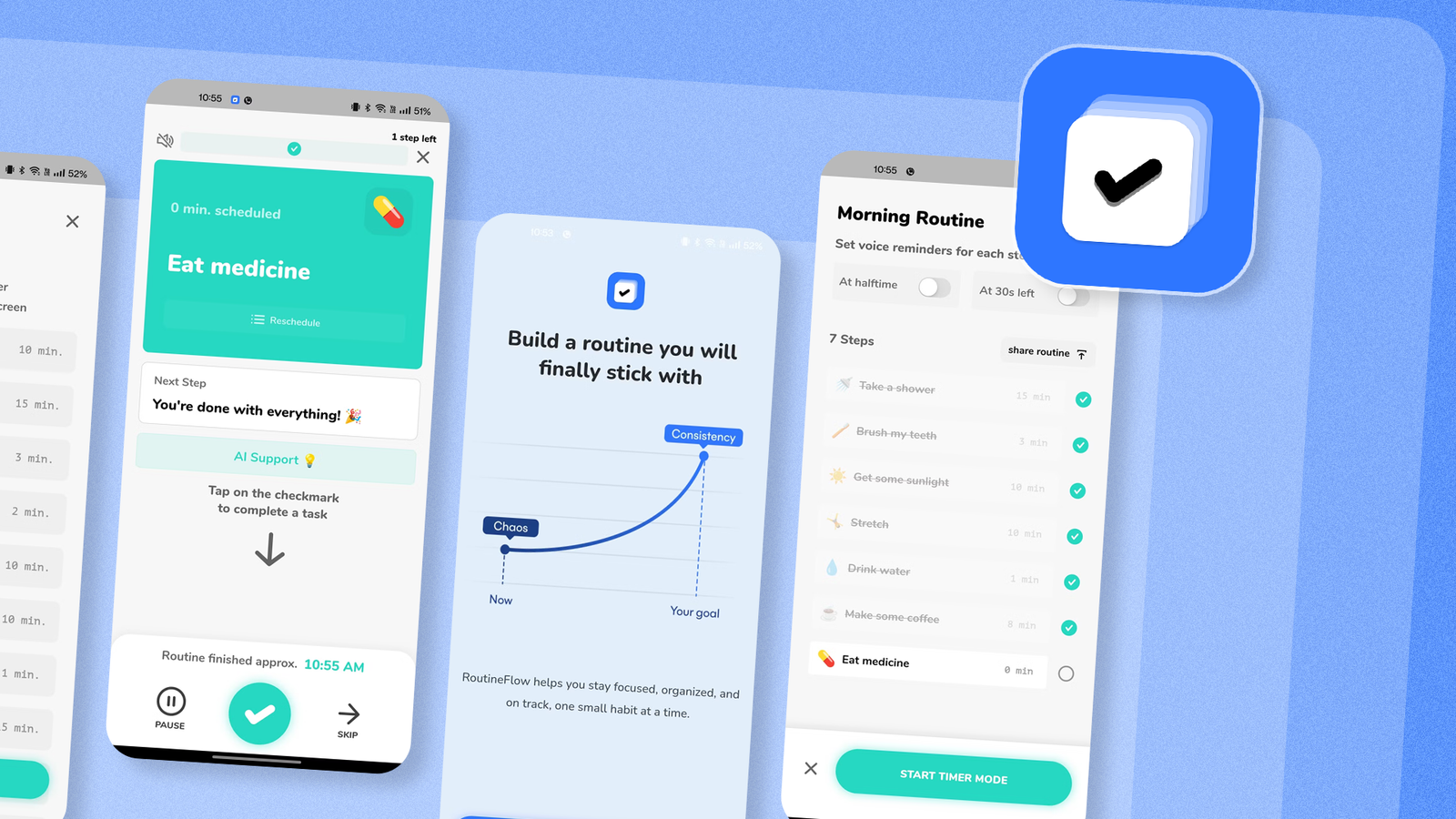
Published Sep 6, 2026, 1:30 PM EDT Akshay Bhalla was the former game guides editor for Screen Rant and the technology editor at MensXP. He has previously written about smartphones, apps, streaming, gadgets, and games for print, digital, and TV media outlets. When he isn’t writing about tech, he can often be found playing JRPGs, listening to music, or playing with his three dogs. You can reach Akshay at bhallanator @ proton dot me. My mornings can be quite hectic, especially when caring for an infant, three dogs, and my own well-being. My personal well-being gets the lowest priority, which often leads me to stray from my morning routine. I've used Google Keep, Gemini, and Calendar widgets to address this issue, but none has fixed it. Until I found an app built specifically for procrastinators like me that makes sure you get stuff done. RoutineFlow is the perfect app that lets you build and stick to schedules Yes, it got that bad My chaotic mornings are filled with alarms, doomscrolling, work texts, and general chaos at home. This often leads me to miss important tasks I need to do every morning. The most important being taking my medicine or even eating breakfast. There have been times I've taken the medicine and forgotten an hour later whether I consumed it or not. Amidst the confusion, I would take the medicine again and realize my mistake later. But these chaotic mornings also made me miss some menial tasks, like making my bed before heading out or making coffee for my commute. While these are basic tasks that I tried to remember by making a to-do list in Google Keep, I still fumbled. My Google Keep is cluttered with notes, and sometimes I skip these menial tasks because I either forget or don't want to dig through the clutter. But when I started using RoutineFlow, I completed all my tasks on time without letting them interfere with my other responsibilities. I've tried habit trackers and calendar apps before, but none of them come close to what RoutineFlow can do. It lets me complete multistep routines and stick to them on time. It guides me using a timed sequence rather than a generic list that I might forget to access later. The app's design is also ADHD-friendly; even though I haven't been diagnosed with it, I greatly appreciate its design choices. It makes the app easy to use and helps me avoid procrastinating in the morning. I use it for other routines as well, especially when I return home from work. RoutineFlow's free period lets you schedule only one routine, but the premium tier unlocks more features and unlimited routines. RoutineFlow is a routine timer and planner that encourages consistency and does all the heavy lifting for you. It lets me make decisions faster and avoid getting lost in a list, wondering which task to tackle next. When you set up RoutineFlow, it asks a few questions about the problems you face with your routine. I'm not sure it makes any difference, but I answered the questions honestly. I like the app's structured approach that I haven't found in other habit apps. The notifications, reminders, and haptic cues gamify my tasks and make sure I never fall behind. How RoutineFlow made me change my bad habits I'm not embarrassed to give an app that credit If you are looking for an app to help you build consistent morning routines, RoutineFlow is the only one that meets my needs. The app does a good job of scheduling times for important tasks I need to complete. The main feature that makes the app stand out is how it handles multistep routines. It guides me through every morning task with a visual countdown. As soon as a timer or task is finished, it starts the next one. To set up a multistep routine, I set a timer for each step and press play. RoutineFlow goes into autopilot and walks through all my tasks within the given timeframe. The app isn't as regimented as it might seem. It knows life happens, and you may need to pause or skip a task. You can pause/resume your routine or adjust the timings whenever something unexpected comes your way. I recommend trying the app if you face situations similar to mine. When setting up, be realistic when setting timers and tasks. Start with a small routine, and adjust your flow using the analytics provided within RoutineFlow. I started with the generic template, then customized it by adding important tasks I need to repeat every morning. If too many notifications bother you, connect the app to your phone's settings so it doesn't disturb you when Do Not Disturb (DnD) is turned on. Similarly, if you have DnD turned on and there's an important task you can't ignore, you can set up a critical alert for it. After I handed over my morning routine to RoutineFlow, I noticed I started my tasks on time, stopped overthinking decisions, and got out of the house faster. The gamification of my tasks was a massive help, and the sequencing was something I never knew I needed. I rely on RoutineFlow every day I've tried a few habit trackers and planners in the past, but this is the first time I've relied on an app daily. RoutineFlow does everything right except for its freemium model. It's a great tool to have for users like me who tend to lack focus in the mornings. It's ADHD-friendly, and the UX is a massive plus that everyone can use to get things done on time.
This Android app turned my chaotic mornings into the most productive part of my day
Full Article
Original Source
Read the full article at Androidpolice →KhanList aggregates and links to publicly available news content. We do not host full articles from third-party sources. Always verify important information with original sources.