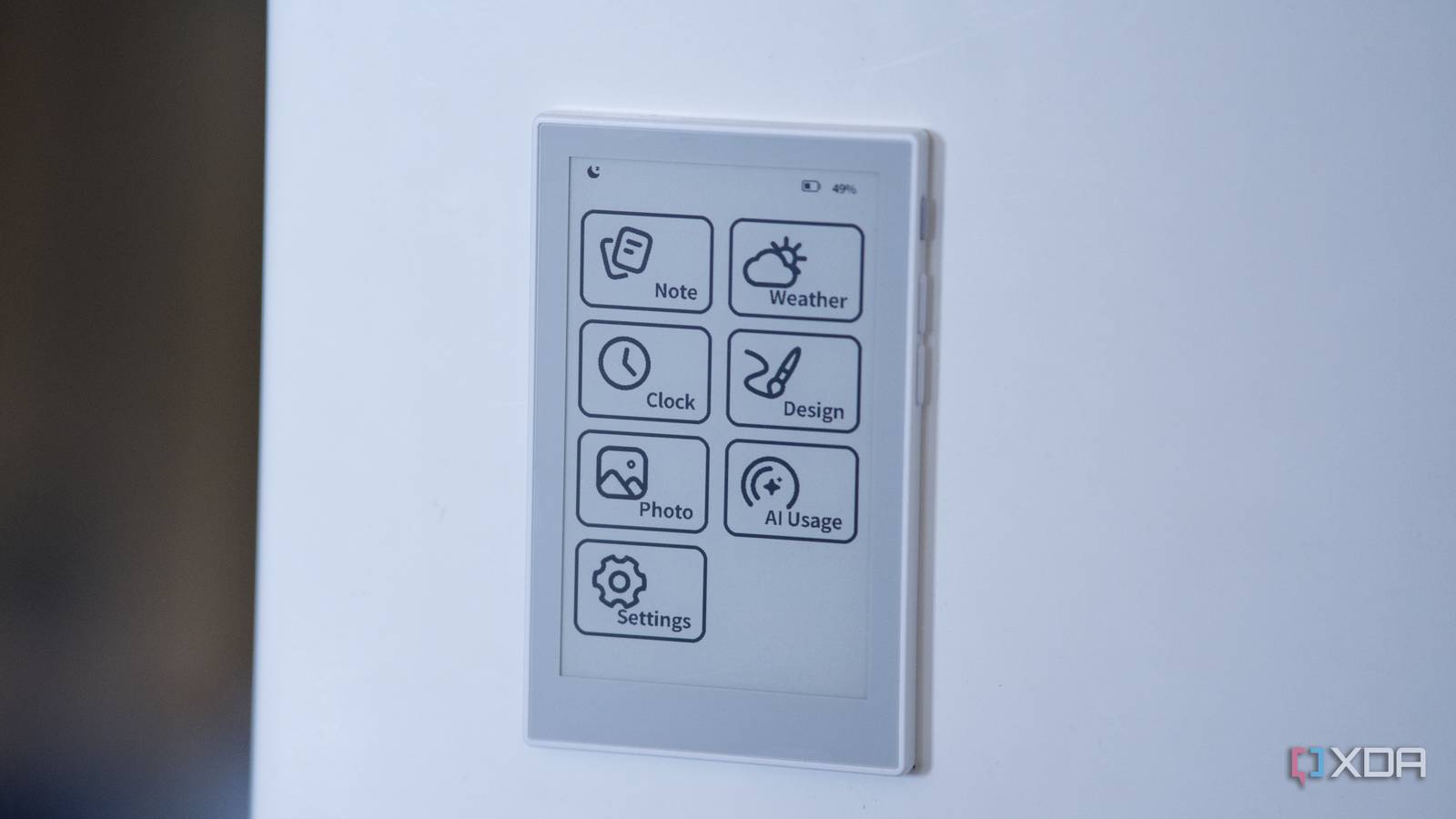
Published Aug 2, 2026, 11:00 AM EDT I’m Adam Conway, an Irish technology fanatic with a BSc in Computer Science and I'm XDA’s Lead Technical Editor. My Bachelor’s thesis was conducted on the viability of benchmarking the non-functional elements of Android apps and smartphones such as performance, and I’ve been working in the tech industry in some way or another since 2017. In my spare time, you’ll probably find me playing Counter-Strike or VALORANT, and you can reach out to me at adam@xda-developers.com, on Twitter as @AdamConwayIE, on Instagram as AdamConwayIE, or u/AdamConwayIE on Reddit. Sign in to your XDA account Seeed Studio's newly-launched reTerminal Sticky is pitched as, essentially, the least intimidating gadget you could put in a smart home. It's a 3.97-inch epaper panel with a magnet on the back, it sticks to your fridge, and you press a button and talk to leave a note your family can see. At $49.90, it's a great gift for someone who doesn't know or care what an ESP32 is. And if you do know what an ESP32 is, you're going to love it even more. I've had one for over a week now, sent to me by Seeed Studio, and the stock experience is genuinely pleasant. You hold a button, say "I'll be back tonight," and a few seconds later the words are on the screen while staying there without drawing any power. The companion app on mobile works well, the magnets on the back are strong, and the whole thing feels premium and well thought-out in a way that a lot of cheap smart-home hardware doesn't. Even still, it's an ESP32-S3 with a microphone, a touchscreen, and a full 32MB firmware image. You can download that firmware image from Seeed's own site, so of course I pulled it apart. Underneath the fridge-magnet smart sticky note marketing is something even more interesting. The voice feature is a thin client that streams your microphone to a cloud service built on an open-source Chinese project, every app on the home screen is a separately loaded program that doubles as an AI tool, and the whole thing is open enough that I was able to compile my own app and get it running on the hardware. Kind of. reTerminal Sticky 9.5/10 The reTerminal Sticky is an ESP32-based smart sticky note manager for your home. However, it also has built-in AI features, a pretty slick mobile app, and a completely open ethos that makes it possible to flash ESPHome, OpenDisplay, and more on it. Pros & Cons Phenomenal value for money Already open and ready for development Looks great Genuinely unique device Open-source firmware not published yet It's a magnetic note that you can talk to What $50 buys you The panel is 800x480 with four-level greyscale and a GT911 capacitive touch layer, driven by an ESP32-S3R8, a dual-core Xtensa LX7 at 240MHz, with 8MB of PSRAM and 32MB of flash. Around it, Seeed has put an SHT40 temperature and humidity sensor, an LSM6DS six-axis motion sensor, a PCF8563 real-time clock, a PDM microphone, a BQ27220 fuel gauge watching a 750mAh cell, 2.4GHz Wi-Fi, and Bluetooth 5.0. Physically, it's 106mm by 65.5mm and 7.3mm thick, weighs 70 grams, and has several N52 magnets in the corners plus an adhesive magnetic ring for surfaces that aren't already metal. It's IP40 rated, so it'll survive a kitchen but not a spill, and it has three buttons, a buzzer, and a reset hole. Seeed quotes about a week per charge in normal use (which matches my experience), or months in a battery-saver mode it says is still being tested. Even better, because the panel is epaper, it keeps showing your last note with the battery flat. None of this is particularly impressive from a technology standpoint, but it doesn't have to be. It's a very well-made device with a lot of thought put into it, and thanks to the community Seeed has fostered, it already has some great support out of the box for other software that you can install, too. Also, as an aside, $50 is a steal for a device like this. Considering an ESP32-S3 alone can run you as much as $10, spending five times as much and getting a touch epaper display, microphone, battery, buzzer, 6-axis IMU, temperature and humidity sensor, RTC, and polished software on top feels like exceptional value. To set it up, the best way is through Seeed's Seeedash app on mobile. You sign in with Google, Apple, GitHub, or email, pair over Bluetooth, give it your Wi-Fi details, and it can then run on its own without needing your phone nearby. From the app you push notes, to-do lists, a clock, the weather, or a photo to the screen, and it updates within a second or two. Living with it is nice until you need it offline The cloud does the talking Day to day, the voice notes are the main selling point, and they mostly work as advertised. Hold the AI voice button, wait for the prompt, speak, release, and the text shows up on the screen with a styling around it. It's quick enough for a "We have to go shopping in the morning" kind of message, which is exactly what it's for, and the touch interface for swapping between the clock, weather, and note screens is responsive once you accept that epaper refreshes at epaper speeds. Right now, voice input only understands English and Simplified Chinese, so a household that speaks anything else can't use it right now, and everything interesting the device does needs an internet connection, because none of the recognition actually happens on the device. Don't be fooled into thinking that the transcription happens on device, given that it's advertised for the ESP32-S3's "edge AI" capabilities. To be totally fair to Seeed Studio, it is an edge device doing AI-adjacent things, but the reality is that pressing the button sends your voice out of your home to be transcribed in the cloud. I don't personally have an issue with it, as it's strictly a press-and-hold feature rather than something that turns on by itself or can mishear a wake-word, but some people will care about that. I took apart the firmware to find out how it works It's all backed by a familiar stack This is where it gets really exciting; I took apart version 1.0.1 of the firmware, built on 21 July 2026 against ESP-IDF 5.4, and made some interesting discoveries. It's worth noting as well that I had to do this because the firmware from Seeed isn't open-source yet, though the company has committed to publishing it. The partition table is a standard dual-OTA layout: a small nvs settings store and the usual OTA stuff, alongside two 6MB app slots. There are also two LittleFS filesystems (9MB of system assets and 10MB of user data) holding the fonts, images, and apps, and a 256KB coredump partition. I went looking for the on-device speech stack first, and how it works is pretty simple. it uses an Opus audio encoder and a WebSocket client, started by holding the AI button. and the firmware Opus-encodes your microphone audio and streams it to a sensecraft-sticky-voice endpoint, with a reference to Xiaozhi included. Text comes back rather than audio, and while basic wake-word detection is possible, it's not used here. Xiaozhi is a widely used open-source ESP32 voice-assistant project that I've actually spent time running on other hardware, and I first came across it on a Seeed Studio device when I was in Shenzhen for Maker Faire 2025. As for how I know? Well, for starters, the WebSocket path is literally /xiaozhi/v1/, the protocol message types are Xiaozhi's hello, listen, stt, tts, and abort, and there are strings like "Requesting Xiaozhi OTA config" and "provider is not xiaozhi-official." The firmware also queries Xiaozhi's own back-end for OTA URLs. To be clear, this isn't anything negative, and cloud voice is how nearly every voice assistant on the market works. In fact, reusing a mature open-source stack is a sensible engineering call to make, and it's not really abnormal for a company based in China to use a Chinese-based provider. As we'll get to as well, the hardware is perfectly capable of talking to a server you run yourself instead, which I also did. The apps are the assistant's toolbox The apps on the home screen, namely the clock, weather, notes, and to-do list, aren't compiled into the firmware. Each is a standalone program in the form of an ELF binary, loaded only when you tap it. There's note.elf, todo.elf, weather.elf, clock.elf, photo.elf, design.elf, and the Codex app ai_usage.elf. Each one is loaded by Espressif's elf_loader, the component Espressif ships specifically for loading and running a compiled program on an ESP32 at runtime instead of baking it into the firmware at build time. The firmware contains the loader's source path (espressif__elf_loader) and calls to esp_elf_init and esp_elf_relocate, and the app binaries match, too. They're position-independent, there's no .dynamic section, there are R_XTENSA_RTLD relocations, and Seeed's app_launcher sits on top. One listed app, artifact.elf, has no file on the device at all. The app set isn't fixed at the factory; new apps can be installed, and it feels quite similar to esp-brookesia, Espressif's framework for making an ESP32 behave more like a phone. However, what Brookesia does is different: it compiles its apps into the firmware, whereas the Sticky keeps each one as a separate ELF it can swap or fetch at runtime. A loaded app can't touch the hardware directly. It runs inside the firmware's world and asks the firmware to act on its behalf, through a fixed menu of functions. I counted 102, every name suffixed with a version (..._v1) and fronted by an elf_host_get_abi_version call the app makes at startup. That ABI, the application binary interface, is the contract between an app and the firmware it calls into: which functions exist, how you pass arguments, and what you get back. Versioning it means an app compiled today keeps working as the firmware changes underneath, as long as Seeed keeps the contract, and you only bother with that when you expect other people to build against it. A private interface doesn't need a version, making this likely to be a stable contract for third-party apps, rather than something exclusively for Seeed's own programs. Fifty-six of those functions are bindings to LVGL, the standard toolkit for drawing interfaces on small embedded screens, so an app can put text, buttons, and images on the panel with calls like elf_host_lv_label_create. The other forty-six cover: an async HTTP client (elf_host_http_async_request_text_v1) a key-value store for the app's own data (elf_host_kv_get_blob_v1/set_blob_v1) control over how and when the e-paper redraws (elf_host_set_display_mode_v1, elf_host_request_full_refresh) touch and gesture callbacks read access to the photo library and the temperature, motion, and battery sensors a call to fetch a service URL from the host (elf_host_copy_service_base_url_v1) That's most of what you'd need to write a genuinely useful app, which makes Seeed's commitment to release "open source development tools and infrastructure for developers to custom build your own on-device apps" a reality. What's going on under the hood here is incredibly impressive. I'm sure a lot of this is subject to change as it undergoes development, especially as there's no official way to build your own apps right now, but it's clearly happening. As well, every app ships a JSON file with the minimum ABI version it needs ("required_host_abi_version") and a SHA-256 of that binary. The manifest also declares the app's functions as MCP tools. MCP, the Model Context Protocol, is the standard for handing an AI model a list of actions it's allowed to take, each with a schema for its arguments. The to-do app declares a todo.list service exposing add_item, toggle_item, delete_item, and more, with toggle_item taking a zero-based integer index; the weather app declares weather.apply_config taking a city, latitude, longitude, and timezone, all carried over an internal host_bridge transport. For example, if we invoke the voice assistant and say "add milk to the shopping list" it works like this: your voice goes to the cloud, the model there is told which tools this device offers, it picks the to-do app's add_item, and the call comes back down to the program exposing that tool. The apps are more than just screens, as they also define things that the assistant is allowed to do. That's why each app is both self-contained and self-describing. One app doesn't talk to Seeed at all, and it's the one that makes the most sense not to. ai_usage.elf shows your OpenAI Codex usage on the panel, and it goes straight to OpenAI to get it: it refreshes its login token against OpenAI's auth endpoint and polls your usage, identifying itself with the same public client ID as OpenAI's official Codex command-line tool. It keeps your access token, refresh token, and account ID in the device's key-value store, reads the rate-limit windows and plan type out of OpenAI's reply, and draws them as a dial. This isn't something you'd keep on your fridge, but it's a great example of what the platform is: it's an app that logs into a third-party service, makes its own web requests, has nothing to do with Seeed, and is exactly what anyone can build once the company releases its documentation. I compiled my own app and the Sticky ran it Complete with my own icon I actually did write my own app. Using the Xtensa GCC toolchain, I compiled a small program for the S3 as a as a position-independent shared object entered at main, matching the included apps right down to the relocation types that the loader expects. I also wrote a manifest in the same schema with my binary's SHA-256 filled in, and put those files in the 10MB user filesystem in place of the pre-installed Design app. And it ran... sort of. My first attempt tried to draw a label and crashed the device on the spot, and because the Sticky writes a coredump to a partition at the end of flash, I could read back exactly why: a LoadProhibited exception (EXCCAUSE 28) at 0x4037855b, inside the firmware's own code, trying to read 0x0000000e, was the issue. It was a near-null pointer I'd given a host function by getting a graphics call's arguments wrong, and trying to figure out how to do it appropriately would have taken a lot more reverse engineering work. A stripped back version that called only functions with no pointer arguments, namely the ABI version check and the request-close call, loaded cleanly and then handed back control to the launcher without issue. This means I was able to get it to load and execute a binary that I wrote, and it was only gated by a catalog ID and a SHA-256 that matched it. There was one issue: a genuinely new app, with an ID the firmware has never seen, gets rejected with "app.id does not match launcher catalog." That catalog is fetched from Seeed's cloud, with a tier attached to each allowed app, so I went looking for where it actually lives on the device... but it doesn't. I dumped the settings storage and both filesystems over USB, and the catalog isn't in any of them; the sys_storage partition read back byte-for-byte identical to the factory image, meaning the device had never written a single byte to it. The list of allowed apps arrives over an authenticated MQTT connection each session, TLS with real certificate checks, and it lives only in RAM. The built-in apps survive a reboot with no Wi-Fi for one reason: their IDs are baked into a table compiled into the firmware image itself. But the thing is, that table is just bytes, which meant I could replace it myself. I pulled the firmware image apart, found the slot for the pre-installed Design app, renamed its ID, fixed up the image checksum and the appended SHA-256 so the bootloader would still accept it, and wrote it back. Then I gave the app its own name and pushed a custom icon onto the user filesystem, the XDA logo, in the same image format the stock icons use. I couldn't just add an eighth entry, mind you; the table is compiled into the image at fixed addresses, so inserting anything would shift every byte after it and break the pointers the firmware relies on, which is why I overwrote an existing slot in place instead. The icon turned out to be the easy part, because the launcher icons are just plain LVGL image files sitting on the user filesystem, so I converted the XDA logo into the same 1-bit format the stock ones use, set its background transparent, and placed it in storage. Now, I have my own app on the reTerminal Sticky, with my own image to go with it. This isn't an open app ecosystem, not yet, anyway. It took a firmware patch and a USB cable, and it takes up the stock Design app's slot. A genuinely open version where you can install your own apps with ease still waits on Seeed. Seeed makes it easy to do what you want with it You can flash it with whatever you want Seeed has one really neat feature for developers and tinkerers that anyone with the device can use, and it refers to it as its "Playground." You can turn it into an e-reader with CrossPoint, a low-power Home Assistant display with OpenDisplay, or deploy ESPHome with ease, complete with pre-made configuration files that get all of the hardware up and running for you. TRMNL support is coming soon as well, and it's generally quite rare for a company to directly advertise all of the methods to leave its own ecosystem. I took the ESPHome route, and Seeed's own generator makes it incredibly easy. You tick boxes for the hardware you want to support, and it just inserts pre-made snippets into the YAML for you. I wired the PDM mic into ESPHome's voice_assistant component, pointed that at a copy of whisper.cpp running on my own machine for transcription and a local language model for the response, and drew the reply back onto the screen. It's a similar flow to the stock firmware, sans MCP, except nothing ever leaves my network and it isn't capped at two languages. If you have one of these devices and want to try it out, the YAML is on my GitHub. As a fridge note, the Sticky is pleasant, fun, and easy to use. If that's genuinely all you want, it's a perfectly good buy, and at $50, it's arguably a steal. It's one of the most unique and interesting ESP32-based devices that I've ever used, and if that was all there was to it, I'd still love it. But underneath, it's an open, already well-documented mini computer with a real app platform. Its own creator helps you flash your own firmware, and with more documentation coming soon, it'll be an even better device. You can buy the reTerminal Sticky for the sticky notes, sure, but I love it for everything Seeed built around the hardware.
This $50 ESP32 fridge magnet takes voice notes, but the best part is the app platform underneath
Full Article
Original Source
Read the full article at Xda-developers →KhanList aggregates and links to publicly available news content. We do not host full articles from third-party sources. Always verify important information with original sources.