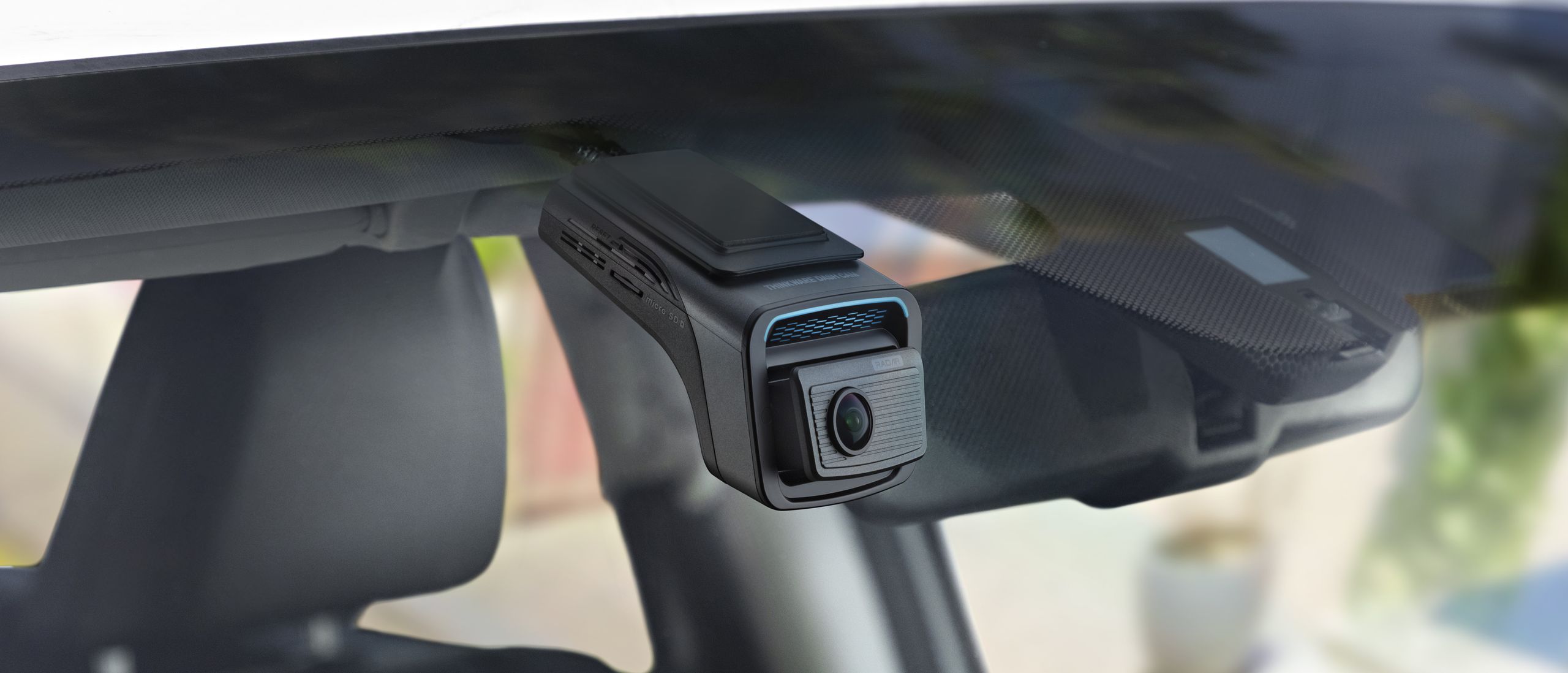
Tom's Guide Verdict Thinkware’s flagship dash cam is a reliable, useful companion for your car, and a great all-in-one package, particularly if you’re looking for security options. But if you’re just after standard 4K recording, other options offer better value for your money. Pros +Good security features +Comprehensive extras +Includes heat-blocking windshield film Cons -Very expensive -Motion blur affects nighttime footage Why you can trust Tom's Guide Our writers and editors spend hours analyzing and reviewing products, services, and apps to help find what's best for you. Find out more about how we test, analyze, and rate. U3000 Pro : SpecsField of view 147°, rear 156°Resolution front 4K, rear 2KGPS YesVoice control NoDisplay NoneDimensions 2.75 x 4.04 x 2.19 inCar prices are trending upwards and aren’t getting any cheaper. With that in mind, any additional security measure can make a huge amount of difference to your peace of mind when you’re away from your vehicle — whether you're leaving it overnight in your driveway or parked on unfamiliar roads.That’s Thinkware’s… well, thinking behind its latest flagship dash cam, the U3000 Pro. It’s a 4K dash cam with plenty of modular extras, which includes the optional 2K rear camera I’m testing as part of this review. This premium model sports front and rear radar parking modes, GPS, driver assistance aids, and real-time safety alerts while you’re on the road.But does the U3000 Pro do enough to stand out from its 4K rivals? Plenty of dash cam makers offer ultra HD and parking security features, after all. Let’s dive in and look at how well it does and how it performs to its touted benefits.Latest Videos FromTom's GuideThinkware U3000 Pro review: Price & availabilityThe U3000 Pro carries a hefty price tag of $549.99 for the dual-channel version and $500 for the front cam alone when you buy direct from Thinkware. It’s a pricey investment, particularly when the market is heavily saturated with 4K dash cams, even with off-the-road monitoring.On the flipside, there are plenty of bundled accessories, such as the CPL polarising filter and both 12V and OBD II cables. You just need to remember to select this option if you don’t want the hassle of a professional install with the hardwire version.Dash cams like the U3000 Pro are a sizeable investment, and I’d argue that basic items needed to ensure they work out of the box need to be included, namely microSD cards. Color my surprise, then, to find that the U3000 Pro does include a microSD card.Most dash cams I’ve tested don’t bother including a card in their retail versions, so it’s refreshing to see one here. Still, those looking for more basic packages might be put off by the price, particularly as you really only need one power cable.Tom's Guide: Direct to Your InboxGet instant access to breaking news, the hottest reviews, great deals and helpful tips.Thinkware U3000 Pro review: Design (Image credit: Future)The U3000 Pro employs a wedge-shaped design, with a main body that sticks directly onto the top of your windshield, widening to house the main 4K camera. This has an adjustable lens, and though it doesn’t offer a great deal of movement, it should do fine for most vehicles.I put the unit partially behind my rear-view mirror, where I could still see and access the buttons. Importantly, the unit is designed to sit discreetly on your windshield, and since it lacks a display, it’s accessible without obscuring your view or being too much of a distraction.The rear camera involves a simple tube design with an adhesive. You can also adjust the lens, but the range of motion also isn’t huge.The main camera lacks the chunkiness of a Garmin or Nextbase, but the unit feels like a decent quality product, with smooth plastic and seams that are uniform. There are four buttons in the center of the wedge: for saving recordings, powering on/off, activating the Wi-Fi, and muting the microphone. These could have been lit for better user friendliness. I struggled to locate the REC button while night driving, even with its added notch. Illuminating it would have led to less fumbling around.Thinkware U3000 Pro review: Features (Image credit: Future)Feature-wise, the dual-channel U3000 Pro carries front and rear radar detection, which you can set to up to 5 meters. Once it detects motion within this detection range, it’ll record and save a 20-second clip. Handy for catching and would-be car snoopers.Plus, the usual onboard G-sensor will detect impacts while driving or parked, wherein it’ll automatically save and protect footage taken directly before and 20 seconds after the collision.Thinkware is also known for tagging on its driver aid systems, and the U3000 Pro is no different. It includes a front vehicle departure warning, letting you know it’s clear to proceed ahead should you get distracted. Plus, there’s a forward collision warning that goes off if you’re traveling too close to the vehicle in front.I also appreciate the included CPL polarising filter, which attaches to the front lens to reduce glare and reflections from the dash. These can often mean the difference between capturing those all-important details and getting a heavy dose of JJ Abrams-esque lens flare on your footage.Finally, a welcome bonus is the addition of a heat-blocking film, which sticks between your windshield and mount, designed to deflect heat from sunlight away from your cam, helping ensure it runs cooler and therefore more reliably. That’s a neat inclusion I haven't seen before in a dash cam package.Thinkware U3000 Pro review: Setup (Image credit: Future)Setup was pretty standard with the U3000 Pro. The unit comes with a thin slide mount on an adhesive, making sliding the main camera unit in fairly painless. I got sent an OBD II cable with my review sample, but you’ll need to remember that the hardwire option requires a professional install meant for more permanent setups. The U3000 Pro also uses its own power adapter rather than the standard USB-C cable, so if you’re upgrading your camera setup, you’ll need to replumb the included wiring.Fitting the wires was a little more complicated, as both sets of power and rear camera cables were on the girthy and stiff side, necessitating some extra force to install behind the trims. Both units don’t intrude too much on their respective windshields, though.There’s also no display to worry about, which can be a pain when you’re fiddling with settings and aligning the camera for the optimal road angle, but I prefer it that way. I have to look at the road while glancing at two screens in my Skoda EV, so having one less to get distracted by is a bonus.Thinkware U3000 Pro review: Software (Image credit: Future)The Thinkware app is a little on the basic side, but it works, with a clean, no-frills design. Handily, there’s no need to manually connect the Wi-Fi — your app and dash cam unit will talk to each other on that front. I’ve sometimes found connecting other dash cams’ Wi-Fi a real pain, particularly when your car’s infotainment system is fighting to do the same, so Thinkware has nailed the convenience here.Once you’re in, you can adjust a host of features, like the Driver Assistance Systems, including traffic light change, forward collision warning, and front vehicle departure warning.You can also set the battery cut-off voltage, which is handy if you’re running a 12V power connection and want to help protect the battery from draining. Downloading high-res videos also takes around 30 seconds per clip, thanks to its 5 GHz Wi-Fi allowing for speedy connections.Thinkware U3000 Pro review: Video & audio quality Thinkware U3000 sample video: Day - YouTube Watch On The U3000 PRO features Sony’s STARVIS 2 top-tier sensors — IMX678 in the front and IMX675 in the rear. These are the best in the business, but they aren’t perfect on their own.Footage shines during the day, with images looking sharp, saturated, and colour-accurate. There’s a hint of digital noise in finer detail textures like tarmac and trees — to be super nitpicky, the Viofo A329S is still the gold standard here, offering a level of smoothness and clarity that’s unmatched.But really, the U3000 PRO delivers enough daytime detail that lets you pick up vehicle tags in either direction of traffic flow. The CPL filter does a decent job of seeing off lens flare, though it won’t eliminate reflections and can make dusk footage a touch darker. Thinkware U3000 sample video: Night - YouTube Watch On Night-time motion blur has always been an issue with these Sony sensors. The HDR mostly does a good job of not overflaring plates directly in front of you, but it can be much trickier to pick out detail in the peripheries of the lens.While I can say the U3000 PRO does a similar job to most high-end dash cams, other manufacturers such as Viofo and Vantrue have upped their HDR modes and included image enhancement features specifically to enhance the detail on vehicle tags.Now, there's an option to enable 60fps recording at 2K, which would provide more frames to weed out full plates, but sadly, there’s no way to activate it automatically for night recording while still having 4K and HDR running during the day. Grain also picks up after hours, which is a usual finding for most dash cams at night. The rear camera behaves in much the same way, just expect a greater level of noise and reduced detail, in keeping with the 2K sensor.Additionally, I found the G-sensor quite sensitive on the default setting — it’ll get upset and activate with fairly inoffensive road bumps, so I had to turn it down in the settings. (Image credit: Future)The security feature is a handy one. When you return to your car, you get voice notifications on how many events it has detected. That gives you more motivation to manually check over your footage — imagine someone keying your car and you not noticing at first. The flipside is that you may tend to ignore this count, particularly if you’re used to busy car parks and roadsides.Those motion detection videos are useful too — I never caught anyone snooping around my car, just people passing by. And though there’s a reduced frame rate of 2fps in these videos to save power, there’s still enough detail on freeze frames to discern faces and car details. If you park in your driveway, think of it as an extra security camera for your home.Audio quality is as good as you can expect, without any digital interference or buzzing. There’s no tinniness that you can often find with cheaper dash cam microphones, and its warning chimes have firm but inoffensive notes, as opposed to the screechy or coarse chime clangs that go through you with cheaper models.Thinkware U3000 Pro review: Verdict (Image credit: Future)The U3000 Pro is a fully comprehensive package with enough extras to protect your car on and off the road. Image quality is reliably solid with sufficient clarity, though better performers, such as the Viofo A329S, offer better nighttime clarity.If you’re looking for a dependable dash cam with 24/7 security, the U3000 Pro fits the bill. And, if you’re after real-time event notifications, the Nextbase IQ might be a better fit.Thinkware is a premium dash cam brand, so this package is expensive, though there’s a great selection of accessories, like the polarising filter and memory card. If you’re upgrading or simply want a dash cam to protect yourself while driving, better deals are out there, particularly if you’re fond of having a display to review footage or tweak settings on the go quickly. But if you’re looking to buy a complete dash cam solution outright for the first time, this is a good option. Matt is a technology journalist with over 20 years of experience, with bylines for The Independent, Stuff, Eurogamer and Popular Mechanics.When not writing or reviewing the latest gadgets, Matt can be found stuck into the MCU film series or any of the latest video games. You must confirm your public display name before commenting Please logout and then login again, you will then be prompted to enter your display name.
Thinkware U3000 Pro review: A worthy dash cam with useful anti-theft features, but rivals offer more value
Full Article
Original Source
Read the full article at Tomsguide →KhanList aggregates and links to publicly available news content. We do not host full articles from third-party sources. Always verify important information with original sources.