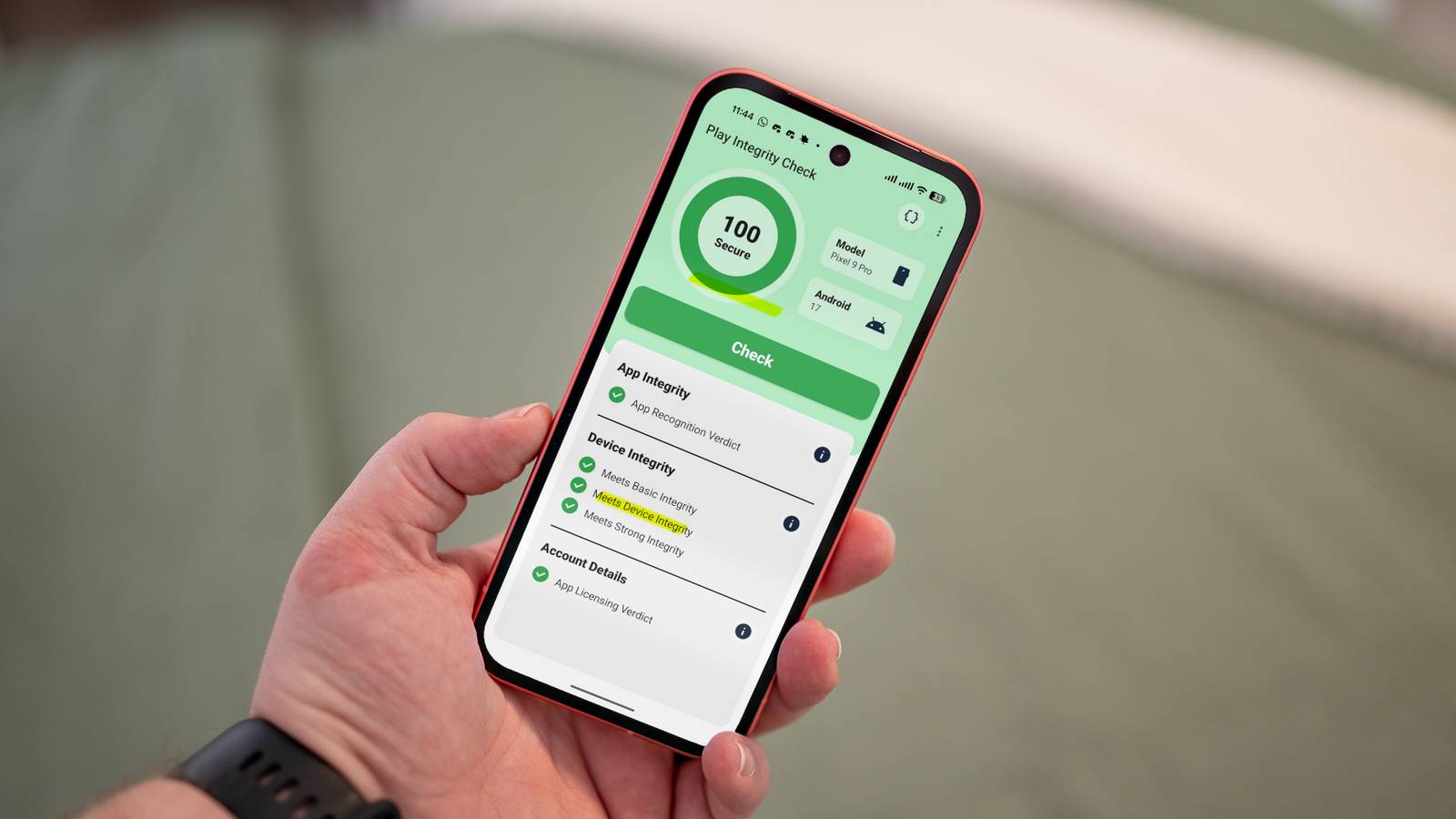
Published Jul 22, 2026, 4:45 PM EDT Arol is a tech journalist who currently works as a contributor at How-To Geek since 2022. He first began writing online for the short-lived portal of Spanish-language gaming forum Emudesc in 2013. Years later, in 2017, he got his true start in tech journalism working for a small Google-focused site called Pixel Spot. He transitioned to a news and feature writer role at XDA Developers that same year, where he worked until 2021 before making the jump to other websites. Arol brings nearly a decade of writing experience, and the occasional hot take, to his writings. While he's a technology lover at heart, he holds computer hardware and smartphones particularly close to heart. You'll normally find him covering news, although he has also written the occasional deal, buyer's guide, how-to post, and round-up. He's also written for Android Police and MakeUseOf. He's also a Political Science student. When he's not writing, you'll probably find him hitting the gym, trying to ace a new hobby, reading his textbooks, or traveling. You can reach him at me@arolwright.com. Rooting an Android phone unlocks a level of customization stock firmware can't touch, but the real power comes from the modules layered on top. After years of flashing and re-flashing, these four make the cut every single time. PlayIntegrityFix Spoofing your way past Google's strictest checks Google's Play Integrity API is the gatekeeper that decides whether your banking app, mobile payment service, or even some games will run on your device. It checks for a verified bootloader, an unmodified system partition, and the absence of root access, then returns a verdict to the app. A rooted phone fails that check almost immediately, which is exactly the problem PlayIntegrityFix exists to solve. The module works by intercepting the device's hardware attestation data and substituting fingerprint, security patch, and build properties that match a certified, unmodified device. Instead of the app seeing a rooted, custom ROM setup, it receives a clean verdict and proceeds as if nothing were out of the ordinary. This isn't a permanent fix in the way installing a new app is permanent, though. Google routinely tightens its detection methods, occasionally flagging fingerprints that PlayIntegrityFix relies on or closing loopholes the module exploits. That means keeping the module updated isn't optional if you want consistent results; a stale version can silently stop working while everything appears fine on the surface. It also pairs closely with other modules on this list, since hiding root status and faking integrity verdicts are related but distinct problems. PlayIntegrityFix alone won't hide Magisk itself from apps that scan for root binaries or suspicious packages, so it's rarely used in isolation. For anyone who wants their daily driver to still run banking apps, Google Wallet, or competitive mobile games after rooting, this module is close to mandatory. It's also one of the more actively maintained projects in the rooting community, with frequent updates tracking Google's changes, which says a lot about how essential it has become for keeping a rooted phone usable for everyday tasks. LSPosed Reviving the Xposed framework without a custom recovery Credit: Arol Wright / How-To Geek LSPosed brings back one of Android modding's most influential tools: the Xposed framework, which lets developers write modules that hook directly into system and app processes to alter their behavior at runtime. Where Xposed once required a separate recovery-based installation method that was finicky and version-dependent, LSPosed runs through Zygisk, Magisk's native injection system, making setup far simpler and more stable. Once installed, it opens the door to a huge catalog of Xposed modules covering everything from UI tweaks and notification control to ad blocking inside individual apps and deep customization of system behavior that manufacturers never intended users to touch. Google Pixel 10 $599 $799 Save $200 Brand Google SoC Google Tensor G5 Display 6.3-inch Actua OLED, 20:9 RAM 12 GB RAM Storage 128 GB / 256 GB Looking to upgrade to a Pixel but not sure if you need all the bells and whistles of the more expensive models? You won't be disappointed with the standard Pixel 10 model. Coming in striking colors, Gemini features, and seven years of updates, you can't go wrong with this purchase. The appeal here isn't a single feature but the ecosystem it unlocks. Modules like this often let people strip bloatware-driven restrictions, force dark mode in apps that don't support it natively, or adjust how notifications behave on a per-app basis with a level of granularity stock Android settings simply don't offer. LSPosed also includes a scope system, letting you choose exactly which apps each Xposed module affects, which keeps things from breaking system apps unintentionally. That said, it requires a bit more caution than some other Magisk modules. Because Xposed modules hook deeply into app processes, a poorly coded one can cause crashes or instability in the apps it targets. It's worth testing modules individually rather than installing a dozen at once, since troubleshooting becomes much harder when several are running simultaneously. For anyone who misses the golden era of Android modding, before manufacturers locked things down as tightly as they have now, LSPosed is essentially a direct line back to that flexibility, just running on modern Android through Zygisk instead of older injection methods. Magisk Bootloop Protector (rhythmcache) A safety net for when modules go wrong Credit: Arol Wright / How-To Geek Flashing modules carries an inherent risk: a misbehaving one can send a phone into a bootloop, where it restarts endlessly without ever reaching the home screen. Recovering from that usually means booting into recovery mode and manually disabling modules through file manager tricks, which isn't always straightforward, especially for less experienced users. Bootloop protectors exists specifically to remove that risk. It works by monitoring the boot process and setting a timer; if the device doesn't finish booting within a defined window, the module automatically disables all installed Magisk modules and reboots the phone cleanly. Once the phone is back up and stable, the modules remain available to re-enable individually, which makes it possible to identify exactly which one caused the failure without resorting to a full wipe or reflash. This kind of safety net matters most when testing new or less established modules, since reliability varies wildly across the Magisk module ecosystem. Some are actively maintained by experienced developers, while others are abandoned, experimental, or built for slightly different Android versions than the one actually installed. Without a bootloop protector, testing those riskier modules means accepting the very real possibility of having to factory reset the device. With it installed, that risk effectively disappears, turning what could be a frustrating recovery process into a non-event. It also requires no real intervention to function; it operates silently in the background until it's actually needed. Keep in mind that there's a ton of bootloop protectors out there and the stuff that works today might break tomorrow. I've linked to a bootloop protector that seems to work for most people as of the time I'm writing this article, but by all means, check out what users recommend. Shamiko / ReZygisk Hiding root deeper than Magisk's built-in tools can Google 10 Pixel Pro XL and Samsung Galaxy S26 Ultra.Credit: Stephen Radochia / Android Police Even with PlayIntegrityFix faking the right attestation values, plenty of apps detect root through other means entirely, like checking for Magisk binaries, su access, or modified system files. Shamiko handles this layer of detection by working alongside Zygisk to hide root status from specific apps, denying them any indication that the device has been modified at all. It integrates with Magisk's app hiding list, letting you choose precisely which apps should see a clean, unrooted environment versus which ones can be aware of root access. ReZygisk enters the picture because of a structural shift in Magisk's development: Zygisk, once a built-in feature, has been deprecated in official Magisk builds, pushed out in favor of letting third-party implementations handle that functionality instead. ReZygisk is a community-maintained continuation of that Zygisk functionality, built to keep modules like Shamiko and LSPosed working as Magisk itself moves away from including it natively. Without ReZygisk, those modules simply have no foundation to run on, since Zygisk's process injection is what makes their hooks possible in the first place. Together, the combination of ReZygisk and Shamiko forms the backbone of effective root hiding for any phone that needs to pass both technical integrity checks and behavioral root detection. It's a slightly more involved setup than just installing PlayIntegrityFix and calling it done, but for apps with aggressive detection systems, particularly certain banking and streaming services, it's often the missing piece that determines whether the app launches at all. Anyone serious about maintaining root while keeping daily-use apps functional should treat this pairing as a baseline requirement, not an optional extra. Four modules, one fully functional rooted phone Between integrity spoofing, Xposed support, bootloop protection, and root hiding, these four modules cover the practical foundation of running a rooted Android phone without sacrificing day-to-day usability.
These are the 4 Magisk modules I install on every Android phone
Full Article
Original Source
Read the full article at Howtogeek →KhanList aggregates and links to publicly available news content. We do not host full articles from third-party sources. Always verify important information with original sources.