
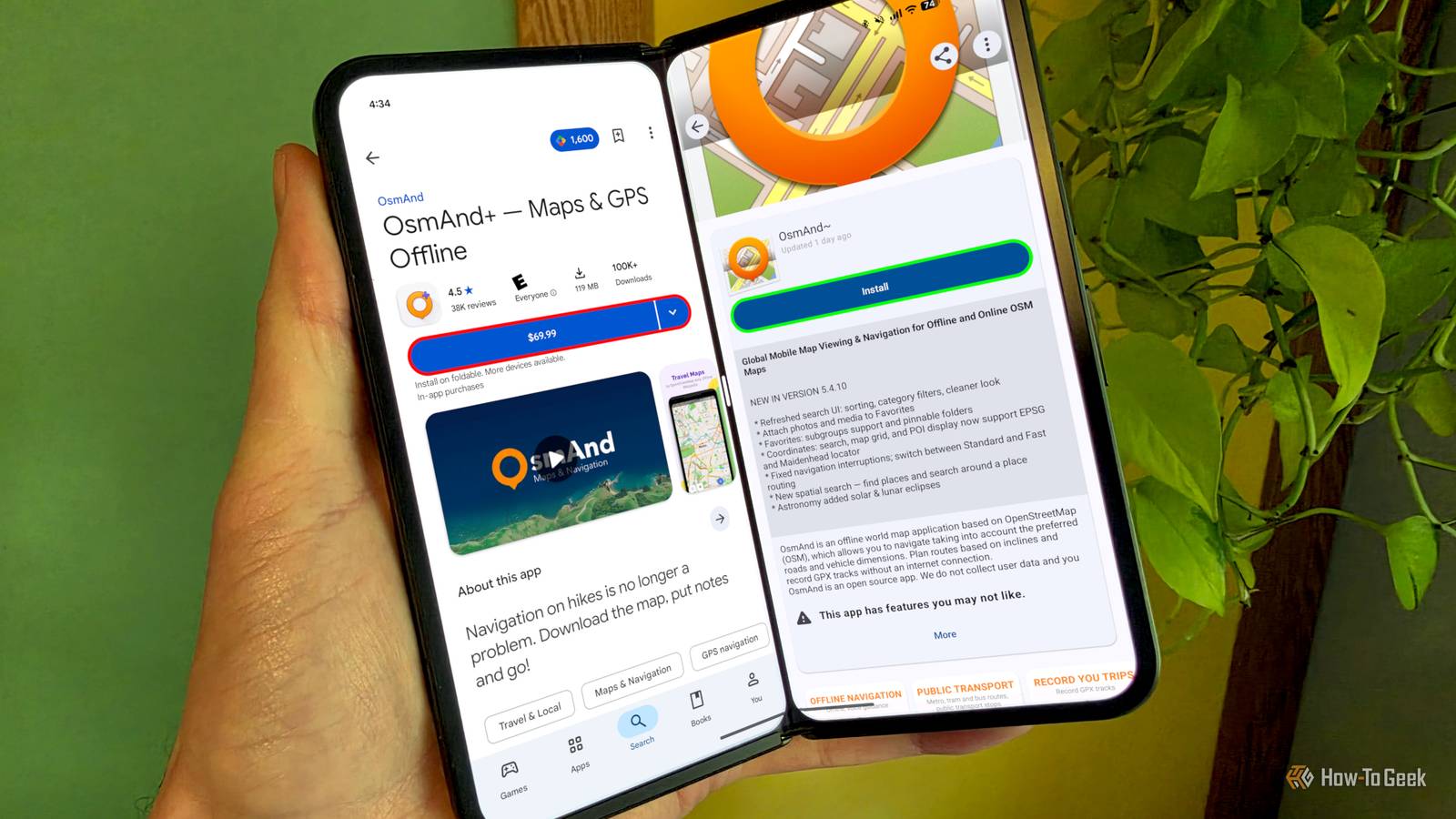
Published Oct 27, 2026, 3:01 PM EDT Joe Fedewa has been writing about technology for over a decade. Android and the rest of the Google ecosystem have been a focus for years, as well as reviewing devices, hosting podcasts, filming videos, and writing tutorials. Joe loves all things technology and is also an avid DIYer and food blogger. He has written thousands of articles, hundreds of tutorials, and dozens of reviews. Before joining How-To Geek, Joe worked at XDA-Developers as Managing Editor and covered news from the Google ecosystem. He got his start in the industry covering Windows Phone on a small blog, and later moved to Phandroid where he covered Android news, reviewed devices, wrote tutorials, created YouTube videos, and hosted a podcast. From smartphones to Bluetooth earbuds to Z-Wave switches, Joe is interested in all kinds of technology. After several years of jailbreaking and heavily modifying an iPod Touch, he moved on to his first smartphone, the HTC DROID Eris. He's been hooked ever since. Developers deserve to be compensated for their work, and "premium" apps usually offer a better experience. But sometimes, those same developers offer a way for loyal users to get their paid apps for free. No trial, no hidden paywall — just sideloading. I'm not talking about piracy. These are open-source projects, and the developers have chosen to offer two ways to download them. The paid version is in the Play Store for most people, but if you're in the know, the developer will allow you to sideload it for free from GitHub or F-Droid. Here are three such apps. Aren't all open-source apps supposed to be free? Open-source software is free by definition, but the people who make it still have bills to pay. One of those bills is a fee to use the Play Store. Charging a few bucks is an easy way to get the app in front of more people and recoup the costs. It's more like a tip jar than a price tag. The free versions typically live on F-Droid, an excellent place to find free and open-source Android apps, or on the project's GitHub page. Both are completely legitimate sources. If you've never used F-Droid, it essentially works like any other app store. You can routinely check it for app updates. For GitHub downloads, it's a little harder to stay on top of app updates. Obtanium is a nice way to keep everything updated. Open Headunit Turn any Android device into an Android Auto display If you've followed my writing, you probably know that Open Headunit is one of my all-time favorite open-source apps. It's a great way to repurpose an old phone or extend the functionality of your current phone. The app enables any Android device to act as an Android Auto head unit — wirelessly or locally. This opens up some fun possibilities. I've used it to mount a tablet in my old truck that has no screen at all, and as a way to transform my daily phone into a headunit itself. It's also handy for trying out Android Auto without actually getting in your car. It does take a little tinkering to get it working. Depending on your setup, you may need to enable some developer options, and your results will vary based on the devices you're using. The Play Store version has a one-time $3.99 price, but you can download it for free from GitHub. OsmAnd Maps+ Offline maps without the subscription OsmAnd Maps is probably the most well-known app on this list. It's a navigation app built on OpenStreetMap data, and it's incredibly useful if you rely on offline maps. You can download entire states at once, and turn-by-turn navigation works without a data connection. There's also a huge number of customization options. OsmAnd is perfect for road trips, hiking, or any time you know you're going to be somewhere with poor service. The free version of OsmAnd is great, but it's limited — you only get seven offline map downloads. So, if you update the offline maps every month, that's less than a year of usage. It also doesn't include support for Android Auto and CarPlay. To unlock these things, you need a Maps+ subscription, which is $14.99 per year, or $69.99 for a lifetime. The lifetime price is the one you see on the paid version in the Play Store. The OsmAnd GitHub page doesn't include APK releases; however, if you tap the F-Droid button, you'll notice the app is called " OsmAnd~." This is a special free version with several features from Maps+ and Maps Pro, including unlimited map downloads. ShizuWall A no-root firewall that actually works ShizuWall is the most niche app of the bunch, but it might be the most useful if you care about privacy. It lets you block individual apps from accessing the internet. Without this app, you can only block apps from using background or mobile data, but not the internet completely. Plenty of apps don't need a connection to do their job, yet they phone home for various reasons. The great thing about ShizuWall is that it doesn't require root access. Instead, it uses Shizuku, a tool that grants apps elevated permissions through wireless debugging. You set up Shizuku once, and then ShizuWall can manage network access without the usual workarounds. Many firewalls on Android rely on using a VPN, which means you can't use an actual VPN at the same time. This approach avoids that problem. As with the others, the paid $4.49 listing on Google Play is optional. The free build from GitHub and F-Droid has the same features. Support developers if you can If you enjoy using an app, and it makes your life better in some way, you should pay for it. That being said, we're not all able to chip in a few dollars for every single app on your phones — especially subscriptions. They add up quickly. These free options for loyal users are a nice way for developers to give back to the people who help make their apps successful.
These 3 paid Android apps are 100% free outside of the Play Store
Full Article
Original Source
Read the full article at Howtogeek →KhanList aggregates and links to publicly available news content. We do not host full articles from third-party sources. Always verify important information with original sources.