
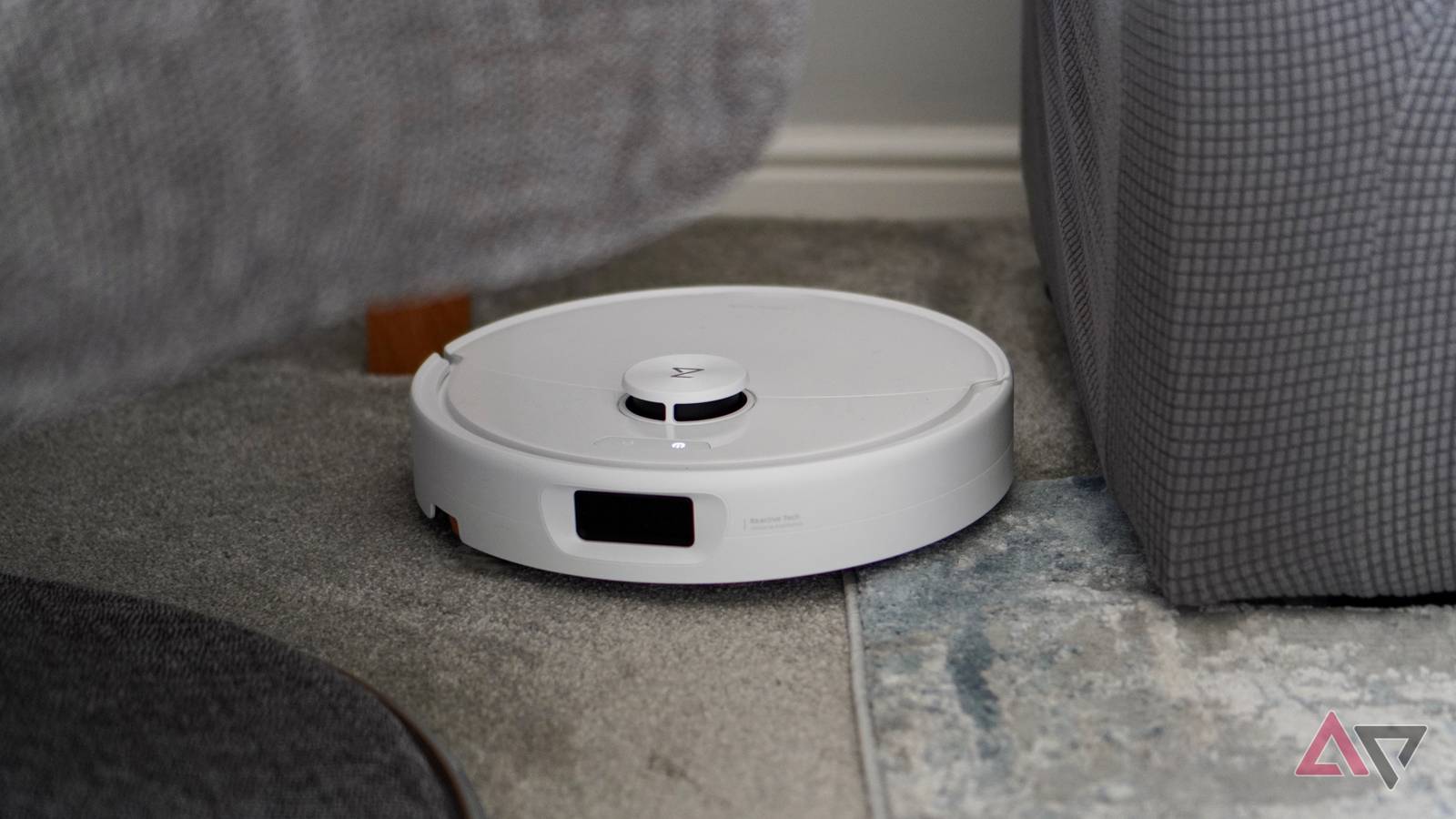
I’ve used a variety of robot vacuum cleaners over the years, but they’ve never quite lived up to expectations. Whether it’s an inability to avoid obstacles, substandard apps, or barely being able to suck up a single cat hair, I’ve found they’re more of a hindrance than a help. I approached the Roborock Qrevo 2 Pro with a very open mind. Would it be the model to make me appreciate a robot vacuum? It has been helping me out around the house for a couple of weeks now, and this is what it has been like. Roborock Qrevo 2 Pro 7/10 Dimensions Robot: 352 x 350 x 96.6mm / Dock: 402 x 494 x 450mm Surface Recommendation Hard floors / carpets Suction Power 25,000 Pa Weight 3.9kg The Roborock Qrevo 2 Pro has both a vacuum and a mop function, all housed in a large dock. Its quiet vacuuming produced solid results, but mopping hasn't been so successful. Pros & Cons Relatively quiet operation Clear and logical app Good obstacle detection Suitable for hard floors and carpets Requires a dust bag Mop function doesn't always fully clean Big, ungainly dock Price, specs, and availability The Roborock Qrevo 2 Pro is available to buy in the US and the UK. It's available in both black and white color schemes. If you want one, it may be wise to pick it up quickly, due to the very good promotional price. The normal retail price is $800, but until September 6, the price has been reduced by $250 to $550, giving you a considerable saving. In the UK it costs £650. If you’re wondering about the Federal Communications Commission (FCC) ban on certain robot vacuum brands, and how it affects the Qrevo 2 Pro, we’ve covered it in a section below. The ban has complicated the competition, and it means many of the models already available are outdated. Roborock Qrevo 2 Pro 7/10 Dimensions Robot: 352 x 350 x 96.6mm / Dock: 402 x 494 x 450mm Surface Recommendation Hard floors / carpets Tangle Detection Y Suction Power 25,000 Pa Mop Y Brushes Y Obstacle detection Y Mapping Y Weight 3.9kg Dust Bag Capacity(L) 270ml Battery 5,200mAh Water Tank Capacity 67ml Roborock Qrevo 2 Pro design It's a bit of a beast I’m coming to the Roborock Qrevo 2 Pro from the Shark PowerDetect robot vacuum, which I’ve used for more than a year. I like its compact dimensions and design, but not the poor app and its annoying tendency to forget room maps. The Roborock Qrevo 2 Pro is considerably larger. The vacuum itself is wide and tall, and the docking station is huge. It takes up a lot of room in my relatively small home, and because the power cord is quite short, it needs careful consideration about where it’s going to be placed before purchasing. Although the instructions state the dock should be placed on a non-carpeted area, I haven’t done so and it has been fine. There are two huge bins in the dock, one for clean water and the other for dirty water. The robot docks underneath, and has the ability to leave its mop heads behind when they’re not needed. Because of its overall size, I’ve got the Roborock Qrevo 2 Pro on display, and it’s not really suitable for that. It has an unfortunate, rather toilety appearance, and it’s not something I’d feel the need to show off. If you can hide it away, I’d suggest doing so. It all feels very sturdy though, and it’s easy to pull the bins out of the dock. There’s also little need to touch any of it very often, making it easier to put it somewhere inconspicuous. Roborock Qrevo 2 Pro app and setup Simple and easy to use The Roborock Qrevo 2 Pro comes in a big box and is quite heavy. Once unpacked, it requires very little assembly, and the app guides you through the setup process. The app is excellent. There are clear instructions on how to prepare the robot vacuum, and to perform its first mapping run. It took about an hour from opening the box to vacuuming for the first time. Once it has vacuumed, you can customize the map. In it, you can label furniture, separate rooms, and create no-go areas. It’s simple and fast. Although it can recognize floor coverings, you can also manually select them, ensuring it won’t accidentally start mopping your carpet. Once this is all done, it’s very low maintenance. There’s a big, obvious start button in the app when you just want to clean, or you can select individual rooms or zones, power settings, or cleaning patterns. There are various Routines to select, such as cleaning after meal times or targeting pet-related areas only. Deeper in the settings, you can set up how it cleans carpets and how and where it mops. There are also a few stats, including how long it has cleaned for, the amount of space it cleaned, and how long the filters and brushes have been used too. So far, the app has been great. It’s logically laid out, doesn’t bombard you with modes or settings unless you look for them, and has a range of clever intelligence options such as tuning the obstacle avoidance and a self-cleaning schedule. The thing is, if you don’t want to deal with any of this, you can ignore most of it. The standard setup is good, and it lets the robot just get on with vacuuming. Roborock Qrevo 2 Pro vacuuming and moping Stick to vacuuming, and it's fine The Roborock Qrevo 2 Pro is designed to be used on hard floors and carpets, and is supposed to be powerful enough to pick up dust, crumbs, dirt, and pet hair. It has a large main brush with rubber and bristles, and a side brush to get into corners and along skirting boards. Vacuum operation is fairly quiet, especially on hard floors, but suction increases when it detects carpet. It does a good job of not getting stuck, but it can pull at the edges of rugs and mats, turning them over and dragging them around in the process of cleaning. There are multiple levels of vacuuming power. I selected the deep clean mode with the tightest cleaning pattern for my living room. It took 12 minutes to complete a seven-meter-squared area. To test how well it performed, I then vacuumed with my usual upright cordless vacuum (a Shark Stratos) afterwards to see how much debris would be collected. It still picked up a fair amount of cat hair, but it is also much more powerful. Visually, the Roborock Qrevo 2 Pro did a good job of vacuuming the carpet, and running it each day would certainly keep mess to a minimum. One thing to note, if you have a cat that’s fascinated by robot vacuum cleaners, like mine, the Roborock Qrevo 2 Pro doesn’t seem to be phased by it moving around, indicating very effective obstacle detection. I’ve used cleaners in the past where they get very confused by the cat, and end up not cleaning well because it’s always avoiding it. This doesn’t seem to happen here. Mopping involves a lot of gurgling as it cleans the mop heads before and afterward. Once it has finished cleaning, you hear the fan drying off the pads for some time. It’s more audibly intrusive than the actual cleaning, and I’ve yet to see that it's worth all the noise and effort. I have tried mopping a hard floor, but it hasn’t been all that successful. The robot has only ever cleaned very specific areas rather than the entire floor so far, and has never done the whole thing in one go. It may be cured by a setting in the app, but as mopping isn’t suitable for carpets, and most of my house is carpeted, it doesn’t really bother me much. The floor type in your house is the most important point to consider before buying a robot vacuum cleaner with a mop function. I’m using the Roborock Qrevo 2 Pro ahead of launch, and it may still receive an update to solve the mopping issues I’ve experienced. I have encountered a few problems with the map, where the robot claims it encountered an ‘abnormal path’ which cut its cleaning short, but nothing in the room had changed. Other than this, it has been a reliable helper. Roborock Qrevo 2 Pro consumables The Roborock Qrevo 2 Pro uses a bag system for dust and debris collected by the vacuum cleaner. The bag is hidden inside the dock and underneath the water tanks, so you have to remove them before changing it. It’s going to depend on how often you use the vacuum cleaner and how much debris it collects as to how often these bags need to be changed. They are quite big, and after about five regular cleans there’s a noticeable amount of cat hair and dust inside already. Considering my house is not very big, I’d expect it would be reasonable to replace it every four weeks or so, if used daily. The bags represent an ongoing cost. Currently, a pack of six bags costs around $26 from Roborock, although third-party versions are also available for less elsewhere. One thing I like about the Shark PowerDetect is its bag-less system, where dust is stored in a compartment in the dock. It makes it cheaper to own. The other consideration is the cleaning solution for the mop. There’s no easy to find guidance here, but digging into the brand’s FAQ reveals it recommends you use Roborock’s own solution, which is $19 for 480ml. Comments indicate it lasts a while. It’s not clear whether other floor cleaners may damage the robot vacuum over time. What about the robot vacuum ban? Will you actually be able to buy it? In July 2026, the Federal Communications Commission (FCC) added various mobile robotic devices made outside the US to its so-called Covered List, which means they won't receive FCC clearance, and this effectively stops them being sold in the US. This includes many robot vacuum cleaners. Android Police contacted Roborock to understand the situation with the Qrevo 2 Pro in the US. We were told: Only new robots without previous FCC certification are affected. The certification process for this robot was passed and successful some time ago. Therefore, it has all relevant FCC certifications and is fit for sale in the US. The ban does not affect the UK, and according to one news report, the government has no plans to introduce a similar ban at this time. Should you buy the Roborock Qrevo 2 Pro? Yes, consider buying the Roborock Qrevo 2 Pro. It’s a quiet, effective, and easy-to-use robot vacuum, which doesn’t seem to get stuck or tangled up in pets or rugs, and has an app with a host of useful features and modes. The mop feature will suit some homes, but even if you have the right flooring for it, the feature still needs optimizing. Robot vacuums without a mop feature are often much cheaper. Also consider the ongoing cost of dust bag replacements. Bag-less models exist, and will be cheaper to run over time. Finally, check the Roborock Qrevo 2 Pro’s dimensions and make sure you have a suitable space for it in your home, as it’s not the prettiest piece of tech you’ll display. Has the Roborock Qrevo 2 Pro changed my mind about robot vacuum cleaners? Yes, and in a positive way. The app is excellent, it has been reliable, and starting a simple cleaning cycle takes no time at all. It has also stayed this way throughout my test, meaning I'm more likely to rely on it than any other robot vacuum I've used before. It has reinforced my assumption I don’t need a mop feature though, and that I definitely need a larger house if I want to hide the massive dock away. Roborock Qrevo 2 Pro 7/10 Dimensions Robot: 352 x 350 x 96.6mm / Dock: 402 x 494 x 450mm Suction Power 25,000 Pa Weight 3.9kg Color White / Black The Roborock Qrevo 2 Pro is easy to use, yet has plenty of customization if you need it, with the app being one of the best I've used. It vacuums effectively, avoids the cat, and doesn't make much noise. Unfortunately, the sizable dock is ungainly, and the mop feature doesn't always work.
The Roborock Qrevo 2 Pro proved robot vacuums aren't the waste of money I thought they were
Full Article
Original Source
Read the full article at Androidpolice →KhanList aggregates and links to publicly available news content. We do not host full articles from third-party sources. Always verify important information with original sources.