
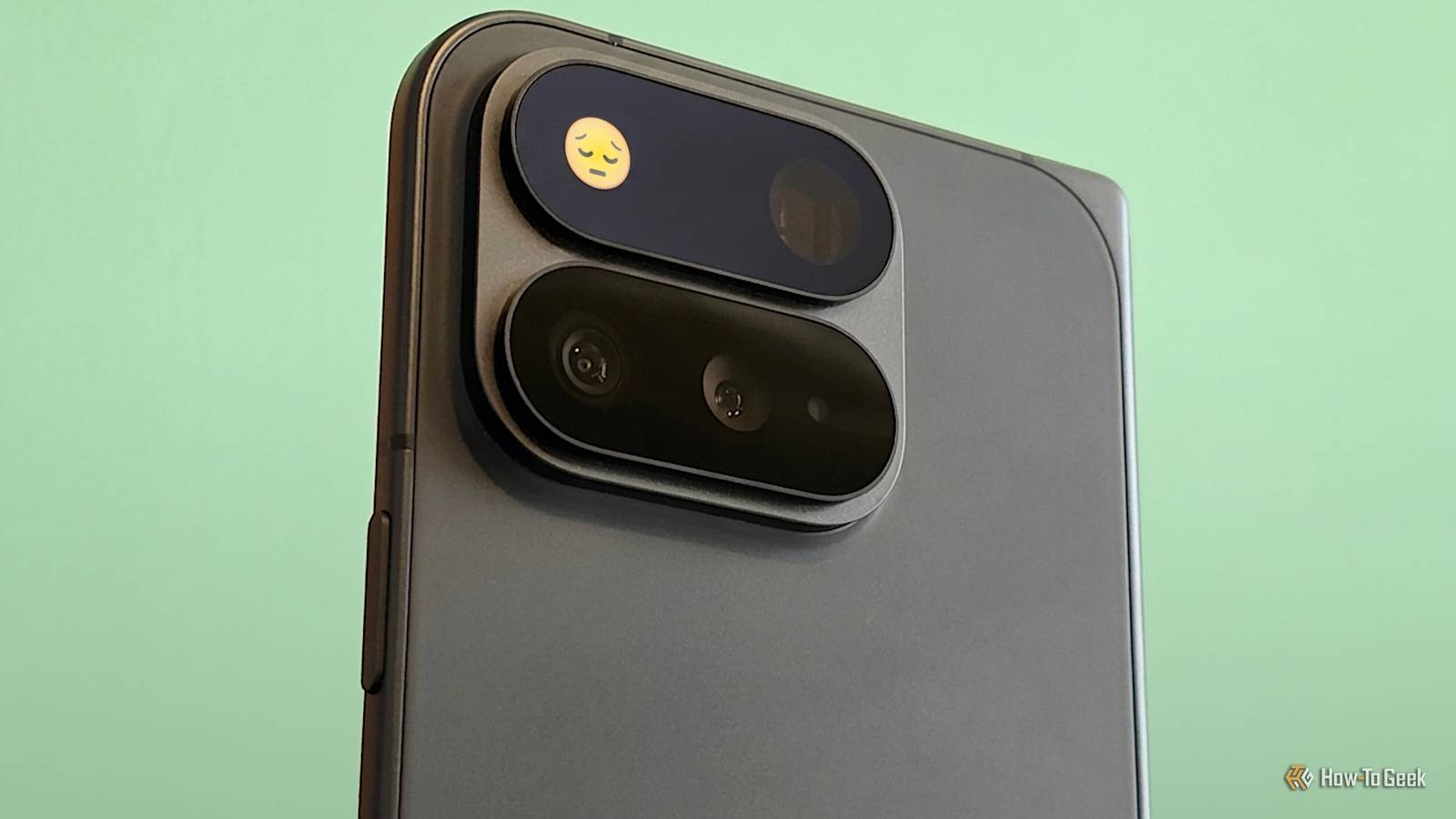
Published Aug 19, 2026, 12:03 PM EDT Joe Fedewa has been writing about technology for over a decade. Android and the rest of the Google ecosystem have been a focus for years, as well as reviewing devices, hosting podcasts, filming videos, and writing tutorials. Joe loves all things technology and is also an avid DIYer and food blogger. He has written thousands of articles, hundreds of tutorials, and dozens of reviews. Before joining How-To Geek, Joe worked at XDA-Developers as Managing Editor and covered news from the Google ecosystem. He got his start in the industry covering Windows Phone on a small blog, and later moved to Phandroid where he covered Android news, reviewed devices, wrote tutorials, created YouTube videos, and hosted a podcast. From smartphones to Bluetooth earbuds to Z-Wave switches, Joe is interested in all kinds of technology. After several years of jailbreaking and heavily modifying an iPod Touch, he moved on to his first smartphone, the HTC DROID Eris. He's been hooked ever since. The general consensus on the Pixel 11 series is that not much sets it apart from last year’s models. One of the few highlights is the “HiLight” LED panel on the camera bar. It’s a cool idea in theory, but painfully underwhelming in reality—and it makes me worry about Google. When the rumors first started popping up about the “Pixel Glow” LED notification light, it sounded like a throwback to the early Android era. Then the leaks appeared, and we could see it was more than a tiny LED dot. The larger size seemed perfect for fun animations, pixel art, and customization. It didn’t take long to be brought back down to Earth, though. The full extent of what HiLight can do on a Pixel 11 This won’t take long I’ve been using a Pixel 11 Pro Fold for a little under a week. Admittedly, I nearly forgot all about the HiLight feature. The latest rumors had said it would only be used for Gemini and calls from favorites—they were spot on. To find the HiLight feature, you’ll need to go to Settings > System > HiLight. In there, you will find exactly three toggles: Use HiLight Speaking with Gemini Calls from favorites It’s not explained anywhere on the HiLight page, but the colors for favorite contacts need to be customized from the Contacts app. You’ll see a “Set [name]’s HiLight” suggestion when you open one of your favorite contacts, or you can scroll down to “HiLight.” From there, Google has graciously given us five colors to choose from: Teal, Yellow, Pink, Purple, and White. At the time of writing, this is where HiLight’s functionality ends. Did Google think this was good enough? Because it’s clearly not First, to answer the question in the subheading above: apparently not. When the HiLight feature was being shown off at the Made by Google event, Trevor Noah—who seemed to be unimpressed—interrupted to ask, “What about messaging?” Toni Urban, a project manager at Google, responded: Well, as you can imagine, we'll be adding more capabilities to HiLight over time, like message notifications from your closest people. Yes, I can imagine more capabilities, but I’m wondering why they weren’t included at launch? I struggle to think of two things I do less often on my phone than talk to Gemini and take calls...while my phone is face-down. To not even include messaging from the get-go is truly bewildering. Incoming call HiLight Then, on top of that, to have such an insultingly low number of color options when it could easily have been a full color wheel. I don’t get to choose my favorite color, blue? Ever heard of green? How about red? I repeat, truly bewildering. First impressions are important. Everyone knows this. People are going to see the limited nature of HiLight and proceed to move on. When Google eventually adds more functionality, it will be too late. Let the Android community do the work Don’t take the ball and go home As limited as HiLight on the Pixel 11 series is at launch, the disappointment could have been avoided with one simple change: open it up to developers. Android is best when it’s a playground for everyone to enjoy, and Google has been the beneficiary of this open approach many times. Pixel features such as Private Space, Quick Share, gesture navigation, native screen recording, and system-wide dark mode made their debut as third-party apps and in custom ROMs. Credit: Joe Fedewa / How-To Geek Now, I have no doubt that the Android community will eventually figure out how to customize HiLight, but it will be despite Google, not thanks to it. That’s sad, because there’s no downside to letting people play with HiLight. This is not a software feature that could give people a reason to stick with their older Pixel if it was back ported—you must buy a Pixel 11 to use HiLight. It’s been years since a prominent Android phone featured a notification LED, yet people still reminiscence and speak fondly of them. HiLight is essentially a maxed-out version of the same concept, but in its current state, no one—including Google itself—will remember it in a couple of years. Google Pixel 11 Pro Brand Google SoC Google Tensor G6 Display 6.3-inch Super Actua display RAM 12 or 16GB Storage 256GB, 512GB, or 1TB Battery 4850 mAh
The Pixel 11’s flashiest new feature makes me worry about Google
Full Article
Original Source
Read the full article at Howtogeek →KhanList aggregates and links to publicly available news content. We do not host full articles from third-party sources. Always verify important information with original sources.