
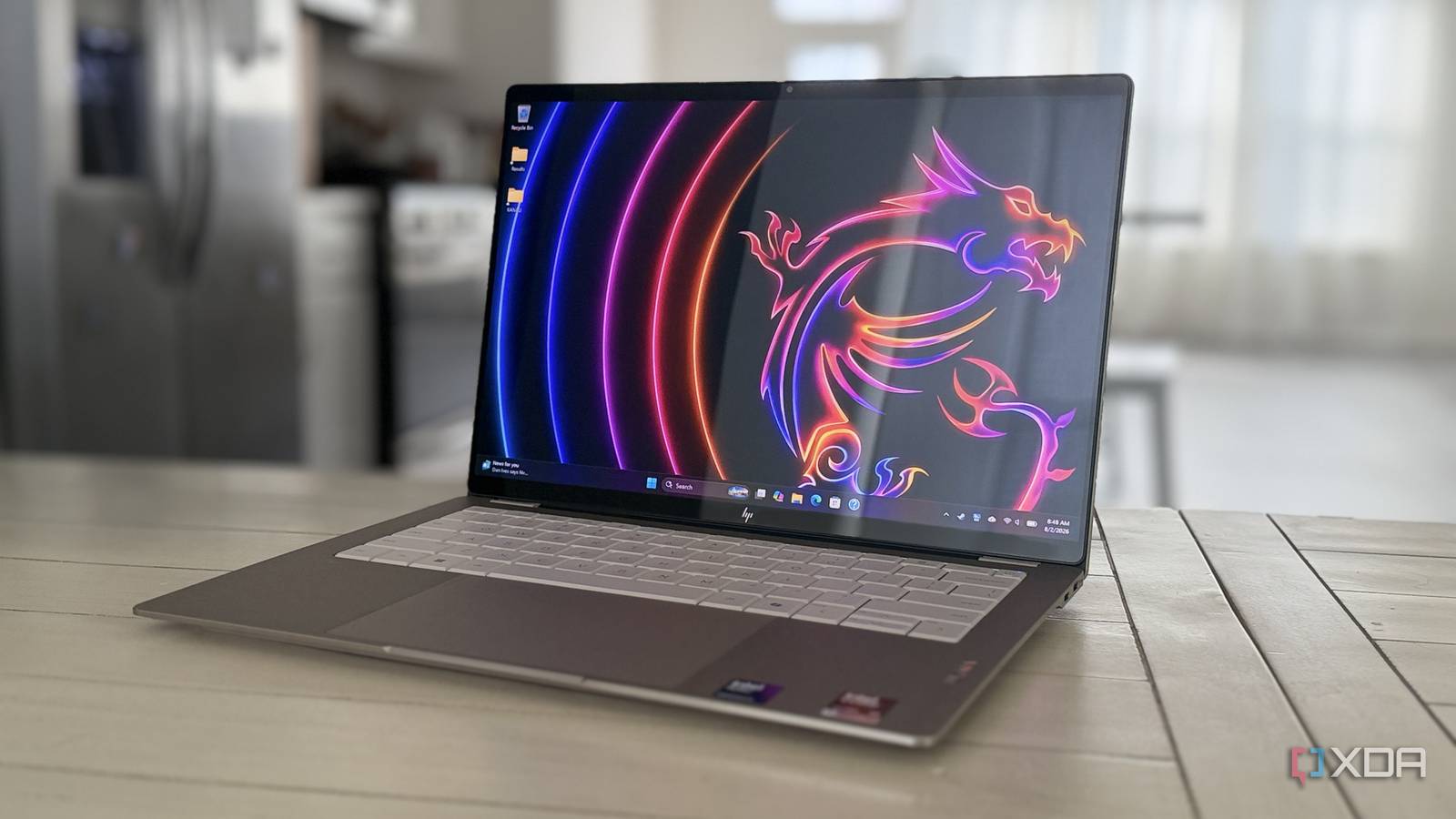
Published Aug 8, 2026, 8:00 PM EDT This is one seriously sleek successor to the HP Spectre It's no secret that XDA has a history with HP's top ultraportable range. We loved it when it was the HP Spectre, and we've loved most of what we've seen of the OmniBook rebranding so far. And this year, HP completely redesigned the OmniBook. The OmniBook Ultra is sleeker, slimmer, and stunning, and I've enjoyed most of my time with it. HP had to make this change. The competition this year has brought out some stunners, like the Asus ExpertBook Ultra and Dell XPS 14. The OmniBook Ultra now has OLED as standard, options for Intel X7 and X9 and Qualcomm X2 Elite and X2 Plus processors, and, as a rarity among laptops right now, options for 64GB of RAM. About this review: HP sent XDA the OmniBook Ultra 14 used in this review but had no input into its contents. HP OmniBook Ultra 14 (2026) 8/10 CPU Up to Intel Core Ultra X9 388H, Snapdragon X2 Elite X2E-90-100 GPU Up to Intel Arc B390, Qualcomm Adreno Display type OLED Display (Size, Resolution) 14-inch 3K (2880x1800) touchscreen, 120Hz, 500 nits; 14-inch 2K (1920x1200), multitouch, 300 nits The OmniBook Ultra 14 is the Spectre replacement that we should have had two years ago. It's gorgeous from every angle, has enough power for your workloads and battery life for days. RAM Up to 64 GB Storage Up to 2TB PCIe Gen5 NVMe Battery 4-cell, 70 Wh Charge speed Approx 50% in 45 minutes Ports 3x Thunderbolt 4/USB4 40 Gbps, 3.5mm audio jack Operating System Windows 11 Webcam 5MP IR Cellular connectivity No Wi-Fi connectivity Wi-Fi 7 Bluetooth Bluetooth 6 (Intel), Bluetooth 5.4 (Qualcomm) Dimensions 12.25 x 8.49 x 0.42 in Weight 2.81 lb Speakers Quad speakers, DTX:X Ultra Colors Eclipse gray, Silk sand, Stone blue aluminum (Qualcomm) NPU 50 TOPS (Intel), up to 85 TOPS (Qualcomm) Pros & Cons Gorgeous OLED screen Haptic touchpad Strong, classy chassis Semi-glossy screen could be a problem Slightly mushy keyboard No USB-A ports Price, specs, and availability of the HP OmniBook Ultra 14 (2026) The HP OmniBook Ultra 14 is out now, from HP, Best Buy, Target, and other big retailers. It starts from $1,800, which gets you an Intel Core Ultra 7 356H with 16GB of RAM and 512GB of storage, or from $1,900 if you want a Snapdragon X2 Plus instead. It's worth mentioning that the base Snapdragon model only has a 1920x1200 OLED screen, while all the Intel versions have a 2880x1880 OLED screen. As reviewed, HP offers this model for $4,010 with the Intel Core Ultra X9 388H, 64GB of RAM, and 2TB of storage. HP OmniBook Ultra 14 (2026) CPU Up to Intel Core Ultra X9 388H, Snapdragon X2 Elite X2E-90-100 GPU Up to Intel Arc B390, Qualcomm Adreno Display type OLED Display (Size, Resolution) 14-inch 3K (2880x1800) touchscreen, 120Hz, 500 nits; 14-inch 2K (1920x1200), multitouch, 300 nits RAM Up to 64 GB Storage Up to 2TB PCIe Gen5 NVMe Battery 4-cell, 70 Wh Charge speed Approx 50% in 45 minutes Ports 3x Thunderbolt 4/USB4 40 Gbps, 3.5mm audio jack Operating System Windows 11 Webcam 5MP IR Cellular connectivity No Wi-Fi connectivity Wi-Fi 7 Bluetooth Bluetooth 6 (Intel), Bluetooth 5.4 (Qualcomm) Dimensions 12.25 x 8.49 x 0.42 in Weight 2.81 lb Speakers Quad speakers, DTX:X Ultra Colors Eclipse gray, Silk sand, Stone blue aluminum (Qualcomm) NPU 50 TOPS (Intel), up to 85 TOPS (Qualcomm) HP redesigned the OmniBook Ultra (again) And it's mostly good news HP's top tier has always been a champion of laptop design, and the OmniBook Ultra is no exception. This year it's thinner than a MacBook Air and has edges that taper into (almost) nothingness on most of the sides, except where the ports are. The sides are also diamond-ground flat, so if you love seeing shiny, flat frames around your smartphone, this is the laptop for you. For such a thin laptop, it has zero chassis flex, which is pretty impressive. It's also cool to the touch no matter how hard the Intel Core Ultra X9 388H works. The haptic touchpad is responsive, and I love that it doesn't dip like the lesser type of touchpad. There are a couple of issues though. Three Thunderbolt 4/USB4 ports sound good until you realize you don't get USB-A anymore and will need an adapter or a USB-C hub. And the redesigned keyboard isn't my favorite to type on. The angled edges to break up the zero lattice are a welcome change from completely flat keys, but they feel slightly disconnected to press. They're not bad, per se, but I feel they're not up to the high standard of the rest of the device and could do with a little more tactile feedback. The screen is the star of the show Even if it's glossier than Hello magazine The OLED display on the OmniBook Ultra is a tale of two halves. The good news is that it's gorgeous, with 100% coverage in the P3 gamut, spot-on gamma, and good color and luminance accuracy across the whole panel. And it's bright, measuring at 485 nits in SDR. That's everything you'd want in a display panel, wrapped in a neat bow. It's also touchscreen, and behind a glass panel. A glass panel that, despite saying it's semi-glossy coated, is rather more on the "glossy" side of things. If you mostly work inside, that won't bother you that much. If you're the type to take advantage of the incredible battery life on this laptop and work from outdoors, the reflections can get overwhelming, and you'll quickly retreat to the semi-darkness of the café. It's unfortunate, because the gloss makes everything pop beautifully. The 5MP webcam is passable for video calls, but shout-out to the mics and speakers, which make meetings easier to handle. Oh, and Windows Hello sign-in worked quickly, even in low-light conditions. I appreciate that so much when I don't have to fumble for my lock screen password. Panther Lake does it again, even with a constrained power envelope This isn't the fastest, but it's still technically impressive I'm going to say this out front. The Intel Core Ultra X9 388H is great, but you don't need it. Save your money for more RAM or storage and get the Intel Core Ultra 7 variants instead. Every processor in this year's OmniBook Ultra is more powerful than the Ryzen AI 9 HX 375 in 2024's version. The simple reason to skip the X9 is that HP has prioritized thermals and efficiency over performance. In synthetic benchmarks, it comes closer to the Ultra X7 chips than to the full-power X9 388H in the Zenbook Duo. Not that you'll notice in daily tasks; it still flies, but the $810 price increase for the X9 CPU is a big one. HP OmniBook Ultra 14 (2026) (Intel Core Ultra X9 388H) Asus EliteBook Ultra (Intel Core Ultra X7 358H) Asus Zenbook A16 (Snapdragon X2 Elite Extreme X2E-94-100) HP OmniBook Ultra AMD Ryzen AI 9 HX 375 Asus Zenbook Duo (Intel Core Ultra X9 388H) PCMark 10 (AC / battery (best perf) / battery (balanced) 8,567 / 10,055 / 7,268 10,197 / 9,385 / 6,356 - / -/ - 7,723 / 6,697 / 5,962 9,474 / 9,692 / 9,112 Geekbench 6 (single / multi) 2,939 / 15,613 2,751 / 16,076 3,521 / 22,978 2,842 / 15,030 2,956 / 17,343 Cinebench 2024 (single / multi) 128 / 999 121 /931 146 / 1,490 114 / 965 129 / 1,114 3DMark (Time Spy / Wild Life / Night Raid) 7,094 / 38,538 / 45,838 6,934 / 39,763 / 43,618 4,516 / 38,708 / 50,653 3,863 / 22,134 / 32,476 7,721 / 36,969 / 47,631 CrossMark (Overall) 2,275 2,128 2,091 1,825 2,010 Running our usual looped battery test at 200 nits brightness, the HP OmniBook Ultra 14 lasted for 25 hours. That's three full workdays, not that anyone is counting. Sure, it likely won't last that long once you add constant email refreshing and daily tasks, but the point is that this laptop is power-efficient and stays cool to the touch. That you get this performance out of something so thin will never fail to amaze me. Yes, there are more powerful X9 288H laptops out there, but nowhere near this portable or as solidly built. Should you buy the HP OmniBook Ultra 14 (2026)? You should buy the HP OmniBook Ultra 14 (2026) if: You value weight and portability You want a crisp OLED display The new design appeals to you You should NOT buy the HP OmniBook Ultra 14 (2026) if: You need a discrete GPU The semi-glossy screen is a deal-breaker You want an island-style keyboard If the semi-glossy screen doesn't put you off immediately, this is a fantastic laptop in every other regard. It's powerful, comfortable to use, and has incredible battery life. It's also gorgeous, and feels as premium as you'd expect. Value is a tricky thing to pin down at the best of times, and the current market makes that harder. That said, most laptop buyers want a good screen, battery life, and performance, and the OmniBook Ultra has all three. HP OmniBook Ultra 14 (2026) 8/10 CPU Up to Intel Core Ultra X9 388H, Snapdragon X2 Elite X2E-90-100 GPU Up to Intel Arc B390, Qualcomm Adreno Display type OLED Display (Size, Resolution) 14-inch 3K (2880x1800) touchscreen, 120Hz, 500 nits; 14-inch 2K (1920x1200), multitouch, 300 nits The HP OmniBook Ultra 14 is a stunning ultraportable laptop with a lot going for it. RAM Up to 64 GB Storage Up to 2TB PCIe Gen5 NVMe Battery 4-cell, 70 Wh Charge speed Approx 50% in 45 minutes Ports 3x Thunderbolt 4/USB4 40 Gbps, 3.5mm audio jack Operating System Windows 11 Webcam 5MP IR Cellular connectivity No Wi-Fi connectivity Wi-Fi 7 Bluetooth Bluetooth 6 (Intel), Bluetooth 5.4 (Qualcomm) Dimensions 12.25 x 8.49 x 0.42 in Weight 2.81 lb Speakers Quad speakers, DTX:X Ultra Colors Eclipse gray, Silk sand, Stone blue aluminum (Qualcomm) NPU 50 TOPS (Intel), up to 85 TOPS (Qualcomm)
The OmniBook Ultra finally proved that HP can compete with MacBook Air at its own game
Full Article
Original Source
Read the full article at Xda-developers →KhanList aggregates and links to publicly available news content. We do not host full articles from third-party sources. Always verify important information with original sources.