
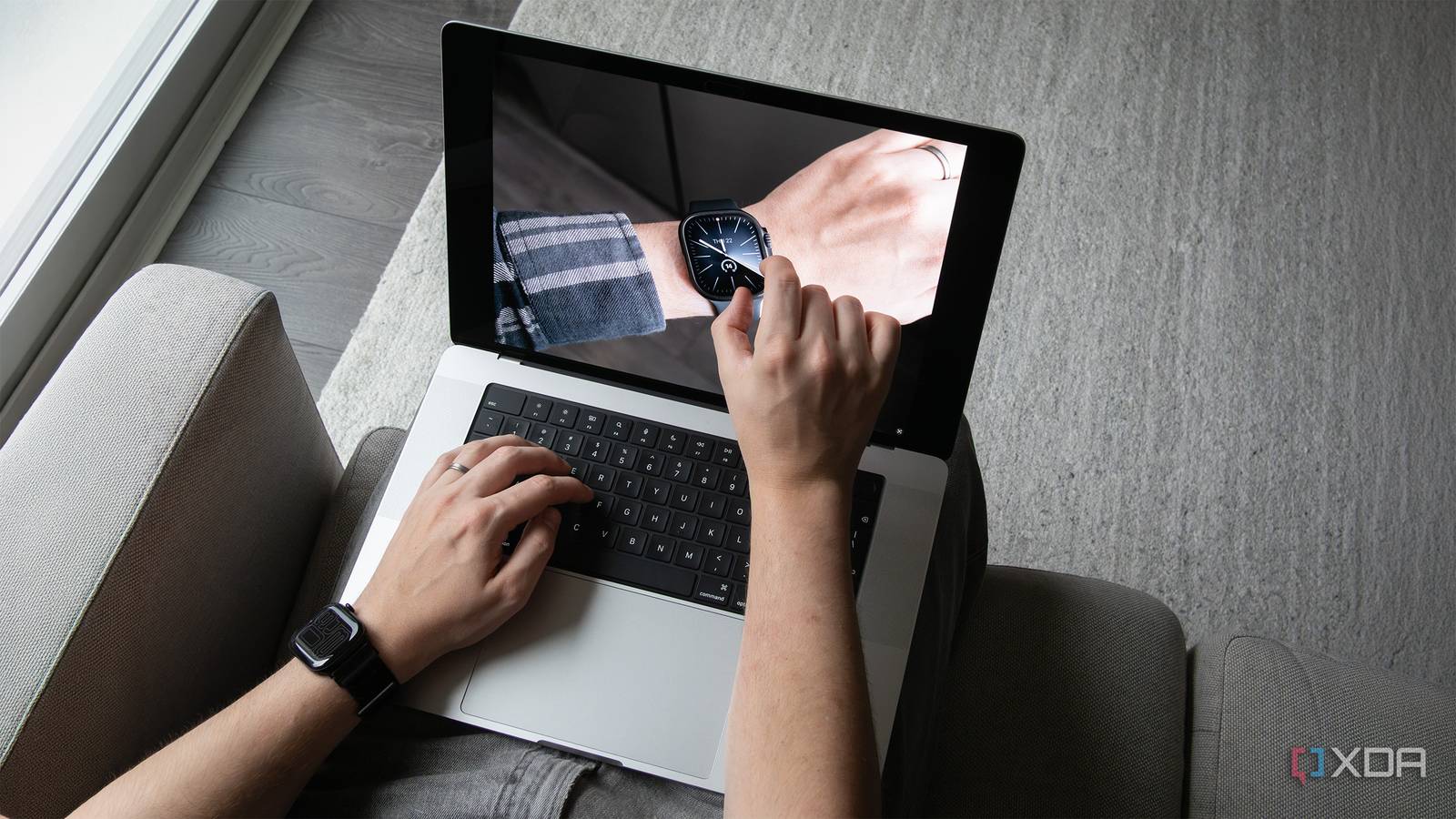
Published Nov 5, 2026, 9:03 AM EST This is the best display I've ever seen in a laptop. For years, various Apple executives have said a touchscreen MacBook doesn't make sense and will never happen. In fact, at one point, Apple founder Steve Jobs even called touchscreen laptops "ergonomically terrible." Fast-forward to 2026, and the somewhat awkwardly named MacBook Pro with ProLED XDR is here. While the laptop was obviously in development long before current Apple CEO John Ternus officially took over from Tim Cook, it feels like a symbolic shift in the company's direction under its new leader. Beyond the new OLED touchscreen, the 14-inch and 16-inch laptops feature subtle design changes compared to the standard MacBook Pro, including minimized bezels, a slimmer profile, and the iPhone's Dynamic Island. Is the new OLED MacBook's touchscreen game-changing, especially given that most Windows laptops have been able to do the same thing since the Windows 8 era more than a decade ago? Not in the slightest. But the screen is very responsive, and there are interesting, very Apple-like ways to interact with it, including the expanding context menu. Still, like Windows 11's touch controls, it's just a touchscreen tied to a desktop operating system, and I haven't felt the need to use it very often. While the MacBook Pro with a ProLED XDR display isn't the revolutionary reinvention of the laptop some are making it out to be, it could be a compelling, ultra-premium option for a very specific type of MacBook user that values having a stunning OLED display and that's always wanted a touchscreen MacBook. About this article: Apple sent XDA the MacBook Pro with ProLED XDR for review. The company had no input on the contents of this article. This review is focused on the 16-inch version of the laptop. MacBook Pro with ProLED XDR 8/10 CPU M5 Pro / M5 Max GPU 16-core / 20-core or 32-core / 40-core Display type Tandem OLED ProLED XDR, 120Hz, 2000 nits peak brightness Display (Size, Resolution) 14.2-inch 3024 × 1986 / 16.3-inch 3472 × 2266 RAM 24GB / 36GB / 48GB / 64GB / 128GB Storage 1TB to 16TB SSD Battery 72.6Wh / 100Wh Ports 3 Thunderbolt 5, HDMI, SDXC, MagSafe 3, 3.5mm headphone jack Operating System macOS Webcam 12-megapixel Center Stage Wi-Fi connectivity Wi-Fi 7 Bluetooth Bluetooth 6.0 Weight 3.04–3.09lb (1.38–1.40kg) / 4.01–4.06 lb (1.82–1.84 kg) Speakers Six speakers with force-cancelling woofers, three studio-quality microphones Pros & Cons Stunning-looking OLED panel Lighter and thinner than the regular MacBook Pro Touchscreen won't be useful for everyone Very expensive Price, specs & availability Apple's OLED MacBook Pro comes in 14.2-inch and 16.3-inch sizes with mostly identical specs across both devices. The laptop's screen is a ProLED XDR Tandem OLED panel with a 3,024 x 1,986 pixel resolution display (14-inch) or a 3,472 x 2,266 pixel resolution screen (16-inch), alongside 120Hz (ProMotion) refresh rate, 2,000 nits of peak brightness, and a 10,000,000:1 contrast ratio. Processor options include the 15-core or 18-core M5 Pro with a 16-core or 20-core GPU, or the M5 Max with an 18-core CPU and a 32-core or 40-core GPU. RAM starts at 24GB and goes up to 128GB depending on the configuration. Storage starts at 1TB and can go up to a 16TB SSD, depending on what chip you opt for. Weight comes in at between 3.04–3.09lb (1.38-1.40kg) for the 14-inch version, compared to 4.01–4.06lb (1.82-1.84kg) for the 16-inch. The 14-inch OLED MacBook Pro is 15mm thick, while the 16-inch is 16mm. The 14-inch has a 72.6Wh battery, while the 16-inch has 100Wh cell. On the port front, the OLED MacBook Pro features 3 Thunderbolt 5 ports, a full-sized HDMI port, an SDXC card reader, MagSafe 3, and a 3.5mm headphone jack. Other key features include Wi-Fi 7, Bluetooth 6, and a 12-megapixel Center Stage camera. It also has revamped internal thermals, six speakers, and three studio-quality microphones. Colors include Space Black and Silver. The particular model 16-inch MacBook Pro configuration Apple sent me to review features the M5 Max chip and 36GB of RAM ($4,800). Pricing starts at $2,900 for the 14-inch M5 Pro, and $3,400 for the 16-inch M5 Pro. MacBook Pro with ProLED XDR CPU M5 Pro / M5 Max GPU 16-core / 20-core or 32-core / 40-core Display type Tandem OLED ProLED XDR, 120Hz, 2000 nits peak brightness Display (Size, Resolution) 14.2-inch 3024 × 1986 / 16.3-inch 3472 × 2266 RAM 24GB / 36GB / 48GB / 64GB / 128GB Storage 1TB to 16TB SSD Battery 72.6Wh / 100Wh Ports 3 Thunderbolt 5, HDMI, SDXC, MagSafe 3, 3.5mm headphone jack Operating System macOS Webcam 12-megapixel Center Stage Wi-Fi connectivity Wi-Fi 7 Bluetooth Bluetooth 6.0 Weight 3.04–3.09lb (1.38–1.40kg) / 4.01–4.06 lb (1.82–1.84 kg) Speakers Six speakers with force-cancelling woofers, three studio-quality microphones An absolutely stunning OLED panel paired with subtle design changes This is the best OLED I've seen in any laptop Let's get this out of the way first: the OLED MacBook Pro is ridiculously expensive. Given that the standard 14-inch M5 Pro MacBook Pro starts at $2,500 and the 14-inch OLED MacBook Pro starts at $2,900, there's a $400 premium for what amounts to minor design changes and an OLED screen. But man, does that OLED look really good. It's punchy, bright, very contrasty, and saturated. Apple's Liquid Retina miniLED display already looked great, but the new OLED version kicks things up several notches. The screen's tandem OLED technology, which stacks multiple light-emitting layers to increase brightness and improve efficiency, really shines through here. In fact, I sometimes find the display almost too bright at 1,000 nits of sustained SDR brightness and 2,000 nits of peak HDR brightness, particularly in dark rooms. Unlike the miniLED MacBook Pro, I've turned down the OLED panel's brightness several times over the past few days (maybe I'm just particularly sensitive to light). The OLED panel also supports P3 and Adobe RGB, plus more than 80 percent coverage of the Rec. 2020 color space for HDR video editing and color grading. To be fair to the Windows space, other laptops offer tandem OLED display technology, including Dell's XPS 13, Lenovo's Yoga Pro 9i (which I actually reviewed), and the Dell Pro 14 Premium. Still, I've found the OLED MacBook Pro's implementation of the technology to be the best I've seen. Then there's the touchscreen. It's been clear for the past few macOS generations that Apple would eventually pull the trigger on a touchscreen MacBook. No company suddenly makes its operating system more rounded with touch-oriented buttons just for fun. Now that a touchscreen MacBook has finally arrived, all I can really say is that.. it's fine. Is it cool to reach out and slide a dial in Adobe's Lightroom with my finger, scrub through a timeline in Premiere, or pinch-zoom into a document? You bet. But I also know that it's something I won't do very often (I also hate covering the great-looking OLED screen with smudges). Optimized apps like Safari include useful features like touch scrolling and pinch-to-zoom, while Photos lets you interact directly with images, among other things. Apple says that more third-party support for touch-optimized apps is coming, including apps like Adobe's Lightroom, Notion, and Canva. There are some cool Apple-like touchscreen concepts here, too, starting with the automatically expanding context menu. As soon as you tap the menu with your finger, macOS Golden Gate increases the spacing between the buttons to make them easier to tap. If you've ever tried to use Windows on a handheld device like the ROG Ally X20, you'll know how painful it is to hit that tiny X button. As minor as the change is, Apple's solution is genuinely novel. While I'll definitely try Lightroom's touch-optimized update whenever it drops, a touchscreen has never felt like a natural way to interact with a laptop — it really is "ergonomically terrible." At the same time, I've also never counted myself among the vocal group that actually wanted a touchscreen MacBook. It's possible other types of users might get more use out of the touchscreen, including developers, who can now test iOS and iPadOS apps directly in Xcode on the OLED MacBook Pro's display. If you're considering the OLED MacBook Pro, I wouldn't buy it just for the touchscreen unless you have a very specific use case in mind. Like with most Windows 11 laptops, it's nice that the option is finally there, but I don't expect many people to use it often. The bigger selling feature is the awesome-looking OLED screen. There are more design changes to the OLED MacBook Pro than I expected The Dynamic Island is a welcome addition Beyond the OLED panel, the first thing I noticed about the new MacBook Pro is the Dynamic Island. Borrowed directly from the iPhone, the oval cutout delivers Live Activities, Spotlight, and Siri AI directly to the top of the screen. It also houses the laptop's 12-megapixel Center Stage camera. In my few days with the OLED MacBook Pro so far, I've come to appreciate that the Dynamic Island shows what's playing on the laptop, whether it's Spotify or YouTube (and it also makes it easy to switch tracks). It's way more useful than the standard MacBook Pro's notch, but it doesn't really do much beyond that right now. Hopefully, more apps add support for it over the next few weeks. I also can't help but be disappointed that Apple didn't finally bring Face ID to the OLED MacBook Pro. It's a perplexing decision, especially given how great Windows Hello's facial recognition has become over the past several years. Other key changes include a lighter and thinner design across the 14-inch and 16-inch MacBook Pro. The 16-inch OLED MacBook Pro with the M5 Max chip I'm using is noticeably lighter than the standard 16-inch M5 Max MacBook Pro, at 4.06lb (1.84kg) versus 4.75lb (2.15kg). In fact, it feels like it weighs almost as much as the M3 Max MacBook Pro I've used almost daily since its launch (it weighs 3.6lb/1.62kg). I'm not about to throw a 16-inch laptop in a backpack and jump on a flight. In that situation, I'd still opt for my trusty M4 MacBook Air or one of the many Windows 11 laptops I've reviewed recently. Still, it's impressive Apple was able to reduce the OLED MacBook Pro's weight this much. While less noticeable, both new OLED MacBooks are also thinner at 0.59-inches (15mm) and 0.63-inches (16mm). The bezels have also been reduced very slightly, with the most notable change being at the bottom, where the corners are more rounded. This gives the display a modern look that aligns more closely with top-tier Windows 11 laptops. Lastly, there's a redesigned six-speaker system that Apple is hyping up quite a bit. To me, it doesn't sound much different from the standard MacBook Pro's already excellent-sounding speakers. The bass is notably deeper, but that's about it. Everything else about the OLED MacBook Pro, whether it's the trackpad, Touch ID, the Magic Keyboard, or the port selection, which includes three Thunderbolt 5 ports, 1 HDMI port, 1 SD card slot, a MagSafe port, and a 3.5mm headphone jack, is identical to the current-generation standard M5 Pro and Max MacBook Pro and the new M6 MacBook Pro. Oh, and I almost forgot — the Apple logo on the back lights up and in a clever mode, matches the screen brightness. This fun design flourish probably never should have left the MacBook line in the first place, so it's cool to see it return. On a side note, this is the first time I've used a 16-inch MacBook Pro for an extended period of time. The laptop is a bit bigger than I expected, but it's still comfortable to use in my lap, which I really didn't expect. Still, it doesn't exactly feel very portable. Its larger display does look great mounted beside my 27-inch LG UltraGear 27GP950-B monitor, though. The M5 Max delivers impressive benchmarks in the OLED MacBook Pro Battery life is a bit better than my experience with the M3 Max MacBook Pro On the performance front, the M5 Max-equipped OLED MacBook Pro Apple sent me to review delivers impressive results. During my time with the laptop so far, I've edited several images in Photoshop and Lightroom at the same time, cut a short video in Premiere, and browsed the internet like a true information superhighway surfer with dozens of Firefox tabs open, all while the laptop is attached to a 4K 120Hz external monitor. So far, I haven't encountered a single instance of lag or a situation where an app froze or crashed, but I'm also not pushing the M5 Max to its absolute limits with something like a resource-intensive local LLM (the M5 Max is admittedly overkill for my purposes). For those that care about benchmarks, you can find several below. In all my tests, the M5 Max with 36GB RAM (18 CPU-core / 32 GPU-core) performed as expected compared to the M3 Max MacBook Pro (14 CPU-core / 30 GPU-core) with 96GB RAM I've used for the past several years, even with the substantial RAM difference between the two laptops: MacBook Pro OLED (M5 Max / 36GB RAM) MacBook Pro (M3 Max / 96GB RAM) MacBook Neo (A18 Pro) Lenovo Yoga Pro 9i (Intel Core Ultra 9 386H) MacBook Air (M4) MacBook Pro (M4) MacBook Pro (M1) Geekbench 6 4,129 / 26,777 3,114 / 19,341 3,032 / 8,281 1,480 / 7,989 3,305 / 14,139 3,652 / 16,509 2,561 / 10,020 3DMark (Steel Nomad Light) 14,475 9,765 1,775 3,218 (Time Spy) / 32,791 (Night Raid) 3,974 5,308 2,025 CrossMark 2,549 2,439 2,069 1,609 1,988 2,142 1,609 Regarding battery life, in my experience, Apple's claims of two- to three-hour improvement seem mostly accurate. On a normal day when I'm spending a lot of time in Firefox, watching a bit of video, and editing photos with Adobe's suite of tools, I typically make it to the end of the day with about 20-25% to spare. If I had to put a number on it, I'd say I got roughly two hours of extra battery life out of the M5 Max MacBook Pro, compared to the M3 Max MacBook Pro I've been using for the past few years. Should you buy the MacBook Pro with ProLED XDR? You should buy the MacBook Pro if: You've been waiting for Apple to release a MacBook with a touchscreen. You really care about having an OLED panel in your laptop. You shouldn't buy the MacBook Pro if: You don't think you'll actually use the touchscreen frequently. You were expecting the OLED MacBook Pro to be a substantial redesign. Unless you really care about having one of the best-looking OLED panels in a laptop, or have a specific use case in mind for the touchscreen — like testing iPhone and iPad apps directly in Xcode — the answer is pretty simple. The extra $400 for an OLED touchscreen, as spectacular as it looks, plus a few other marginal improvements, just isn't worth the steep $2,900 starting price for the 14-inch version. And that price climbs even higher if you opt for the 16-inch OLED MacBook Pro. For most people, I'd recommend buying the regular M5 Pro or M5 Max MacBook Pro instead (or even the new M6 MacBook Pro, unless you really need that extra power). That said, it's difficult not to be impressed by the OLED display Apple has packed into this pricey laptop. It looks exceptional, but I don't think it's necessarily worth the extra cost. MacBook Pro with ProLED XDR 8/10 CPU M5 Pro / M5 Max GPU 16-core / 20-core or 32-core / 40-core Display type Tandem OLED ProLED XDR, 120Hz, 2000 nits peak brightness Display (Size, Resolution) 14.2-inch 3024 × 1986 / 16.3-inch 3472 × 2266 RAM 24GB / 36GB / 48GB / 64GB / 128GB Storage 1TB to 16TB SSD Battery 72.6Wh / 100Wh Ports 3 Thunderbolt 5, HDMI, SDXC, MagSafe 3, 3.5mm headphone jack Operating System macOS Webcam 12-megapixel Center Stage Wi-Fi connectivity Wi-Fi 7 Bluetooth Bluetooth 6.0 Weight 3.04–3.09lb (1.38–1.40kg) / 4.01–4.06 lb (1.82–1.84 kg) Speakers Six speakers with force-cancelling woofers, three studio-quality microphones
The OLED MacBook Pro's display is absolutely stunning, but the touchscreen feels unnecessary
Full Article
Original Source
Read the full article at Xda-developers →KhanList aggregates and links to publicly available news content. We do not host full articles from third-party sources. Always verify important information with original sources.