
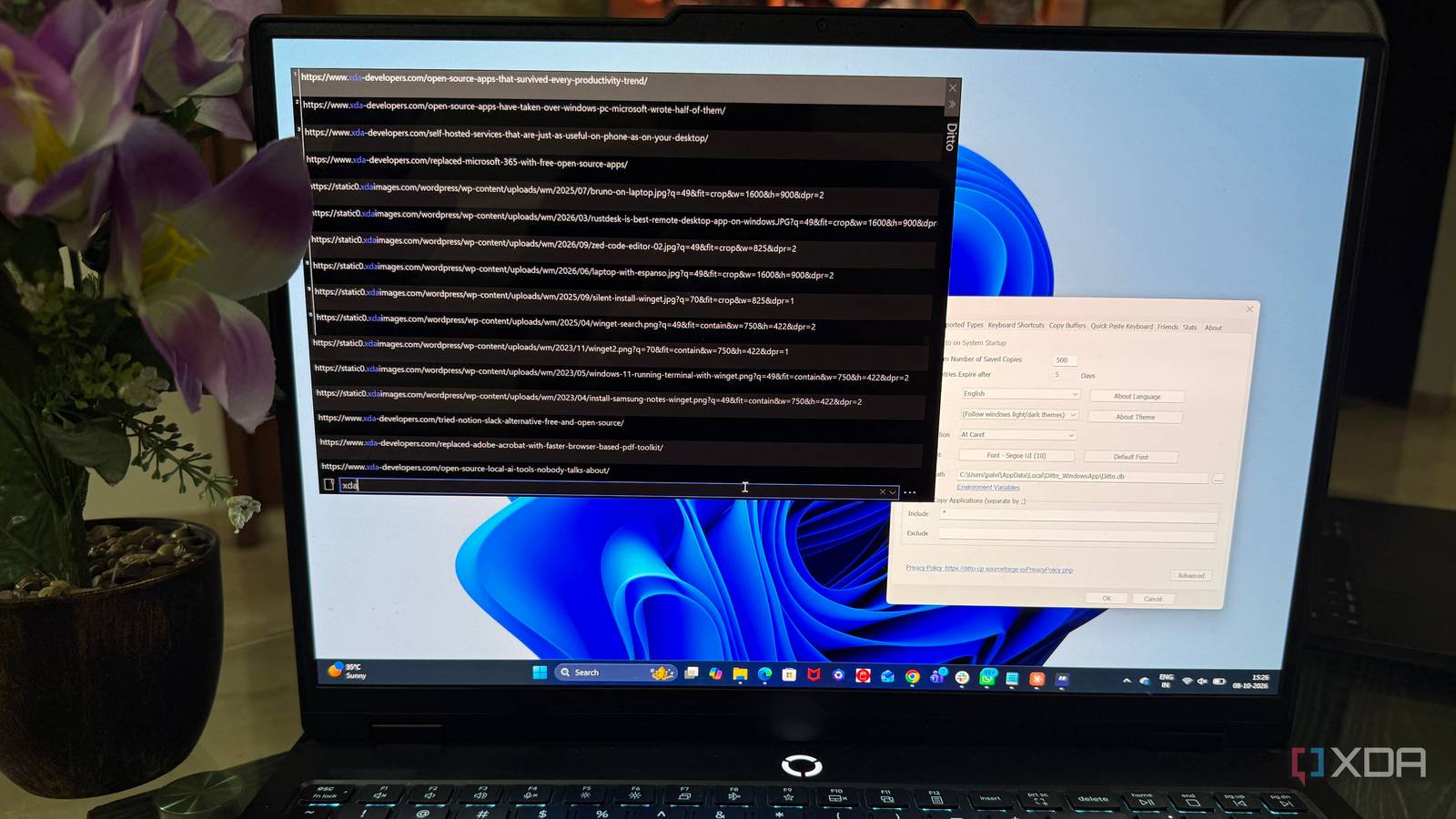
Published Oct 8, 2026, 7:00 PM EDT Beginning his professional journey in the tech industry in 2018, Yash spent over three years as a Software Engineer. After that, he shifted his focus to empowering readers through informative and engaging content on his tech blog – DiGiTAL BiRYANi. He has also published tech articles for MakeTechEasier. He loves to explore new tech gadgets and platforms. When he is not writing, you’ll find him exploring food. He is known as Digital Chef Yash among his readers because of his love for Technology and Food. I’ve installed plenty of productivity apps over the years, and most of them promise to help me work faster, stay organized, or save time. This year, though, the app that made the biggest difference was one I almost overlooked. It isn’t a task manager, note-taking app, or AI assistant. It’s a small Windows utility that sits quietly in the background and solves a problem I didn’t realize was slowing me down. After using it regularly, I started wondering how something this simple had become one of the most useful tools in my workflow. Windows clipboard history wasn’t enough I needed more from my clipboard Windows' built-in clipboard history was useful, but I kept hitting its limits. I could press Win + V and see a few recent items, which was enough for basic tasks. But as my work became more detailed, I noticed how quickly that history became hard to use. As a blogger, I constantly copy snippets, links, headings, quotes, search terms, and bits of text while researching and writing. I often need something I copied several minutes ago, not necessarily the last thing I copied. Windows clipboard history made that harder than it needed to be because I had to scroll through the list and visually look for the right item. I also had a simple problem with how I worked. I rarely copy something just once. I might copy a sentence, switch to another window, copy a URL, grab another piece of text, and then realize I need the first sentence again. At that point, the clipboard started feeling less like a useful history and more like a temporary holding area. I didn't need another complicated productivity system. I just wanted my clipboard to remember more of what I had copied and make those items easier to reuse. That's when I started looking beyond Windows' built-in option. Ditto changed everything My most underrated productivity tool I tried multiple clipboard managers before settling on Ditto, and most of them either felt too complicated or added features I didn’t really need. Ditto was different. It was simple enough to get out of my way, but capable enough to become genuinely useful in my daily workflow. After installing it, I didn’t need much time to figure out how I wanted to use it. I kept working as usual and slowly started relying on it whenever I needed something I had copied earlier. That made a bigger difference than I expected. I started using it while researching articles, moving information between different windows, and collecting small pieces of text that I knew I would need again. Instead of interrupting what I was doing to save something somewhere else, I could leave it in my clipboard history and keep going. That sounds like a tiny improvement, but I noticed the difference almost immediately. I was spending less time recopying things and less time wondering where I had put a piece of text. After trying several options, Ditto was the first clipboard manager that felt like it belonged on my PC rather than another app I had installed just to test. The boring features are my favorites The small things that matter Once I started using it regularly, I began appreciating how much control it gives me over something as simple as copied content. One feature I use often is searching my clipboard history. When I know I copied something earlier but can’t remember exactly when, I don’t have to keep scrolling and guessing. I can search for a word or phrase and quickly find what I need. For my research-heavy work, that is genuinely useful. Keyboard shortcuts are another reason Ditto feels so natural to me. Instead of reaching for the mouse every time I want to access my clipboard, I can open Ditto with a shortcut, move through my history, and select what I need. It sounds minor, but when I’m constantly switching between my browser, editor, and other apps, those few seconds add up. I also like being able to pin items that I use repeatedly. Things like common phrases or text snippets can stay available instead of getting buried among newer copies. None of these features sound exciting on their own. That’s probably why I like them. They solve small problems without trying to turn the clipboard into an entire productivity system. Sometimes, the smallest tools make the biggest difference I used to think productivity apps needed to solve big problems to be worth keeping. Ditto changed that perspective for me. It doesn’t try to organize my entire life or add another system to maintain. It simply makes one everyday part of working on Windows less frustrating. That’s probably why I’m a little embarrassed to call a clipboard manager my productivity app of the year. But after using it regularly, I can’t imagine going back to working without it. Ditto Ditto is a simple clipboard manager for Windows that adds a lot more functionality, including the ability to remember copied files and retain items indefinitely.
The most useful productivity tool I installed this year costs nothing and does one thing perfectly
Full Article
Original Source
Read the full article at Xda-developers →KhanList aggregates and links to publicly available news content. We do not host full articles from third-party sources. Always verify important information with original sources.