
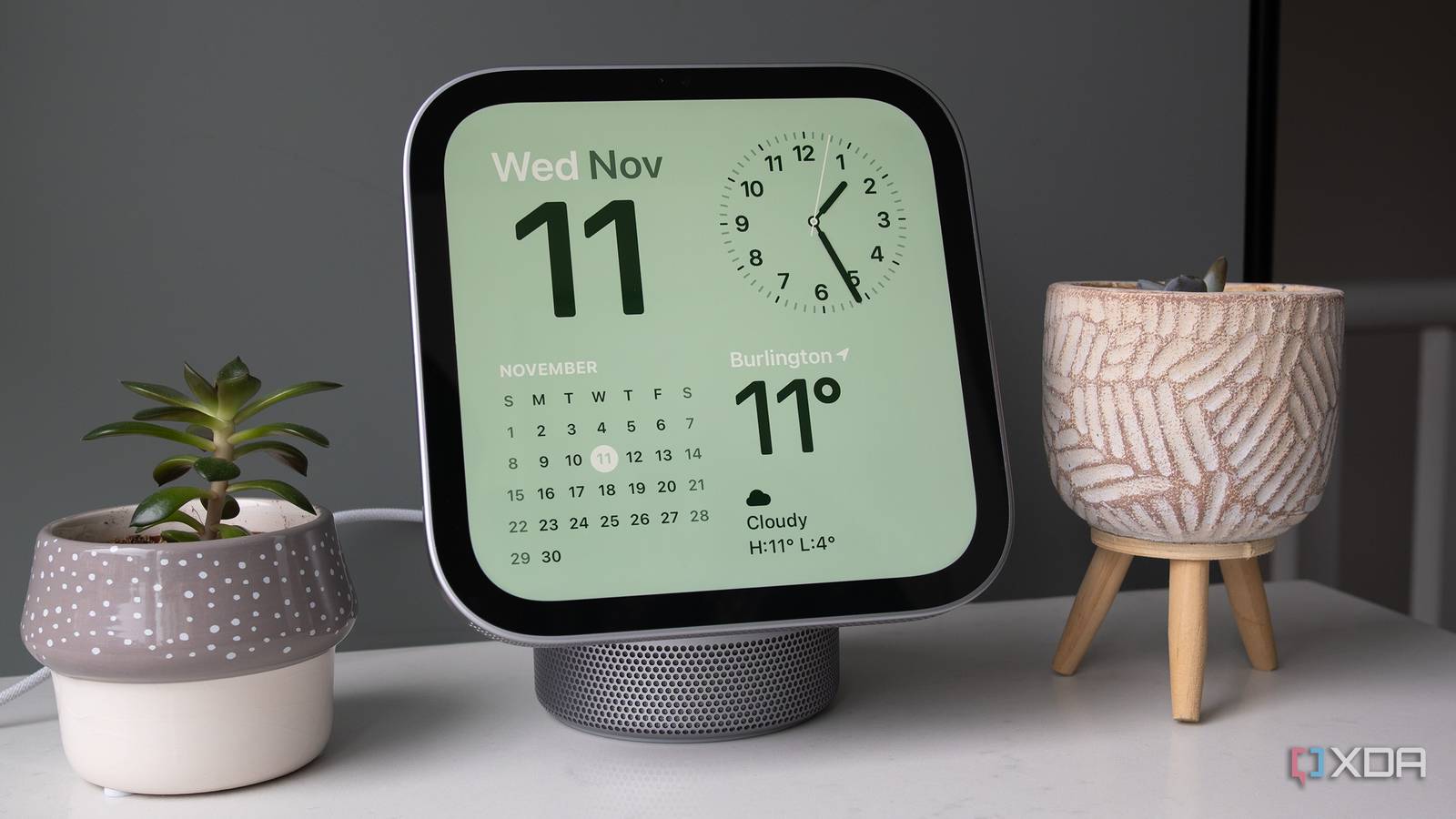
Published Nov 12, 2026, 9:05 AM EST Patrick O'Rourke is XDA's News Editor and Entertainment Segment Lead. Previously, he was Pocket-lint's Editor-in-Chief, the Editor-in-Chief of Canadian tech publication MobileSyrup, and earlier in his career, he worked as the technology editor at the Financial Post and Postmedia. He's based in Toronto. Over the past 15 years, he's written thousands of articles. Patrick has also interviewed dozens of tech industry executives and covered GDC, E3, Gamescom, WWDC, Apple keynotes, Samsung Unpacked events and more. Patrick has a BA in journalism from Toronto Metropolitan University. Sign in to your XDA account At first glance, Apple's HomeView seems like the tech giant's long-overdue take on Amazon's screen-clad Echo Show and Google's Nest Hub — and in many ways, it is. The sleek smart home device features a 7-inch screen and a built-in HomePod-like speaker (unless you opt for the wall-mounted version). At the same time, it aims to take things further with built-in Safari support, multi-user authentication, and access to personal content like Messages and your Calendar, pulled directly from your iPhone. But the first-generation smart home display is also perplexing in other ways. There's no app store, and apps seemingly just appear on its "HomeView Software" operating system for some reason. The HomeView uses the same app framework as CarPlay, so it likely has something to do with that, but there's no way to manage it from your phone. On top of that, third-party app support is nearly non-existent ahead of release, with major apps like Google's suite (including YouTube) and Netflix not yet available on the $300 smart display (hopefully, that changes soon). You really need to be embedded in Apple's device and app ecosystem to take advantage of HomeView's more interesting Siri AI personal content features, limiting the HomeView's audience. It's an Apple device for hardcore Apple users in the truest sense. About this article: Apple sent XDA the HomeView to review. The company had no input on the contents of this article. This review is focused on the tabletop version of the HomeView. HomeView 7/10 Dimensions (exterior) 5.73 × 5.38–6.82 × 3.78–5.13-inches (14.55 × 13.67–17.32 × 9.60–13.03cm) Weight 2.10lb (952g) Colors Silver, Starlight, Rose, Pink, and Space Gray Display 7-inch Liquid Retina IPS LCD 1088 x 1088 pixel resolution and 500 nits Pros & Cons Great looking design Excellent sound quality Very expensive No app store Need to be Apple device and app user Price, Specs & Availability The HomeView features a 7-inch Liquid Retina IPS LCD screen with a 1088 x 1088 pixel resolution and 500 nits of max brightness. The smart home display is powered by Apple's A18 chip (the same chip in the iPhone 16). Other features include four far-field microphones and a 12-megapixel f/2.4 Center Stage camera. The HomeView's speakers consist of two full-range drivers, a down-firing woofer, and two passive radiators. The speakers support Spatial Audio, Dolby Atmos, and AirPlay. Sensors include ambient light, temperature, humidity, and an accelerometer. The smart home display is powered by USB-C (there's no battery power). The tabletop version is 5.73 × 5.38–6.82 × 3.78–5.13-inches (14.55 × 13.67–17.32 × 9.60–13.03cm) and 2.10lb (952g). Colors include Silver, Starlight, Rose Pink, and Space Gray. The wall-mounted HomeView is 5.73 × 5.73 × 0.39-inches (14.55 × 14.55 × 0.99cm) and weighs 0.63lb (286g). This version is only available in Silver and Space Gray. Both HomeView iterations cost $300. The wall-mounted version doesn't feature a dedicated woofer, and the Power Mount USB‑C Wall Connector ($60) and Power Mount AC Wired ($80) are sold separately, even though this version costs the same as the tabletop HomeView (weird, right?). HomeView specs Dimensions (exterior) 5.73 × 5.38–6.82 × 3.78–5.13-inches (14.55 × 13.67–17.32 × 9.60–13.03cm) Weight 2.10lb (952g) Colors Silver, Starlight, Rose, Pink, and Space Gray Display 7-inch Liquid Retina IPS LCD 1088 x 1088 pixel resolution and 500 nits CPU A18 Camera 12-megapixel f/2.4 Center Stage camera Speaker 2 full-range drivers, a down-firing woofer, and 2 passive radiators I'm really into the iMac G4-inspired design The design is one of the best things about the HomeView I'm a big fan of HomeView's overall design. It sort of looks like an iMac G4 brought to the future and then shrunk down to sit on a tabletop or bedside table. There's the cylinder-like base that houses its woofer, followed by the great-looking 7-inch square display that's easy to see even from across the room. The bezels could definitely be smaller, but I haven't found this to be a big issue. The HomeView's overall quality is impressive and on par with the HomePod mini. This means it offers rich bass, balanced vocals, and great-sounding, room-filling audio. The screen can also adjust from a peak brightness of 500 nits down to 0.3 nits, making the HomeView work as a nightstand clock. While I am using the HomeView in a central location on my kitchen counter, I can confirm the screen does get very dark and would likely work fine as a bedside clock. The display pivots more than I expected, making it easy to view from a variety of angles. It also doesn't really show fingerprints thanks to its oleophobic coating, which I've appreciated. The sleek design fits into my kitchen surprisingly well. It's obviously a piece of technology, but Apple's design flair helps it blend in alongside my plants, knife block, and other kitchen appliances. It's worth mentioning that there's no built-in battery, so you can't just pickup the HomeView and move it whereever you want, though its USB-C power cord is pretty long. The operating system is perplexing Why is there no app store? This is where the HomeView starts to get confusing for me. There's no app store for the device. In fact, you can't even uninstall Apple's apps or even third-party apps. Over the past few days, I've seen several different third-party apps seemingly randomly appear on the HomeView display, whether it's Pocket Casts, Instapaper, or even APTV, a weird third-party app I covered a few weeks ago because it lets you watch YouTube through CarPlay. There's no way to long-press apps and remove them like you would on an iPhone or iPad, and there isn't a CarPlay-like iPhone Settings menu to add or remove apps from the HomeView (the only way to do that seems to be uninstalling them from your iPhone entirely). It really doesn't make sense to not have control over what apps show up on a display designed to sit in the center of your home. On top of that, major third-party apps haven't made it to HomeView yet, whether it's Google's entire suite (including YouTube), Netflix, Prime Video, or pretty much any app you can think of. The available Apple apps include what you'd expect. There's Apple's Home app for controlling smart home devices — which, of course, need to support HomeKit — FaceTime, Messages, Music, Alarms, and Safari, along with a few others. Over my time with HomeView so far, I've leaned on Safari pretty heavily to access streaming platforms like Netflix and YouTube, which work great through the browser. That said, it's not very convenient to need to leave windows open or set up bookmarks to easily access the web-based version of various streaming services. I'd much rather have dedicated streaming apps I tap and use instantly. On the plus side, the Apple TV app is here, and the content looks great, whether I'm watching Silo or Foundation in the background while cleaning up my kitchen. On the third-party front, Spotify, Instapaper, and PocketCasts, which are all also available on CarPlay, have shown up on my HomeView home screen. HomeView third-party apps seem to be adapted from their CarPlay counterparts, which makes sense given Apple says the smart home display and the in-car projection platform run on the same framework. In theory, this should make it easy for developers to port their apps from CarPlay to HomeView, but right now, the third-party app options are disappointing and make the pricey HomeView feel very limited. It will be interesting to see how quickly the situation changes after the HomeView is released. One of the HomeView's biggest strengths is personalization Apple's user-identification technology is impressive One of the most impressive things about the HomeView is its ability to instantly recognize who is using it. Each user has a personalized Home Screen they can access by swiping up, revealing a mix of apps and widgets. This includes individual Messages, Calendar, Reminders, FaceTime, and Find My information. To access more sensitive information like Messages or FaceTime, the user's face needs to be recognized. To be clear, the HomeView doesn't have Face ID biometric authentication because it lacks a depth-sensing or TrueDepth camera system. Instead, the device uses facial recognition to give users access to this data, which, in a way, feels uncharacteristic for the privacy-focused company (also, why didn't it just add facial recognition to the OLED MacBook Pro?). Once a user's face is recognized, personal content is then shared in real time from the user's paired iPhone if it's on the same network or was recently on the same network and has recently been unlocked. The way HomeView handles personal content seems very similar to how the Apple TV 4K 4th-gen handles personal context requests that require it to pull information, like a contact who recently texted you about a specific movie. Apple says that the HomeView can identify up to six people. In my case, it's just my partner and me (I don't think my 16-month-old son is interested in using the HomeView yet). It's all pretty cool to see in action. For example, I was playing around with the HomeView when my wife wanted to FaceTime her parents with our son. I stepped away from the screen, and the device instantly recognized her. She then called her parents and talked with them using the HomeView's built-in ultra-wide camera, which also supports Center Stage. The call worked well, though Center Stage gets a bit wonky with multiple people in the frame and sometimes zooms in and out randomly. She then transferred the FaceTime call to her iPhone 15 with a quick tap. The whole experience was very seamless. When I went back to the HomeView, it instantly recognized my face, even at a distance, and switched to my account, giving me access to my home screen and personal Messages (oddly, there's no Siri voice recognition with the HomeView). This also ties into Siri AI, which is contextually aware and can pull information from Messages, Calendar, Reminders, and more. Apple's new Siri is a bit slow to respond to commands, but it works pretty well in most cases. Since I primarily use Apple devices and Google apps like Gmail and Calendar, I can't really use HomeView the way I'd want to right now, especially with Siri AI's context-aware features. Those who live in an all-Apple world will get way more out of HomeView. Hopefully, Google will eventually bring apps like Calendar and Gmail to HomeView. On that note, I'd also like to see third-party AI chatbots make their way to Apple's new smart home display. Should you buy the HomeView? You shouldn't buy the HomeView if: You aren't sold on the idea of a central device for your whole family. You don't primarily use Apple devices and apps. You should buy the HomeView if: Your entire tech world revolves around all things Apple. You don't mind waiting for third-party app support to arrive. While I've used the HomeView quite a bit over the past few days, I can't shake the feeling that it should probably just be an iPad Mini on a stand. Sure, the various Apple Watch-like home screens, which show off information like the weather, sleek-looking clocks, and smart home gadget widgets are great, but these could just as easily run on an iPad Mini sitting on a counter or on a stand. The same goes for apps like Home, Messages, FaceTime, and more. However, there are some interesting personal context features, and I've been impressed at how quickly it identifies users. For the HomeView to work for you, you really need to be sold on the idea of having access to a central shared device in an open area of your home, sort of like the modern version of a landline telephone or the kitchen desktop computer. On top of that, to get the most out of the smart display, you need to be a hardcore Apple user who uses Apple devices, the tech giant's apps, and owns sveral HomeKit smart home devices. The HomeView also feels very incomplete in key ways. Third-party app support is very sparse right now, and while that might change, I don't review devices entirely on their potential. Given the limited audience, it's possible major app developers like Google could decide the HomeView just isn't worth the effort. With all of this in mind, the HomeView is really just for Apple diehards at launch, which is a shame because it features some genuinely cool hardware. HomeView 7/10 Dimensions (exterior) 5.73 × 5.38–6.82 × 3.78–5.13-inches (14.55 × 13.67–17.32 × 9.60–13.03cm) Weight 2.10lb (952g) Colors Silver, Starlight, Rose, Pink, and Space Gray Display 7-inch Liquid Retina IPS LCD 1088 x 1088 pixel resolution and 500 nits
The HomeView feels like a giant Apple Watch for your smart home, but it comes with some surprising limitations
Full Article
Original Source
Read the full article at Xda-developers →KhanList aggregates and links to publicly available news content. We do not host full articles from third-party sources. Always verify important information with original sources.