
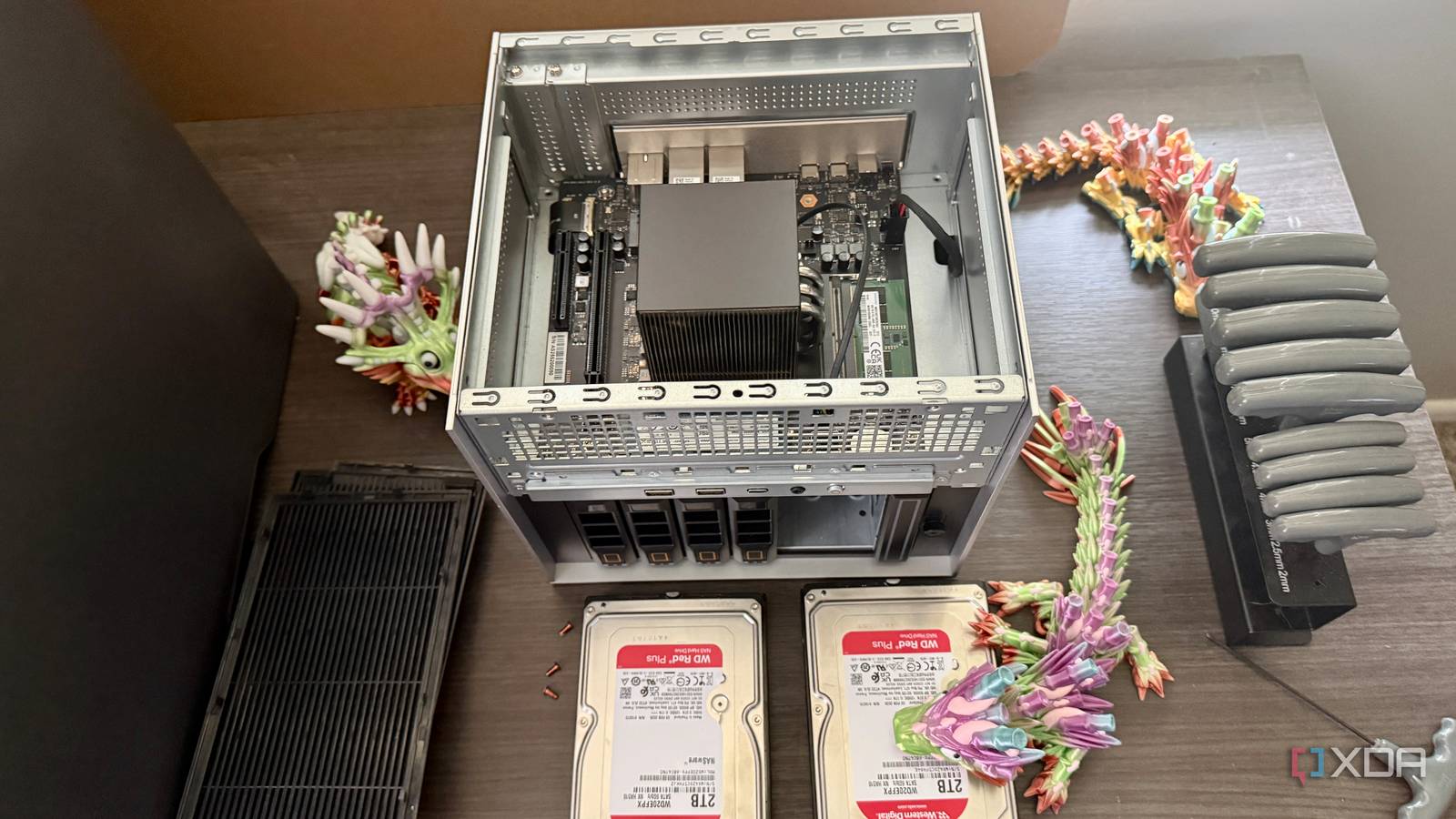
Published Aug 6, 2026, 4:00 PM EDT Jeff's been involved in the IT industry since before the Internet and spent more than 20 years working in technical support, system administration, network administration, and consulting roles. He holds an undergraduate degree in English, a Master's degree in English with a focus on professional writing and editing, and another Master's degree in Computing & Information Systems. After teaching university English and computer science for a few years, Jeff launched his writing career. He's written for Macworld, Tom's Hardware, groovyPost, The Mac Observer, and more before beginning here at XDA. A six-bay NAS is easy to understand at a glance. You load it with drives, build a storage pool, install the services you need, and start throwing data at it. That’s a big part of the ZimaCube 2’s appeal, but the drive bays aren’t the part I keep coming back to. The two PCIe slots inside are much more interesting because they leave room for the ZimaCube 2 to become something quite different from the NAS you bought on day one. The PCIe slots change what this NAS can become It doesn’t have to remain only a storage server Most NAS upgrades are predictable. You add RAM, swap in larger hard drives, or populate an empty M.2 slot and move on. Useful, sure, but none of that really changes what the machine is. PCIe does, or at least it gives you the option to take it somewhere else later. The standard ZimaCube 2 has two internal expansion slots, with PCIe 4.0 x4 in a physical x16 slot and PCIe 3.0 x2 in a physical x8 slot. That physical-versus-electrical distinction matters because a full-length connector can make a slot look more capable than it is. Even so, there’s still room for network adapters, storage controllers, and certain GPUs. That’s where the ZimaCube 2 stops feeling quite so much like a finished appliance. The ZimaCube 2’s PCIe connectors are physically larger than their electrical connections. The primary x16-length slot runs at PCIe 4.0 x4, while the secondary x8-length slot runs at PCIe 3.0 x2, so check a card’s bandwidth requirements before buying it. That matters to me because my home lab doesn’t stay organized around the original plan for very long. A machine bought for one job tends to pick up another once I notice idle CPU, unused storage, or an empty slot. Something that starts as network storage can wind up handling media, virtual machines, or a service I hadn’t thought about six months earlier. I’d rather have that flexibility built in than discover later that the hardware is a dead end. Network upgrades are an obvious place to start Faster Ethernet can completely change the machine’s useful role The standard ZimaCube 2 comes with dual 2.5GbE ports, and I don’t have a problem with that. For many home networks, 2.5GbE is already more bandwidth than the rest of the setup can use. It’s enough for backups, media streaming, and plenty of ordinary file transfers. That being said, I wouldn’t assume that’s where I’d want the machine to stay forever. A PCIe network adapter gives me somewhere to go if 2.5GbE eventually becomes the limiting factor. A 10GbE card is the obvious example, especially if the ZimaCube 2 is regularly moving large files or serving storage to several systems. I’d much rather add that later than pay more up front to predict what my network will look like years from now. I’m usually wrong about at least one part of that prediction anyway. And a network card doesn’t have to be about speed alone. A multi-port adapter could give the ZimaCube 2 a role in a more involved network setup, assuming the software side supports what you’re trying to do. I may never need that. The important bit is that the hardware leaves the option open instead of closing it for me. A GPU opens up even more possibilities Expansion makes local workloads much more interesting over time The GPU angle is probably what caught my attention first. Local AI has made accelerator hardware much more relevant to home servers than it used to be, while media servers have benefited from hardware acceleration for years. The ZimaCube 2 obviously isn’t a desktop tower with room for whatever graphics card happens to be sitting on a shelf. Still, an actual PCIe slot gives you options that many prebuilt NAS boxes don’t. There are limits, and they’re not minor. Low-profile, efficient cards are the sensible targets, and there’s no auxiliary PCIe power connector inside for a power-hungry GPU. That cuts the list down fast, which is probably for the best. The slot is useful, but it isn’t permission to treat the chassis like a workstation case. Even with those restrictions, I like what it does for the long-term plan. I don’t need to decide right now whether the machine should eventually handle local inference, more media acceleration, or something else entirely. Maybe I never install a GPU. That doesn’t make the slot pointless, because the useful part is being able to make that decision later. There are still some frustrating limits to expansion These slots don’t turn it into a desktop workstation The large connectors can create the wrong first impression if you only glance at the board. The primary slot is physically x16 but electrically delivers four PCIe 4.0 lanes. The second slot is physically x8 and runs at PCIe 3.0 x2. If you approach the ZimaCube 2 expecting the expansion bandwidth of a normal desktop motherboard, you’ll hit that limit pretty quickly. Space and power further narrow the choices. Low-profile cards are the practical option, and the lack of auxiliary GPU power eliminates many options before dimensions even become a problem. Thermals matter, too, because you’re still adding expansion hardware to a compact server chassis already packed with storage. A card that fits the connector is only step one. And then there’s the obvious question: how many NAS buyers are actually going to use any of this? Someone who wants a dependable box for backups, photos, and a Jellyfin library could run the ZimaCube 2 for years without touching either PCIe slot. Six SATA bays and four M.2 slots already give you a lot to work with. For that buyer, the expansion hardware may sit empty forever. Those limitations don’t reduce the value of having options Practical server upgrades rarely need maximum PCIe bandwidth anyway I don’t think the slots need desktop-class bandwidth to justify their existence. A home server usually isn’t trying to feed a flagship gaming GPU at full tilt. Network adapters, storage controllers, and modest accelerator cards have much more reasonable needs. Four lanes here and two there can look disappointing on a spec sheet, but that isn’t automatically a problem in practice. A 10GbE adapter is a good example. I’m not buying one to admire a giant theoretical PCIe throughput number. I need enough bandwidth for the network interface to do its job without becoming the bottleneck. A lot of server expansion works the same way: enough bandwidth matters, and anything beyond that is mostly unused headroom. The bigger benefit is that the empty slots spare me the need to predict everything up front. Maybe 2.5GbE stays perfectly fine. Maybe local AI keeps getting more useful, and I decide a small accelerator belongs in the box. Maybe neither happens, but I still prefer having the choice rather than discovering later that there was never one to begin with. The ZimaCube 2 is really an expandable server That’s what changes how I look at the ZimaCube 2. The six drive bays are useful, the M.2 storage options are generous, and the Core i3 gives the standard model enough CPU power to do more than serve files. None of that is especially hard to appreciate from a product page. The PCIe slots are different because their value depends on what I decide to do with the machine later. I don’t need to know today what job this machine will be doing three years from now. If all I wanted was somewhere to put files, there are plenty of NAS boxes that would do the job with fewer decisions. The ZimaCube 2 gets more interesting if I want storage now but don’t yet know what else I’ll ask of the hardware two or three years from now. Faster networking, acceleration, extra storage hardware, or something I haven’t needed yet can all stay on the table. That’s why the most important expansion bays in the ZimaCube 2, at least for me, aren’t the six on the front. ZimaCube 2 $749 $849 Save $100 Brand Zima CPU Intel Core i3-1215U (6 cores, 8 threads, up to 4.4GHz) Memory 8GB DDR5-4800 SODIMM, expandable to 64GB Operating System ZimaOS Pro Ports 2x 2.5GbE, 4x USB-A 3.0, 1x USB-C 3.0, 2x Thunderbolt 4 USB-C, HDMI 2.0, DisplayPort 1.4, 3.5mm audio jack The ZimaCube 2 is a six-bay NAS built to do more than basic file storage. It combines traditional SATA drive bays with multiple M.2 slots and two internal PCIe expansion slots. That gives it room for upgrades such as faster networking, storage controllers, or compatible accelerator cards. It’s a good fit for users who want a NAS today but also want the flexibility to turn it into a more capable home server later. Display HDMI 2.0 and DisplayPort 1.4 video output GPU Integrated Intel UHD Graphics Dimensions 240 x 221 x 220mm Operating Systems ZimaOS; also supports Linux-based/server operating systems including TrueNAS, Unraid, Proxmox, OpenMediaVault, and others External Storage 6x 3.5/2.5-inch SATA bays, 4x M.2 NVMe slots in the 7th Bay, plus USB and Thunderbolt 4 storage support
The best thing about the ZimaCube 2 isn’t the drive bays: It’s the PCIe slots
Full Article
Original Source
Read the full article at Xda-developers →KhanList aggregates and links to publicly available news content. We do not host full articles from third-party sources. Always verify important information with original sources.