
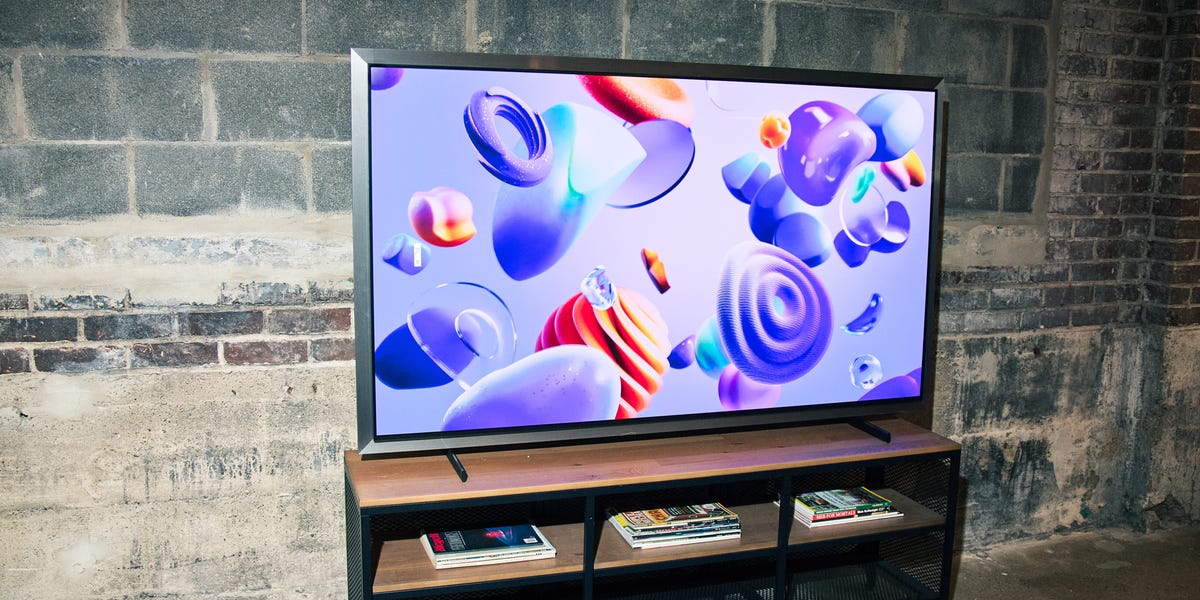
12 min readSamsung is such a dominant force across so many industries that chances are you’re reading this on—or at least near—one of its devices. From smartphones to laptops to large appliances, the brand has its fingerprints on countless products, but Samsung’s televisions are its crown jewel, and today the lineup is deeper than ever.The Best Samsung TVsBest Overall: Samsung S95H QD-OLED TVBest Value: Samsung S95F QD-OLED TVBest Budget: Samsung M70H Mini LED TVBest Design: Samsung The Frame QLED TVBest for Gaming: Samsung QN90F Mini LED TVBest for Movies: Samsung S90H OLED TVSamsung’s new flagship in 2026 is no longer an OLED but Micro RGB, a backlight technology that uses red, green, and blue LEDs to produce a wider, more lifelike range of color than any OLED can manage. Below it sits the QD-OLED S95 series (now the S95H, with last year’s S95F still an excellent value), the Neo QLED and Mini LED families, and The Frame, which doubles as wall art and now comes in a step-up Frame Pro version. Prices climb with size and technology, but there’s something here for every type of user and budget.We’ve picked the best Samsung TVs for different needs, from a bright OLED for movie nights to a gaming-first Neo QLED, and highlighted what to consider before you buy. If you’re cross-shopping brands, it’s worth checking our guides to the best TVs, the best LG TVs, and the best soundbars to pair with your new set.ProsExceptionally bright for an OLEDGreat gaming featuresSleek, furniture-grade designConsNo Dolby Vision supportKey SpecsPanel TypeQD-OLEDSizes55, 65, 77, and 83 in.Resolution4K (3,840 x 2,160)Refresh Rate165HzConnectivity4x HDMI 2.1, eARC, Wi-Fi 6E, BluetoothSamsung resisted OLED for years, but the S95 series is now one of the best picture-quality lines you can buy, and the 2026 S95H is the best yet. It adds a sleeker design, more futureproof connectivity, and a brighter screen than last year’s S95F. In our testing, it delivered stunning visuals across World Cup matches and 4K HDR streaming and gaming, with rich color, sharp clarity, and zero stutter.Brightness has always been OLED’s weak spot, and it’s the S95H’s biggest strength. It has a peak output of 3,000 nits, and paired with Samsung’s excellent anti-glare coating, you can watch it in nearly any lighting. An AI processor upscales lower-resolution content to 4K with impressive detail.Gamers get up to 165Hz with VRR, both FreeSync and G-Sync, and a Gaming Hub for cloud play. Tizen OS is easy to use with seven years of updates, and the SolarCell remote never needs batteries. The one miss is no Dolby Vision, though HDR10+ Advanced is excellent.ProsExcellent OLED brightnessFour HDMI 2.1 ports with up to 165 HzConsNo Dolby Vision supportKey SpecsPanel TypeQD-OLEDSizes55, 65, 77, and 83 in.Resolution4K (3,840 x 2,160)Refresh Rate120Hz (up to 165Hz)Connectivity4x HDMI 2.1, eARC, Wi-Fi 6E, BluetoothBefore the S95H arrived, the S95F was Samsung’s flagship OLED, and now that it’s discounted as last year’s model, it’s the best value in the lineup. It shares the same QD-OLED technology as our top pick, providing perfect blacks, a wide quantum-dot color range, and roughly 30 percent more brightness than the older S95D. Coupled with Samsung’s second-gen glare-free matte coating, you can watch it in a sunlit room.For gaming, it matches the S95H with four HDMI 2.1 ports, a 165Hz refresh rate, and FreeSync Premium Pro for tear-free play. The NQ4 AI Gen3 processor handles upscaling, and Object Tracking Sound+ add spatial audio from the panel itself. Like every Samsung OLED, it lacks Dolby Vision, but the HDR10+ it supports still looks fantastic.The newer S95H adds a faster processor, expanded AI features, and a slightly bright screen, but the gains are incremental, and it costs considerably more. If you want nearly the flagship experience for meaningfully less money, the S95F is a solid value.ProsLooks like framed art with a matte, glare-free displayOne Connect box routes everything through a single cableKey SpecsPanel TypeQLEDSizes32, 43, 50, 55, and 65 in.Resolution4K (3,840 x 2,160)Refresh Rate120HzConnectivityOne Connect box (HDMI, USB, Ethernet), Wi-Fi, BluetoothThe Frame TV is the model for people who don’t want a black rectangle on the wall. Its matte, virtually glare-free display gives artwork a print-like finish that looks like a real canvas, and in Art Mode it cycles through Samsung’s Art Store or your own photos, with snap-on customizable bezels completing the gallery look. If you’ve never seen the Frame in person, it does a very convincing job of looking like a picture on your wall, blending in seamlessly with your decor.The TV connects to a separate box you can hide in a media console, so the only thing running to the screen is a single cable. You can then plug in a streaming box or gaming console, so there’s no tangle of wires hanging from the TV. As a TV, the Frame delivers a bright QLED 4K picture with Pantone-validated color and VRR gaming up to 120Hz. It doesn’t offer local dimming, so shadows may look washed out in dark scenes; however, Samsung offers the step-up Frame Pro, which adds a Neo QLED Mini LED panel with local dimming.ProsMini LED backlight is rare on a budget TVVibrant color and strong contrast for the moneyConsThe 120Hz mode softens the imageKey SpecsPanel TypeMini LEDSizes43, 50, 55, 65, 75, and 85 in.Resolution4K (3,840 x 2,160)Refresh Rate60Hz (120Hz mode)Connectivity4x HDMI 2.1, eARC, Wi-Fi 6E, BluetoothThe Samsung M70H is the budget pick to beat because it brings a Mini LED backlight to the entry tier. That means brighter highlights, deeper blacks, and better contrast than you’d expect from a TV at this price range. Samsung’s Pure Spectrum Color adds vivid, lifelike reds and greens, and it delivers a crisp picture for movies and gaming. It’s a great pick for a bedroom, guest room, or any second screen where you casually watch TV without spending flagship money.It’s capable of running games and sports at a smoother 120Hz, though it hits that rate by temporarily lowering resolution rather than using a true 120Hz screen. Meanwhile, its local dimming is handled by software, so contrast isn’t as precise as it is on pricier Mini LED sets. It comes in everything from a 43-inch bedroom size up to 85 inches, giving you plenty of flexibility to fit your space.ProsFour HDMI 2.1 ports with up to 165HzVery low input lagBright, glare-free screen for any lightingConsSo-so built-in speakersNo Dolby Vision supportKey SpecsPanel TypeMini LEDSizes43, 50, 55, 65, 75, 85, 98, and 115 in.Resolution4K (3,840 x 2,160)Refresh Rate120Hz native (up to 165Hz)Connectivity4x HDMI 2.1, eARC, 2x USB, Bluetooth, Wi-FiIf OLED is out of your price range, the QN90F is an excellent alternative for gaming. It pairs a Mini LED backlight with precise local dimming for deep blacks, while a matte, glare-free coating—the same on Samsung’s flagship OLED—makes it a perfect option for gaming in a bright room.It has four HDMI 2.1 ports, a refresh rate up to 165Hz, and VRR with both FreeSync Premium Pro and G-Sync compatibility. Its fast input lag means controls feel instant, and Samsung’s Gaming hub adds cloud services like Xbox Game Pass for console-free play. As we’ve mentioned for other premium Samsung models, there is no Dolby Vision, and the built-in 4.2.2-channel speakers are a bit lackluster, so you’ll want a soundbar for a truly immersive gaming experience.ProsPerfect blacks and infinite contrastVery bright for an OLEDAccurate Filmmaker Mode out of the boxConsMatte coating can make blacks look slightly washed out in bright roomsKey SpecsPanel TypeQD-OLED / WOLED (varies by size)Sizes42, 48, 55, 65, 77, and 83 in.Resolution4K (3,840 x 2,160)Refresh Rate165HzConnectivity4x HDMI 2.1, eARC, Wi-Fi, Bluetooth, EthernetFor a home theater setup, OLED is the technology to beat, and the S90H is a great pick for immersive movie nights. Every pixel makes its own light and can switch off completely, so blacks looks truly black instead of dark gray. That gives you the deep, infinite contrast, so shadow detail stays intact and bright highlights don’t bleed into other areas of the picture. Basically, it produces an image just as the filmmaker intended.The S90H can hit an eye-watering 1,700 nits at its peak, so HDR movies keep their dynamics, rather than looking bland. Samsung’s Filmmaker Mode nails color accuracy right out of the box, so you get a faithful, cinematic picture without spending hours calibrating the image. And the glare-free matte screen combats reflections, so you can watch movies in a brightly lit room.In addition to the lack of Dolby Vision, user reviews say the matte coating can slightly soften the image and make blacks a little less impactful in a room with a lot of ambient light.What to ConsiderKnow your display tech.You’ll come across a few different display technologies when shopping for Samsung TVs. These dictate certain elements of your viewing experience, such as brightness and picture quality.LED/QLED: At the more budget-friendly end of the spectrum are traditional LCD TVs, which use standard LED backlighting, which Samsung sells under its Crystal UHD label. More common now are QLED televisions, which add a layer of tiny particles called quantum dots that emit their own precise colors, producing a much broader and more vivid range than a basic LED panel.Neo QLED (Mini-LED): Neo QLED is Samsung’s premium LED technology, which uses thousands of tiny LED backlights (hence the Mini-LED name) combined with quantum dots for enhanced color. The smaller, more plentiful LEDs allow for more precise local dimming zones. This results in deeper blacks and better contrast than standard QLED. While these TVs are more expensive than regular QLED models, they represent a compelling upgrade because they perform well in both bright and dark rooms.OLED: OLED TVs use self-lighting pixels that turn completely on or off, one by one, to deliver true blacks and effectively infinite contrast. Nothing creates a more immersive picture in a dark room. OLEDs were long knocked for being dimmer than QLED and tough to watch in bright light, but Samsung’s newer QD-OLED panels have largely closed that gap. The current high-end sets get far brighter than OLEDs of a few years ago, and many now add a glare-free coating that helps cut down on reflections in a sunny room.Micro RGB: Micro RGB sits at the very top of Samsung’s lineup. It’s a backlight technology that uses tiny individual red, green, and blue LEDs to produce a wider, more lifelike range of color than any OLED can manage, paired with the high brightness of Samsung’s best LED sets. The result is bold, accurate color that holds up in any lighting.There are more screen sizes options than ever before.Samsung TVs come in a wide range of sizes. The affordable M70H is available from 43 all the way up to 85 inches, while the premium S95H runs from 55 to 83 inches. If you want to go really big, the QN90F goes up to a massive 115-inch display. As you might expect, prices rise steeply with each jump in size, especially in the higher-end models, so keep that in mind when shopping around.That said, the size you choose should ultimately be determined by your space. First, consider the placement. You’ll want to position your TV where it won’t catch too much glare from windows or bright lights. Then, think about viewing distance. This distance calculator can help you determine the optimal size and viewing distance. For a 55-inch 4K TV, for example, you’ll want to be about 7.5 feet from the screen so it fills about 30 degrees of your horizontal field of view.The new baseline resolution is 4K.At this point, 4K (3,840 x 2,160) is the standard resolution for new TVs—four times the pixel count of traditional 1080p full HD displays. TVs with a 4K resolution deliver sharp and detailed images, making it the ideal way to watch movies and play games. While 8K resolution exists, there is virtually no native content to take advantage of all those pixels, and there likely won’t be for a long time.Samsung still sells a handful of 1080p TVs, but they’re typically limited to smaller screen sizes. For everything else, we recommend going with 4K, which offers the best balance of picture quality, content availability, and price.High dynamic range, or HDR, can improve picture quality even further by displaying a wider range of brightness levels and colors. To enjoy HDR content, you’ll need both an HDR-capable TV and HDR-enabled content, which you can find on streaming services like Disney+, Amazon Prime Video, and Netflix. Many, but not all, Samsung televisions support an enhanced HDR format called HDR10+, so if picture quality is your top priority, you should consider a model with this technology.Samsung TVs notably don’t support Dolby Vision, which is generally considered the best HDR format. Instead, Samsung has invested in HDR10+, which offers similar performance but has less widespread adoption across the entertainment industry. This means Samsung TV owners might miss out on Dolby Vision content from streaming services and movies, having to rely on the HDR10 base format instead of the enhanced Dolby Vision version.Immersive audio may require a soundbar.TVs are thinner than ever. As a result, the built-in speakers of even the most premium TVs often fall short in delivering an audio experience that’s as immersive as the picture quality demands.Most TVs offer a basic 2.0 channel stereo setup (left and right speakers), though more premium models include virtual surround sound. Samsung’s flagship S95H uses a 4.2.2 configuration, which is four regular speakers, two subwoofers, and two upward-firing speakers for a more theater-like effect. Samsung also offers Q-Symphony, which lets the TV’s own speakers play in sync with a compatible Samsung soundbar rather than switching off, for fuller sound.Advanced features like dialogue enhancement can make speech clearer, while different sound modes optimize audio for movies, sports, or music. However, if you care about audio quality, a soundbar or home theater setup is the best way to get the most out of a newer television. Even a basic soundbar will significantly improve your audio experience.The number of ports matters.Most modern TVs come with multiple HDMI ports (usually three to four), which you’ll need in order to connect devices like gaming consoles, streaming boxes, and soundbars. Look for TVs with HDMI 2.1 if you want to take full advantage of gaming features like 4K resolution at 120 Hertz (Hz) and variable refresh rate (VRR), which ensures a smooth gaming experience.If you’re going to use a soundbar, the TV you choose needs an HDMI Enhanced Audio Return (eARC), which allows for high-quality audio pass from your TV to your sound system. This feature lets you control your soundbar’s volume with your TV remote, and it supports advanced audio formats like Dolby Atmos. Even older, more budget-friendly TVs have eARC, so you should be covered with most options.Additionally, TVs typically include two or three USB ports for powering streaming sticks or displaying media from external flash drives. Built-in Bluetooth and Wi-Fi features have also become standard features, so you can connect wireless headphones or speakers and access streaming services without additional devices.How We SelectedOur editors have spent over a decade writing about and testing the best TVs, from budget-friendly models to premium OLED displays. When curating this list, I evaluated Samsung’s current lineup based on size, resolution, features, and price, while also considering real-world performance through my own experience and extensive research.I selected TVs that excel in specific scenarios, whether it’s a high refresh rate for gaming, perfect blacks for movie night, or a TV that blends into a room. Every 4K pick features at least one HDMI 2.1 port, so it can handle the latest gaming consoles and streaming devices.Best Samsung TVs FAQsWhat’s the perfect TV size? Finding the perfect TV size depends on the size of your room and how far you’re sitting from the screen. A good rule of thumb is that your viewing distance should be about 1.5 to 2.5 times the TV’s diagonal measurement.For a 50-inch TV, this means sitting between 75 and 125 inches away. This range offers a comfortable and engaging viewing experience. Ultimately, it’s about balancing comfort, space, and personal preference to find your ideal TV size.How long should my TV last?Your TV can be a dazzling centerpiece in your home for about seven to 10 years, provided you treat it right. The brand and type of TV, whether it’s LED, LCD, or OLED, play a big role in its lifespan.Regular use is fine, but remember, marathon sessions can take a toll. To keep it shining bright for years, maintain moderate settings and ensure your TV is well-ventilated. As we all know, technology moves fast so the allure of newer models with advanced features might catch your eye long before your current set dims.What about TVs with voice assist functions?These offer a streamlined and interactive viewing experience. Featuring compatibility with popular voice assistants such as Google Assistant, Amazon Alexa, or Siri, these smart TVs allow you to operate them through simple voice commands.You can switch channels, modify the volume, search for shows, or even manage other smart devices in your home without needing a remote. This functionality is especially beneficial for individuals with mobility challenges or when their hands are busy.Bezel-less or not?Choosing a bezel-less TV comes down to aesthetics and your desired viewing experience. Bezel-less designs offer a sleek, modern look, making the screen appear larger and more immersive. This edge-to-edge display enhances the viewing experience, especially for cinematic content, as it minimizes visual boundaries.However, TVs with thin bezels can be more fragile and may require careful handling. While the visual appeal of a bezel-less TV is undeniable, consider the practical aspects like placement, handling, and your room’s aesthetics.What is burn-in, and how can I avoid it? Burn-in is a permanent display issue where remnants of static images linger on the screen, a common concern with OLED TVs. It occurs when the same image, like a channel logo or a game’s HUD, is displayed for long periods, causing uneven wear of the screen’s organic pixels.To avoid it, vary the content you watch and use features like pixel shifting or screensavers, which move static images slightly to prevent prolonged exposure. Also, reduce brightness and contrast settings as high levels accelerate burn-in. Most modern TVs have built-in settings to minimize this risk, ensuring a longer life for your screen.Brandon Russell is a freelance writer covering gear and technology. He started his journey as a news writer at a small newspaper and later began reviewing smartphones, movies, and video games. In his free time, he enjoys the slower, more intentional experience of using a 35mm film camera and making short videos about movies he grew up watching.
The Best Samsung TVs Blend Standout Design With Elite Picture
Full Article
Original Source
Read the full article at Popularmechanics →KhanList aggregates and links to publicly available news content. We do not host full articles from third-party sources. Always verify important information with original sources.