
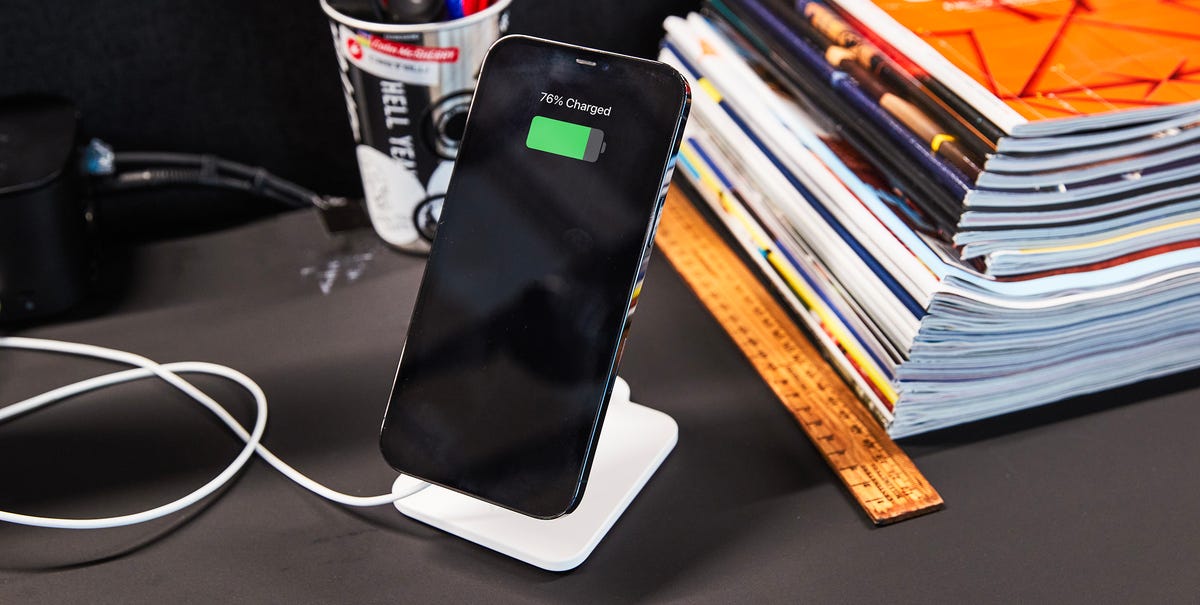
8 min readYour iPhone goes almost everywhere you do—it’s your camera, wallet, streaming device, and so much more. The right accessories are what help turn it from a great phone into a setup that fits your life. And in 2026, there are more great accessories than ever, giving you endless possibilities to charge faster, mount it anywhere, and protect it from damage.Best Overall: AirPods 5 with Wireless Charging CaseBest Wall Charger: Apple 40W Dynamic Power Adapter with 60W MaxBest Charging Cable: Anker Nano USB-C to USB-C Cable (240W)Best Item Tracker: Apple AirTag (2nd Generation)Best Portable Power Bank: Anker Nano Power Bank (10,000mAh, 45W)Every current iPhone, from the budget iPhone 17e up to the new iPhone 18 Pro Max and foldable iPhone Duo, now charges over USB-C, so a single cable can power your phone, iPad, and MacBook Neo. MagSafe and the Qi2 standard have taken over too, which means battery packs, car mounts, and desk stands snap right onto the back of an iPhone and charge without plugging anything in.The catch is the selection of accessories is huge, making it tough to find the right ones worth adding to your setup. So, we did the sorting for you. We hand-picked accessories across every major category—wall chargers, MagSafe power banks, cases, mounts, and more—that can make your iPhone experience even better. Below are the ones we’d actually spend our own money on.How We SelectedWe’ve spent real time with many of the accessories on this list, or with earlier versions of them, living with each one long enough to see how it holds up in daily use. That hands-on experience shaped how we thought about every pick, since the goal here is to find the chargers, cables, cases, and drives that actually make an iPhone easier to carry, power, and use. From there we took into account aspects like functionality—how it fits in with the way people already use their phone—price, retailer availability, and brand recognition, favoring companies with a track record for safety and support.For more great tech accessories, check out our picks for the best iPhone chargers and best iPhone cases.Full ReviewsProsOpen-ear design stays comfortable all day, while keeping you aware of your surroundingsImproved ANC and excellent spatial audioCons5 hours of battery falls behind some competitorsI’ve tried sealed, silicone-tipped wireless earbuds, but I keep coming back to Apple’s open-ear AirPods. The AirPods 5 are the latest pair from the brand, and a relatively affordable $149 with the wireless charging case ($129 without). The open design never wedges into your ear canal, so they stay comfortable during a morning meeting through an evening run, and they let you hear a car or a coworker without having to pull a bud out.A redesigned acoustic architecture and reworked computational audio let the AirPods 5 block up to 50 percent more noise than the AirPods 4 did, while Apple’s H2 chip drives features like Adaptive Audio, Conversation Awareness, and hands-free Siri. You get up to five hours of listening with active noise cancellation (ANC) on and 22 hours with the case, plus Personalized Spatial Audio and Live Translation. The AirPods 5 are also rated IP57 for dust and water resistance, up from the previous generation’s IP54. If you want a more snug fit and even better ANC, consider checking out the AirPods Pro 3. If you’re not a fan of wireless earbuds at all—and want to save some money—Apple’s wired EarPods are a fantastic option for under $20.ProsFast dynamic charging that charges the iPhone 18 Pro to 50 percent in about 15 minutesCompact design, with prongs that fold flat for travelConsOnly has a single USB-C portThis is the fastest single-port iPhone charger Apple makes, and it’s a great option for your desk or bag. The Dynamic Power Adapter normally runs at 40 watts but ramps up to 60 watts in short bursts. That means Apple’s charger can take the new iPhone 18 Pro from empty to 50 percent in about 15 minutes. It has a classic Apple design, featuring a small white square and rounded corners, and the prongs fold flat, so it won’t snag on anything in your bag. It only has a single USB-C port, but if all you need is to charge your iPhone, this is the wall adapter to get. Just make sure you have a cable that supports the faster speeds, like this Anker Nano USB-C to USB-C.ProsOne 240-watt cable charges everything from an iPhone to a MacBook ProBraided recycled jacket rated for more than 30,000 bends and 220 pounds of pullConsSlow USB 2.0 data transfers, no video outputA single 240-watt cable covers everything with a USB-C port, from an iPhone to a 16-inch MacBook Pro, so there’s no need to carry separate cords. It’s USB-IF certified, meaning an independent lab tested and verified that it safely handles the full 240 watts rather than the brand just claiming so.The braided jacket is made from 100 percent recycled material, and it’s rated for more than 30,000 bends and able to take 220 pounds of pull. Some braided cables can be stiff and more difficult to manage, but Anker’s is softer and easier to maneuver. Just know it’s built purely for charging. Data moves at USB 2.0 speeds, and it won’t carry a video signal to an external display.ProsFolds flat to 7.8mm and weighs 2.3 ouncesPrecision hinge holds portrait or landscape angles without droopingConsDoesn’t charge, and may not accommodate heavier phones in a thicker caseTwelve South’s Curve Nano is a fold-flat aluminum stand that snaps onto the back of a MagSafe-compatible iPhone, propping it up in portrait or landscape. I’ve been using a non-charging MagSafe stand around the house for months, and it’s more useful than you might think. It’s great for propping my phone up for FaceTime calls and watching movies, and it works just as well on the kitchen counter while I follow a recipe.The Curve Nano weighs just 2.3 ounces and folds down to about 7.8mm thick, then slips into an included travel sleeve so it won’t get damaged in your bag. A precision hinge holds any angle without drooping, and a silicone-padded, anti-slip base keeps it from sliding around. It doesn’t charge the iPhone, but the port remains free to plug in a cable when you want to top up while you catch up on your favorite show.ProsQuick enough to move 4K video without the waitDual USB-C and USB-A swivel connectors, no cable to fuss withConsLarger capacities climb in price quicklyThe Lexar D50E can move a phone’s worth of photos and videos quickly, and without costing much. It reads at up to 400MB/s and writes at 360 MB/s, faster than comparable drives at this price, so a batch of 4K videos copies over in seconds. A connector on each end—USB-C and USB-A—swivels out of the metal housing, so it plugs straight into an iPhone and into any laptop with no separate cable. It weighs just 28 grams, clips to a keychain, and has storage options up to 1TB if you need a lot of extra space.ProsPrecise fit with cutouts aligned to Camera Control and every portProperly aligned MagSafe magnets for secure snap-on accessoriesConsIt costs more than third-party cases that protect just as wellHonestly, it’s hard to buy a bad iPhone case in 2026. Most of them protect the phone and feature clicky buttons, so the real decision is which look and feel you want. Apple’s own silicone case is molded to its iPhones exactly, with a soft-touch silicone exterior, a microfiber lining inside, and cutouts that line up cleanly with Camera Control and every port.The case’s MagSafe magnets are properly aligned, so chargers, wallets, and mounts snap on every time, and wireless charging works. It also clips onto Apple’s new Wrist Strap and Crossbody Strap for hands-free carrying, and it comes in a wide range of colors, with clear and woven versions if silicone isn’t your thing.ProsJust 2.6mm thick, making it easy to slip into your pocketKick-out ring makes it easy to prop the phone in portrait or landscapeConsHas to come off before using a wireless chargerDesigned to be used with a MagSafe-compatible casePopSockets rethought its signature grip for the MagSafe era, and the Low-Pro is the result. It sits just 2.6mm thick against the back of the phone, lower than the camera bump, so it comfortably slides in and out of a pocket. Press the outer edge and slide inward and it pops up into a soft, flexible grip rated to hold up to 30 pounds. Fold out the stainless steel kick-out ring instead and it props the phone at nearly any angle in portrait or landscape. PopSocket recommends you use this with a case, not on a bare iPhone. It’s also worth noting you need to remove the grip if you want to charge your phone wirelessly.ProsExtended Precision Finding reaches up to 1.5 times the range of the original AirTagIP67 water resistance and a user-replaceable batteryConsYou need a separate holder to attach it to keys or a bagApple’s tracker finally got an update, and it’s a solid step up for anyone in the Find My ecosystem. The 2nd-gen AirTag uses a new Ultra Wideband chip that stretches Precision Finding to as much as 1.5 times the range of the original, so the on-screen arrow pointing you to your keys or luggage locks on from farther away. The speaker is 50 percent louder with a new chime, which makes a hidden tag much easier to hear from across a room.The new AirTag taps into Apple’s vast Find My network, features an IP67 rating for water- and dust-resistance, and runs more than a year on a replaceable CR2032 battery. Location sharing now extends to trusted contacts and more than 50 airline partners for tracking lost baggage. You can snag a single AirTag or get a 4-pack, giving you options to add one to your keys, bags, and more.ProsRetractable USB-C cable built into the body, plus a second USB-C port for another devicePass-through charging, so it works as a wall charger while it refills itselfConsRelatively heavy despite it more compact sizeThe Nano fits a large 10,000mAh capacity and a 45-watt USB-C output into something close to the size of a deck of cards, with a retractable USB-C cable built into the body. That cable is rated for more than 20,000 bends, and a small display on the front shows exactly how much charge is left. Support for pass-through charging lets you plug the bank into a wall outlet and power a phone from it while the bank itself refills. It also has an Active Shield system that monitors temperature and output, so your devices don’t overheat, and it clears airline rules, allowing you to throw it in your carry-on bag during trips.ProsBuilt-in US, UK, and EU plugs cover more than 200 countriesUp to 100 watts across four portsConsNo Australia or New Zealand plugUS, UK, and EU plugs fold out of a single GaN block, so one charger covers outlets across more than 200 countries without a separate adapter. Three USB-C ports and one USB-A handle up to four devices at once, and either main USB-C port can push a full 100 watts on its own, which is enough to power a laptop. PowerIQ 4.0 divides that power across whatever is plugged in, and a 1.3-inch screen reads out the voltage zone, wattage, and temperature.Anker also offers a more basic 5-in-1 travel adapter that can get the job done, but its fast-charge USB-C port tops out at 20 watts. The Universal Charger is a better option for anyone traveling with a whole kit of devices, since its 100-watt output and four ports replace every charger you’d otherwise pack.ProsFeatures full-size sticks, a D-pad, and remappable rear buttonsWorks wired or wireless, with about 40 hours of battery over BluetoothConsMuch more expensive than a simple Bluetooth controllerGaming has never been better on an iPhone, and the Backbone Pro turns the device into a proper handheld. It clamps onto either side of the phone over USB-C, with full-size analog sticks, a real D-pad, tactile face buttons, and remappable rear triggers that feel closer to a PlayStation or Xbox controller.The Pro adds Bluetooth to what used to be a wired-only design, so it also pairs with a tablet or computer and runs about 40 hours on a charge. It has three modes, including docked to your phone, wireless over Bluetooth, or wired to a computer for low latency gaming. It also plays native iPhone games and streams console libraries through Xbox Cloud Gaming, Game Pass, and PlayStation remote play.ProsCharge iPhone, Apple Watch, and AirPods simultaneouslyTilting hinge supports the iPhone’s StandBy featureShips with a 45-watt adapter and compatible cableConsThe fan can be a little noisy, though there’s an on/off switchBelkin’s 3-in-1 dock charges an iPhone, an Apple Watch, and a pair of AirPods at the same time, and it’s built around the newer Qi2.2 standard, so it can wirelessly charge an iPhone 16 and newer at a full 25 watts. A hinge tilts the phone to a 65-degree angle for StandBy, and the pad features a fan to keep your phone cool while it’s charging. Unlike other 3-in-1 chargers that feature a wider arrangement, Belkin’s model is more compact, so it takes up less space on a nightstand. The base is nice and weighty, too, ensuring the charger stays steady when you grab your phone off the magnetic pad.Tom Price is a reviews editor for Popular Mechanics while also contributing to Runner's World, Best Products, and Bicycling. Here at Popular Mechanics, Tom loves testing out home appliances, smart tech, gear for city life and outdoor adventures, small gadgets like watches and multitools, and anything else you can find piled up at his hoarder's nest of a desk. Prior to working here, Tom attended NYU, graduating with a degree in English and a minor in creative writing. He also wrote for Best Reviews, The Daily Beast, and other publications covering tech, fitness gear, gadgets, and lifestyle products. Furthermore, he covered startup news, pop culture, and even professional wrestling. To follow more of his work, check back here for new stories.Douglas Helm is a freelance writer who specializes in the technology space. Douglas started out working for various marketing agencies, learning copywriting and SEO, before moving on to a full-time freelance career. Throughout his nearly decade-spanning career, he’s written for a diverse array of companies, including Y-Combinator start-ups. His experience in computer sales, cryptocurrency investment, and his general curiosity have given him a breadth of knowledge in the tech space and the know-how to write useful buying guides and product reviews. Douglas currently lives on the road, exploring nature, cities, and the world at large.
The Best iPhone Accessories Worth Buying, According to Our Hands-On Experience
Full Article
Original Source
Read the full article at Popularmechanics →KhanList aggregates and links to publicly available news content. We do not host full articles from third-party sources. Always verify important information with original sources.