
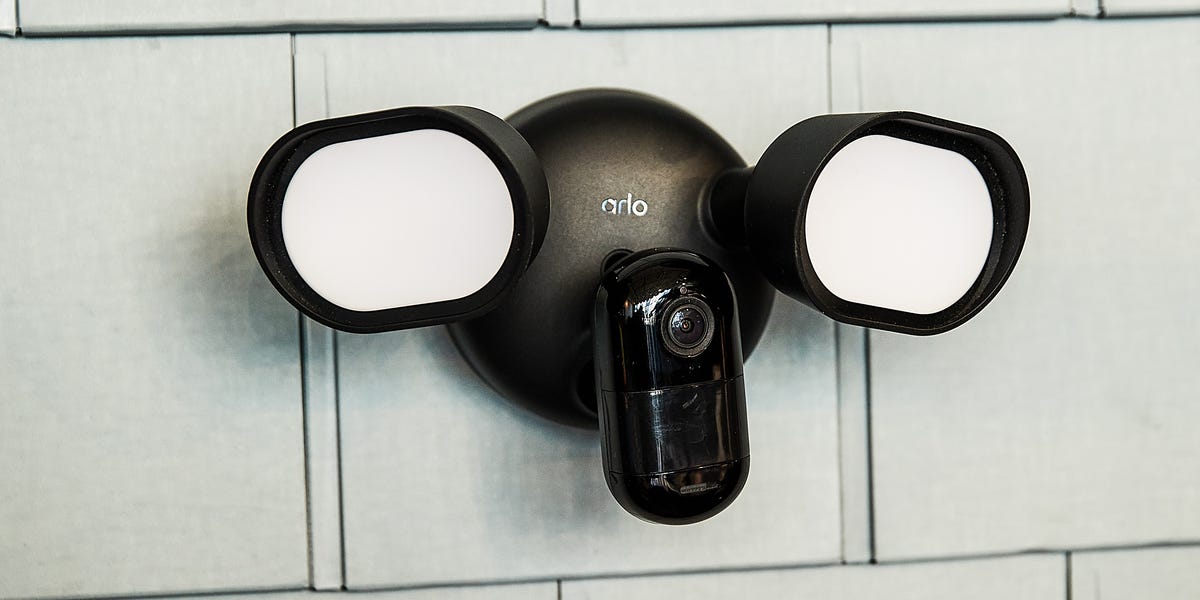
ProsSolid features without a subscriptionColor night visionIntegrated spotlightConsAdvanced features require subscriptionThe Arlo Essential XL stands out for its user-friendly design, durable exterior, and of course, its clear video quality—all for a fair price. It's completely wireless, which means you can mount it anywhere around your home without worrying about power and wiring issues.It excels as a 24/7 outdoor cam, with features like color night vision that improves the clarity of nighttime footage. During testing, we were impressed by its resolution in low light, as well as its accurate motion detection. It provides real-time alerts directly to your smartphone, and will let you check a live feed to observe any suspicious activity live as it happens.You can also program the integrated spotlight to automatically flash on when someone is within visual range. It's a great deterrent against potential robberies, and lets you leave the house without leaving a porch light on.While this cam has solid features without a subscription, an Arlo Secure subscription adds cloud storage for your video footage, as well as additional target recognition and home security features, for $96 to $300 per year.Arlo Essential XL Security Camera ReviewKey SpecsVideo resolution2KField of View130 degreesPower SourceBatteryIP RatingIP67ProsTwo storage optionsThermal and motion detectionFew options balance price and quality as well as this affordable option from Wyze. The battery-operated Wyze Outdoor V2 camera can be mounted anywhere. New buyers should pick up the starter kit, which includes a base unit that allows you to expand your system with up to four cameras. Though it's the most affordable on the list, it still offers a lineup of powerful features including motion-sensing technology that detects both body heat and movement, reducing the number of potential false alarms drastically. The Wyze is also quite flexible for storage options with the camera capable of online cloud storage as well as localized storage on a microSD card.Key SpecsVideo resolution1080p HDField of View130 degreesPower SourceBatteryIP RatingIP65Advertisement - Continue Reading BelowSolar-powered cameras, while power-efficient, present extra setup challenges. Most of the time, the panel is attached to the body of the camera, so you need to need find to camera positions with a good field of view and get good sun exposure. Depending on the layout of your home and the surrounding area, that may lead to less-than-ideal placements, which create holes in your surveillance.The Tapo MagCam solves this issue with a detachable solar panel, so you can keep it connected when it's effective, or remove and mount it higher above the camera to get more sun. It features a 13-foot extension cord, so you have a good amount of slack to move it to an open, sunshiny space. Test Editor Bradley Ford mounted his test camera in a semi-shaded area, then set up the solar panel in direct sunlight. Despite the fact that he was testing at the end of 2025, when there was significantly less daily sunlight, the battery never dipped below 80 percent charge. In the warmer weather, the camera typically sat at 100 percent.In addition, Ford preferred that the MagCam relied on local storage. "One of the things we like best is that there is no need for a subscription to access activation videos," Ford said. "They’re all stored locally on a Micro SD card in the camera. However, if you wish to pay for cloud storage, that option is also available."This specific kit comes with a camera, solar panel, and mount, however Tapo offers others with two or three cameras as well.Key SpecsVideo resolution4KField of View113 degreesPower SourceBattery (Solar)IP RatingIP66ProsFloodlight is nice and bright3D motion radar technologySupports dual-band WiFi ConsProfessional installation requiredOur previous pick in this category, the Ring Floodlight Cam Wired Plus, was a terrific outdoor security camera that featured a dual-LED floodlight. The new Ring Floodlight Cam Wired Pro builds on that solid design with extra features, including support for dual-band WiFi and a “bird’s-eye view” feature that tracks a recorded subject as they move within the camera’s view, showing it on a top-down layout of the area. The camera’s 1080p video resolution and 140-degree field of view are the same as the previous model, but image quality is enhanced with high dynamic range (HDR) support, which improves visibility in both low light and extremely bright conditions.The lights themselves are also quite bright, 2000 lumens each, and the fixtures are adjustable so you can angle the light as you please.The Ring Floodlight Cam Wired Pro also features two-way audio support, with a 110-decibel siren that sounds when the system detects motion. It also offers customizable motion zones and 3D- motion radar for you to tailor to your property. However, to take advantage of the camera’s full capabilities, you must subscribe to Ring Protect, which costs $4.99 per month or $49.99 per year for the most basic service. The subscription includes features like storing videos in the cloud for 180 days, person alerts, and more control over when the camera records video.A word of warning: We found the wired installation was fairly difficult, so we recommend hiring an electrician unless you're experienced with wiring and up for a challenge.Key SpecsVideo resolution1080pField of View140 degreePower SourceWiredIP RatingN/AAdvertisement - Continue Reading BelowProsNo need for WiFiEasy setup and power optionsUnlike any other outdoor security camera on our list, this option from Tactacam does not require a WiFi connection. Instead, it connects to cellular towers and works similarly to your smartphone. This makes the camera perfect for homes in remote locations.The security camera does require a monthly subscription for access to on-demand videos and photos that are stored in the cloud, but plans start at just 5 bucks a month.The device works with AA batteries or a rechargeable battery pack. In our testing, we took anywhere from two to 10 pictures a day and the pack lasted about three to four months before needing to be recharged.In practice, the security camera is great at sensing motion more than 100 feet away, so it could potentially double as a nature cam. It lacks some of the features other, similarly priced models on this list have, but the biggest drawback is that the field of view is only about 50 feet wide. Key SpecsVideo resolution1080p (4K photos)Field of View~50 degreesPower SourceBatteryIP RatingIP65ProsFlexible light fixturesPowerful sirenConsRequires subscription for top featuresThe Arlo floodlight has everything we love from our top pick, including Arlo's superior app and software, but adds on a large floodlight, as well as a need for wired power. As with the Arlo Essential XL, you get quality motion detection software and color night vision. Spring for Arlo Secure, and you get AI target recognition that can point out passing cars or faces, and highlight packages. The floodlight also has some interesting features: Each light is individually adjustable, so you can angle them for the best possible coverage. That includes creative solutions like angling one light toward your back door, while pointing the other toward the steps leading to your back porch. It's a small touch, but a very appreciated one. It also includes a loud, 110-decibel siren. Key SpecsVideo resolution2KField of View160 degreesPower SourceWiredIP RatingIP65Advertisement - Continue Reading BelowProsPerpetual batteryRequires no subscription for full access to featuresConsRequires direct sunlightIf you're looking for a low-maintenance outdoor security camera system, eufy's S330 "eufycam 3" is a dynamic wireless option that supports solar charging and doesn't require professional installation.Once installed and set up, we did not have to take either of the cameras down for recharging once over months of use. The solar panels kept them perpetually charged as long as they got exposure to a few hours of sunlight per day.It was similarly easy to connect the cameras to the greater home security. The outdoor cameras works through the home hub which after initial installation using an ethernet cable, works comfortably through your home WiFi. The cameras can then be set up anywhere within several hundred feet of the hub without losing connection.A big benefit we also loved is the camera system requires no monthly subscription to access its features. This includes AI-powered face recognition, customizable activity zones, and of course, motion detection.The only drawback for this camera set is the placement of the solar panels. While the panels being integrated directly on top of the camera makes it less cumbersome, it also means you need to install them in a spot with direct sunlight or they won't properly charge.Key SpecsVideo resolution4KField of View135 degreesPower SourceBatteryIP RatingIP67ProsWide field of viewExternal solar panelNo subscription necessaryConsSeparate mounting mechanism for camera and solar panelThe Reolink Argus 4 Pro gives you a sweeping 180-degree field of view, which allows you to cover large open spaces with as few cameras as possible. Properly positioned, you can achieve a near-complete view of an area with just two cameras.This 4K camera features a dual-lens design that covers larger areas without blind spots or fishbowl-style warping. You'd think that might lead to complications with position or usage, but we found it easy to operate.It features discrete solar panels for power, which allows for more placement flexibility: For example, you can install the camera under a ledge or rooftop, then secure the solar panel above, where it will get direct sun. That makes it easier to get the perfect shot and optimal power. In terms of storage, the Argus 4 Pro records footage locally and connects to a home hub. You don't have to pay a monthly fee for cloud storage or additional features. Simply turn it on, connect it the hub, and in theory, it should run without issue in perpetuity.Key SpecsVideo resolution4KField of View180 DegreesPower SourceBatteryIP RatingIP66Advertisement - Continue Reading BelowWhat to ConsiderWired vs. Battery-Powered: Which is Better?There are two types of consumer-grade home security cameras: wireless battery-powered cameras that you can set up easily nearly anywhere, but require you to occasionally replace batteries, and wired models that connect directly to your home's electrical system.Wired cameras are generally more expensive and require an electrician's help unless you're comfortable with home wiring, but require far less maintenance once they're installed. Their placement is also restricted to locations where you can wired them in.Battery-powered cameras, by contrast, are only restricted by the range of your WiFi router. Of course, you'll need to access them every few months to replace their batteries. Some models feature solar panels, giving you renewable energy, but panels also impose some placement restrictions. (Namely, access to sunlight).Wired cameras do fall short of battery-powered models in one niche scenario—when the power goes out. Unlike, say, wired smoke or carbon monoxide detectors, which have reliable battery backup, you can't count on a wired security camera to provide surveillance footage during an extended period of time if there's a power failure. It varies from model to model, but most wired cameras can only last for 30 minutes to, at most, a few hours before they go dark. Trevor RaabMotion and Sound DetectionTo avoid recording 24/7, which wastes power and storage space, outdoor security cameras usually feature motion sensors that trigger recording whenever there’s activity. Many cameras will also an alert to your companion app whenever they start recording.Most cameras give you the ability to calibrate the motion sensor by setting motion zones in spots where you expect frequent false alarms, like a sidewalk. Others offer smart features that can differentiate between people, animals, and vehicles. You should also have the ability to customize your notifications, so you’ll only receive an alert in certain situations, like if it detects a person.Furthermore, some cameras feature microphones, enabling audio detection, which can trigger recording and alerts based on nearby sounds that may be out of view (like a window breaking). Audio detection is a useful extra layer in a few specific situations, like when a single camera can’t cover the entire side of your home, but may also lead to more nuisance alerts. If you decide to use one, we recommend customizing your audio alert sensitivity if possible so you aren’t constantly getting notified when the neighbor’s dog barks.Video Quality and RangeThe best outdoor security cameras record video in "Full HD" (1920 x 1080p) resolution, which captures enough detail to identify facial features or a car’s license plate. More expensive cameras record at higher resolutions, such as 2K or "Quad HD" (2560 x 1440p) or 4K Ultra HD (3840 x 2160) video, which deliver better detail. While higher resolution may help, 1080p video is usually clear enough to give you more than enough information in most situations.Your camera’s field of view (FOV) is just as important as its resolution. Field of view refers to how wide of an angle the lens is and therefore, how much of your yard or porch is in view. With a wider FOV, your camera can see a wider area around your property, providing more coverage. For the best results, we recommend a model with a field of view between 130 and 180 degrees.Trevor RaabMany outdoor cameras also feature an integrated spotlight that can illuminate the surroundings if motion is detected, improving visibility in low-light situations. A spotlight also acts as a deterrent by making potential intruders more visible. Similarly, the majority of outdoor cameras offer some kind of night vision feature, which uses infrared (IR) lights to record a high-contrast black and white video in the dark. Top-of-the-line cameras are capable of recording standard video in low light, minimizing the need for night vision.Storing your footage: more options that just the cloud.There’s no point in recording camera footage if you can’t store it for when you need it. Many manufacturers offer free cloud storage for a limited time—typically seven days–after which video is overwritten with new recordings. You can always download and save that footage, so long as you do during that initial window.Trevor RaabIf you want to save your footage for a longer period, there are a couple of options. Many companies provide additional cloud storage for a subscription fee. There are also cameras that feature a microSD card slot for storing footage locally. This does require a bit of extra maintenance in the form of occasionally removing the card and either deleting or downloading the recorded data to free up more space on the card.If you’re concerned with privacy, be aware that cloud footage is generally kept on a manufacturer’s servers, which can be stolen if the company’s digital security is breached. Some companies may also use or share data from stored recordings in ways you might not anticipate. For example, Amazon has shared footage from Ring cameras to law enforcement without customers’ permission on many occasions. While storing locally requires more legwork, it is definitely the most secure option for privacy-conscious homeowners.Subscriptions and CompatibilitySecurity cameras are more than just their features. Nearly all security cameras are built to connect with other smart home devices. So, before buying any specific option, make sure it is compatible with the devices you already own. For example, Amazon makes it easy to pull up a live feed from your Ring camera(s) on an Echo Show or Fire TV. There are many brands that work with the majority of the smart home software available such as Apple, Google Nest, and Ring. Some have limited functionality on other smart home software systems outside of their brand, but still work with them. Furthermore, most security camera brands require a monthly subscription to gain full access to many of their features. These monthly subscriptions range in price and overall necessity with some basically essential to operate the cameras and store footage in the cloud while others are designed as a bonus add-on to the base product. Prior to purchase, make sure to take a close look at both the smart home compatibility as well as what comes with and without the monthly subscription service.Outdoor Security Camera Tips From Our ExpertsPhoto by Hunter Fenollol // The Ring floodlight illuminating a large area around the camera.Do I need more than one outdoor security camera?Most of the outdoor security cameras we recommend are sold individually or as part of a larger set. The number of cameras you need for your property will vary, based on your home security plan and how much camera coverage you want. A well-installed camera with a wide field of view can cover an important and vulnerable area on your property, such as a back door or garage. That said, even a small home will need at least a few cameras to achieve full coverage on every ground-level door and window. You may need multiple cameras to reveal tricky blind spots created by corners, lawn features, and anything else that might impede a single camera position. Don't freak out about needing a fleet of surveillance gear, though. Not everyone wants or needs to have every single square inch of their property under constant watch. It’s up to you to decide where you want an extra eye. The important thing is to make sure you know what you need before making a purchase.Can I use an outdoor security camera indoors?Of course. There are no features of an outdoor security camera that would prevent it from working inside. That said, many companies make indoor cameras that are cheaper, and may feature a stand or mounting options that make more sense for blending in with your home or office.Should I be concerned with my privacy when using an outdoor security camera?You should always be careful when considering home security. Over the years, there have been multiple reports of strangers accessing live video feeds and recorded videos from home security cameras.Luckily, there are simple ways to protect yourself. As with other devices, adhering to digital security best practices, such as keeping your smart home devices’ firmware up to date, creating a strong password and activating two-factor authentication wherever possible, will help prevent a breach.You may also have concerns about who has access to video that’s stored in the cloud. Most companies ask for permission to review recordings for research and development purposes. Depending on the company, this request often comes in the form of an “opt-in” setting in the camera app, though some may turn it on by default unless you “opt out.”Some may also share recordings with law enforcement. In some cases, they will only do so when compelled by a search warrant. A couple manufacturers, specifically Amazon (Ring) and Google (Nest), have said they will provide footage without a warrant if law enforcement claims it is an emergency.If you're concerned with how a manufacturer manages your data and video, read its terms of service agreement and privacy policy closely.Tom Price is a reviews editor for Popular Mechanics while also contributing to Runner's World, Best Products, and Bicycling. Here at Popular Mechanics, Tom loves testing out home appliances, smart tech, gear for city life and outdoor adventures, small gadgets like watches and multitools, and anything else you can find piled up at his hoarder's nest of a desk. Prior to working here, Tom attended NYU, graduating with a degree in English and a minor in creative writing. He also wrote for Best Reviews, The Daily Beast, and other publications covering tech, fitness gear, gadgets, and lifestyle products. Furthermore, he covered startup news, pop culture, and even professional wrestling. To follow more of his work, check back here for new stories.Brandon Russell is a freelance writer covering gear and technology. He started his journey as a news writer at a small newspaper and later began reviewing smartphones, movies, and video games. In his free time, he enjoys the slower, more intentional experience of using a 35mm film camera and making short videos about movies he grew up watching.Brad Ford has spent most of his life using tools to fix, build, or make things. Growing up he worked on a farm, where he learned to weld, repair, and paint equipment. From the farm he went to work at a classic car dealer, repairing and servicing Rolls Royces, Bentleys, and Jaguars. Today, when he's not testing tools or writing for Popular Mechanics, he's busy keeping up with the projects at his old farmhouse in eastern Pennsylvania.
The 8 Best Outdoor Security Cameras Keep an Eye on Your Home When You're Away
Full Article
Original Source
Read the full article at Popularmechanics →KhanList aggregates and links to publicly available news content. We do not host full articles from third-party sources. Always verify important information with original sources.