
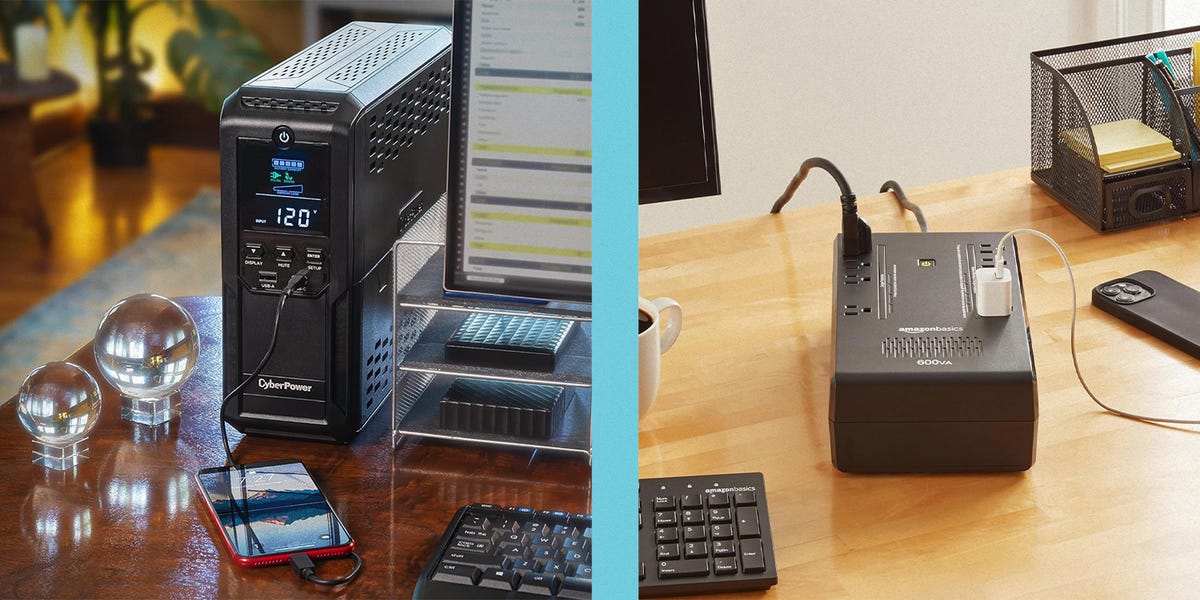
ProsAmple outletsUSB portsThe CyberPower CP1500PFCLCD offers a whopping 12 outlets, six of which can pull pure sine wave alternating current (AC) power from the battery. The six secondary outlets give you plenty of surge protection and power for non-essential devices, so you have a full power solution for everyday, and plenty of emergency backup power in an outage.The battery backed outlets are clearly marked, so there’s no confusion. The shape itself also cleverly makes extra room for bulky power bricks in two spots, in case you have a couple of larger plugs.The CyberPower model contains two USB ports—one USB-A and one USB-C—on its front, and an LCD display gives you detailed information on battery capacity and current load. An alarm sounds when something is wrong with either the device or your setup (like the battery is low or the UPS capacity is overloaded), plus there’s a button to mute the alarm as needed.The CP1500PFCLCD also supports data line protection, so your devices stay safe from power surges that travel through Ethernet. The cord is a foot shorter than our top pick, but this model provides slightly more output capacity, so it’s worth checking out if you want a ton of outlets.Read Our Full ReviewKey SpecsTotal Outlets12Battery-backed outlets6Battery runtime10 mins (half load), 2.5 mins (full load)Output capacity1,000 wattsAVRYesCord length5 ftProsGood outlet spacingPower management softwareThe Amazon Basics Standby UPS 600VA provides basic backup on a budget, but it lacks the more advanced features of other options. It has eight outlets total, including four battery-backed outlets to plug in devices like a modem, laptop, or NAS. And with an output of 360 watts, it’s the perfect option for home offices, with space to connect multiple devices simultaneously.There’s a good amount of space between outlets on the Amazon UPS to easily accommodate two larger power bricks without crowding other nearby outlets. Additionally, it has a user-replaceable battery and supports power management software.As we said, it lacks more advanced features, including AVR, but it’s still a solid, affordable option.Key SpecsTotal Outlets8Battery-backed outlets4Battery runtime9 mins (half load), 2 mins (full load)Output capacity360 wattsAVRNoCord length5 ftAdvertisement - Continue Reading BelowProsUser-replaceable batteryLCD panelConsBulkySimulated sine wave currentThis CyberPower model offers everything you need in a powerful and reliable UPS. It includes 12 surge-protected outlets, with six of those backed by battery power. This gives you ample space to connect various devices, from your home office setup to more fun devices like your PlayStation 5, smart TV, or gaming desktop. The front of the UPS also features both a USB-A and USB-C port for connecting mobile devices.An LCD panel displays information about battery and power conditions. If the power goes out, this model’s replaceable battery runs for up to 12 minutes at half load, giving you plenty of time to safely power down. It features simulated AVR, which corrects minor power fluctuations but may not be ideal for sensitive high-end gear.Key SpecsTotal Outlets12Battery-backed outlets6Battery runtime12 mins (half load), 3 mins (full load)Output capacity900 wattsAVRYesCord length6 ftProsPower management softwareAmple outletsThis APC model features power management software and AVR and comes with an LCD panel, all of which make it another great advanced UPS for home offices and small businesses.The APC’s power management software boasts several additional features, including the ability to remotely shut down your connected devices during an emergency. This prevents potential corruption or data loss. The device also supports a graceful shutdown feature, which automatically shuts down connected equipment if you’re unable to do it when the connected devices reach a predetermined power level.The UPS offers both data line and coaxial line safeguards to give you extra peace of mind during power disturbances. An informative LCD screen on the front panel displays crucial information, such as battery capacity, load capacity, the number of power events that have occurred, and any system errors.For added convenience, the UPS is equipped with both a USB-A and a USB-C port on the front to charge your phone or tablet in the same place as your home office equipment.Key SpecsTotal Outlets10Battery-backed outlets6Battery runtime4 mins (full load)Output capacity900 wattsAVRYesCord lengthN/AAdvertisement - Continue Reading BelowProsRelatively compact5 battery-backed outletsMost UPS devices take up a lot of floor or desk space. This one, however, measures approximately 4.1 by 10.8 by 5.5 inches, which is more compact than most for easier integration into your current home office.Even with its smaller design, this UPS packs a punch with seven total surge-protected outlets, five of which offer battery power. It offers 330 watts of output power—perfectly suitable for a more modest setup.The UPS automatically switches off from the battery backup when your power comes back on. And when the time comes, you can replace its battery instead of replacing the entire unit.There are some trade-offs to the more compact design. For instance, more advanced models contain a few more outlets. You also miss out on an LCD screen and AVR. However, these compromises bring the cost down on this space-efficient UPS.Key SpecsTotal Outlets7Battery-backed outlets5Battery runtime3 mins (full load)Output capacity330 wattsAVRNoCord length5 ftPros8 battery-backed outletsLCD panelConsSmaller size means fewer overall outletsThis CyberPower UPS easily integrates into a server setup because of its rack-mounting feature. The design makes it an excellent choice for small businesses that have a data center or server room, keeping the UPS close to the devices it’s protecting. It fits into racks as small as 14 inches in depth.The device features eight battery-backed outlets and an LCD panel, which displays information on battery and power conditions. The screen also shows alerts about potential issues before they affect your devices.Like other CyberPower models, this one supports management software for monitoring the UPS remotely. Other features include data line protection and an estimated battery runtime of 10 minutes at half load.Key SpecsTotal Outlets8Battery-backed outlets8Battery runtime10 mins (half load), 3 mins (full load)Output capacity1,000 wattsAVRYesCord length6 ftAdvertisement - Continue Reading BelowProsExcellent battery life6 battery-backed outletsMost UPS models offer limited battery life, even at half load, which isn’t ideal for IT professionals or network administrators. This APC model, however, delivers impressive battery runtime, with up to 23 minutes at half load in the event of an outage. That’s almost double what other top models offer, giving you ample time to save your work and safely shut down your devices.Beyond excellent battery life, this model comes with a number of advanced features, including cloud-based remote power monitoring, remote diagnostics, and email notifications with recommended actions. It also supports graceful shutdown.All of these premium features mean this UPS costs more and is noticeably larger than other options on the list. That said, its combination of extended runtime and management features makes it a worthwhile investment, particularly for small businesses that want to protect their hardware and data.Key SpecsTotal Outlets8Battery-backed outlets6Battery runtime23 mins (half load), 6 mins (full load)Output capacity1,000 wattsAVRYesCord length6 ftProsHours of backup for a home officeSwitches to battery in under 10 msLFP battery rated for 6,000 cyclesConsOnly one high-powered USB-C portA traditional UPS buys you a few minutes, just enough time to save your work and shut down. If the power's out for hours, you need something bigger. The Anker Solix S2000 is a portable power station that doubles as a UPS: Plug it into the wall, plug your gear into it, and when the power cuts out, it switches to battery power in under 10 milliseconds, fast enough for most home office setups.And it can keep going for a long time. In our testing, the S2000 ran a refrigerator for just over 24 hours on its 2,010 watt-hours of capacity, and a typical home office draws far less. That's enough to keep a desktop PC and monitor running for several hours, or a modem and router online for more than a day. Its LFP battery is rated for 6,000 cycles before dropping to 80 percent capacity, so it should outlast several lead-acid UPS batteries, and it comes with a five-year warranty.The trade-off is that it's far pricier than a standard UPS, and at 35.7 pounds, it's not something you'll want to move often. But if you live somewhere with long outages, it's the only pick here that can keep your WiFi running all night.Read Our Full ReviewKey SpecsTotal Outlets5 AC (plus 3 USB)Battery-Backed Outlets5Battery runtime24+ hours (refrigerator, in our testing)Output capacity1,500 Watts (3,000-watt peak)AVRN/ACord6 ftAdvertisement - Continue Reading BelowWhat to ConsiderOutlet Type and Number The UPS you choose should come with enough outlets to accommodate all the devices you need to plug in, with some room for additional devices in the future. Pay attention to the distinction between battery-backed outlets, which offer surge protection and battery power during outages, and surge-protected-only outlets, which, as the name suggests, only offer surge protection.Every model we write about offers surge protection as a standard feature, even on outlets that don’t offer battery power. Batteries enable a UPS to power your devices once the grid fails. That’s why it’s essential to choose a UPS with enough battery-backed outlets to support the devices you want to keep online.More advanced UPS models typically offer more outlets (and more that are battery-backed). For example, the more affordable Amazon Basics Standby UPS 600VA has eight outlets, four of which have battery backup, while the more advanced CyberPower CP1500AVRLCD3 has 12 outlets, six of which have battery backup. In addition to AC outlets, some UPS models have USB-A or USB-C ports to connect your smartphone and other devices. These ports easily charge your devices without taking up an outlet.BatteryIt’s also important to ensure replacing the battery on the UPS you choose is straightforward and easy. This simplifies maintenance and increases the device’s lifespan. Advanced UPS models typically include battery health monitoring features, so you’ll get a heads up when a battery nears the end of its life.On average, UPS batteries last three to five years before needing replacement, though this lifespan varies depending on usage. Automatic Voltage Regulation, or AVR, stabilizes inconsistent incoming voltage. It converts fluctuating voltage from the power source into a steady, consistent output for connected devices. This protects sensitive electronics from power irregularities without relying on the UPS battery.As a bonus, AVR reduces wear and tear on the battery, potentially extending its lifespan. Not all models include this feature, particularly those priced on the lower end.Pure Sine Wave vs. Simulated Sine WaveDuring an outage, a UPS inverter converts the direct current (DC) stored in its battery into the alternating current (AC) that devices expect. Pure sine wave models output a smooth wave that closely matches utility power. The CyberPower CP1500PFCLCD lists sine wave output on battery and is designed for active PFC power supplies. The APC BR1500MS2 lists sine wave output on battery with a transfer time of as little as eight seconds.During an outage, a UPS inverter converts the direct current (DC) stored in its battery into the alternating current (AC) that devices expect. Power from the wall doesn’t just switch on and off. Its voltage rises and falls in a smooth, rounded curve called a sine wave, swinging from positive to negative and back 60 times a second.Pure sine wave models output a smooth wave that closely matches utility power, so your devices run on battery the same way they run on the grid. Some models output a simulated sine wave instead, a stepped signal that switches between positive and negative voltage with brief rests at zero. That output works for basic electronics, but it could cause problems for more sensitive electronics, like audio equipment and desktop PCs.Desktop PCs are the biggest concern. Most use power supplies with active power factor correction (PFC), a circuit that improves efficiency and helps the unit meet energy standards. On a simulated sine wave, some of these power supplies can shut down unexpectedly or run under extra strain. Most devices without active PFC, including modems and routers, can handle a simulated wave without trouble during a typical short outage.For a gaming PC, workstation, or home theater system, a pure sine wave UPS is the safer bet. The CyberPower CP1500PFCLCD lists sine wave output on battery and is designed for active PFC power supplies. The APC BR1500MS2 lists sine wave output on battery with a transfer time of as little as 8 milliseconds.DisplayHaving a display on a UPS may seem like a luxury, but it’s very helpful to have some kind of indicator to give you insight into battery status. Compact and budget models, like the APC BE600M1, typically stick to a few status lights that tell you whether the unit is running on wall power or battery.An LCD screen shows measurements such as battery charge, how much power your devices are drawing, input and output voltage, and, most importantly, estimated runtime. That last one comes in clutch during an outage, since it tells you exactly how many minutes you have to save your work and shut down.The CyberPower CP1500PFCLCD's color screen tilts upward, so it's easier to read when the UPS sits on the floor under your desk, and the APC BR1500MS2 keeps a running count of the power events it has handled. And if your UPS lives in a bedroom, check whether you can dim or turn off the backlight. A glowing screen is useful during an outage, but less so at 2 a.m. when you’re trying to sleep.Cable LengthA cable that’s at least five feet long offers greater flexibility in terms of where you place your UPS. A five-foot-long cable reaches wall outlets that are farther away and positions the UPS conveniently for your devices. You’ll have the freedom to place the UPS in the best spot for your setup, such as under a desk or in a server rack. Remember, a short cable potentially limits where you place the UPS, so it’s always a good idea to go longer, not shorter.Extra FeaturesUPS models that support management software give you greater control over the UPS from a phone or computer to remotely shut down connected devices, and some support “graceful shutdown,” which automatically shuts down connected equipment if you’re unable to do it when the connected devices reach a predetermined power level.Other features worth considering include an LCD display to monitor a UPS’s status, expandable battery capacity, and an audible alarm during power disturbances.SafetySetting up a UPS is straightforward: Simply plug the UPS into a wall outlet and connect your devices to the UPS. This plug-and-play simplicity means a UPS device is great for anyone, no matter their level of technical know-how. But be aware of the following safety guidelines before powering on a UPS in your home office.Companies advise against connecting devices like copiers, laser printers, or space heaters to a UPS, as these can overload the device. Instead, use a separate surge protector.Additionally, never plug a UPS into a surge protector or vice versa. It’s also important to avoid plugging a UPS into an extension cord because this can potentially overload the cord and create a fire hazard. It’s recommended to always plug your UPS directly into a grounded wall outlet. Doing so will ensure your UPS operates safely while providing the best possible protection for your devices.FAQsWhat size UPS backup do I need?Finding the right UPS battery backup largely comes down to the total wattage you need to keep your computer up and running while you save and shut down. Speaking broadly, we'd tell you that most home office setups with a desktop PC, monitor, modem, and router should look for a UPS around 600 to 1500 volt-amperes (VA).To get a more accurate idea of what you specifically need, add up the wattage of all your connected devices, then look for a backup that can handle 120 to 130 percent of that load. That will give you enough time to shut down safely with some wiggle room in case you need to finish a task (or have something urgent come up before you can finish up).How long will a UPS battery backup last during a power outage?Every system is different, but we'd expect a UPS in the 1000 to 1500VA range to keep your desktop and monitor running for about 15 minutes, which should be long enough to save and safely shut down. A smaller model can probably keep laptop-based setup for a similar amount of time, or power a modem and router for 30 to 45 minutes.These are all broad estimates, though, and will vary based on what specific gear you're using. We recommend calculating your own power needs to figure out exactly how much time you'll have to shut down in the event of an emergency.Can a UPS backup power a router and modem?Yes, a UPS backup easily powers a router and modem, and this is one of the most common uses for a small unit. This type of hardware usually consumes only about 10 to 30 watts combined, which is relatively low when compared to computers or TVs. Because of this low draw, even a compact unit would be able to keep your internet running for 30 minutes or more during a power outage.Brandon Russell is a freelance writer covering gear and technology. He started his journey as a news writer at a small newspaper and later began reviewing smartphones, movies, and video games. In his free time, he enjoys the slower, more intentional experience of using a 35mm film camera and making short videos about movies he grew up watching.Amber is a Reviews Editor with bylines on Popular Mechanics, Runner’s World, Bicycling, and Best Products sites. Specializing in kitchen gadgets, small appliances, lifestyle, and consumer tech, she brings hands-on testing and a detail-oriented approach to every review. In her free time you can likely find her trading trinkets at an EDM festival, searching for hidden gems at thrift stores, or cuddling with her two cats.
The 7 Best UPS Battery Backups
Full Article
Original Source
Read the full article at Popularmechanics →KhanList aggregates and links to publicly available news content. We do not host full articles from third-party sources. Always verify important information with original sources.