
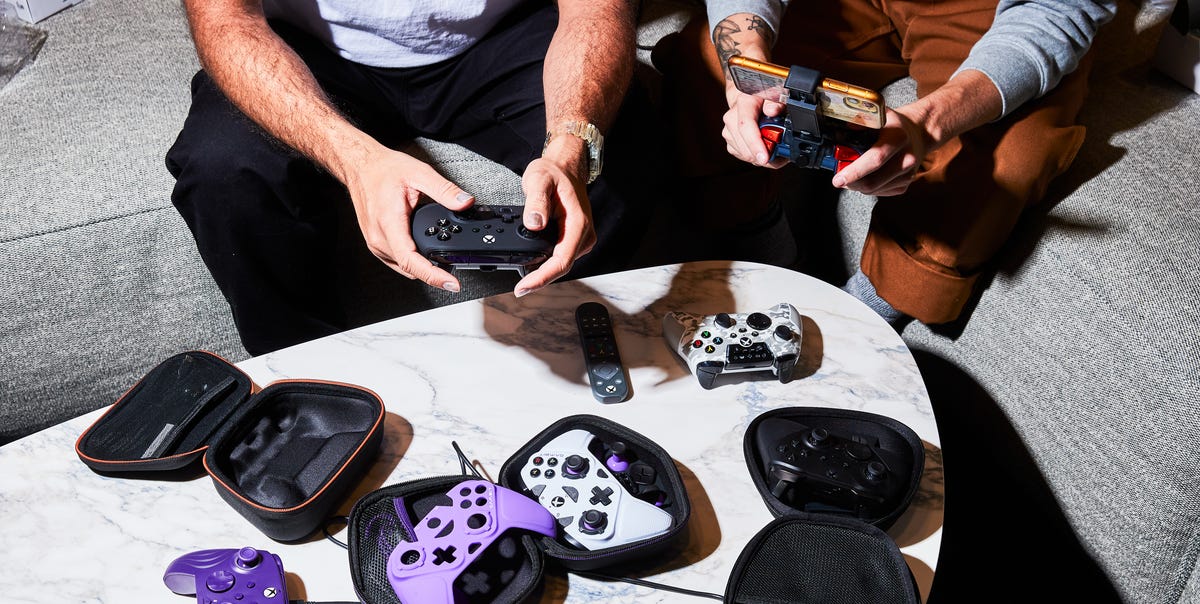
6 min readXbox controllers are better now than they have ever been. The gamepad that comes with a Series X or Series S is one of the best around, and if you want something different, you are picking from a deep field of strong options to choose from. Brands like 8BitDo, Razer, Scuf, GameSir, and Hyperkin all make Xbox pads worth owning, so it is hard to end up with a bad one.The biggest reason to look at third-party options comes down to the thumbsticks. Microsoft’s own wireless controller uses potentiometer sticks, which rely on tiny parts brushing together and wear down over time. Eventually they start to drift, meaning your character or the camera moves on its own even when you are not touching the stick. Newer controllers use Hall effect or TMR (tunneling magnetoresistance) sticks that read movement with magnets, so nothing physically touches and nothing wears out.Best Overall: Xbox Wireless ControllerBest Budget: 8BitDo Ultimate C Wired ControllerBest Customizable: Xbox Elite 2 Wireless ControllerBest for Competitive Gaming: GameSir G7 ProBest Wireless Pro Controller: Razer Wolverine V3 ProBest for Cloud Gaming: Turtle Beach ReconWe played first-person shooters, fighting games, racing sims, and open-world titles to test a wide range of options, and the standard Xbox Wireless Controller is still the top choice for most people. It feels great in the hand, it works on Xbox and PC, and it costs far less than the premium pads. If you want drift-proof sticks, mappable back paddles, or software that lets you tune every button, several alternatives below are worth checking out.Need more gaming accessories? Here are our picks for the best PC controllers, PC joysticks, and Nintendo Switch controllers.How We SelectedOur picks come from a mix of hands-on testing across several models and the deeper research we do when writing roundups, where we dig through expert reviews and customer feedback. We weighed each controller on the things that make a difference during long sessions, including comfort in the hand, responsiveness, build quality, battery life, and ease of use. For this update, we paid particular attention to stick technology, favoring Hall effect and TMR sensors that resist the drift that cuts an otherwise good controller’s life short.ProsOne of the most comfortable controllers ever madeWorks across Xbox, PC, mobile, and cloud setupsConsPotentiometer sticks are prone to driftRuns on AA batteriesKey SpecsConnectionXbox Wireless, Bluetooth, USB-C wiredCompatibilityXbox Series X|S, Xbox One, Windows PC, Android, iOS, and cloud devicesSticksPotentiometerBatteryTwo AA batteries, ~40 hoursAudio3.5mm headphone jackCustomizationButton remapping and saved profiles via the Xbox Accessories appThe standard Xbox Wireless Controller is the one most people should buy. The controller has become legendary for its ergonomics, with sculpted grips and textured triggers, bumpers, and thumbsticks, making it incredibly comfortable to hold during long sessions. A hybrid D-pad is great for modern fighters and retro titles, and the Share button can take a screenshot or clip without interrupting your game.Something unique about the controller is it pairs over Xbox Wireless, Bluetooth, and USB-C, so it works across several platforms, including the Xbox Series X or S, a Windows PC, a phone, and most cloud setups. Unfortunately, it still uses potentiometer sticks, which could lead to drift with prolonged use. It also requires two AA batteries, though you can always use rechargeable batteries or a battery pack.ProsHall effect sticks and triggers that resist driftComfortable textured grips, RGB light rings, and a 3.5mm headphone jackConsNo back paddles or button remappingKey SpecsConnectionUSB-C wiredCompatibilityXbox Series X|S, Xbox One, Windows PCSticksHall effectBatteryNoneAudio3.5mm headphone jackCustomizationRGB lighting modesThe 8BitDo Ultimate C Wired Controller not only costs less than the standard Xbox Wireless Controller, but it ships with Hall effect joysticks and Hall effect triggers. That makes 8BitDo’s accessory less prone to stick drift, and a great option as a second controller or a first one for a kid.The controller features RGB light rings around the sticks, rumble triggers, a 3.5mm headphone jack, bumpers, and a D-pad. To keep the cost down, the Ultimate C is wired only, but it comes with an 8.2-foot USB-C cable, so it suits setups where you’re sitting relatively close to your TV. You can also snag the controller in a few different colors, including a really vibrant orange.ProsOffers the deepest customization of any Xbox padRechargeable battery lasts up to 40 hoursConsPotentiometer sticks are drift-proneKey SpecsConnectionXbox Wireless, Bluetooth, USB-C wiredCompatibilityXbox Series X|S, Xbox One, Windows PC, cloud devicesSticksPotentiometer Battery~40 hoursAudio3.5mm headphone jackCustomizationInterchangeable components, adjustable stick tension, three custom profiles, remappable buttonsThe Elite Series 2 is the most complete premium controller you can buy for Xbox. It features six swappable thumbsticks, four paddles, two D-pads, adjustable stick tension, three-stage hair trigger locks, and up to three custom profiles you can switch with a button mid-game. It charges in the included dock for up to 40 hours of playtime and connects over Xbox Wireless, Bluetooth, or USB-C.While you pay a much higher price for the deeper customization, the Elite 2 still uses potentiometer thumbsticks, the same drift-prone design as the standard pad. That means you could potentially experience the dreaded stick drift issue over time. Considering the cost of this controller, it’s a big risk to take. But if you want unmatched customization, the Elite 2 is the best out there.ProsTMR sticks resist driftHall effect triggers with clicky microswitch trigger stopsConsWired only on Xbox, with the 2.4GHz wireless limited to PCKey SpecsConnectionWired USB-C on Xbox, Bluetooth, 2.4GHz wirelessCompatibilityXbox Series X|S, Xbox One, Windows PC, cloud devicesSticksTMRBattery1,200mAh rechargeableAudio3.5mm headphone jackCustomizationFour extra buttons, plus remapping, stick curves, and gyroFor competition-grade features without the exorbitant cost, check out the GameSire G7 Pro. It uses TMR thumbsticks, a newer magnetic sensor that resist the drift that plagues the Elite Series 2, so it should hold up for longer. You also get Hall effect triggers with clicky microswitch trigger stops, two extra shoulder buttons, and two lockable rear buttons, all mappable through GameSir’s Nexus PC app.Four rumble motors give you finer haptic feedback than the two you’ll find in a standard pad, and the box includes two swappable D-pads, so you can pick the feel you want. A built-in 1,200mAh battery and an auto start-stop charging dock mean it’s easy to charge after every gaming session.The downside is the G7 Pro is wired-only on the Xbox, with its 2.4GHz wireless and app-based customization reserved for PC. That makes it a natural fit for players sitting close to the screen and less so for anyone gaming from the couch.ProsHall effect sticks resist driftSix remappable inputs, including four mouse-click back buttonsConsMiddling battery lifeKey SpecsConnectionUSB-C wired, Bluetooth, 2.4GHz wirelessCompatibilityXbox Series X|S, Xbox One, Windows PCSticksHall effectBattery~20 hoursAudio3.5mm headphone jackCustomizationRazer Controller app for button mapping, stick sensitivity, deadzones, and profilesThe Razer Wolverine V3 Pro takes on the Elite Series 2 by addressing a major weak spot, matching Microsoft’s flagship on customization and swapping in Hall effect thumbsticks. You get six remappable inputs, four mouse-click back buttons and two claw-grip bumpers, plus Pro HyperTriggers that toggle between full analog pulls and instant mouse-click actuation.Razer’s Mecha-Tactile face buttons and 8-way floating D-pad keep inputs quick and precise, and the Razer Controller App stores custom profiles for both Xbox and PC. It also runs true low-latency 2.4GHz on Xbox through Razer’s HyperSpeed dongle, not just on PC. It requires more frequent charging, though with around 20 hours of battery life on a single charge.ProsExcellent grip and hand feelGrips are great for keeping hands coolProgrammable buttonsConsNot great for phone casesAdjustable phone clip feels cheapKey SpecsConnectionUSB-C wired on Xbox, BluetoothCompatibilityXbox Series X|S, Xbox One, Windows PC (wired), plus Android 8.0+ mobile devices (wireless)SticksPotentiometerBattery~30 hoursAudio3.5mm headphone jackCustomizationTwo mappable rear quick-action buttons supporting up to 4 switchable profiles, plus remappable face buttons and the Recon Cloud companion appAre you a cloud gamer? This wired controller from Turtle Beach holds your phone in place while you game away on Xbox Game Pass. Its ergonomic grips have a pattern that keeps your hands cool and still offers vibration for in-game feedback.The controller also has a module for controlling audio, just in case you’re playing online and need to shift your headset’s volume. Rechargeable with a claimed battery life of up to 30 hours, this controller is a solid choice for anyone gaming on the go.Users say the controller has an excellent feel in hands and the programmable buttons are useful. Some, however, say the adjustable smartphone clip feels cheap and isn’t phone case-friendly.What to ConsiderBe aware of stick driftOne of the most important specs to be aware of is something that could greatly impact your experience down the road. Pads that still use potentiometer sticks, including Microsoft’s standard controller, rely on small physical contacts that can wear down over months of play. That can cause stick drift, where the camera or your character keeping moving after you’ve let go. Newer controllers use technology like Hall effect and TMR sticks, which can resist drift effect far longer. The good news is Hall effect and TMR sticks are more or less the norm on third-party controllers, even in budget models.Wired or wireless?Wired controllers are cheaper, need no batteries, and deliver the lowest input latency, which is why competitive players still reach for a cable. The tradeoff is that you’re tethered to the console. Wireless is the better fit for couch play and the only practical option for cloud gaming on a TV or phone. Just know that on Xbox, true wireless means either Microsoft’s Xbox Wireless standard or a 2.4GHz dongle. Plain Bluetooth usually connects to PCs and phones rather than the console itself, so check the connection type before you buy.Look out for customization optionsRear paddles and remappable buttons can handle actions like jumping, reloading, or sprinting without contorting your hands, so you can be in full control while playing online games like Call of Duty. Adjustable trigger stops shorten how far you have to squeeze the triggers, which speeds up firing or accelerating. Swappable thumbsticks and D-pads let you dial in the height and feel your prefer, and companion apps save your button layouts as per-game profiles. The best of those apps now run on the Xbox itself instead of requiring a PC. All of it adds to the overall cost, though, so weigh how often you’ll really use these extras against a simpler, cheaper pad.
The 6 Best Xbox Controllers for Every Kind of Player
Full Article
Original Source
Read the full article at Popularmechanics →KhanList aggregates and links to publicly available news content. We do not host full articles from third-party sources. Always verify important information with original sources.