
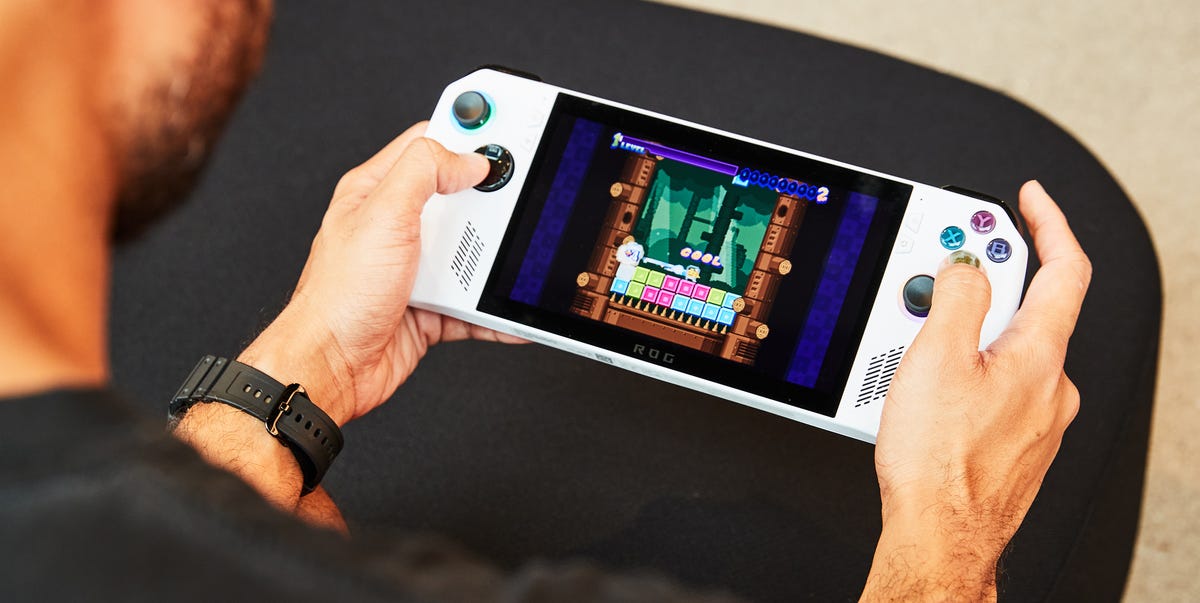
Thanks to powerful mobile processors and more compact components, a new generation of handheld PC gaming is here. These portable consoles are a worthwhile alternative to spending loads on a gaming laptop or desktop—they’re powerful enough for Full HD gaming, and the most impressive can handle whatever your Steam or Microsoft Game Pass libraries throw at them.With a small form factor, you can take these machines anywhere and enjoy your games with the same functionality as your desktop, whether you’re on the go or chilling in a lounge. That freedom also means you’re untethered from your desk and you don’t need to lug a heavy laptop around.Handheld PCs are also far more versatile than full-sized computers. Many offer the precision of analog controls and the convenience of touchscreens. Some even have detachable controllers and output ports you can hook up to any TV or monitor and use like a traditional gaming console. Importantly, these handheld PCs cost significantly less than other PC gaming options.Arguably, the most popular option is Valve’s Steam Deck, though many competitors in this space are vying for your coin. In this guide, we’ll explain what to look for when shopping for a handheld gaming PC and offer our thoughts on the best available.Best Overall: Asus ROG Xbox Ally XBest Budget: Asus ROG Xbox AllyBest for Performance: MSI Claw 8 EX AI+Best Large Screen: Lenovo Legion Go 2Best SteamOS: Valve Steam Deck OLEDHow We SelectedI’ve been gaming since I could hold a controller, and I've been PC gaming for over 20 years. My first handheld gaming involved going square-eyed on the original Game Boy (the Tetris theme song lives rent-free in my head) and continually slotting in hundreds of AA batteries so I could play Super Smash TV on the Game Gear. Since I was a teen, I’ve always saved up for new 3D graphics cards and enhanced sound cards, and invested in faster modems for peak PC performance. Though I adore my Nintendo Switch, I mostly play on my Asus Vivobook Pro 15.For this guide, I tested various graphically diverse games on SteamOS and Microsoft Game Pass. These titles included Persona 3, Dead Cells, and Fallout: New Vegas. I also spent time with their OS and settings, getting used to how they played and how easy it was to tweak settings on the fly. I also stay up to date on the gaming industry and use my expertise, along with other component reviewers', to inform my PC purchases and upgrades, as well as this buying guide.For the models I couldn’t test personally, I relied on various reviews and dozens of user reports. I rated these machines based on their operating systems (OS), comfort and ergonomics, gaming specs, and displays.Full ReviewsProsBoots straight into the Xbox interfaceLarge 80Wh batteryConsRelatively bulky thanks to larger gripsKey SpecsCPUAMD Ryzen AI Z2 ExtremeGPUAMD Radeon GraphicsRAM24GBDisplay7-inch 1080p IPS, 120HzStorage1TBBattery80WhWeight1.58 lbsThe Asus ROG Xbox Ally X uses AMD’s Ryzen AI Z2 Extreme chip, which Asus says runs games like Doom: The Dark Ages up to 30 percent faster than the previous ROG Ally X. The 7-inch 1080p screen refreshes at 120Hz, so motion looks smoother than on a standard 60Hz display, and FreeSync Premium matches the screen to the game’s frame rate to stop the picture from tearing when performance dips.Microsoft’s Xbox interface is the biggest change from earlier Windows handhelds. The Ally X starts up in a full-screen Xbox app instead of the Windows desktop, so you can open Game Pass, Steam, and other game stores with the controller instead of tapping at tiny Windows menus. Asus rates the 80Wh battery for up to twice the playtime of the older model in lighter games, and the storage drive is a standard M.2 that you can swap for a bigger one.ProsSame Xbox interface as the Ally XLighter than the Ally XConsSlower chip limits newer gamesKey SpecsCPUAMD Ryzen Z2 AGPUAMD Radeon GraphicsRAM16GBDisplay7-inch 1080p IPS, 120HzStorage512GBBattery60WhWeight1.48 lbsIf you mostly play indie games, older releases, or cloud-streamed games, the regular ROG Xbox Ally gives you nearly everything the Ally X does. Its four-core Ryzen Z2 A chip is slower, though, so the newest big-budget games will need lower settings to run smoothly. Asus says it still runs Forza Horizon 5 at 720p up to 20 percent faster than the original ROG Ally.The 7-inch 1080p screen matches the Ally X’s, with a 120Hz refresh rate and FreeSync Premium to prevent screen tearing when the frame rate drops. The Ally also boots into the same full-screen Xbox interface. Its 60Wh battery is smaller than the Ally X’s, but Asus rates it for up to 110 percent more playtime than the original Ally because the newer chip uses less power. At 1.48 pounds, it’s also a little easier to hold over longer gaming sessions.ProsHall effect sticks and triggersTwo Thunderbolt 4 ports for docks and monitorsConsHeavier at 1.73 poundsKey SpecsCPUIntel Arc G3 ExtremeGPUIntel Arc GraphicsRAM32GBDisplay8-inch 1920 x 1200 IPS, 48–120Hz VRRStorage1TBBattery80WhWeight1.73 lbsEvery other handheld on this list runs on an AMD chip, but the MSI Claw 8 EX AI+ uses Intel’s Arc G3 Extreme. MSI says it averages over 50 percent higher frame rates than the previous Claw at 1200p and medium settings, including a 54 percent gain in Cyberpunk 2077. Those numbers rely on Intel’s XeSS 3, which renders each frame at a lower resolution, sharpens it with AI, and inserts AI-generated frames between real ones.The thumbsticks and triggers use Hall effect sensors, which track position with magnets instead of parts that rub together, so they don’t wear down and start drifting over time. MSI rates the 80Wh battery for more than five hours of Diablo IV at a capped 30 FPS. The microSD Express slot reads 600 to 800MB/s, fast enough to run big games straight from the card.ProsBig 8.8-inch 144Hz OLED screenDetachable controllers with an FPS mouse modeConsThe heaviest option on the list at about 2 poundsKey SpecsCPUAMD Ryzen Z2GPUAMD Radeon GraphicsRAM16GBDisplay8.8-inch 1920 x 1200 OLED, 144Hz VRRStorage1TBBattery74WhWeight2.02 lbsAn 8.8-inch OLED screen makes the Lenovo Legion Go 2 the biggest display on this list. OLED screens light each pixel individually and switch off completely for black, so dark scenes look deep instead of washed-out gray. The panel refreshes at up to 144Hz, faster than the 120Hz on the Asus and MSI picks, and VRR keeps the picture from tearing when frame rates dip.The controllers detach from both sides, like Joy-Cons on a Nintendo Switch, so you can stand the screen on its kickstand and play with a controller in each hand. In Lenovo’s FPS mode, you slot the right controller into a base and slide it across a desk like a mouse to aim in shooters. The base model uses AMD’s Ryzen Z2, a step below the chip in the Ally X. For more speed, Lenovo sells a Legion Go 2 with the Ryzen Z2 Extreme, the same chip as the Ally X.ProsTwo trackpads and gyro aiming for mouse-style control1,000-nit HDR OLED screenConsRelatively poor battery lifeKey SpecsCPUAMD Zen 2GPUAMD RDNA 2RAM16GBDisplay7.4-inch 1280 x 800 HDR OLED, 90HzStorage1TBBattery50WhWeight1.41 lbsValve built two 32.5mm square trackpads into the Steam Deck OLED, one under each thumbstick, and they make PC games designed for a mouse much easier to play. Strategy games and point-and-click adventures that are awkward with a thumbstick cursor work almost like they do on a laptop, and the haptic feedback in each pad gives you a click you can feel. A gyro sensor lets you aim by tilting the whole device, and you can map the four grip buttons on the back to any action.The 7.4-inch HDR OLED screen reaches 1,000 nits at its peak brightness in HDR games and refreshes at up to 90Hz. Its 1280 x 800 resolution is lower than the 1080p screens elsewhere on this list, but that means Valve’s older custom AMD chip has fewer pixels to draw on each frame. SteamOS opens straight into your Steam library and shows each game’s compatibility rating, so you know how well something will run before you install it.ProsBoots straight into your Steam libraryHall effect sticks resist driftConsBase Z2 Go model is slower than the Z1 Extreme versionKey SpecsCPUAMD Ryzen Z2 GoGPUAMD Radeon GraphicsRAM16GBDisplay8-inch 1920 x 1200 IPS, 120Hz VRRStorage512GBBattery55.5WhWeight1.61 lbsLenovo’s Legion Go S was the first handheld from a company other than Valve to ship with SteamOS, the software that runs the Steam Deck. SteamOS turns the handheld into something closer to a console. Press the power button mid-game and it suspends, then resumes right where you stopped. Steam Cloud syncs your saves with your gaming PC, and Remote Play can stream games from that PC to the handheld over your home Wi-Fi.The 8-inch 1920 x 1200 screen runs at 120Hz with VRR. The Hall effect thumbsticks use magnets to track position, so they won’t wear down or start drifting. Lenovo also added adjustable trigger stops, which shorten how far you have to pull them so you can fire faster in shooters. Two USB4 ports on the top edge let you plug in a monitor and a charger at once without either cable sticking out where your hands rest.What to ConsiderBecause of their power draw, the graphics and processing power of handheld gaming PCs aren’t make-or-break specs—they all offer comparable play experiences. The more powerful the GPU and CPU, the faster the battery drains, so rest assured these machines can play new titles and indie games. However, you'll still notice performance differences at different screen resolutions.ScreenThe display plays a major role in your handheld PC gaming experience. Seven-inch screens typically rule the roost, but larger displays are available, though they're heavier and drain the battery faster. Screens also vary in resolution, with options like the Steam Deck running 720p and newer models offering 1080p (Full HD).The higher the resolution, the lower the frame rate and the greater the battery drain. Since handheld screens are much smaller than laptop screens, 800p resolution is enough for many gamers—it balances smooth gameplay with sufficient graphical detail. Some handhelds offer 1600p, but sustaining a frame rate that high for more powerful games is nearly impossible.Some devices feature a dedicated settings button, so you can quickly jump into a menu and turn the graphical fidelity down if you’re not getting the frames per second (FPS)—the rate at which a game can render single frames—you want. The recent advent of GPU docks lets gamers plug in their consoles and drastically boost their graphical power, though it somewhat defeats the portability of these gaming machines.Operating System Some handheld gaming PCs run gaming-focused operating systems, such as SteamOS, which bakes the Steam gaming library into the machine using a Linux-based system. It’s a convenient and quick way to access games, though it can’t run other tasks or programs. That said, some Steam games won’t run well on SteamOS due to hardware or controller limitations. For a full list of SteamOS-compatible games, check the crowdsourced directory ProtonDB.Other gaming PC handhelds run Windows 11, offering versatility if you need a device to browse the web, write a document, or get some work done. Sadly, Windows isn’t well suited to small screens and gaming controllers—it’s often clunky and unresponsive. So consider whether you want to use your handheld for anything beyond gaming; remember, writing and editing documents on such a small device without a dedicated keyboard can be tough. On the flip side, Windows-based systems can run any PC game, though hardware and control limitations can take some thunder out of SteamOS.ComfortHandheld gaming PCs are designed to be used with, you guessed it, your hands, so comfort matters. Bigger screens, more storage, and better batteries mean a heavier machine, which affects how comfortable it feels in your hands. Ergonomics also plays a role—are the buttons and sticks laid out well? Can your hands hold it for multiple hours at a time? Some machines include a kickstand or detachable controllers to help reduce hand cramping.Are you planning to buy one for your kid? These portable PCs are still pretty hefty, about 4 to 6 inches wider and 50 percent heavier than a Nintendo Switch. Their size, large grips, weight, and poor battery life make them a poor fit for kids.If you’re set on buying one for the little one in your life, we’d recommend the Asus ROG Xbox Ally, as its dimensions and size are similar to those of the Switch 2.Battery LifePC gaming drains batteries quickly, especially in handhelds. Bigger batteries add extra life between charges, though they also add heft, making them less portable and more strenuous on the palms during longer play sessions. Most handheld gaming PCs are expected to last about 1 to 2 hours with intense graphical games and 4 to 10 hours with more casual titles and lower settings.StorageHandheld gaming PCs can handle indies and retro emulation, but newer games are much more demanding and require more storage. Major studio releases usually require 68 GB to 75 GB. Luckily, every handheld on this list is available in several storage sizes, from 512 GB to 1 TB. You can also expand them by purchasing an SSD separately.Matt Ng is a writer and editor who specializes in gaming, tech, and movies, so he’s usually writing about the next shiny gadget or triple-A PS5 title. He also has experience as a copy editor within the healthcare sector. When he’s not fawning over the latest MCU release, he can be found on a softball pitch chasing after flyballs.
The 6 Best Handheld Gaming PCs for Taking Your Steam Library On the Go
Full Article
Original Source
Read the full article at Popularmechanics →KhanList aggregates and links to publicly available news content. We do not host full articles from third-party sources. Always verify important information with original sources.