
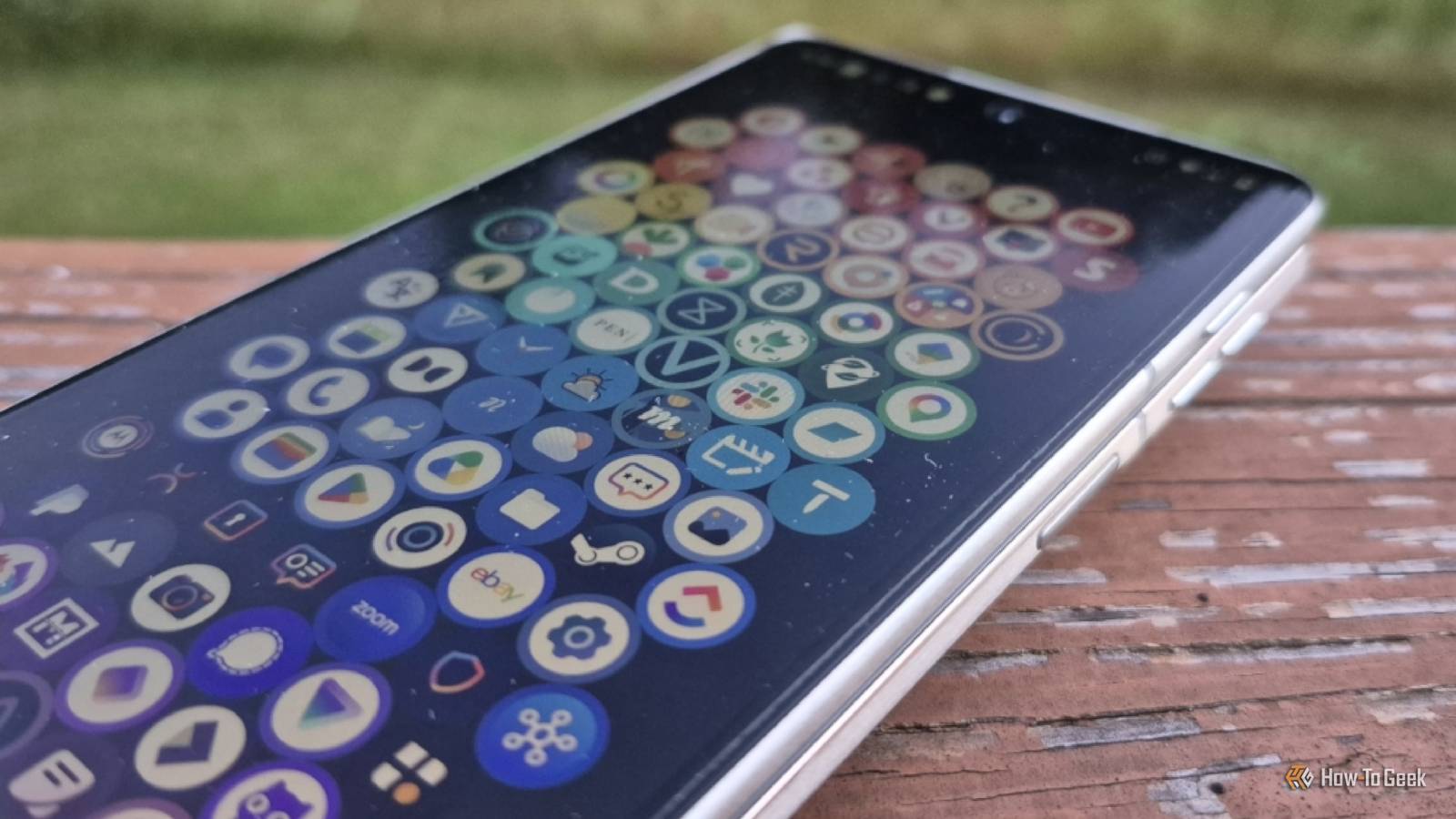
Published Oct 9, 2026, 9:00 AM EDT Bertel is a lifelong tech enthusiast with over a decade of experience writing thousands of articles about Android devices, Linux, and more. Before joining the How-To Geek team, Bertel wrote for the likes of MakeUseOf, MakeTechEasier, and Android Police—at the latter he wrote over 3,500 articles. He delights in helping others decide which tech to bring into their lives... and which tech to do without. Bertel graduated from the College of William and Mary in 2012 with degrees in History and Government. He has spent his entire career as a tech journalist covering Android, Linux, wearables, smart home devices, and more. Android's default home screens are good enough that most of us no longer feel compelled to swap them out, but I still do. Hear me out — if you want a launcher that's willing to try something different and that you know isn't tracking what you do, here are some of the cream of the crop on F-Droid today. Entropy's Defiance Let's start this list with something completely unconventional. As the name suggests, Entropy's Defiance isn't your usual home launcher. It has no app icons on your home screen, and getting to your apps isn't the priority. This launcher is a task manager, first and foremost. You'd be forgiven for mistaking the screenshots above for a to-do list app or calendar. Entropy's Defiance keeps your priorities at the top of your mind, and your screen. The launcher encourages you to reflect on your life goals and to set hard deadlines. It then reminds you of these intentions day in and day out by keeping them in a place you're most likely to see. The beautiful thing about Entropy's Defiance is that it's a beautiful app. Thankfully, this is not a case of function over form. The launcher has a distinct vibe that I'm happy to see whenever I swipe up from the bottom of my screen. Plus, unlike most minimalist launchers, it actually pushes me to think differently about how I use my phone and what I do with my time. Victoria Launcher I have a deep love for Niagara Launcher, and this Android launcher is the first I've seen gain traction among people in my personal life as well. You don't need to be an Android power user to have heard of it. Victoria Launcher is a clone of Niagara Launcher that, while lacking the full range of themes and widgets, nails the fundamentals. Your favorite apps appear in a list with a clock above them, and you can scroll through apps by swiping the right side of the screen. It's hardly the first launcher like this, but most don't quite feel like Niagara Launcher. This one does. Like many open-source launchers, Victoria Launcher comes with more fine-tuned controls. I can adjust the left-side padding, and unlike Niagara, the position stays consistent as I switch from the cover screen to the interior of my folding phone. Escape Launcher F-Droid is packed with text-only minimalist launchers, most of which look like basic text editors. Escape Launcher is an option that brings the style. It has the polish and presentation that you would expect on a commercial minimalist device like the Light Phone 3. Before Victoria Launcher, Escape Launcher was my Niagara Launcher replacement. Like most minimalist launchers, your apps are displayed in a list. You can pick from many themes that will integrate with your phone's Material 3 Expressive design. You can search for apps by typing to launch them more quickly. There's also an optional screen-time tracker to help you use apps more mindfully. Kvaesitso Many open-source launchers are clones or variations of approaches used elsewhere. Like Entropy's Defiance, Kvaesitso is bold enough to go in a different direction. Instead of encouraging you to swipe through app icons or app names, it instead emphasizes searching for your apps by typing (though a full list of apps and app icons is always just a swipe away). Other phone tasks are meant to be just as accessible. In the same place you type app names, you can look for contacts, search for files, and search the web. While the launcher works just fine on standard Android phones, it feels particularly at home on keyboard-equipped models like the Unihertz Titan 2 Elite. Chroma Launcher Here's a fun one. Do you organize books on your bookshelf by color instead of title or author? Chroma Launcher does the same thing, but for the apps on your phone. When you return to your home screen, you see every app you've installed arranged in a grid by app icon color. This is an incredibly quick and easy way to pick out a familiar icon in a crowd, though it obviously isn't for everyone, especially if you have a hard time distinguishing between certain shades. There is no other rhyme or reason for how the app icons are arranged to fall back on. More open-source Android launchers are appearing all the time I love open source software, but Android, rather than Linux, is my preferred operating system. While there have always been great open-source Android apps, there hasn't always been a wide range of options, and some felt just a bit janky. It now feels like we're entering a golden age of open-source Android software, with tantalizing options entering F-Droid all the time.
The 5 best open-source Android home screen replacements you haven't heard of
Full Article
Original Source
Read the full article at Howtogeek →KhanList aggregates and links to publicly available news content. We do not host full articles from third-party sources. Always verify important information with original sources.