
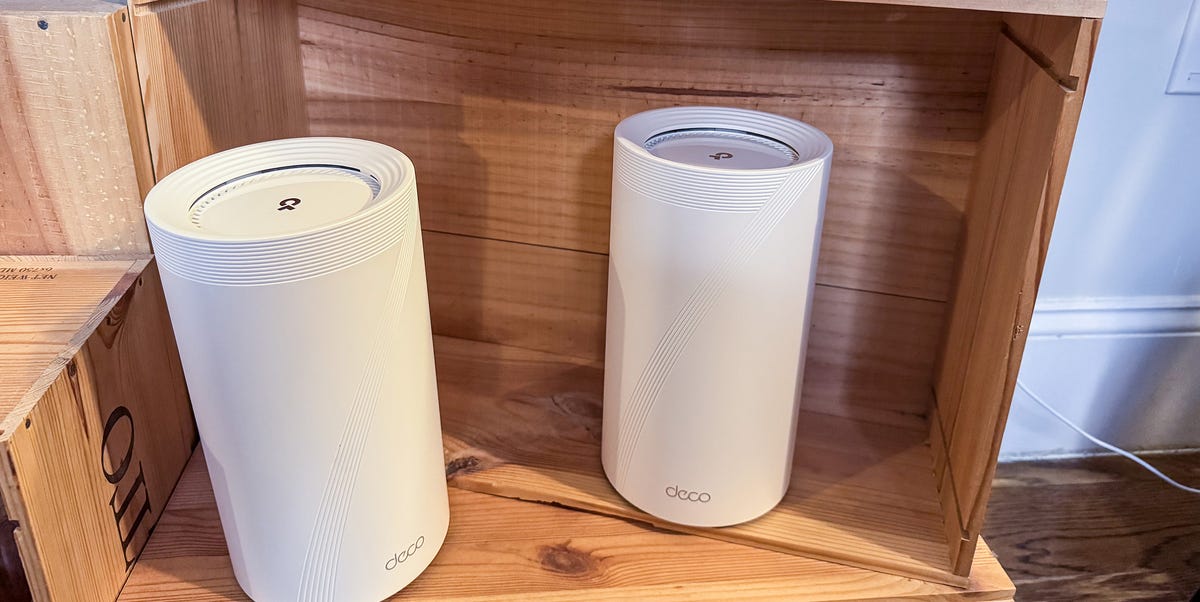
ProsAffordable 6 GHz-compatible optionPlenty of fast Ethernet portsAlexa and Google Assistant integrationConsAdvanced parental controls and security features cost extraMobile app setup onlyThe TP-Link Deco 7 Pro BE14000 is a jack of all trades mesh network that offers strong performance in nearly every category, delivering impressive speeds that are close to our top performers’ without costing an arm and leg.The setup was fairly straightforward. All I had to do was download the TP-Link Deco app, log into my TP-Link account, and press a button on-screen to set up a new network via the main hub. Once the main hub was connected, the app walked me through linking additional nodes. You don’t have to be a techie to set up the Deco.And while wired connectivity always plays second fiddle to wireless speed in a mesh (or any router these days), I liked the Deco 7 Pro’s solid selection of Ethernet ports. You only get three per node, which is not a lot, but one of them is a 10GB connection, which opens the door for one device to get a highly stable, high-speed connection when and if you need it.My biggest issue with this router is the fact that TP-Link locks many of its software-based features, including security and parental controls, behind a $6 per month/$55 per year paywall. Mesh networks, even a mid-priced one such as this one, are already pricey devices. It’s a price I’m sure most people will avoid paying, and the router’s worse-off for it.Read Our Full ReviewProsImpressive real-world speeds for a dual-band mesh networkNo paywall for parental controls and advanced security featuresMaintains solid performance at a distance better than expectedConsNo 6 GHz supportWired Ethernet ports max out at 2.5 Gbps.Mesh networks can toss a lot of exotic specifications in front of you to wow you and impress you, but the Asus ZenWifi BD5 BE5000 is powerful enough for most large households and small businesses. You can get a three-node set for less than $250 on Amazon right now. That gives you 6,800 square feet of coverage. And if you need “only” 5,000 square feet of coverage? The two-pack will run you less than $140 at the moment. That’s an incredible amount of performance for a very low price.There’s only one of me, and Popular Mechanics refused to pay for my plan to clone me into a family of five for testing, but I did my best to try and overload the BD5’s network. Cue one TV streaming a movie through a Roku Ultra, one MacBook streaming another movie in 4K, one Windows laptop connected to an online game, an iPhone streaming YouTube videos in 4K, an iPad streaming yet another 4K movie, and a Sonos sound system playing lossless audio, all over WiFi (not to mention the smattering of smart home devices, from Philips Hue bulbs to SimpliSafe security cameras). The BD5 didn’t hiccup. Even when I began to move the more portable devices farther away from the nodes, it maintained a reliable connection over the 2.4-GHz band.I also liked the fact that you can set up BD5 without a mobile app. App-based setup is generally more intuitive for most new users, but some of us still prefer setting up on our primary device. Asus lets you handle it either way, and I appreciate having the option.This is not a great network for power users who want high-speed wired connections. The main node only has two Ethernet ports, both of which top out at 2.5 Gbps, so you have limited wired bandwidth. If you have a lot of devices that need the added stability of a wired connection, like a desktop PC or game console, this network may not have enough ports for you. Still, the BD5 still outperforms some of the most popular mesh networks–most notably the Eero 7–on speed and bandwidth, and at a lower price. When it comes to the best overall performer for most households, the Asus BD5 is hard to beat.Key SpecsHighest Recorded Data Transfer Speed (Wireless)5 GbpsHighest Recorded Data Transfer Speed (Wired)5 GbpsWiFi StandardWiFi 7 (802.11be)Bands2 (2.4 GHz, 5 GHz )Streams8 (2x2 2.4 GHz, 2x2 5 GHz)WAN/LAN Ports2 x 2.5 GB WAN/LANDimensions5.51 x 2.76 x 5.51 in.Advertisement - Continue Reading BelowProsThe 6-GHz band offered the fastest speeds of any mesh networkMaintains fast performance even after straying far from a nodeFanless design runs quietAdvanced features aren’t hidden behind a paywallConsNot enough high-speed ethernet portsLarge access points make them hard to place elegantlyThe Asus ZenWiFi BQ16 Pro BE30000 delivered the best pure networking performance of the mesh networks I tested, delivering higher and more consistent speeds across four bands, even as I walked a connected device farther and farther away from the nodes. Its 6 GHz band, in particular, delivered immense speed–up to 3 Gbps for one device in real-world ·albeit close-range) testing–even while dealing with the expected range and performance roadblocks created by my building.The BQ16 is, quite simply, a beast. There was no way that one person like me was going to overload its capabilities. I’d need a U-Haul to drop off enough laptops, smartphones, game consoles, and TVs to run simultaneously to even think of starting to stress the BQ16’s limits. Even then, the limiting factor would probably be the internet plan more so than the mesh network itself.That means the BQ16 will be overkill for most homes, but if you run a small business or office that requires a lot of people using very performance-intensive programs online at the same time, then it’s your best option to make sure that none of your employees are bumping elbows with each other to compete for WiFi signal strength and speed.Its fanless design is also a much bigger selling point than you might think. The nodes run remarkably quiet. Some of the networks I tested, like TP-Link Deco BE330000, generated a fair amount of white noise, but you won’t hear a peep from these guys. That said, they are fairly large, which may lead to issues if you don’t have rooms where you can conspicuously place them on desks, shelves, or end tables.And while BQ16 is far more expensive than many of my other recommendations, I appreciate that Asus doesn’t try to nickel and dime you with a subscription to access advanced features like VPN integration, security features, and parental controls. It’s a surprisingly common practice these days that leads many people to leave their systems unsecured. Here, you pay a high price, but you get the full package.Pros2.4 GHz, 5 Ghz, and dual-6 GHz bands provide plenty of connection optionsFour Ethernet ports for wired connectionsSlightly cheaper than the direct competitionConsSurprisingly loud fanMonthly subscription for advanced parental controls and security featuresIf you’re willing to pay top dollar for a flagship mesh network like Deco 7 Elite or the Asus BQ16 Pro, the distinctions between the options can become hard to parse on paper. I found that the Asus mesh outperformed this model in practice, but TP-Link comes close to matching it in nearly every category, but costs about $100 less. (That price may vary, though, depending on how many nodes you buy.)The one circumstance where I’d definitely recommend the Deco 7 Elite over the BQ16 is its array of ports. You get four ethernet ports, two of which support up to 10GB data transfer speeds. That specifically makes it a great option if you have a gamer in the house, since fast-paced online games like racers and shooters can be disrupted by even small connection hang-ups. Putting a node near their setup will ensure they get the best possible speeds (and don’t choke up the network for everyone else).As with the Deco 7 Pro, TP-Link networks come with a few hitches, including a subscription for advanced features. This is an annoying issue, but not wholly disqualifying, especially if you want top-tier specs and this router’s slightly lower price allows you to afford it.Key SpecsHighest Recorded Data Transfer Speed (Wireless)Up to 33 GbpsHighest Recorded Data Transfer Speed (Wired)Up to 25 GbpsWiFi StandardWiFi 7 (802.11be)Bands4 (2.4 GHz, 5 GHz, 6 GHz-1 [lower], 6 GHz-2 [upper])Streams16 (4 x 2.4 GHz, 4 × 5 GHz, 4 x 6 GHz-1 [lower], 4 x 6 GHz-2 [upper])WAN/LAN Ports1 x 10 GB WAN/LAN, 1 x 10 GB SFP+/RJ45 Combo WAN/LAN, 2 x 2.5 GB WAN/LANDimensions5.04 × 5.04 × 9.29 in.Advertisement - Continue Reading BelowProsSleek, compact form makes it easy to placeEasy to set upSyncs easily with Amazon Alexa for better smart controlsReal-world WiFi speeds match theoretical specs more closely than other brands’ mesh networksConsNot many Ethernet portsAd blocking, content filters, and other advanced security features are locked behind a monthly subscription paywallCan’t choose frequency bandAmazon’s Eero mesh networks are far and away the most user-friendly mesh networks for folks who are new to and/or uncomfortable with setting up their own routers. Unboxing the Eero 7 and setting it up for the first time was easy as pie, thanks to an intuitive, app-based setup process that walks you through every step, and additional connectivity with my Alexa-based smart home gear. After naming the network, choosing a password, and deciding to turn on the optional guest network, Eero breezed me through setup in about 10 minutes. You don’t have to be a computer person to set up the Eero 7.Part of the Eero’s ease and speed comes from eliminating the fine-tuning customization options of most routers and mesh networks, such as choosing which frequency band you want to use. That’s right, there’s only one WiFi network to connect to. The Eero 7 will automatically swap the connection among the bands based on which it thinks is best for your use at the moment. On the one hand, that means the Eero is intelligent enough not to have you micromanage your connection by switching between bands manually. On the other, though, it means you forfeit that level of control.The Eero 7 comes as either a two-pack or three-pack, depending on how much coverage you need. Two nodes will cover up to 4,000 square feet, and three should cover up to 6,000 square feet. The most irritating thing about the Eero 7 is that Eero locks away some parental control features behind Eero Plus, a monthly subscription service that costs $10 per month or $100 per year.Matt Jancer has been in the industry for 15 years and lives in his favorite urban death maze, New York City. He’s traded words for money on behalf of more than 15 magazines. Some of his longest-running bylines were spent covering cars, motorcycles, outdoors gear, health and fitness for Car and Driver, Outside, Esquire, Smithsonian, Playboy and Wired. When he’s not writing about motorcycles and our place in the wilderness for a living, he’s writing for enjoyment, riding his motorcycle, and mountain climbing out West. He believes everyone needs at least one hobby they have none of their ego invested into, and so guitar noises and cooking smells have been known to emanate from his apartment. Oh yeah, and he thinks pigeons are way underrated.Mike Epstein is a Senior Commerce Editor at Hearst Enthusiast Group, producing reviews for buying guides Popular Mechanics, Runner’s World, Bicycling, and Best Products. Prior to joining Hearst, he was a video game and technology critic for over 10 years, with bylines at IGN, Gamespot, Variety, Lifehacker, Kotaku, GamesRadar, Flavorwire and Digital Trends, among others. Now, he’s a jack of all trades, helping reviewers share everything they know about all kinds of technical gear, from snowblowers, to running shoes and bicycles, and every kind of gadget imaginable.
The 5 Best Mesh WiFi Systems Can Reach Every WiFi Dead Zone in Your Home
Full Article
Original Source
Read the full article at Popularmechanics →KhanList aggregates and links to publicly available news content. We do not host full articles from third-party sources. Always verify important information with original sources.