
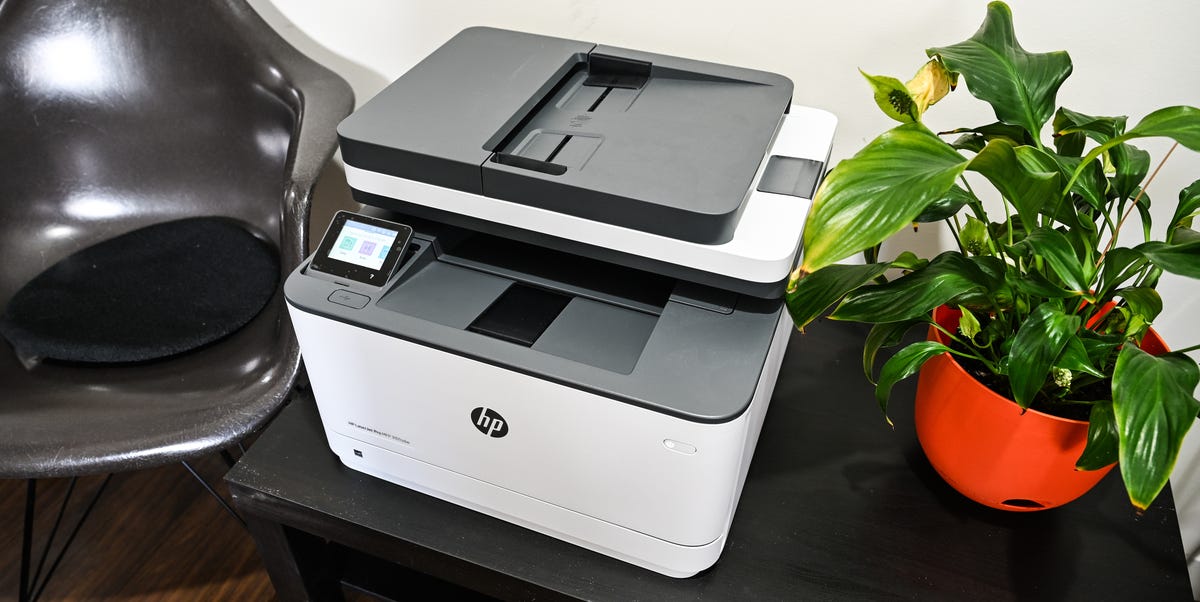
ProsTouchscreen color LCDFast performanceGood build qualityThere’s no perfect laser printer, but if you’re looking for a reliable, easy-to-use unit that produces high-quality prints, the HP LaserJet Pro MFP 3101sdw fits the bill. I’ve been using this printer for several months and found that it’s an ideal fit for my home office. It also has plenty of advanced features that would make it a good fit for a small business.With a 35ppm print speed, the 3101sdw is fast for its intended audience. When connected to a typical home Wi-Fi network, it takes about 5 seconds from pressing print to outputting the first page. Printed text looks good even at lower-quality settings, with small fonts staying sharp and legible. I found the scan quality more than adequate for everyday use, but 300 dpi is too low for designers, photographers, and other creative users. It also runs quiet, which is always a nice bonus.Anybody who needs to make copies will find the ADF-equipped scanner handy, while the 2.7-inch touchscreen makes setup easy. It took me less than 10 minutes to get it up and running. Whether you connect via USB, Ethernet, or Wi-Fi, the printer responds quickly. It also has a USB port for quick prints or saving scans to a flash drive.While the 3101sdw is small enough to fit on a large desk, it’s more practical to put it on its own stand. I wouldn’t call it “lightweight,” but I could carry it down five floors without much effort. It won’t win any design awards, either, which is too bad because HP generally knows how to make great-looking products.The paper tray has an average 250-page capacity, but a notable drawback is that it has no manual feed tray. I didn’t find this an issue, but if you need to, say, print on envelopes, it could be problematic because you'd have to switch out the paper in the main tray. Another expert reviewer dinged the 3101sdw for lacking a fax function, but my workaround is to use the HP Smart companion app to scan and send (but not receive) faxes.The 3101sdw offers stronger print quality, a better build, and ease of use. It’s hard to say how long mechanical devices like this will last, but HP’s printers are known for their reliability—I have a LaserJet from the 1990s that’s still going strong.Key SpecsFunctionsPrint (monochrome), scan, copyPrint speed35 ppmPrint resolution1200 x 1200 dpiPaper capacity250 pagesDuplexingYesDuty cycle50,000 pagesConnectivityUSB, Ethernet, Wi-FiDimensions16.5 x 15.7 x 12.3 in.ProsAffordableCompactSuitable for personal and small office useConsLow duty cycleNo scanning or copyingIn my experience, Brother makes affordable laser printers that consistently deliver solid performance and text quality. At 36ppm and under $200, the HL-L2460DW is a strong basic option for a home or small office. Despite its barebones design, it has useful features like double-sided printing, Ethernet connectivity, wireless printing, a generous 250-page paper capacity, and a mobile app. Plus, it’s lightweight and doesn’t take up too much space.The HL-L2460DW supports a 1,200-page standard-yield toner cartridge or 3,000-page high-yield toner cartridge, but comes with a starter cartridge that only yields 700 pages out of the box. (This is typical of printer manufacturers.) If you plan to print a lot, I’d recommend buying a high-yield cartridge right when you buy the printer.This is a “budget” option, though, so this printer comes with a few caveats. I don’t love the small LCD display, which has a basic interface that doesn’t display much info and doesn’t feel as well-made. The basic operation means there’s no scanning, copying, faxing, ADF, or other multi-function capabilities. Plus, black-and-white graphics and images don’t look as good as text. User reviews have also complained about its reliability. Still, given its balance of price, speed, and print quality, the HL-L2460DW is a good value regardless of budget.If it’s for personal use and you only plan to use it every so often, I’d steer you toward a different model, the HL-L2420DW, which has a 30ppm speed and every aforementioned feature except Ethernet. It’s perfect for casual printing, and it costs $50 less.Key SpecsFunctionsPrint (monochrome)Print speed36 ppmPrint resolution1200 x 1200 dpiPaper capacity250 pagesDuplexingYesDuty cycle35,000 pagesConnectivityUSB, Ethernet, Wi-FiDimensions14.0 x 14.2 x 7.2 in.Advertisement - Continue Reading BelowProsExcellent print qualitySupports glossy paper for photosLarge touchscreen LCDConsPrint resolution max is 600 x 600 dpiPricey to maintainMost offices shy away from color laser printers because they are expensive to buy and maintain, and employees often use them to make wasteful prints. Likewise, at home, you’re probably better off going with a color inkjet printer. That said, if you truly need color prints, I love the HP Color LaserJet Pro MFP 3301fdw, which delivers excellent print quality and attractive features like glossy paper support. It’s a strong, if pricey, complement to any office.Despite its compact footprint, the 3301fdw has a 50-page duplexing ADF and a 250-page paper tray. It’s not the fastest color laser printer, but its 26ppm speed is more than adequate for home or small business use.Print quality is where HP’s laser printers excel. You can expect documents with crisp text and well-saturated, natural-looking color graphics and photos. Unlike most laser printers, the 3301fdw is compatible with select HP glossy paper, so you can make photo prints. They don’t really compare to inkjet photo printers, but it’s fine in most cases.Like our overall pick, the 3301fdw is a breeze to set up via its 4.3-inch color touchscreen. For connectivity, it supports USB, Ethernet, and Wi-Fi, which covers most home and office networks.You may have guessed the printer’s big con is that it’s pricey to operate. Whether you’re using the standard or high-yield toner options, the cost per page is high. If you’re looking to spend a little less, I’d look at the Brother MFC-L3380CDW, which has a comparable feature set to the 3301fdw and a lower operating cost. You’re compromising a bit on print quality and performance, though, which is why the HP leads the pack.Key SpecsFunctionsPrint (monochrome or color), scan, copy, faxPrint speed26 ppmPrint resolution600 x 600 dpiPaper capacity250 pagesDuplexingYesDuty cycle40,000 pagesConnectivityUSB, Ethernet, Wi-Fi, faxDimensions16.46 x 16.5 x 13.44 in.ProsDuplexing for printing and scanning50-page ADFLarge 3.5-inch touchscreenConsPaper capacity not expandableNo front-USB portA true small-business laser printer needs to be a workhorse. It should offer a robust, office-centric range of features, print fast, support multiple users, hold enough paper, and have a high duty cycle. Experts agree that Brother makes some of the best laser printers for offices, and the monochrome MFC-L2900DW multi-function model is a particularly good option.Imagine the L2900DW as an enhanced version of the HL-L2460DW. It shares a similar design, small footprint, and print engine, but features a high-capacity 50-page ADF for copying or scanning multi-page documents. The L2900DW also has a single-page duplexing scanner for two-sided pages. There’s even a fax function.A large 3.5-inch touchscreen makes setup and on-device operation easy without a computer, while USB, Wi-Fi, and Ethernet give you options for connecting. Combined with a fast 36ppm speed, sharp text print quality, low operating cost, and the option to use high-yield cartridges, you’ve got a very capable all-in-one laser printer.Graphics don’t look as sharp as text, but that shouldn’t matter if your office prints mainly documents. While its 250-page paper tray is adequate for a small business, expect to reload often if multiple users print often. This model offers no option for a larger or expandable paper tray.The ADF has a scanner resolution of just 600 dpi, but that is plenty for text documents; the flatbed scanner has 1,200 dpi, which is fine for color images. The output tray’s 100-page capacity is low for heavy usage. One missing feature is a front USB port, which is handy for printing or faxing documents from a flash drive or saving scans to one.If you need to support a large number of workers, consider stepping up to Brother’s MFC-L5915DW. It has a 70-page ADF and a 5-inch LCD, and you can expand its paper capacity beyond the standard 250 pages. With a faster 50ppm speed, support for 18,000-page high-yield cartridges, and a higher duty cycle, it’s an ideal choice for busy offices. It’s a big jump in price, which is why I went with the L2900DW, but it may cost less to operate in the long run.Key SpecsFunctionsPrint (monochrome), scan, copy, faxPrint speed36 ppmPrint resolution1200 x 1200 dpiPaper capacity250 pagesDuplexingYesDuty cycle35,000 pagesConnectivityUSB, Ethernet, Wi-Fi, faxDimensions16.1 x 16.6 x 12.5 in.Advertisement - Continue Reading BelowWhat to ConsiderWhether for the office or your home, a laser printer is a good option if you often print many multi-page documents. If you need a home printer for occasional printing, a more affordable inkjet printer may make more sense. Again, a laser printer costs more up front but pays dividends in the long run as a professional tool or a home tech staple. If you’re on the fence about what to buy, here are the things I look at when I evaluate laser printers:Monochrome or Color?Most prints from a laser printer are black-and-white text documents, and most models deliver decent print quality. If you need to print impactful pages with photos and charts, a color laser printer can print higher-quality graphics. Even the best monochrome printers we’ve tested and researched can’t match the detail and clarity of color ink toner. For example, if you have a multi-colored pie chart, a monochrome reproduction can only do so much to separate the different color shading.Keep in mind, though, that even the cheapest color laser printer will be expensive, and its print quality may not rival that of higher-end models. They also do not support specialty media like glossy photo paper.Single-Function or Multi-FunctionA basic laser printer’s sole function is to print documents, and that’s enough for most people. It’s generally compact and fits on a desk. But if you run a small business or work remotely in a home office, you may want a multi-function, “all-in-one” printer that scans and copies, too, among other tasks. Multi-function printers are far more useful, but they’re larger and cost more due to the extra hardware inside.Yield and Duty Cycle“Yield” refers to the estimated number of pages you can get out of a single toner cartridge. Most laser printers should get around 1,500 pages from a toner cartridge, while high-yield cartridges should last 3,000 pages or more.Toner cartridges are expensive, especially for color printers, but they offer a better cost per page than ink. My rule of thumb is that high-yield toners will save you money in the long run.Similarly, a laser printer’s “duty cycle” rating refers to the maximum number of prints per month that the manufacturer recommends to keep it in proper working order. Basic laser printers have a duty cycle of around 5,000 pages or less, while heavy-duty models have ratings of 10,000 or higher. Printing beyond the rated duty cycle can lead to breakdowns, more maintenance, or a shorter lifespan.SpeedFor personal use or small businesses that print occasionally, 25 to 30 pages per minute (ppm) should be fine. Small offices with a few employees that print often may want a faster printer with a speed of 35 to 40 ppm. In a larger office, I’d look for at least 40 ppm, if not more. Keep in mind that manufacturers measure speeds under ideal conditions, and real-world results may not always match. Expect a small discrepancy of a few pages.ConnectivityMost printers rely primarily on a USB cable to connect to your computer, but a hard-wired connection alone isn’t practical in today’s world of wireless laptops, phones, and tablets. I recommend choosing a printer with a wireless connection compatible with your most-used devices, such as Wi-Fi or Apple AirPrint. Some laser printers also support Ethernet for a high-speed hard-wired connection. Office-focused machines may include a front USB port so you can plug in a flash drive with the files you need to print.Paper handlingMost laser printers have a paper tray that holds 250 pages, which is enough for personal and small business use. Some compact printers may have a smaller capacity–around 150 pages. If you expect to print a lot, consider a model with a higher-capacity tray or support for multiple trays, and look for an output tray large enough to hold everything you print out. All printers also have a multi-purpose tray for manually feeding non-standard paper like envelopes.Extra featuresIn addition to the essentials, there are some features that I look for which are nice to have, but won’t make or break a printer:Double-sided printing (duplexing) saves paper and benefits many users. An automatic document feeder (ADF) is a tray that makes scanning multi-page documents fast and efficient. Though it’s an analog technology, fax support is still prevalent today. A touchscreen display makes navigation easier, allowing you to initiate scans, prints, and copies, and helps diagnose problems without a computer, phone, or tablet.Last but not least, most laser printers include security features to protect against unauthorized use, especially units for small and large businesses. Depending on the model, it can be basic or advanced. Depending on your use case, you may consider some or all of these essential. That said, they aren't universal, and some printers work well without them.FAQsAre laser printers better than inkjet printers?Laser printers use toner, a powder heated onto paper, while inkjet printers spray ink droplets. Laser printers are considered superior for their speed and print quality, but they are expensive to purchase and maintain. Inkjet printers offer color printing and affordability, but prints need time to dry, and the cost per page can be higher with heavy use.However, the best modern inkjet printers today are fast and deliver great-looking prints, especially photos. They also support different paper types and sizes. Laser printers can also print in color, but they're pricey. Beyond speed, their advantages include consistent print quality and long-term reliability.Which technology is better ultimately depends on your needs. Most people will find an inkjet printer sufficient and more versatile, but those who print often may find a laser printer more economical in the long run. In an ideal setup, consider an affordable laser printer for frequent print jobs and a good inkjet printer for color documents and photos.Is a laser printer good for photos?Color laser printers can print photos and graphics on standard paper, but if you want to print on photo paper, an inkjet is the better choice, especially one that supports multi-color ink tanks. Laser printers aren’t designed for photo-quality reproduction, and generally don’t work with specialty paper. (As we discussed, some HP models are compatible with select glossy paper.)Are laser printers reliable?Depending on usage and maintenance, a laser printer can last for many years. It’s a mechanical device, though, so there’s no guarantee that it won’t break down and require service. Here are a few tips to keep your printer running as efficiently as possible and maximize its lifespan:Keep the area around the printer dust-free, and replace the drum unit (the component that transfers toner powder onto paper) and rollers when you notice issues like frequent paper jams or inconsistent print quality. Avoid using incorrect paper or overfeeding it to prevent jams. If you encounter a jam, remove the paper gently to avoid damaging any components. Check the manufacturer’s website for firmware updates to keep the printer software current and fix bugs. Toners have a longer shelf life than ink, but consider replacing them after a couple of years if the print quality looks off. Use official ink from the manufacturer for reliable operation and results, rather than third-party options.For office environments where heavy-duty printing occurs (10,000 pages a month or more), have a technician service the printer once a year. Home models with low usage levels generally don’t need professional servicing.Les Shu has been writing about consumer tech for over 20 years, including product reviews and features about the companies that make them. As a former editor, he helped shape tech coverage for publications such as Business Insider and Digital Trends. Besides tech, he has experience covering lifestyle topics ranging from outdoors gear and travel to toys and men’s style. He’s currently obsessed with minimalist travel and planning a long trip with just one bag.
The 4 Best Laser Printers For Your Home and Small Office
Full Article
Original Source
Read the full article at Popularmechanics →KhanList aggregates and links to publicly available news content. We do not host full articles from third-party sources. Always verify important information with original sources.