
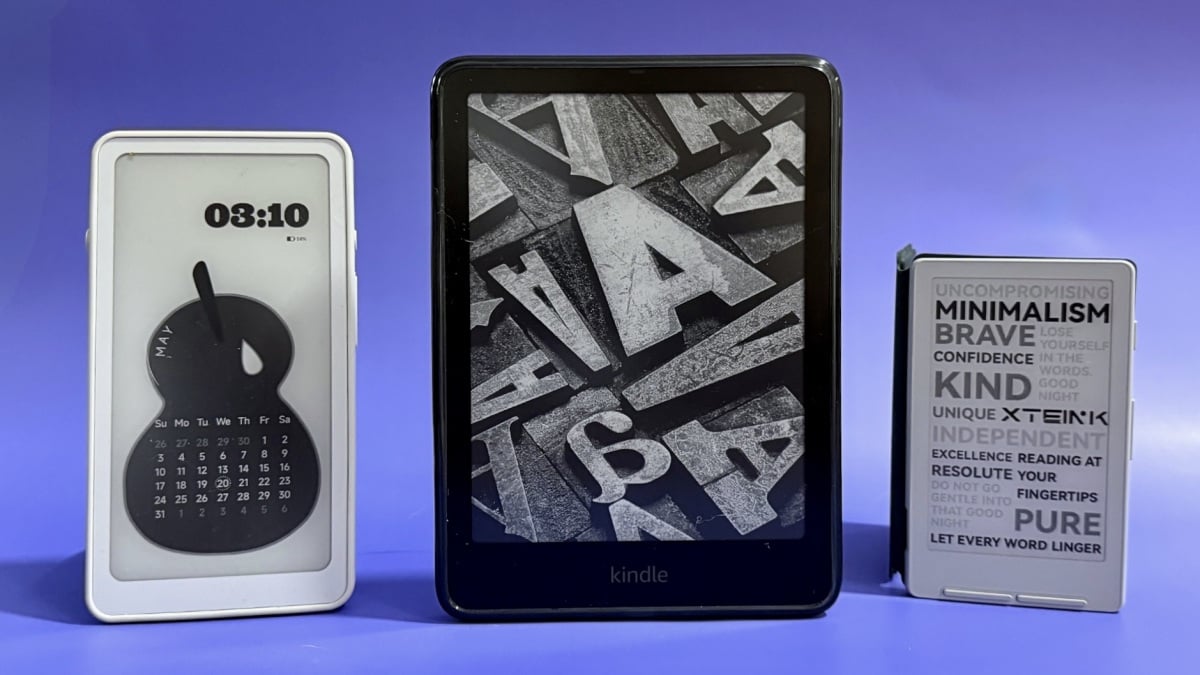
You won't miss the feeling of paper with these e-readers. By Samantha Mangino Samantha Mangino Lead Shopping Reporter Samantha Mangino, is an e-reader expert. She's tested all the Kindle and Kobo e-readers, diving into the buzziest models. Her love of reading extends beyond the e-reader beat, covering books and authors, too. In the tech space, she covers tablets, smart rings, and headphones. Read Full Bio on September 15, 2026 Share on Facebook Share on Twitter Share on Flipboard All products featured here are independently selected by our editors and writers. If you buy something through links on our site, Mashable may earn an affiliate commission. Credit: Samantha Mangino / Mashable While trading in a classic book for a digital device may seem sacrilegious, the reading community has wholeheartedly embraced e-readers. Just head over to BookTok, and you'll find a passionate community of Kindle, Kobo, and Boox users.When you think of the best e-readers, your first thought is likely an Amazon Kindle; however, this isn't a list of the best Kindles — although we do have a list of those, too. While Kindles are great — there's certainly no denying that — you can find a couple of equally wonderful alternatives. Overview These are the tech, tools, and products — from laptops to e-readers, from earbuds to robovacs, and more — that Mashable ranks best in class. Table of Contents So, what is the best e-reader for 2026? I'm regularly testing new e-readers (and tablets) and cycling through different models to stay up to date on the best options available. If you're gearing up to read more books this year, I can recommend a model you'll love. Latest e-reader newsAs of September 2026, we've added the Boox Go 6 to this guide, naming it the best Kindle alternative. We also named the Kindle Paperwhite the best e-reader for the beach (in addition to being the best overall) and named the Durobo Krono the best e-reader for audiobooks.In August 2026, Amazon increased the price of Kindles. Now the basic Kindle costs $149.99 ($40 increase) and the Kindle Paperwhite costs $199.99 ($40 increase).In July 2026, Boox announced it was releasing a pocket-sized e-reader, the Picco. After IFA 2026, rumors floated that the Boox Picco would be released in November 2026.Also in July 2026, Xteink dropped the X4 Pro, a new tiny e-reader with a touchscreen.As of April 2026, we have included the Durobo Krono and the Xetink X4 e-reader in this guide.In May 2026, Amazon ceased support for e-readers released in 2012 or earlier, which includes the first generation of Kindle and Kindle Paperwhite.Also in May 2026, Kobo announced its integration with Storygraph, which syncs your on-device reading progress with the Storygraph app. Our Pick The Good & The Bad Good storage option Warm light adjusts from white to amber 20% faster page turns 12-week battery life Fully waterproof Ad-free version more expensive Brightness doesn't auto-adjust Our review Read our full review of the Kindle Paperwhite. Who it’s for Pretty much everyone: If Amazon is pretty intrinsic to your spending, then going for a Kindle, specifically the Paperwhite, makes the most sense. Amazon promised that the 12th-generation Kindle Paperwhite would be the fastest yet, and it delivered. It turns pages without stuttering, never slowing down when you’re in the thick of the action.Beach readers: It's also the best e-reader for the beach. The screen is vibrant and has adjustable brightness, meaning it can adjust when transitioning from reading in bright sunlight to dimmer indoors. It also comes with adjustable screen warmth, perfect for evening readers who want to give their eyes a chance to relax. It’s lightweight and fits comfortably in small crossbody bags. Plus, it’s waterproof, keeping it safe from poolside vacations and spilled water bottles in bags. Why we picked this Not a ton has changed between the 2022 (our previous pick) and 2024 models of the Kindle Paperwhite, but I can say for certain that the 2024 Kindle Paperwhite is the sleekest, fastest e-reader yet. It now has a slightly bigger screen at 7 inches compared to the previous 6.8-inch model, but the change is minuscule — besides the fact that the bigger model is slightly too big for my old Kindle case. The 2024 Paperwhite has gotten a slight upgrade in screen quality compared to the 2022 Paperwhite. While the resolution is still 300 ppi, it appears to have higher contrast, straying away from the like-paper look and edging closer to the look of a tablet. Don’t worry, though — unlike tablets, the Kindle Paperwhite still has a gloriously glare-free screen. It still has an IPX8 waterproof rating, so you can get some leisurely reading in the bath.In his review of the 2022 model, Mashable senior editor Stan Schroeder found only one extremely minor quibble with the Paperwhite Signature Edition, and I have to agree with him. On all Kindle models (besides the Scribe), the power button sits on the bottom, resulting in many accidental presses. This was the case with the prior Paperwhite model, and I was hoping that it'd move up top for the new model, but alas, Amazon has not made all the improvements it could have. Additionally, I wish this Kindle Paperwhite had page-turning buttons like the now-discontinued Kindle Oasis or the Kobo Libra Colour for a more ergonomic design.A big reason why I came back to the Kindle Paperwhite as the best overall e-reader is its processor. It's exceptionally fast and updates quickly. With Kobo e-readers, I had to manually sync them to get my library books to appear. The only feature I wish the operating system of the Paperwhite had was the ability to recalculate the page count of a book when you adjust the font size or margins. However, one big note on the Kindle Paperwhite is that it's not great for users outside of the U.S. The Kindle's Libby integration is only available in the U.S., so for those outside of the States, a Kobo is a better option.That said, the Kindle Paperwhite is still the best e-reader you can buy. Details The Good & The Bad Matte, glare-free display Perfect screen size Adjusts page count based on font Color display Waterproof Ad-free No page-turning buttons Can't log in to multiple library accounts at once No Amazon integration (though that may be a pro) Our review Read our full review of the Kobo Clara Colour. Who it's for For those who want an Amazon alternative: If you're just diving into the world of e-readers and not particularly thrilled about Kindles and their Amazon ties, then the Kobo Clara is the right answer. It offers a color display for those who enjoy manga and graphic novels, but it remains speedy with fast processing when turning pages or swapping between books.Libby users: It's especially great for Libby users, who want seamless integration with books that automatically load into your library as soon as you borrow them. While Kindle's Libby integration only works in the U.S., the Kobo works with Libby no matter where you live. Why we picked this Having tried my hand at more than a dozen e-readers in all shapes, sizes, and brands, I wasn't expecting to be so deeply impressed by the Kobo Clara Colour, but it is a wonderful e-reader. With a 6-inch screen, it's slightly smaller than the Kindle Paperwhite, but it allows you to hold it comfortably for multiple hours at a time without any wrist or arm fatigue.In my previous testing with Kobo devices, I've really liked them, but one sticking point is that they're slower than Kindles. Initially, I found that the Kobo Clara kept up with the Paperwhite, but after several months of use, it had a tendency to lag. Compared to Kindles, I had to manually sync the Kobo Clara to get my library books to show up.Its processing system is otherwise really smart and fixes one of my biggest e-reader pet peeves. When you adjust the font size on a Kindle, the device doesn't recalculate how many pages are in the book, making it inaccurate, so you don't know exactly how many pages you have left in a chapter. The Kobo Clara does recalculate page count accurately for a more exact reading experience. Though, one thing to note: Kobo counts the number of digital pages, whereas Kindle page numbers typically match up with physical book copies.For the same price as the Kindle Paperwhite, the Kobo Clara offers color displays, something you can't get in the Kindle lineup unless you're willing to spend $250. The colors aren't as bright as you'd experience in a physical book, but they're still vivid enough to enjoy a graphic novel.Its Libby (aka Overdrive) integration is seamless, and e-books you borrow on your library card will automatically populate on your account. You can browse and borrow library books directly from the e-reader, instead of having to whip out your phone app. However, for users who use Libby to the max with multiple library cards, you can only log in to one account at a time.The Kobo Clara's biggest downfall is its battery life. It's supposed to last up to 42 days, although many online users say it averages out at about two weeks. That's quite pathetic in the face of the Kindle's 12-week battery life; however, I'd trade in a better reading experience over a couple weeks of battery life any day. Details The Good & The Bad Adjustable warmth and brightness Scrolling feature Screen refreshes often Access to Google Play Store Fast processing Short battery life Slows down the more apps you download Not distraction free Our review Read our full review of the Durobo Krono. Who it's for Across app readers: If your digital library is sprawling — you have books through Kindle, Kobo, Libby, and Audible — then you need an e-reader that can access all of them. Durobo's Krono e-reader is a compact e-reader that basically functions like a tablet. Most e-readers on this list are Androids, but none have open Android systems that let you download the apps you want, as the Krono does.Audiobook lovers: For the audiobook lovers, the Durobo Krono also plays audio in addition to transcribing it. With access to the Google Play store available, you can download any app you read on to access your digital library, including Audible, Libro.fm, and Spotify. However, if you have a collection of EPUB files, you can also download them directly to Krono's library. Why we picked this Having tried several other open Android e-readers, I haven't been impressed. The Remarkable Paper Pro is way too big and the Boox Go is too slow and too difficult to get books on, so I wasn't expecting much from the Durobo Krono. Turns out, it is a phenomenal e-reader.Since I test e-readers for a living, my digital library is spread out across all different platforms. Rather than balancing a bunch of different e-readers, the Krono puts both my Kindle and Kobo libraries on one device. The only library I don't have access to is Apple Books, since it's unavailable in the Google Play Store.The Durobo Krono is the perfect size, with a 6.13-inch display, similar to the basic Kindle. It has a matte display with 300 ppi resolution. It also has a front light with adjustable brightness and warmth.Powered by an octa-core processor, it moves quickly between apps and books. It easily competed with the speed of both Kindles and Kobos; however, it can get bogged down. It runs the Kindle app, Libby, and Libro.fm no problem. But some apps, like Substack, slowed it down with their high internet demands. Once I deleted the Substack app, though, it got back to normal.As someone who loves to read while listening to the audiobook, I also love that I can do both on one device. I can listen to an audiobook on Audible while reading the EPUB file alongside it. The Krono also has voice transcription and note-taking capabilities, a nice bonus feature, but not essential in an e-reader. Details The Good & The Bad Perfect size for a reading marathon Comes with 32GB of storage Features writing capabilities Open Android system puts all reading apps on one device Steep learning curve for new users No waterproof rating Occasionally freezes when flipping through pages Our review Read our full review of the Boox Go 6 (Gen II). Who it's for You want an e-reader that does more: If you want to do more on an e-reader, like check your Storygraph or browse Libby, then you'll need one with an open system. The Boox Go 6 (Gen II) runs on an Android 11 system with access to the Google Play Store, so you can download any app to your e-reader. Yes, it could lead to more distractions, but with an E Ink display, it still feels more analog than a classic iPad or Android tablet.But you want it to look like an e-reader: The Boox Go 6 (Gen II) doesn't look like a tablet, though. The E Ink display provides a matte, black and white background with 300 ppi resolution, so it's gentle on the eyes. It's the same size as a basic Kindle but with the flush front design of a Paperwhite, so it gives you the best of both worlds. Why we picked this The Boox Go 6 (Gen II) is the brand's answer to Amazon's Kindle. With a 6-inch screen, it fits comfortably in your hand for hours of reading. With an open Android system, you can download any app in the Google Play Store, so you can access any book across any app, including Kindle, Rakuten Kobo, and Libby. It's the perfect size and shape to hold for hours at a time. Boox even sells a MagSafe case so you can pop on a PopSockets grip for an ergonomic hold. Boox e-readers do have a bit of a learning curve, as the E Ink display requires a bit of tinkering. But once you get it set up, it's extremely customizable. Because it can tackle a lot of apps rather than just doing one thing like a Kindle, it needs some extra power behind it. Unfortunately, it doesn't quite have it. The Boox Go 6 suffers from significant lag and screen response issues that make it occasionally frustrating to use. It's slower than either a Kindle or a Kobo, but it's a consolation you'll have to make if you want an e-reader that does more. Details The Good & The Bad Wireless transfer available Not compatible with DRM files Page turning buttons Built-in magnet Screen size is a little too small Low-resolution display Doesn't fit on all phones Who it's for Miniature enthusiasts: If you want an e-reader that you can have on you at all times and even slip in your pocket, there are so few options out there. That's what makes the Xetink X4 so special. It's a truly tiny e-reader with a 4.3-inch display; but with a built-in magnet, it can attach to MagSafe devices so you can keep it attached to your iPhone.You must love DRM ePUBs: If you think you're getting a mini Kindle, you're not. Instead, expect a tiny e-reader that is a great fit for turning online articles into PDFs or collecting all the free ePUBs. It's not compatible with any DRM files. Why we picked this In such a little package, the Xetink X4 feels like it should be a toy, but it's actually a solid e-reader. It's the smallest e-reader we've tested, measuring 4.3 inches, so you can slip it in your pocket and go. That small display, while convenient on the go, won't be suitable for all eyes, especially if you like to crank up the text size on your e-reader or phone.The resolution of the Xetink X4 is 219 ppi, which is lower res than you'll find on most e-readers. It also includes page-turning buttons along the bottom of the e-reader. Xteink has a great transfer system, too. It's similar to Amazon's Send to Kindle feature, in that you can send EPUBs and articles to the e-reader. The ability to send articles is particularly compelling, so you can send your reading list to your e-reader and enjoy them in one spot.My biggest issue with the Xetink X4 is how few files it supports, as you can't access Libby books or any DRM files on it. If you are going to commit, you'll have to be OK with reading primarily free EPUB files. However, folks at Lifehacker figured out how to install different firmware onto the device for a better reading experience. Details The Good & The Bad Compact size Most lightweight Kindle Best of the basics Generous storage space Cover sold separately Not waterproof No warm light Short battery life compared to other Kindle models Our review Read our full review of the Kindle (2024). Who it’s for Quality on a budget: If you want to dip your toes into e-readers, the standard Kindle model is the best budget-friendly model. Like the Paperwhite, it has 16GB of storage, with room for thousands of books. It’s the smallest Kindle, and you won’t miss the size of the Paperwhite. Instead, you’ll be delighted that it’s genuinely pocket-sized. Plus, if you want an e-reader with some flair, it’s now available in black and matcha, a vibrant light green. Why we picked this After testing the Kindle Paperwhite and Kobo Clara Colour, I thought I’d be ruined for the basic Kindle, but I found it to be an equally great device. It comes in a smaller package, the lightest e-reader here. Plus, the six-inch size makes it practically pocket-sized. Generally, it feels nicer to hold in my hand and bring on the go with me — exactly what I want in an e-reader.Sure, it’s not as high-tech as the Paperwhite, but I think it’s an even better size. The screen has the exact resolution as the Paperwhite, but just a bit smaller. You lose some screen space with its plastic casing, but I didn’t mind. I liked the rimmed front design, making it easier to hold while using. It also has the bottom power button, which is far less touchy than the other Kindle models, and it was harder to turn the device on or off accidentally.Functionally, it’s comparable to the Paperwhite. The biggest feature the standard Kindle lacks is adjustable warmth, which I worked around by using Dark Mode at night. However, the standard Kindle would be perfect if it were waterproof. That’s the biggest downside to me, as someone who needs to be able to take it to the beach.That being said, it is the most affordable, even after a recent $40 price increase, and it's a worthy sacrifice not to have waterproofing for its $149.99 price. Details The Good & The Bad The perfect size for being portable without being too small Buttons are excellent for turning the pages Generally well-designed Color (especially highlights) show up clearly OverDrive integration is seamless and beats Kindle's options Pocket integration is great for folks who love to read articles Palm rejection could use some work Kobo’s online store isn’t as expansive (or affordable) as Amazon’s Some ghosting issues occasionally Notebook mode could use some work Battery life could be better Our review Read our full review of the Kobo Libra Colour. Who it's for Color enthusiasts and graphic novel readers: For serious readers who don't mind splurging a little, the Kobo Libra Colour delivers an upgraded e-reader experience. With a similar seven-inch display, the Libra Colour offers two features the Kindle Paperwhite cannot: Color and note-taking. Book covers, in-book illustrations, and photos are all featured in color with the Libra. Annotators and highlighters: And if you're an annotator, you can highlight and mark up your pages in different colors to stay organized. In the Kindle family, only the Scribe supports scribbling, and with a higher price tag. Bathtub readers: It's equipped with more than enough storage at 32GB and is waterproof. Plus, if you were devastated by the discontinuation of the Kindle Oasis, the Libra Colour offers a similar design that includes page-turning buttons. Why we picked this If you were to ask me which e-reader to buy, it's a real toss-up between the Kindle Paperwhite and the Kobo Libra Colour. While the Kobo Libra Colour is expensive at $229.99, it's worth its price tag, something I can't say is true for Amazon's Paperwhite Signature Edition.Above all, the Kobo Libra Colour has the best ergonomic design. It's more square than a Kindle, as one side offers extra space for page-turning buttons. This makes it easier to hold, especially while lying down and reading one-handed. It's the only e-reader (besides the iPad) on this list that has an internal gyroscope, so when you rotate the device, the display rotates with it. While reading in bed, if I flipped over, I could rotate the device to still be able to hold it on the side with page-turning buttons.The Overdrive (aka Libby) integration is great, as you can log in with your library card, and your borrowed e-books instantly populate on the Overdrive tab. While this is a more seamless integration than Kindle, I do have some minor beef with it. On a Kobo, you can only log in to one library card at a time, so if you borrow using multiple cards, you might be signing in and out of different accounts often. Plus, while using the Kobo Libra Colour, one of the library books I borrowed wasn't available on the Kobo and I had to switch to the Paperwhite to be able to access it.While the color display on the Kobo is nice, it is still rather muted. While reading Heartstopper, the colors were quite toned down in comparison to how they appeared on the iPad Mini. The Libra Colour's battery life isn't as strong as a Kindle Paperwhite's. While testing the Kobo Libra Colour over 10 weeks, my colleague Bethany Allard had to charge the device twice. Plus, it's a bit slower than a Kindle with the occasional stall while switching between books.While the Kindle may have the Kobo beat on processing and battery life, I still think the Libra Colour is a worthy upgrade as it offers the best design of an e-reader with the perk of color. Amazon's first color e-reader, the Colorsoft, costs $289.99, so at $259.99, the Libra is a little cheaper. Details The Good & The Bad Waterproof Adjustable warm light Worry-free guarantee 6 months of Kindle Kids+ Choice of cover included Black-and-white interface More expensive than regular Paperwhite Who it's for Young readers: If you're raising a voracious reader, the Kindle Paperwhite Kids is the best e-reader for kids. It's waterproof, which means it stands up to juice spills and dips in the pool. Plus, it comes with a built-in case. It's designed to be kid-proof, not just physically, but also with built-in parental controls. If you're concerned about monitoring your kid's bookshelf, this Kindle allows you to approve downloads by kids and displays age-friendly titles that kids can easily access. Why we picked this One area where Amazon has all other e-reader brands beat is in the kids market. There are special kid-friendly models of the basic Kindle, Kindle Paperwhite, and Kindle Colorsoft. Our preferred model for kids is the Kindle Paperwhite Kids.More than anything else, an e-reader for kids has to be waterproof, which is why the Kindle Paperwhite Kids is the best choice. It comes with everything we like about the standard Paperwhite: a beautiful, high-resolution screen that works faster than any previous generation.But what makes it great for kids is that it's a distraction-free device. It doesn't come with ads, notifications, or the temptation of games or video. I also like that it's a bit heavier than the standard Paperwhite, giving it a sturdier design. Plus, the built-in case adds an extra level of protection.The parental controls are easy to use and set up, and the device also comes with a six-month free subscription to Amazon Kids+, which provides unlimited access to thousands of age-appropriate books. The library of books is easy for kids to navigate and offers classics like Lois Lowry's The Giver and modern classics like Diary of a Wimpy Kid.What I don't love is the price. At $229.99, it's more expensive than the standard Paperwhite. If you want to go for a budget kids' pick, I'd recommend the standard Kindle, which you can set up as a kids' device during setup to ensure parental controls and add an Amazon Kids+ subscription for $5.99 per month. Plus, as your kid ages, you won't have to upgrade to a more teen-friendly e-reader. Details The Good & The Bad Better proportions than previous models New front light creates a brighter surface Well-organized home screen Fantastic note organization Expensive Hard to hold for long periods of time Our review Read our full review of the Kindle Scribe (3rd Generation). Who it's for For annotators and journalers: If, looking through your bookshelf, your books have dog-eared pages, highlighted lines, and scribbles in the margins, your instinct might be that an e-reader isn't for you, but I'd like to introduce you to the Kindle Scribe. It's the only Kindle with writing capabilities and comes with an included stylus pen that magnetically attaches to the side of the e-reader; it's ready for all your handwritten thoughts.The pen moves nicely across the screen, mimicking the texture of writing on paper. In addition to a library of books, the Kindle Scribe also comes with a journal section where you can take notes. The notes feature is especially great for students who want to handwrite notes and convert their handwriting into text. Why we picked this The 2025 Kindle Scribe got a much-needed upgrade. All the good stuff has held over with the addition of some major improvements.It's still big, with an 11-inch display, which does make it a little more awkward to hold while reading, but for writing or annotating, it's optimal. Unlike other tablets (I'm looking at you, iPads) that require you to buy a pen separately, the Kindle Scribe comes with a pen that conveniently attaches to the side so it doesn't get lost. However, it's not the most secure magnetic hold, so be careful not to bump the pen off accidentally.Writing on the Kindle Scribe is a joy. Before testing this e-reader, I used my iPad and Apple Pencil to annotate readings, but I never loved it because the screen felt too slick for the Apple Pencil. The Kindle Scribe does not suffer this problem, as the matte screen lends some friction to the pen, making it feel like you're writing on paper. I enjoyed writing with the pen, and I swear my handwriting looked better on the Kindle Scribe than on my iPad.It finally got a processing update that makes it as speedy as every other Kindle. Gone is the lag when switching between journals and books. Plus, the displays have greatly improved, too, as the 2025 Kindle Scribe has virtually no ghosting. Like the Kindle Paperwhite, the Scribe's battery life lasts 12 weeks. It also has storage options, with 32GB and 64GB versions available.It's not your only option if you want a Kindle that can write. The Scribe Colorsoft is also available, and while we appreciate that model, it's quite a bit more expensive. The 2025 Scribe is a better value; it just doesn't have the wow factor of color. Details The Good & The Bad Fast processing Internet capabilities Nice display size Lots of storage Touch ID Short battery life Glare on screen can make it hard to read Our review Read our full review of the Apple iPad mini. Who it's for Single device users: There are so many devices that the modern person is meant to have. If adding an e-reader seems superfluous, I'd recommend a tablet that allows you to read books, stream shows, and browse the internet. The best tablet for reading? It's the iPad mini.But why is this iPad better than any other? It's all about the size. At 8.3 inches, it comfortably sits in your hand and is about the same size as a paperback. Why we picked this Before testing these e-readers, I read using my 9th-generation iPad, and my main complaint was always the size. After 30 minutes of reading, my hand and wrist would strain holding up all 10.2 inches of the screen. That's why the 8.3-inch display of the iPad mini was such a treat. Reading with the mini made me feel like I was holding an actual book rather than a laptop screen.Unsurprisingly, the iPad mini has the most computing power of all the e-readers on this list. It jumps between apps and turns pages without an ounce of hesitation. Plus, it offers the most expansive ways to read books. You can read using Apple's built-in Apple Books app or download and read within the Kindle and Libby apps. And unlike most e-readers, you can read comics and graphic novels in full color. Plus, it has far more storage than any other e-reader, as the 7th generation iPad mini starts at 128GB of storage.Despite my love of the iPad mini, I have some beef, most of which is with the screen. While I love its overall size, it has a substantial glare problem. I've found this to be true with any iPad I've read on; the slick glass screen has a glare in almost any environment. That's no surprise in the sun, but even at night, I found the screen to be a little too shiny, causing my eyes to have some trouble focusing. This does have a fix; if you want your iPad screen to look more like the matte of a Kindle, a screen protector such as Paperlike creates that effect.Additionally, compared to e-readers, which provide months of battery life, the iPad mini only gets you hours. If you're reading for a couple of hours a day, you're probably only charging the iPad once a week, which isn't a big deal but certainly more than a traditional e-reader. Details Other e-readers we've tested From left to right: Kindle Paperwhite, Nook GlowLight 4 Plus, Kindle Scribe Credit: Samantha Mangino / Mashable Remarkable PaperPro: Whenever you search for e-readers, Remarkable's tablets will always pop up in the search results, but unfortunately, it's hard to obtain ePUB files on the Remarkable. With Remarkable, you can access files within Google Drive, Dropbox, and OneDrive. If you have any locked ePUB files — like from Libby — you won't be able to access them on a Remarkable tablet. So, after testing the Remarkable tablet myself, it proved to be a better document reader or digital journal than an e-reader.Onyx Boox Go 7: While we love the Boox Go 6, we didn't love the Go 7. It's the same size as the Kobo Libra or Amazon Kindle, but it really lags on processing speed. Reading ePUB files from Libby required downloading the Adobe Digital Editions app onto the Boox Go 7, and there was significant lag when opening and closing the app. While it was an easier process than getting library books on a Nook, it was still a major pain compared to Kindle or Kobo's integrations. The Boox Go 7 lagged and took ages to load files. I was most looking forward to testing this Boox because of its page-turning buttons, but unfortunately, I found that they didn't work on my device.Boox Palma 2: I loved reading on the Boox Palma. It's a really solid palm-sized e-reader with an open Android system, so you can download any reading app from the Google Play store, including Libby, Kindle, and Kobo. Unfortunately, the Palma 2 is being discontinued, and its availability is dwindling, which is why it's not included in this list.What about the Kindle Paperwhite Signature Edition?If you're familiar with the Kindle lineup, it may come as a surprise that the Kindle Paperwhite Signature Edition isn't on this list. Don't get me wrong, it's great, but I think there are better options. The Signature Edition is an upgraded version of the Paperwhite, and we've compared the devices head-to-head. The short version? The Paperwhite is a better value, even with the SE's added features like auto-adjusting brightness and 32GB of storage. Plus, after recent price increases, the Paperwhite SE now costs $249.99. If you are prepared to spend that much on an e-reader, I say skip the Kindle Paperwhite Signature Edition and go for the Kobo Libra Colour.Where's the Nook on this list?In terms of big-name e-readers, you might notice one omission from this list: the Barnes & Noble Nook. I have tested this e-reader, and it was previously featured on this list. However, after testing more devices, it no longer makes the cut. In comparison to any of the Kindles or the Kobo Libra, the Nook has sloth-like performance, making it frustrating to use.Plus, getting my library books onto the Nook was a nightmare, as it was a multi-step process that required downloading to a computer before uploading to a Nook. Its only redeeming quality was the buttons on either side of the device, which made page turning a breeze. However, unless you are a loyal buyer of Barnes & Noble books, I recommend steering clear of the Nook.Where to get e-reader books for freeOnce you get an e-reader, it's time to fill it up with books, and that doesn't necessarily mean spending money. In fact, you can load up your e-reader without spending a dime; you just need to be a bit resourceful.The best way to read nearly any book — a classic or hot new release — is with Libby. I have read hundreds of free books with the Libby app — I wouldn't have been able to test for this guide without it. It connects with your library card, allowing you to borrow from your local library's digital collection. Plus, both Kobo and Kindle have exceptional Libby integrations.Another way to build your library is through Stuff Your Kindle Day events. These are 24-hour opportunities led by authors that make books discounted or free.If you're a fan of the classics or looking to discover a treasure lost to time, an online resource like Project Gutenberg has more than 75,000 books in the public domain that you can download and read on an e-reader. Frequently Asked Questions The best Kindle is the Kindle Paperwhite. Overall, it strikes the right balance of performance and value, while possessing everything we want in an e-reader. The standard Kindle is great for those on a budget, but it's not waterproof, and while the Kindle Paperwhite Signature Edition is certainly the most advanced Kindle, the extra features aren't worth its nearly $200 price tag. Our two favorite e-readers come from Kindle and Kobo, but is one better than the other? It depends on what you're looking for. If performance is your primary concern, then a Kindle, specifically the Paperwhite, is better as it outperforms the Kobo Libra Colour in terms of speed when turning pages or loading books. However the Kobo Clara Colour measures up to the Paperwhite's performance.If you're looking to de-Amazon your life, then a Kobo e-reader is the better e-reader. It offers all the things we like in a Kindle, such as Libby integration, adjustable brightness and warmth, a waterproof rating, and an overall better-designed package. While Amazon discontinued its Kindle Oasis, an e-reader with page-turning buttons, the Kobo Libra Colour has not abandoned this fan-favorite design. It also features an internal gyroscope so you can rotate the Kobo for a better ergonomic experience. Yes, you can read on an iPad, and as an iPad reader, I highly recommend it. iPads come with the Apple Books app. However, other reading apps, including Libby and the Kindle app, give access to the world of books.For this reason, I included an iPad in my testing. The iPad Mini made my list because it is the perfect size to feel like you're reading a paperback novel versus larger iPad models like the 9th generation, which feel like reading a clunky magazine. Buying an e-reader is a far more significant investment than going to the bookstore. Plus, you still have to buy e-books. At first glance, it seems like an expensive adventure. Luckily, even with an e-reader, you can support your local library. With Libby, you can borrow and read audio and e-books from your local library and get them on your digital e-reader.Libby has an iOS app and can instantly send books to your Kindle. If you don't happen to have a Kindle or iPad, you can still upload your library books through Adobe Digital Edition. Aka, you can still support your local library — and not pay a single penny to read a new book. I tested each of these e-readers over several weeks, reading at least one book per device in different environments. Here are the criteria upon which we decided this guide. How easy was it to download and read new books from Libby or the Amazon store? Did the Scribe's stylus work smoothly? Is the user interface intuitive or was there a learning curve? I also noted which e-readers work best with Libby, for easy access to library books. E-reader models vary wildly in price; I made sure to include affordable options as well as splurge-worthy models that are a good value. This includes auto-adjusting displays for indoor/outdoor reading, warm light settings to block blue light, note-taking abilities, and page turn buttons for one-handed reading. I made sure to pinpoint which models are waterproof for a worry-free outdoor reading experience as well as those better suited for children. Samantha Mangino, is an e-reader expert. She's tested all the Kindle and Kobo e-readers, diving into the buzziest models. Her love of reading extends beyond the e-reader beat, covering books and authors, too. In the tech space, she covers tablets, smart rings, and headphones.
The 10 best e-readers weve ever tested
Full Article
Original Source
Read the full article at Mashable →KhanList aggregates and links to publicly available news content. We do not host full articles from third-party sources. Always verify important information with original sources.