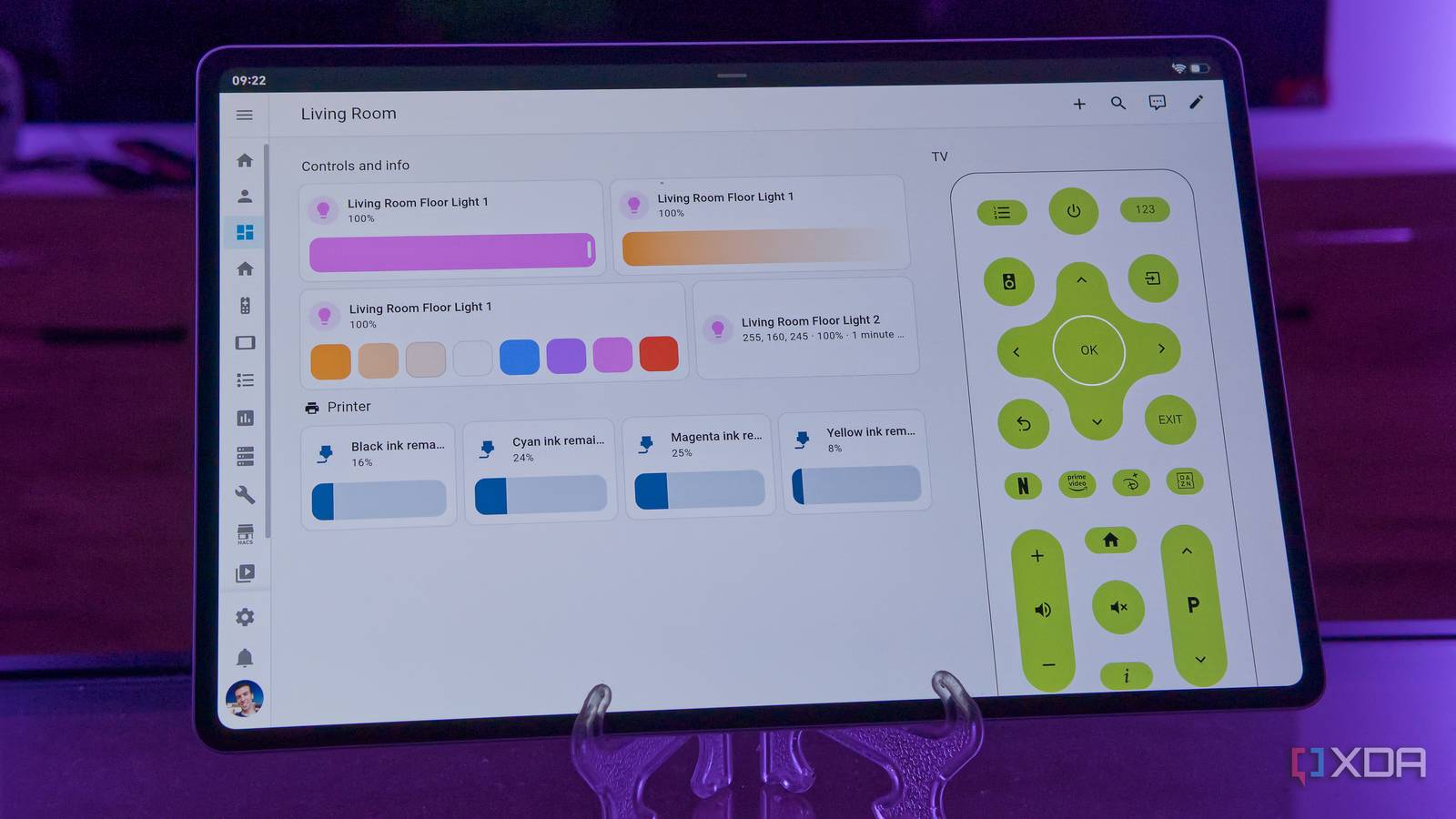
Published Aug 6, 2026, 7:00 AM EDT João has been covering the tech world for over 7 years, with a heavy focus on laptops and the Windows ecosystem. I also love all things tech and videogames, especially Nintendo, which he's always happy to talk about. Prior to joining XDA in 2021, he worked at Neowin: https://www.neowin.net/news/poster/jo%C3%A3o-carrasqueira/ Having smart devices in your home can make life a lot easier, but once you have a few, you may start wishing you had a dedicated device to control them. And there are some devices out there that sell themselves as just that — dashboards for your smart home. But why spend that money when you already have the perfect smart home dashboard in your home, likely going unused? That's right, I'm talking about old tablets that get stuck in a drawer for months on end. You can turn them into smart home dashboards, and I've done exactly that with one of mine. It doesn't need a lot of power Any old tablet should be fine Being a dashboard for your smart home isn't a particularly demanding task, so as long as your old tablet has a version of Android that still supports the apps you need, you should be completely fine even with an older or low-end machine. You can remove every other app to make things a little lighter on the hardware, too. Home Assistant is particularly great for this because you can also just use a web browser to access your dashboard, so you shouldn't even have to worry about the app supporting your version of Android. But if you do want to use the official app, you can even set it as the Home screen app for your tablet. That way, you don't need to go through the usual launcher at all, and you can jump straight into the smart home controls every time. You don't even need a great screen. In fact, an ePaper or E Ink display can be a great fit for a smart home like this, since the screens use so little power, you can have the screen turned on at all times without much of a hit on battery life. It's a flexible solution A tablet can run anything A dedicated smart home dashboard may be great, but buying a dedicated device likely means getting locked into a specific ecosystem or set of ecosystems. A big benefit of using an old tablet, especially an Android one, is that you can install any app you want and customize your dashboards exactly to your liking. Again, Home Assistant is the best option for this because the range of customization is incredible. The default general dashboard includes pretty much every device on your home so it's the most general view, but you can create custom dashboard with different cards to make specific devices easier to control and manage. I like having full control over my lights, so my custom dashboards usually include big Light cards with brightness controls built right into the main UI. I also have a pair of custom cards for controlling my LG webOS TVs, which don't automatically appear in the Overview-style dashboards. These are the controls that make the most sense for my tablet dashboard, but you can really do anything you want. But because I'm not limited to Home Assistant, I can make my tablet even more useful. The Google Home app also comes in handy here because Home Assistant doesn't support all my smart devices, like my air fryer. Plus, the Google Home app lets me directly control my Chromecast with Google TV, which is another reason why it's handy. Yes, I am aware I could add an Android TV remote to Home Assistant as well, but from what I've found, that can take some work, so this solution is simpler for me. You can put it anywhere Keep it plugged in, or make it portable Another great thing about using an old tablet is that you can really use it in any way you can imagine. The tablet I'm using for my dashboard lives on my coffee table, so it's more easily accessible when I'm just lounging on the couch and watching TV. That way, I can control my TV, smart lights, and so on, without having to get up and interrupt my entertainment. Of course, the downside in this setup is that I can't keep the device charged at all times. This works alright as I do have a power bank around and the tablet has solid battery life, but my tablet is admittedly not that old, either. An older device may already be doing poorly on battery, making this less feasible. But if this particular solution doesn't work for you, there's nothing stopping you from setting the tablet up on a kickstand near an outlet and just making it a fixed smart display. You could even buy some adhesive pads and fix it to a wall or something if you want those controls to always be accessible from a particular location. This can be great for a kitchen display or something you can have in your hallway or next to the door of a given room. Sure, having the tablet plugged in at all times will kill the battery even more quickly, but as long as it stays plugged in, that shouldn't be a concern. Plus, how much does the battery really matter if the tablet was collecting dust anyway? You can even set up multiple of these devices and have different dashboards for each one. Home Assistant lets you change the default dashboard for each user, so a valid approach could be to create a user profile for each device, so they can all have dashboards that make more sense for the room they're in. Save money and gain flexibility If you've been thinking about buying a smart home dashboard but you have a tablet lying around at home, it's worth reconsidering that approach. You can save money by just using your old tablet, and at the same time have an even more flexible setup that lets you create more customized dashboards or combine different apps to suit your needs.
That old tablet in your drawer is the smart home dashboard you keep meaning to buy
Full Article
Original Source
Read the full article at Xda-developers →KhanList aggregates and links to publicly available news content. We do not host full articles from third-party sources. Always verify important information with original sources.