
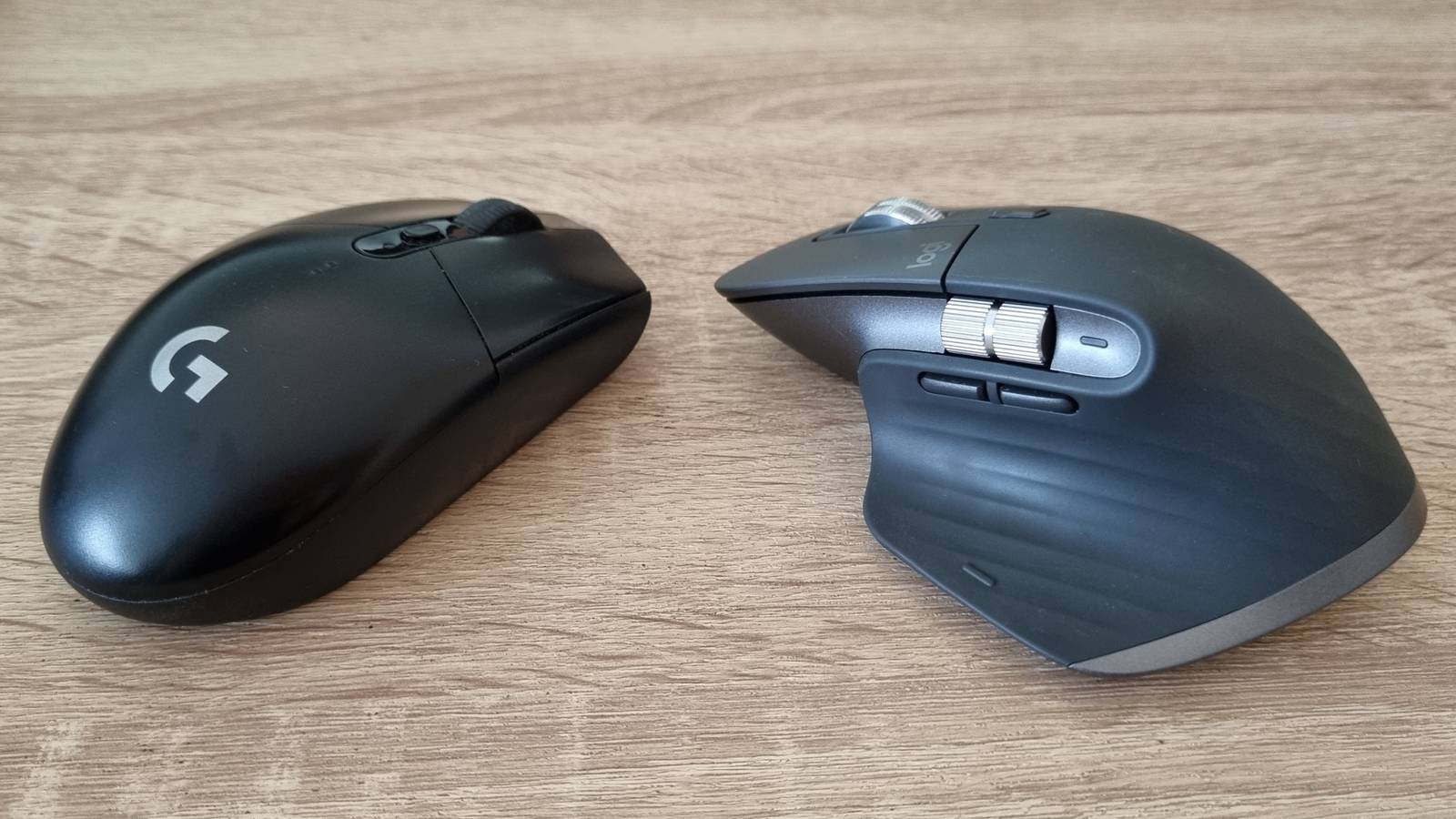
Published Sep 25, 2026, 12:01 PM EDT Ever since he got his first smartphone, the legendary Nokia 6600, back in 2005, Goran became obsessed with technology. This obsession had only gotten worse after he received his first gaming PC a couple of months later. He fell in love with video games in the early '90s, shortly after embarking on his gaming journey with the Sega Master System II and SNES. Since then, he has built dozens of PCs, played thousands of games, and authored hundreds of articles about PC hardware, gaming hardware, and video games. He knows everything there is to know about the PC gaming and PC hardware space, and while his console gaming knowledge isn't as comprehensive, he considers himself a console veteran. Goran has almost a decade of experience writing about tech and video games for numerous web publications including TechSpot, TechPowerUp, and EsportsHeadlines. He has been writing for How-To Geek since December 2022. When he isn't gaming or deciding which component of his PC to upgrade next, you can find him strolling around Novi Sad while listening to music and contemplating what to play next. After almost two decades of using gaming mice, I switched to an ergonomic mouse about a month ago. The move is already paying dividends because my Logitech MX Master 3S is super comfortable to use, but I still decided to keep my Logitech G305 and switch to a dual mouse setup. Here’s why. I can switch from action to comfort at any time This Logitech MX Master 3S is so much more comfortable than my gaming mouse Credit: Justin Duino / How-To Geek The Logitech MX Master 3S is a fantastic mouse for productivity and daily usage that doesn’t include gaming. Its size and shape fit my hand perfectly, and the rubberized coating feels great to the touch. After using it for about a month, I can say that this is the most comfortable mouse I’ve used to date. I had some issues moving away from the claw grip I used to hold my mice with for almost two decades. While I still catch myself on occasion claw-gripping the MX Master 3S, I hold it as supposed to most of the time, which has led to feeling less strain in my right wrist compared to using the G305 24/7. While I don’t like heft in my gaming mice (the reason why I opted for the MX Master 3S instead of something like the Logitech G502), I do like the MX Master 3S’ heft when casually browsing the web or working, its weight stabilizing and slowing down mouse movements when steering the mouse left and right across the mouse mat instead of turning every mouse movement into a lighting fast flick, which happened with the G305. A business-class mouse includes perks that gamers miss out on I also love its quiet clicks, infinite scroll, and a bunch of programmable buttons Credit: Justin Duino / How-To Geek But the perfect size, shape, and weight aren’t the only things I love about the MX Master 3S. While its quiet clicks didn’t work for me the first couple of days of owning it (they felt quite mushy compared to the highly tactile and loud clicks on the G305), I’ve gotten used to them since then and have ended up loving them. After you get used to the lack of any sound, you find the previously mushy tactile feedback to be of just the right strength to clearly inform you that you just clicked the mouse, with the actuation force being just high enough to prevent accidental clicks. Then there’s the famous infinite scroll. When I picked up the G305 for the first time to play some games after using the MX Master 3S for a few days, its scroll wheel felt like something from the Dark Ages compared to the sci-fi feeling of the MX Master 3S’ scroll wheel. The scroll wheel's magnetic design results in superb tactility, and the SmartShift feature allows me to use it as a fidget toy when watching YouTube, which I ended up liking more than I should. In a nutshell, I adore the scroll wheel, and I can’t imagine using a mouse that doesn’t feature this kind of magnetic scroll wheel in the future. Quiz 8 Questions · Test Your KnowledgeKeyboards, mice, and PC input devicesTrivia challengeFrom scroll wheels to switch types — how well do you really know the gear you use every day?KeyboardsMiceSwitchesHistoryTech SpecsBegin Which company introduced the first commercially successful optical mouse, released in 1999?ALogitechBMicrosoftCIBMDKensingtonCorrect! Microsoft introduced the IntelliMouse Explorer in 1999, which was one of the first widely adopted optical mice. It used an LED and image sensor instead of the old rubber ball mechanism, making it far more reliable and maintenance-free.Not quite — it was Microsoft. The IntelliMouse Explorer launched in 1999 and used optical tracking technology developed in partnership with Agilent Technologies. It marked a major turning point away from ball-based mice that required regular cleaning.Continue What does the acronym 'QWERTY' refer to in the context of keyboard layouts?AThe name of its inventorBA company trademark registered in 1878CThe first six letters on the top row of keysDA standard defined by the ISO keyboard committeeCorrect! QWERTY simply refers to the first six letters on the top alphabetic row of the keyboard. The layout was designed by Christopher Latham Sholes in the 1870s and became the dominant standard worldwide.Not quite — QWERTY refers to the first six letters on the top row of the keyboard: Q, W, E, R, T, and Y. The layout was designed by Christopher Latham Sholes and popularized through its adoption in the Remington typewriter in 1873.Continue What is the primary characteristic of a mechanical keyboard switch labeled 'linear'?AIt produces a loud click at the actuation pointBIt has a tactile bump you can feel when the key actuatesCIt provides smooth, consistent resistance all the way down with no bump or clickDIt uses optical infrared sensing instead of physical contactCorrect! Linear switches offer smooth, uninterrupted keystrokes from top to bottom with no tactile bump or audible click. They are popular with gamers who prefer fast, consistent key presses, with Cherry MX Red being one of the most well-known examples.Not quite — linear switches have smooth, consistent resistance all the way down with no tactile bump or click sound. Switches with a bump are called tactile, and switches with both a bump and a click are called clicky. Cherry MX Red is a classic linear switch.Continue What does DPI stand for when describing mouse sensitivity?ADigital Pulse IntensityBDots Per InchCDevice Precision IndexDDynamic Pointer InputCorrect! DPI stands for Dots Per Inch and measures how sensitive a mouse is to physical movement. A higher DPI means the cursor moves further on screen for the same physical movement, which can be useful in different gaming or productivity contexts.Not quite — DPI stands for Dots Per Inch. It describes how many virtual pixels the cursor moves for every inch the mouse is physically moved. Higher DPI settings result in faster cursor movement, while lower DPI settings offer more precision.Continue Who is widely credited with inventing the computer mouse in the 1960s?ASteve JobsBAlan TuringCDouglas EngelbartDBill EnglishCorrect! Douglas Engelbart invented the computer mouse at the Stanford Research Institute in 1964. His famous 1968 presentation, known as 'The Mother of All Demos,' showcased the mouse alongside many other groundbreaking computing concepts.Not quite — Douglas Engelbart invented the mouse at the Stanford Research Institute in 1964. He demonstrated it publicly in 1968 in what became known as 'The Mother of All Demos.' Bill English was his collaborator who helped build the physical prototype.Continue What is the typical actuation force range for most standard membrane keyboard keys?A5–15 gramsB45–80 gramsC100–150 gramsD200–300 gramsCorrect! Most membrane keyboards require somewhere between 45 and 80 grams of force to actuate a key. This is similar to many mechanical switches, though the feel differs significantly due to the rubber dome mechanism used in membrane designs.Not quite — the typical actuation force for membrane keyboards falls between 45 and 80 grams. While this overlaps with many mechanical switches, membrane keyboards use a rubber dome that collapses under pressure, giving them a mushier feel compared to the distinct bump or click of mechanical switches.Continue What is a 'tenkeyless' (TKL) keyboard missing compared to a full-size keyboard?AThe function key row at the topBThe dedicated numpad on the right sideCThe arrow key clusterDThe navigation keys like Home, End, and Page UpCorrect! A tenkeyless keyboard omits the numeric keypad (numpad) found on the right side of a full-size layout. This makes TKL keyboards more compact and allows users to position their mouse closer to the keyboard, which is a popular choice among gamers and desk-space-conscious users.Not quite — TKL keyboards remove the numpad, the block of number and math keys on the far right of a standard keyboard. The name 'tenkeyless' literally refers to the absence of those ten numeric keys. This reduces the footprint significantly while keeping all the core typing keys intact.Continue Which mouse connectivity technology uses a 2.4GHz wireless signal via a USB dongle rather than Bluetooth?AWi-Fi DirectBRF wirelessCNFC pairingDZigbeeCorrect! RF (Radio Frequency) wireless mice use a 2.4GHz signal transmitted between the mouse and a small USB receiver dongle. This method typically offers lower latency than Bluetooth, which is why many gaming mice use proprietary RF solutions like Logitech's LIGHTSPEED.Not quite — the technology is called RF wireless, short for Radio Frequency. It operates on the 2.4GHz band and uses a dedicated USB dongle receiver. RF wireless generally has lower and more consistent latency than Bluetooth, making it the preferred choice for wireless gaming mice.See My Score Challenge CompleteYour Score/ 8Thanks for playing!Try Again The Logitech MX Master 3S also has a ton of programmable buttons. I mapped volume control to the secondary scroll wheel, and I take screenshots with the button at the bottom of the thumb rest, which is pretty handy when having to capture a lot of screenshots for step-by-step guides. I also like the laser sensor, which, unlike the optical sensor in the G305, works perfectly on any surface. This makes my MX Master 3S a perfect rodent to use when streaming videos on my TV while chilling on the couch or watching YouTube/browsing the web while reclining in my computer chair and gliding the mouse over my T-shirt or thigh. Yes, I kind of look like the humans from Wall-E during those moments. Last but not least is the battery life. I’ve charged the mouse just once since I got it, and when I checked the Logi Options+ app just now, the battery still had a 45% charge left. That's phenomenal battery life if you ask me. When I want to game, I can switch to my Logitech G305 in a second No compromises here Of course, the Logitech MX Master 3S isn't perfect—far from it. This is a Bluetooth mouse with the option to use a Logi Bolt adapter, so while the performance is fine for regular usage, the high latency and lack of accuracy in games that require aiming are too high for comfort, at least for me. Then you’ve got the skates, which aren’t as slippery as those on the G305. They create ever-so-slight resistance when moving the mouse, which I don’t mind when working or browsing the web, but that does annoy me when gaming. This is why my Logitech G305 hibernates under the monitor, ready to be used in less than five seconds. I just launch the game with the MX Master 3S, move it away, and pick up and turn on the G305 in less time than it takes the game to show its start screen. The relatively lightweight G305 feels even lighter after I've used the other mouse for days on end, making every gaming session even more enjoyable. I can flick the mouse left and right with almost zero effort, which is the main reason why I like my gaming mouse to be on the lighter side. Also, its fantastic optical sensor might behave erratically on any surface other than a mouse mat, but when on a mat, it works and feels staggeringly better than the one on the MX Master. A dual mouse setup really is the best of both worlds At the end of the day, a dual mouse setup really gives me the best of both worlds. I can use my ergo mouse when working and using my PC for anything other than gaming. It’s super comfy, great for casual use, has a ton of programmable buttons, and the best scroll wheel I’ve ever used. But when I need the precision and lightweight design of a gaming mouse, I can switch to the G305 in a second and game with it like nothing happened. I love this dual mouse setup, and I don’t think I’ll ever switch back to using a single mouse again.
Switching to a dual-mouse setup is the best thing I’ve done this year
Full Article
Original Source
Read the full article at Howtogeek →KhanList aggregates and links to publicly available news content. We do not host full articles from third-party sources. Always verify important information with original sources.