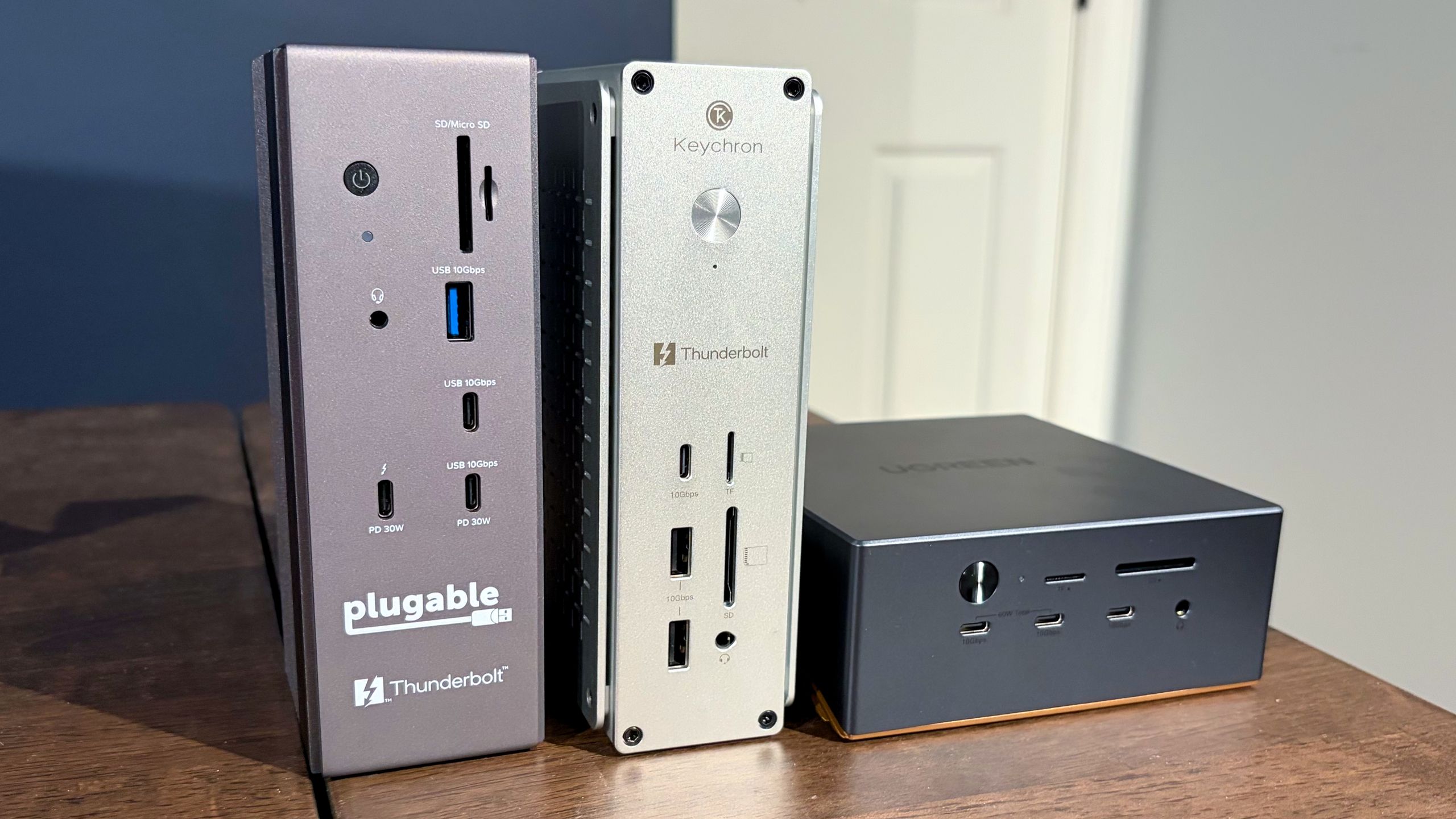
(Image credit: Tom's Hardware) Thunderbolt docks are an easy way to expand the number of available external ports for a laptop and have become quite popular in recent years. They are particularly beneficial with the best ultrabooks, which can sometimes be equipped with as few as just two Thunderbolt ports and no additional external ports for connectivity.We’ve previously taken a look at some popular Thunderbolt 5 docks, with some costing as much as $650. This time around, we’re looking at some more affordable solutions, with all three of these units carrying a street price of less than $400. The UGREEN Revodok Maxidok has a street price of $389.99 after coupon, while the Plugable TBT-UDH2 and Keychron TB5D-1 are both available for around $350.Plugable TBT-UDH2 Swipe to scroll horizontally Cost $349.95 Row 0 - Cell 2 Front Ports 1x USB-C 10 Gbps (30W PD)1x USB-A 10 Gbps1x Thunderbolt 5 downstream (30W PD) 1x microSD UHS-II slot1x SD UHS-II slot1x audio combo jack Row 1 - Cell 2 Back Ports 1x Thunderbolt 5 upstream (140W charging to host)3x USB-C 5 Gbps2x USB-A 5 Gbps 2x HDMI 2.11x 2.5 GbE Row 2 - Cell 2 The Plugable TBT-UDH2 is a relatively compact Thunderbolt 5 dock that feels absolutely solid with its weighty aluminum chassis. The BT-UDH2 is designed to stand vertically (confirmed by the rubber feet at the base of the unit). However, there’s no reason why you wouldn’t be able to lay the unit on its side if you wanted to. (Image credit: Tom's Hardware)As for actual ports, the TBT-UDH2 has two USB-C ports up front (one of which supports 30W PD), a single USB-A port, microSD and SD card slots, a 3.5 mm headphone jack, and a single downstream Thunderbolt 5 port (30W PD).Moving to the rear of the unit, there are two more USB-A ports, three additional USB-C ports, two HDMI 2.1 ports, a 2.5 GbE port, and a Thunderbolt 5 upstream port for your laptop. And here lies my main complaint with the TBT-UDH2: it only has one downstream Thunderbolt 5 port, and it’s on the front. I would have liked to have seen at least two, with one on the front and one on the back. At this price point, having just one downstream Thunderbolt 5 port seems like a big miss.Keychron TB5D-1 Swipe to scroll horizontally Cost $349.99 Row 0 - Cell 2 Front Ports 1x USB-C 10 Gbps 2x USB-A 10 Gbps1x microSD UHS-II slot1x SD UHS-II slot1x audio combo jack Row 1 - Cell 2 Back Ports 1x Thunderbolt 5 upstream (140W charging to host)2x Thunderbolt 5 downstream2x USB-A 10 Gbps (15W PD)2x HDMI 2.11x 2.5 GbE Row 2 - Cell 2 The Keychron TB5D-1 is the other $350 Thunderbolt 5 dock assembled here today. It is similar in size to the Plugable dock, but is finished in natural aluminum. Keychron includes rubber feet on the bottom and one side of the dock, encouraging you to operate in either a vertical or horizontal orientation. (Image credit: Tom's Hardware)You’ll find two USB-A and one USB-C port on the front, along with microSD/SD slots and a 3.5 mm headphone jack. Moving to the back, you’ll find two additional USB-A ports, two HDMI 2.1 ports, two downstream Thunderbolt 5 ports, and a Thunderbolt 5 upstream port for the host PC. For networking, there’s also a 2.5 GbE port.Get Tom's Hardware's best news and in-depth reviews, straight to your inbox.UGREEN Revodok Maxidok (Image credit: Tom's Hardware) Swipe to scroll horizontally Cost $499.99 Row 0 - Cell 2 Front Ports 2x USB-C 10 Gbps (30W PD)1x USB-C 10 Gbps1x microSD UHS-II slot1x SD UHS-II slot1x audio combo jack Row 1 - Cell 2 Back Ports 1x Thunderbolt 5 upstream (140W charging to host)2x Thunderbolt 5 downstream3x USB-A 10 Gbps 1x DisplayPort 2.11x 2.5 GbE2x audio combo jackInternal1x M.2 NVMe PCIe 4.0 slot (supports up to 8TB) Row 2 - Cell 2 The UGREEN Revodok Maxidok is the most expensive Thunderbolt 5 dock here, with a street price of around $390. However, you do get some added functionality for the $40 price difference. At first glance, the Revodok Maxidok looks like a Mini PC with its square-ish form factor. The aluminum body is finished in a combination of dark grey (upper half) and copper (bottom half). (Image credit: Tom's Hardware)Unlike the other two docks, the Revodok Maxidok has an internal cooling fan mounted inside to help keep the electronics cool (Thunderbolt docks are notorious for their heat output). During normal operation, I couldn’t hear the fan running. I could only just barely hear it if I stuck my ear to the side of the docking station (which is, of course, not a typical usage scenario).The front of the docking station houses microSD/SD slots, three USB-C ports (two of which support a total of 60W PD), and a 3.5 mm headphone jack. On the back, you'll find three USB-A ports, two more 3.5 mm audio ports, a DisplayPort 2.1 connector, two Thunderbolt 5 downstream ports, and one Thunderbolt 5 upstream port. (Image credit: Tom's Hardware)The Revodok Maxidok also has one hidden feature. If you flip the dock over, it has a cover that's held in with one screw. Remove the screw, and you'll find an M.2 slot for adding an internal SSD (up to 8TB in capacity).Thunderbolt 5 Dock Specs Comparison Swipe to scroll horizontally Header Cell - Column 0 Thunderbolt 5 Ports (Downstream) USB-C Ports (Downstream) Downstream USB-A Ports (Downstream) HDMI DisplayPort microSD/SD slot Ethernet PCie 4.0 M.2 slot UGREEN Revodok Maxidok 2 3 3 N/A Yes Yes 2.5 GbE Yes Keychron TB5D-1 2 2 4 Yes N/A Yes 2.5 GbE N/A Plugable TBT-UDH2 1 5 3 Yes N/A Yes 2.5 GbE N/A Thunderbolt 5 Dock SSD Performance TestingWe tested SSD performance of the three docks using a 1TB Micron 2500 Series PCIe 4.0 SSD (MTFDKBA1T0QGN-1BN1AABYY). The SSD is rated for sequential read speeds up to 7,100 MBps and sequential writes up to 5,800 MBps.For baseline performance numbers, I tested the Micron 2500 using the onboard PCIe 5.0 M.2 slot on an Asus Z890 Creator WiFi motherboard. For testing with the Keychron TB5D-1 and the Plugable TBT-UDH2, I used an Orico Thunderbolt80G enclosure with the Micron 2500 – it supports up to M.2 (PCIe Gen4x4) SSDs. The enclosure was plugged into one of the Z890 Creator WiFi’s two Thunderbolt 5 ports. For the UGREEN Revodok Maxidok, I used the native M.2 PCIe 4.0 slot with the Micron 2400. (Image credit: Tom's Hardware)Using the Micron 2500 SSD and Asus Z890 Creator WiFi motherboard as a baseline, we saw 6,674.53 MBps reads and 5,628.61 MBps writes. Of the three docks we tested with the Micron 2500, the Revodok Maxidok was the fastest with its native M.2 PCIe 4.0 slot. It achieved 5,780.54 MBps reads, roughly 300 MBps ahead of the other two.The Keychron TB5D-1 and the Plugable TBT-UDH2 put up nearly identical numbers using the Orico Thunderbolt80G enclosure, with around 5,400 MBps reads and 4,200 MBps writes.All three docks had no trouble maxing out the 2.5 GbE port using iPerf3, and I didn't run into any compatibility problems running my 49-inch 240 Hz DQHD monitor using the docks via HDMI or DisplayPort connections.While all of the docks were warm to the touch, the Revodok Maxidok was noticeably cooler thanks to its internal cooling fan.Bottom LineOf the three docks that we tested, the one that I felt was the most versatile and worthy of a place on my desk is the UGREEN Revodok Maxidok. It’s the only one of the docks with a native DisplayPort 2.1 connector and the only one with an internal M.2 SSD slot. In addition, it offered ever so slightly faster storage performance than using an SSD with a Thunderbolt 5 enclosure. And with a street price of $390, you’re only paying a $40 premium over the other two docks. (Image credit: Tom's Hardware)If you prefer having two additional HDMI 2.1 ports at your disposal, the Keychron TB5D-1 is a good option as well. All of the Keychron’s USB-A and USB-C ports are 10 Gbps, while the Plugable TBT-UDH2 gives you a mix of 10 Gbps and 5 Gbps USB ports. In addition, the Keychron dock features two downstream Thunderbolt 5 ports, while the Plugable only has one.Additional Thunderbolt 5 Docks to ConsiderAlthough we plan to keep this guide updated as we test additional Thunderbolt 5 docks, here are some additional units to consider:UGREEN Thunderbolt 5 Dock – $274.99Ivanky FusionDock Max 2 – $379.99Anker Prime Thunderbolt 5 Dock – $319.99Kensington SD50000T5 Thunderbolt 5 Dock – $194.99CalDigit E5 Thunderbolt 5 Dock – $249.99 Brandon Hill is a senior editor at Tom's Hardware. He has written about PC and Mac tech since the late 1990s with bylines at AnandTech, DailyTech, and Hot Hardware. When he is not consuming copious amounts of tech news, he can be found enjoying the NC mountains or the beach with his wife and two sons.
Sub-$400 Thunderbolt 5 dock roundup — Keychron and Plugable offer dual HDMI, but UGREEN takes top spot with an M.2 NVMe slot
Full Article
Original Source
Read the full article at Tomshardware →KhanList aggregates and links to publicly available news content. We do not host full articles from third-party sources. Always verify important information with original sources.