
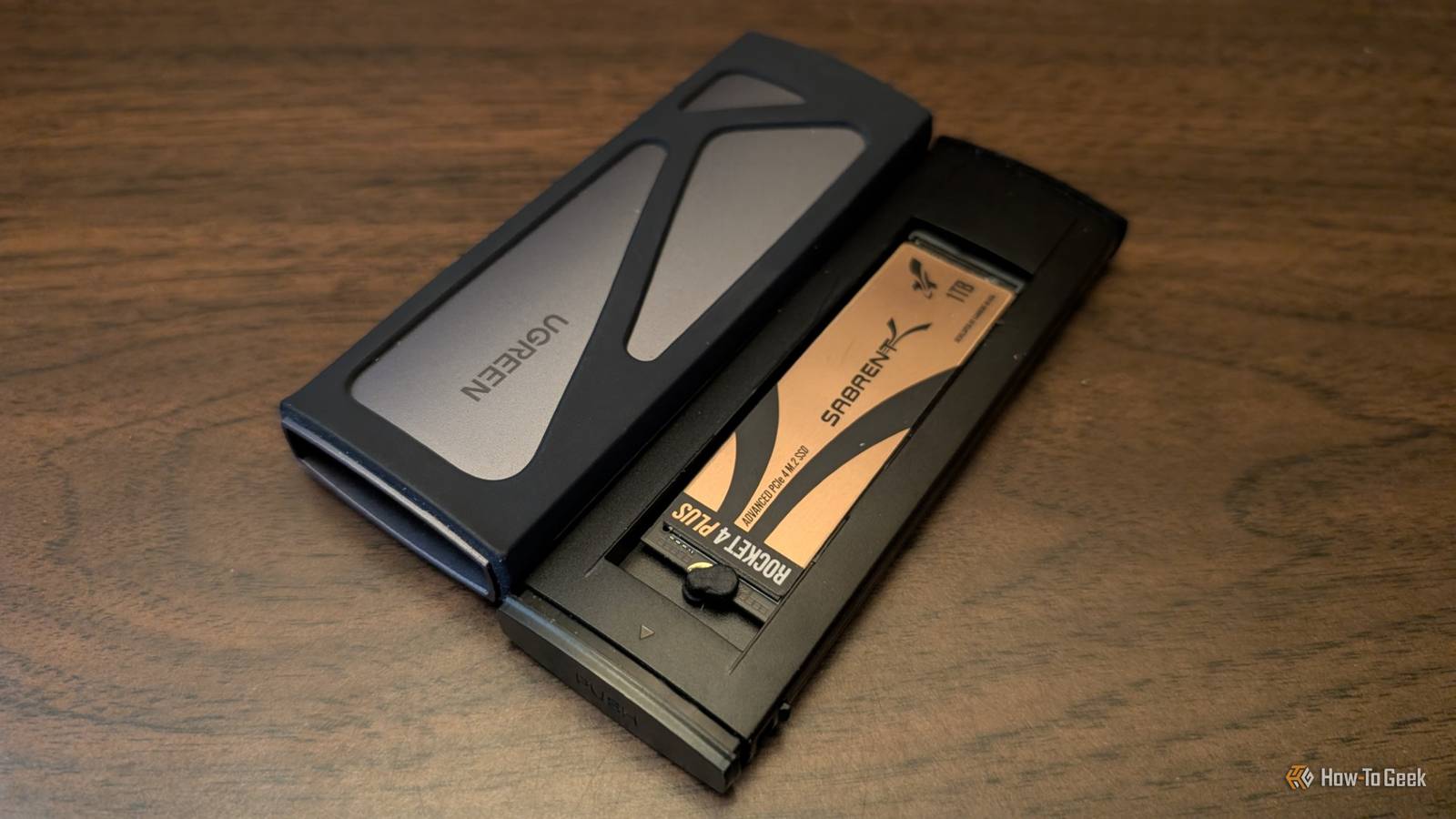
Credit: Nick Lewis / How-To Geek Published Aug 30, 2026, 9:30 AM EDT Monica J. White is a journalist with over a decade of experience in covering technology. She built her first PC nearly 20 years ago, and she has since built and tested dozens of PCs. PC hardware is her main beat, and graphics cards and the GPU market at large are her main area of interest, but she has written thousands of articles covering everything related to PCs, laptops, handhelds, and peripherals. From GPUs and CPUs to headsets and software, Monica's always willing to geek out over all things related to computing. Outside of her work with How-To Geek, Monica contributes to TechRadar, PC Gamer, Tom's Guide, Laptop Mag, SlashGear, Whop, and Digital Trends, among others. Her ultimate goal is to make PC gaming and computing approachable and fun to any audience. Monica spends a lot of time elbow-deep in her PC case, as she's always making upgrades, testing something, or plotting out her next build. She's the go-to tech support person in her immediate circle, so she's never out of things to do. Whenever she has spare time, you'll find her gaming until the early hours and hanging out with her dog. Sign in to your How-To Geek account SSD speeds are far from the only thing that matters. In fact, many will say that they're almost irrelevant, and buying an expensive SSD is a waste of money. But if you already have one such SSD—one with high read/write speeds—please don't put it in an enclosure. It'll work, but really, what even is the point? SSD enclosures are great, but they're not for everything They don't need to be the go-to for an older SSD. Whenever the time comes for me to replace an SSD, putting it in an enclosure and turning it into a portable drive seems like an obvious choice. But I know that this option, while convenient, comes with downsides, some of them pretty major. Enclosures are great for turning a spare drive into a backup drive. While using SSDs for cold storage can be risky, using them as portable storage is a good way to keep fast access to your files. They're not a set-it-and-forget-it type of backup, but they're a backup nonetheless, and a much better one than HDDs can ever hope to be. But the moment you put an SSD behind a USB port and connector (which is what happens in an enclosure), you're no longer playing by the same rules. Your SSD is faced with a massive bottleneck: the USB standard. So, what's the problem with that? For starters, USB ports are super confusing, and that can make it hard to determine their true capabilities. Ports can be 5Gbps, 10Gbps, 20Gbps, or 40Gbps, depending on the device. USB 2.0, 3.0, 3.1, 3.2, 4, USB-C, Thunderbolt, and so on: all of these ports have different maximum speeds, and it's not always possible to tell at a glance which one you're connecting to. That, on its own, makes it difficult to make the most of an SSD through an enclosure. It's not just confusing, either. Having multiple ports usually means that they look identical, but one might be full-featured while another is meant for basic charging or a slower mode. Using front panel ports, hubs, or cheap adapters throws another wrench into the mix. Then there's the reliability and convenience factor. Enclosures add another point of failure, and you're likelier to run into weird issues like random disconnects during big transfers than if you just use your SSD inside the PC. I had that exact problem not too long ago: an SSD that behaved perfectly inside the PC kept disconnecting while in an enclosure. That doesn't feel like a steady place to back up your files. Faster drives have no business going into enclosures You're leaving money on the table. Credit: Sydney Louw Butler/How-To Geek The problem with putting SSDs inside enclosures starts when the SSDs in question are fast, high-end NVMe drives. Those drives are built for a PCIe slot, not a USB port. You paid a lot of extra money for the capabilities of that slot, and these days, you're probably paying a whole lot more, what with the ongoing SSD market disaster. PCIe Gen 5.0 SSDs can reach up to 14,900MB/s in read speeds, and while previous generations cap out at much less, all three of the newest consumer PCIe gens can max out an SSD enclosure—yes, even a pricey, high-end one. Enclosures themselves have data transfer rate limits, and there's a big gap between what an enclosure can offer and what an expensive NVMe drive can provide. At best, expensive 40Gbps enclosures can reach maximum speeds of around 3,600MB/s, which is around what Gen 3 NVMe SSDs max out at. Newer generations can blow those speeds right out of the water, but when placed in an enclosure, that doesn't matter. They're limited by the enclosure itself before anything else even comes into play. And, as mentioned, other factors do play a part. Plenty of devices still don't offer fast USB ports, and Thunderbolt support is not universal either. Even a fast enclosure with an even faster SSD won't be satisfactory unless all the stars are perfectly aligned. What to do if you need a fast portable drive There are options, but also things to keep in mind. Credit: Patrick Campanale / How-To Geek "Fast" and "portable" may not perfectly go hand in hand, but it also depends on your needs. What's fast for one person may feel sluggish for another. Since we're talking about portable SSDs, you're unlikely to be worried about things like loading screens and boot times. That's both good news and bad, as pretty much any NVMe SSD can do well with those; they're a massive upgrade over HDDs in that regard. But sequential read speeds can truly be felt, so if you're looking to transfer a lot of large files on a regular basis, it's worth keeping some things in mind before you pop that NVMe SSD into an enclosure. Start by making an inventory list of your ports, and just knowing their standard isn't enough. Check spec sheets and manuals for actual information as to how much your port, cable, and connector can provide. Then, do the same for the enclosure, and see whether it all adds up into one cohesive whole. To avoid that element of randomness I talked about above, make sure you're using the cable that came with the enclosure. Skip hubs and plug your SSD into the back panel, not the front, to cut back on latency. If you're doing long transfers, picking an enclosure with a focus on thermals can be a good option. Ultimately, putting a fast NVMe drive in an enclosure will always turn out to offer around the same speed as a portable SSD without the enclosure. Top models hit around 3,800MB/s, like the SanDisk Extreme Pro, but they're also very expensive. Still, enclosure or not, those are the maximum speeds you can hope for, but to actually achieve them, you'll need to make sure everything else works together, too. Quiz 8 Questions · Test Your KnowledgeSSDs, NAND memory, and interfacesTrivia challengeFrom flash cells to PCIe lanes — see how much you really know about modern solid-state storage.NANDInterfacesHardwarePerformanceStandardsBegin Which type of NAND flash stores exactly one bit of data per cell?AMLCBTLCCSLCDQLCCorrect! SLC stands for Single-Level Cell, meaning each cell holds just one bit — either a 0 or a 1. This makes SLC the fastest and most durable NAND type, but also the most expensive per gigabyte, so it's mainly found in enterprise and industrial storage.Not quite — the answer is SLC, which stands for Single-Level Cell. MLC stores 2 bits, TLC stores 3, and QLC stores 4 bits per cell. The more bits per cell, the cheaper but slower and less durable the NAND becomes.Continue What does NVMe stand for in the context of SSDs?ANon-Volatile Memory ExpressBNetwork Virtual Memory ExtensionCNext-gen Volatile Memory EngineDNon-Volatile Module ExtenderCorrect! NVMe stands for Non-Volatile Memory Express, a communication protocol designed specifically for flash-based storage. Unlike AHCI, which was built for spinning hard drives, NVMe takes full advantage of PCIe's parallel lanes to deliver dramatically lower latency and higher throughput.Not quite — NVMe stands for Non-Volatile Memory Express. It's a host controller interface protocol designed to replace the older AHCI standard, which was originally built with spinning hard disk drives in mind rather than fast flash storage.Continue Which physical form factor is most commonly used for NVMe SSDs in modern laptops and desktops?A2.5-inch SATABmSATACM.2DU.2Correct! The M.2 form factor has become the dominant standard for NVMe SSDs in consumer devices. It's a compact, card-style connector that fits directly onto the motherboard, eliminating the need for data and power cables and saving space inside the chassis.The correct answer is M.2. While 2.5-inch SATA and mSATA were common in older systems, M.2 has taken over as the go-to slot for NVMe drives. U.2 is also used for NVMe but is mostly found in enterprise servers rather than consumer hardware.Continue Approximately how fast can a high-end PCIe 4.0 NVMe SSD read data sequentially?A550 MB/sB1,200 MB/sC7,000 MB/sD20,000 MB/sCorrect! Top-tier PCIe 4.0 NVMe SSDs can achieve sequential read speeds of around 7,000 MB/s. This is a massive leap over SATA SSDs, which are capped near 550 MB/s due to interface bandwidth limitations, and even outpaces many PCIe 3.0 drives significantly.Not quite — the answer is approximately 7,000 MB/s. Around 550 MB/s is the ceiling for SATA-based SSDs, while 1,200 MB/s is typical for older PCIe 3.0 drives. 20,000 MB/s exceeds even PCIe 5.0 NVMe drives available at time of writing.Continue What does 3D NAND refer to in modern SSD manufacturing?ANAND chips shaped into a three-dimensional cube for faster accessBStacking memory cells vertically in multiple layersCUsing three separate dies wired together on one chipDA three-bit-per-cell design that improves enduranceCorrect! 3D NAND, sometimes called V-NAND by Samsung, stacks memory cells vertically in dozens or even hundreds of layers rather than spreading them flat across a wafer. This dramatically increases storage density without shrinking individual cell sizes, which also helps preserve endurance and reliability.The correct answer is that 3D NAND stacks memory cells vertically in multiple layers. Planar (2D) NAND arranges cells flat on a single layer, but manufacturers hit physical scaling limits, so the industry moved to vertical stacking to keep increasing capacity without sacrificing cell quality.Continue Which interface protocol were most SATA SSDs designed to use before NVMe became mainstream?ANVMeBAHCICSCSIDIDECorrect! AHCI (Advanced Host Controller Interface) is the protocol that SATA SSDs communicate over. It was originally designed for mechanical hard drives and supports a single command queue of 32 commands — a major bottleneck compared to NVMe, which supports 65,535 queues each holding 65,535 commands.The answer is AHCI, which stands for Advanced Host Controller Interface. SCSI and IDE are much older standards largely retired from consumer use, while NVMe is the newer protocol used by PCIe-based drives. AHCI's single command queue made it a poor fit for the parallelism flash storage can deliver.Continue Which NAND type offers the highest storage density per chip but typically has the lowest endurance?ASLCBMLCCTLCDQLCCorrect! QLC, or Quad-Level Cell NAND, packs four bits into every cell, giving it the highest density of common consumer NAND types. The trade-off is significantly reduced endurance — QLC cells wear out faster because of the precision needed to distinguish between 16 different voltage states per cell.The answer is QLC (Quad-Level Cell). It stores 4 bits per cell, making it the densest and most affordable NAND type, but it also has the lowest P/E (program/erase) cycle endurance. SLC sits at the opposite end — fewest bits per cell but the longest lifespan.Continue Which PCIe generation, first adopted widely in consumer SSDs around 2020, doubled the bandwidth of its predecessor?APCIe 2.0BPCIe 3.0CPCIe 4.0DPCIe 6.0Correct! PCIe 4.0 arrived in consumer platforms around 2020, starting with AMD's Ryzen 3000 series and X570 motherboards. It doubles the per-lane bandwidth compared to PCIe 3.0, pushing NVMe SSD sequential speeds from roughly 3,500 MB/s up to around 7,000 MB/s.The correct answer is PCIe 4.0, which first appeared broadly in consumer hardware around 2020 with AMD's Zen 2 platform. PCIe 3.0 was the previous mainstream standard, while PCIe 6.0 is a more recent enterprise-focused generation not yet common in everyday consumer motherboards.See My Score Challenge CompleteYour Score/ 8Thanks for playing!Try Again Don't need portability? Do this instead Your SSD can come in handy in other ways. Credit: Patrick Campanale / How-To Geek If you somehow have an SSD you don't know what to do with, but you don't need it to be portable, there are a few other ways to use it. The best option is to simply use two SSDs inside your PC. Whichever drive is slower or older can be the one used for less consequential tasks, while the boot drive will handle the OS and important apps. Older drives do well as game libraries. They can also be used as a scratch/cache drive for creative apps. Beyond that, you can always throw it inside a NAS and create a much more robust backup solution where the SSD can actually stretch its legs. All-SSD NAS solutions are expensive, but every NAS benefits from having one SSD to use as cache. Nothing bad will happen to your SSD just due to the fact that it lives in an enclosure, but I hate to see expensive Gen 4 and Gen 5 drives reduced to such low speeds. Before you do that with yours, check to make sure it won't be bottlenecked by another piece of hardware.
Stop putting NVMe SSDs in USB enclosures: You're crippling your hardware
Full Article
Original Source
Read the full article at Howtogeek →KhanList aggregates and links to publicly available news content. We do not host full articles from third-party sources. Always verify important information with original sources.