
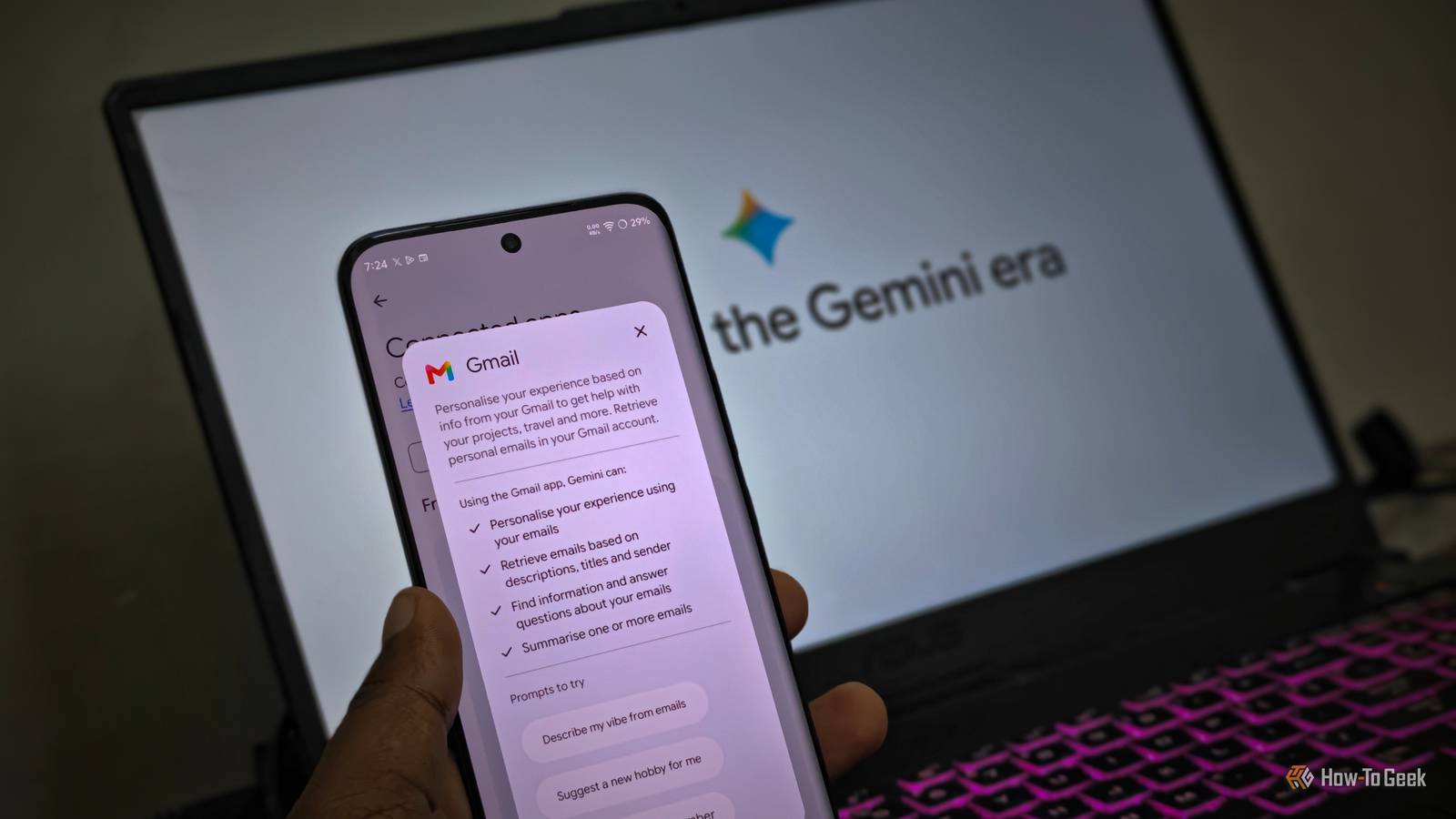
Published Sep 9, 2026, 6:30 AM EDT Vishwamoorthy's interest in tech started early, as a school student, watching Pixel 2 XL camera review videos and being awestruck by what a phone camera with excellent software could do. That curiosity stuck with him: since 2022, he's published over 1,500 articles covering smartphones, Android, and consumer tech news at FoneArena, one of India's leading tech publications. Lately, he's obsessed with how AI is reshaping the business world, the deals, the products, the quiet feature rollouts nobody notices until they're everywhere. Reading and writing about tech is what keeps him going; doomscrolling is what keeps him honest. If you're keeping up with the AI trend, you might be familiar with big tech companies like Apple and Google promising personalized AI experiences. Apple calls it Apple Intelligence, while Google calls it Personal Intelligence on its Gemini platform. I've been using Gemini with Personal Intelligence turned on with my Google apps — including Gmail, Drive, Tasks, Calendar, Keep, and Docs — connected to the feature. I put it to the test by asking Gemini a simple question about the places I've traveled to in 2026 so far, and I was amazed by Gemini's response. It was able to list all places, the reasons for each visit, and even modes of transport — with Gmail serving as a primary source for travel bookings, Google Photos for identifying locations, and past Gemini conversations. It was able to pull together all this information within a few seconds. Impressive, yes — but knowing that Gemini could access my personal emails made me question how much of my data I was giving to Google. If you're skeptical, like me, about giving Google's Gemini access to your email data, there are two settings you can turn off — and this guide shows you exactly how to do it. Auditing your Gemini Personal Intelligence settings Verify whether Gemini is quietly indexing your inbox and cloud files It's worth noting that Personal Intelligence is an opt-in feature. But I've seen Google pushing it aggressively, with pop-ups in the Gemini app or on the web, allowing users to turn it on instantly. There's a high chance that you may have enabled it without understanding what it does. In that case, it's worth reviewing your Gemini settings. To see if you've opted in, head on to your Gemini app on your phone or web, tap your profile from the left pane, and you'll find the Personal Intelligence menu. Once you enter it, you'll see the various services being turned on, and there'll be an option called Connected Apps. Under this option, you can see a list of apps and services that your Gemini can access. You can review each connected app and the access it provides, and in particular, you can check if you've enabled Google Workspace, which allows Gemini to access information from your emails. Gemini's Personal Intelligence feature is not available in the European Economic Area (EEA), Switzerland, and the United Kingdom. Disconnecting Gmail access from Gemini Cut off inbox scanning without breaking standard Gmail features Credit: Vishwamoorthy / How-To Geek Gmail is part of the broader Google Workspace apps alongside Google Docs, Tasks, Calendar, Drive, and Keep. Under the Connected Apps option, Google Workspace will be listed; you can disable it so that Gemini can no longer access your emails. Disconnecting Google Workspace from Gemini also disconnects other workspace apps like Drive, Docs, and Keep, as well as from accessing personal data. I wish Google had offered an app-level enable or disable option, but it doesn't offer one at the moment. Google claims to offer the following personalizations when you connect Gmail to Gemini: Personalizing your experience using your emails Retrieving emails based on descriptions, titles, and sender Finding information and answering questions about your emails Summarizing one or more emails If you're better off without this personalization, you can disable the Google Workspace connector under Gemini Personal Intelligence settings. Disconnecting Google Workspace from Personal Intelligence doesn't necessarily delete your existing saved data, which has to be deleted under Gemini Apps Activity. If you've enabled Gemini's Memory feature, Gemini can still use past memories from your emails (if any) to personalize its responses. Disabling Gemini's native Gmail integration Turn off Workspace smart features to neutralize the inbox assistant When you don't want your emails being read by Gemini, just disabling Personal Intelligence under Gemini settings isn't enough. Google, as always, makes settings and features scattered across its products, making them confusing to manage. After I disabled my workspace access in the Gemini app, I could still use it in the Gmail app, which again causes a lot of confusion around Google's policy. To prevent Gemini's Gmail features from accessing your emails, you can easily disable the Workspace Smart Features in your Gmail app or web. In the Android app, the steps were pretty straightforward: go to settings, choose the Gmail account, and find Google Workspace Smart Features, and inside that, uncheck Smart Features in Google Workspace. Enabling this feature on the Gmail app does a similar job of letting Gemini access your email to offer personalized results, summarize emails, and surf your inbox, and connect Gmail events with other Workspace apps such as Calendar. It shouldn't be confused with standard Smart Features in the Gmail app, which is responsible for email categorization and high-priority notifications, smart replies, and more. Unlike Personal Intelligence, which is an opt-in feature in the Gemini app, this Workspace Smart feature in Gmail is an opt-out. Although Google's support page suggests the opposite, I verified across multiple personal accounts that this setting was toggled on automatically, quietly granting Gemini access to my emails. Taking control of your email privacy While these two settings help you limit direct access to your personal emails being used by Gemini, they don't necessarily mean Gemini has no access to any information from your Google account. Even a simple copy-paste of your personal email in a Gemini chat shares your data, which might be subject to review by human annotators. While Google promises that your emails won't be used to train AI models, it always finds a way to use them in a different way that helps the company make profits. Ultimately, it's our responsibility to review and manage our privacy settings carefully.
Stop Gemini from accessing your emails with these two hidden settings
Full Article
Original Source
Read the full article at Howtogeek →KhanList aggregates and links to publicly available news content. We do not host full articles from third-party sources. Always verify important information with original sources.