
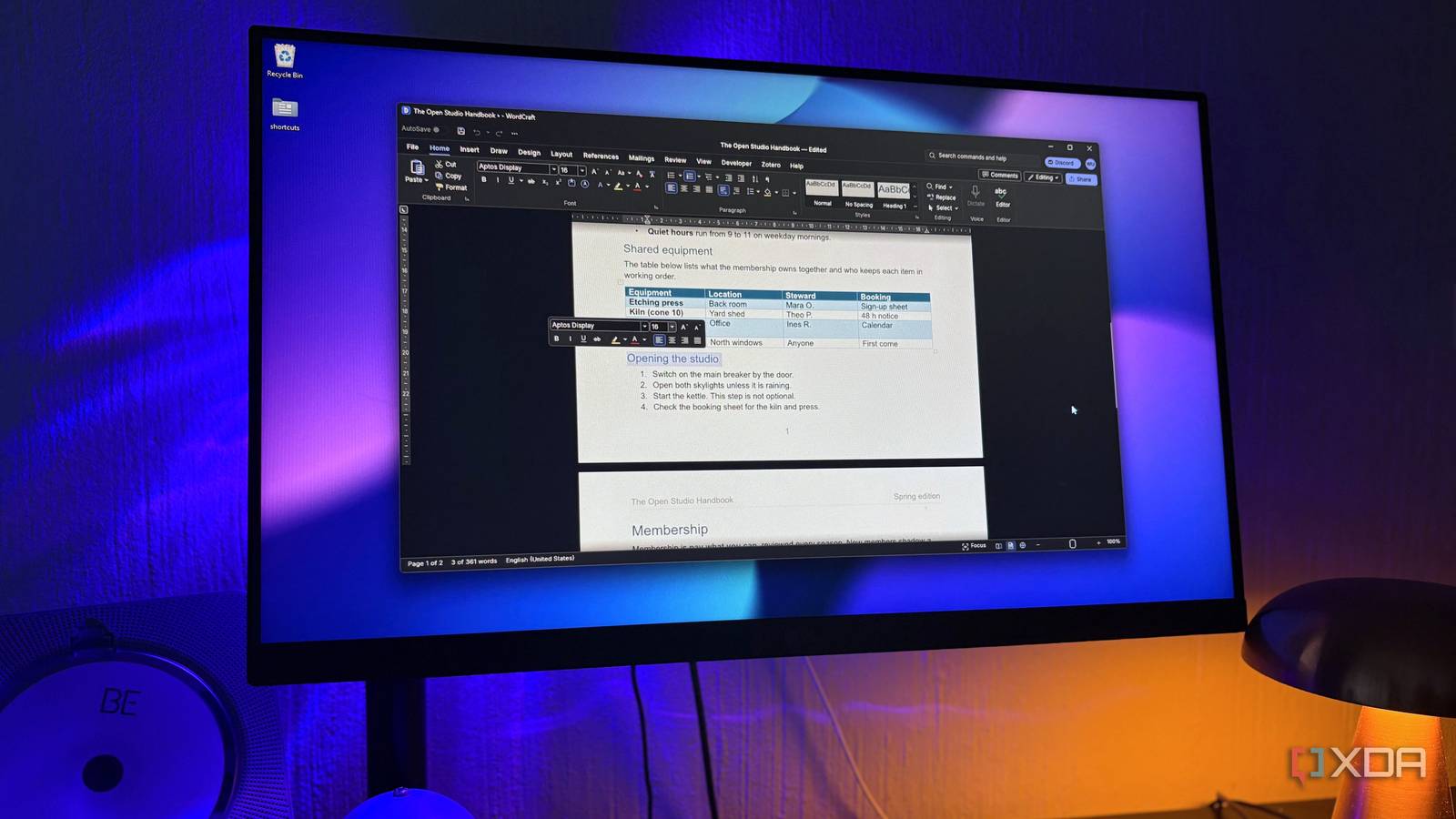
Published Oct 28, 2026, 10:31 AM EDT Nolen began their writing career in 2019, with three years dedicated to editing the Creative section at MakeUseOf. Their expertise lies at the crossroads of technology and creativity, covering areas like photography, video editing, and graphic design. Outside of work, you'll often find Nolen diving into a good book, writing their own stories, or playing video games. Whenever the discussion of software subscriptions comes up, it usually centers around Adobe, but Microsoft's apps are the ones almost everybody ends up paying for in some way, even if it's just a work account. Tools like Word and Excel are about as default as it gets. Free alternatives like LibreOffice have been around for decades too, though switching usually means relearning a UI and compatibility with your Microsoft files isn't always 100%, so most people would rather just keep paying than go through that. Now the developer behind ArtCraft, an open-source project that's been rebuilding Adobe's apps one at a time, has released free clones of all the big Microsoft players: Word, Excel, and PowerPoint. A Photoshop lookalike mostly matters to people who edit photos, but a free Word that opens the same .docx files everyone already passes around matters to pretty much anyone with a computer, so these felt worth giving a shot. ArtCraft stepped out of the creative lane The Adobe clones were only the start ArtCraft is Brandon Thomas's family of free, open-source desktop apps built predominantly with Claude Opus 5.5, and Adobe isn't the only company it's going after anymore. The lineup is at thirteen apps right now, and a few of them actually have nothing to do with creative work at all, despite "Art" and "Craft" in the suite's name. WordCraft, GridCraft, and DeckCraft landed less than two weeks after the Adobe batch, apparently because people kept asking for an Office version and Thomas took them up on it. The naming always gets a little muddy for me. Microsoft sells the bundle as a Microsoft 365 subscription these days, but most of us still call Word, Excel, and PowerPoint Office, and the Personal plan costs $100 a year in the US. That yearly renewal is exactly what this trio is going after. Thomas has also pointed out that the subscription bundles in apps a lot of people barely open, which is the case for a lot of these suite-type tools. There are definitely Adobe apps I barely touched while I had a Creative Cloud subscription, for example. Free Office alternatives aren't new either. OpenOffice.org arrived in 2000 and LibreOffice split off from it in 2010, and both were built over years by big developer communities. ArtCraft's versions are picking up outside help fast as well, with WordCraft's latest release crediting over 20 people who'd never contributed to it before. WordCraft looks exactly like Word Right down to the tabs WordCraft is the MS Word stand-in, and it pretty much feels like a clone right down to the start screen with a few templates and a greeting based on the time of the day. The ribbon has all the usual tabs, as well as a Zotero tab. Zotero is a free reference manager people use to keep track of sources for papers, and in Word that tab only shows up once Zotero's own add-in is installed, so having it built in is a nice option for students I think. There's even the small mini toolbar that pops up when you select text. I think something people will probably care about most is how their files will make it across; well, WordCraft has you covered. It reads and saves .docx as its main format. It also opens old Word 97 to 2003 .doc files and password-protected documents, and the latest update stopped charts and SmartArt from getting dropped when you save. There's also a comment feature for when you work with other people, with the same reply and resolve options. There are also track changes, that marks every edit for someone else to accept or reject, and even the compare tool for when two versions of the same doc needs to be compared. The team says it has commands for 97% of the ribbon and menu features in its own catalogue, but only rates it about 60% ready for real work, since it still needs testing against real-world .docx files before a beta. GridCraft goes deeper than a basic spreadsheet Even the stuff Excel hides away made it in GridCraft takes Excel's spot, and the household budget sample it ships with makes a decent first look because it shows off a lot of formatting in one sheet. Conditional formatting is the same as it is in Excel, and more importantly, GridCraft saves to the same .xlsx format Excel uses, so your charts, pivot tables, and conditional formatting should still be there when you open the file in Excel later or vice versa. Older .xls files don't fare as well, since they open with their numbers and formulas but lose their formatting for now it seems. Then there's the Data tab. I assumed a spreadsheet this new would stick to sorting and filtering, but it has Forecast Sheet for projecting numbers forward, and even Solver, which works out the best values for a problem within limits you set. In Excel, Solver is an add-in you have to switch on yourself, but here it comes already accessible in the ribbon. I also set up a validation rule that only accepts dates within a range, and the dialog had the same input and error message options Excel gives you. Formulas are covered too. The team counts 513 standard worksheet functions, and each one in the Formulas tab dropdowns comes with a short tooltip explaining what it does. The Search Commands palette is probably what I reach for most though since I never actually memorized Excel's menus. The devs put GridWork at about 50% ready for real work. DeckCraft is built for people who care how slides look A few rough edges, but an impressive tool nonetheless Now, I never particularly liked PowerPoint - Canva is the much more appealing option to someone like me who loves design tools, and more recently Claude Design has been taking over my deck projects anyway. But I still had to give Deck Craft a spin, the one that replaces PowerPoint. Like the other two it opens and saves the same file format as the original, .pptx, so decks made in PowerPoint should open without any converting. It can export to PDF too, including handouts and notes pages, which covers more than what I actually do with my finished decks. If you've used PowerPoint before, then you already know how to use this. Slide masters and layouts control fonts and placement across the whole deck. The Insert tab also has a searchable icon library, so you don't need to go hunting online for simple icons. Coming from design tools, the shapes were the most exciting part because there are over 150 presets and also merge tools that can combine and cut the shapes into new ones. Whenever a deck calls for animation, that's my favorite part about it, and DeckCraft's Animations tab doesn't disappoint. It covers entrance, emphasis, and exit effects along with motion paths, and each one can start on click or alongside the previous animation the way it does in PowerPoint. It also has Morph in the transitions list, which animates objects smoothly from one slide to the next. Custom Show felt rough, though. It lets you present just a selection of your slides, but instead of ticking them from a list you type the slide numbers into a box, like 1,3,5. It works but it's just a bit clunky. The team rates DeckCraft at about 55% ready for real work. A Microsoft 365 renewal just got awkward Somewhere at Microsoft there's probably a spreadsheet tracking how many people skip their 365 renewal this year. I think all three Craft apps are still early for anyone whose job lives inside Office, and the team says as much. But for a household budget or anyone who just needs a quick deck, I think these are worth opening before renewing your subscription. ArtCraft
Someone vibe-coded the entire Adobe suite, then went after Microsoft Office too
Full Article
Original Source
Read the full article at Xda-developers →KhanList aggregates and links to publicly available news content. We do not host full articles from third-party sources. Always verify important information with original sources.