
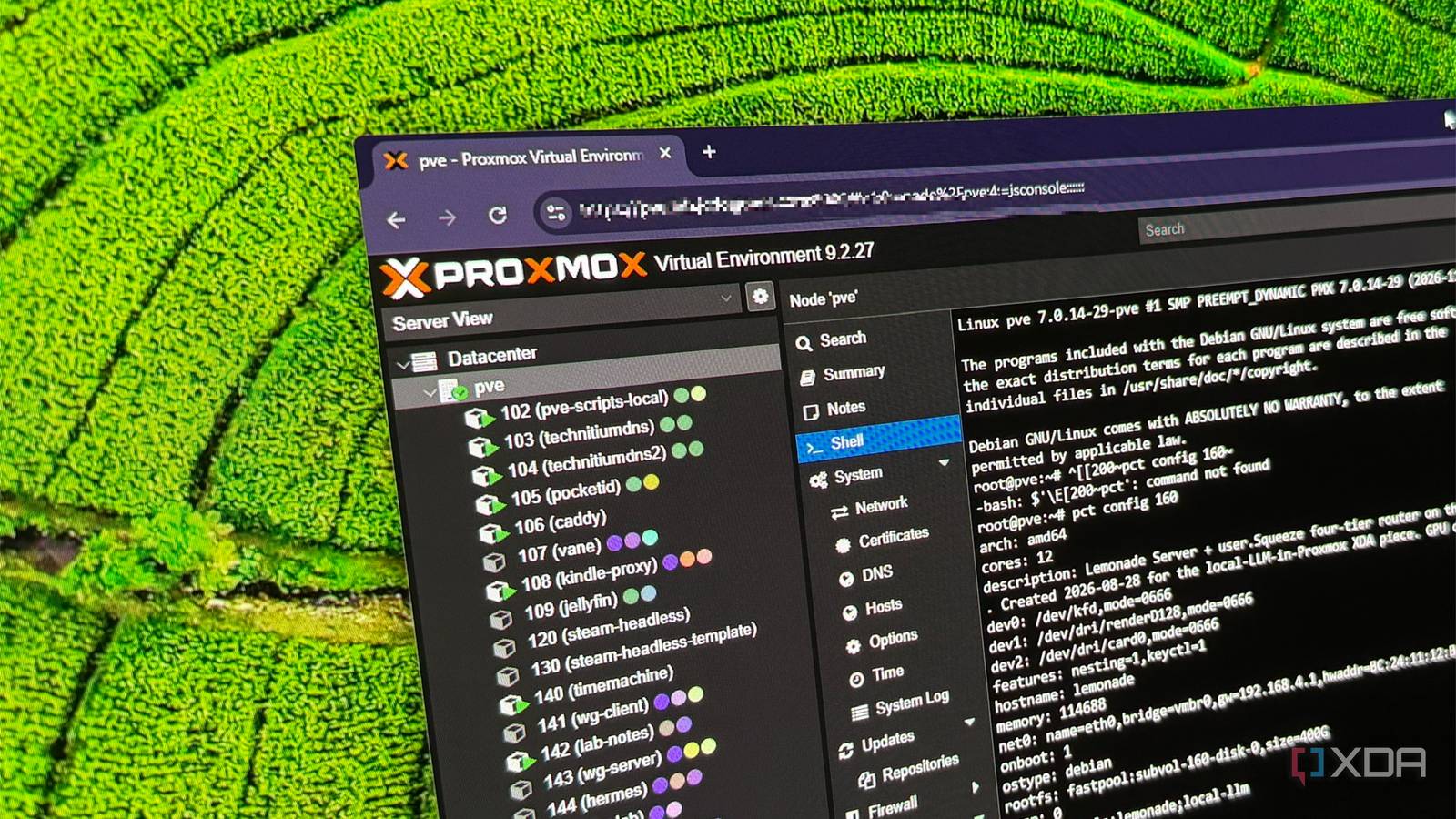
Published Nov 22, 2026, 8:01 PM EST Maker, meme-r, and unabashed geek, Joe has been writing about technology since starting his career in 2018 at KnowTechie. He's covered everything from Apple to apps and crowdfunding and loves getting to the bottom of complicated topics. In that time, he's also written for SlashGear and numerous corporate clients before finding his home at XDA in the spring of 2023. He was the kid who took apart every toy to see how it worked, even if it didn't exactly go back together afterward. That's given him a solid background for explaining how complex systems work together, and he promises he's gotten better at the putting things back together stage since then. I'd always assumed a local LLM needed its own machine, or at least its own VM with the GPU passed straight through. I ignored that. My Strix Halo mini PC already runs Proxmox for my lab, so after switching my local AI setup to AMD's Lemonade, I dropped it into an LXC container and figured I'd move it to bare metal once it got too slow. It never got too slow. Since I ditched cloud AI for a local LLM in Proxmox, that container has fed gpt-oss-120b to the search engine that gave my local LLM real-time search, a Discord bot, and a coding agent. Its numbers sit right alongside the bare-metal Strix Halo machines I've tested, including the tablet that runs the same LLMs as my PC. It hasn't all been smooth tokening, but the issues I ran into are all preventable, and the benefits far outweigh them. Why a container beats a VM for local LLMs on Strix Halo An LXC shares the host's kernel, so the GPU never has to be handed over The box is a Bosgame M5 with AMD's Ryzen AI Max+ 395, its Radeon 8060S integrated graphics, and 128GB of unified memory. It's node pve in my Proxmox cluster, and it also runs my reverse proxy, my DNS servers, and a pile of other containers. Lemonade lives in CT 160, a Debian 13 container with Lemonade installed as the regular lemonade-server package and running as a service. A VM would need the whole GPU passed through with PCIe passthrough, and an integrated GPU is a fiddly thing to give away. A container is simpler, because it shares the host's kernel. Instead of handing over the card, Proxmox exposes the GPU's device files to the container, and the ROCm stack inside talks to the same driver the host uses. That's three lines in the container's config, and the container stays unprivileged. One maps /dev/kfd, the compute interface ROCm needs, and the other two map the GPU's /dev/dri nodes: dev0: /dev/kfd,mode=0666dev1: /dev/dri/renderD128,mode=0666dev2: /dev/dri/card0,mode=0666 I had Claude build the container through the Proxmox API, because it's just easier, and that worked right up until the GPU. The API refused with a 403, because only root@pam can configure device passthrough, so I added the three mappings myself with pct set from the host's shell. The rest is an ordinary Debian container with 12 cores, 112GB of memory, and no swap. Dynamic VRAM was a benefit I didn't see coming The model takes the memory it needs and gives it back when it's done If you're setting up Strix Halo (or any other unified memory device) for local AI, this is the most important part. Out of the box, the BIOS's Auto setting carved 64GB of my 128GB off as dedicated VRAM. That memory belongs to the GPU whether a model is loaded or not, so every other container on the node was fighting over what was left. So I set the BIOS to UMA_SPECIFIED with just 512MB reserved, then added ttm.pages_limit to the Proxmox kernel command line to let the GPU borrow up to 100GB of system memory. Now the allocation scales with the model. A 9B model takes about 7GB, gpt-oss-120b takes around 60GB, and when Lemonade unloads them, that memory goes straight back to the rest of the system. On a machine that also runs my DNS and reverse proxy, that's a far better deal than a fixed 64GB chunk of VRAM sitting idle. Sure, you can do the same thing on a bare-metal installation, but this is where the container earns its keep. Because CT 160 shares the host's kernel, it gets that dynamic pool directly, and nothing has to be carved out for a guest in advance. The default backend made the container look three times slower Lemonade picked Vulkan, and Vulkan barely touched the GPU My first benchmarks were rough, and I nearly blamed the container. Lemonade was auto-loading llama.cpp models on the Vulkan backend, and inside CT 160, Vulkan barely touched the GPU. The tell was the VRAM column in lemonade bench: Qwen3.5-9B on Vulkan used 0.2GB of GPU memory and crawled along at about 10.7 tokens per second. Qwen3.5-9B in CT 160 ROCm Vulkan Generation (chat, long output) 33.0 tok/s 10.7 tok/s Time to first token (code-debug) 495ms 5,261ms VRAM in use 6.7GB 0.2GB Forcing ROCm tripled generation speed and cut time to the first token in the heaviest test by a factor of 10. The fix is one command, and the --save-options flag is the important part, because without it the next auto-load quietly drops back to Vulkan. lemonade load Qwen3.5-9B-GGUF --llamacpp rocm --save-options Don't make the other mistake I did, either. Saved options apply per model, so when gpt-oss-120b auto-loaded later, it came back on Vulkan at 13 tokens per second until I ran the same command for it. And lemonade status won't warn you, because on the version I was running, its Recipe column showed plain llamacpp whichever backend was in use. Only the server log names the backend. gpt-oss-120b runs faster in my container than on my Strix Halo tablet The fairest test I have is gpt-oss-120b, because I've also run the same MXFP4 model on bare metal. My Asus ROG Flow Z13 has the same Ryzen AI Max+ 395 and 128GB of memory, running Windows 11. In the CT 160 container, during a project I did in October, the same model generated at 36 to 42 tokens per second. That's double what I measured when I first set the container up in late August, when gpt-oss-120b managed 19 tokens per second on ROCm through my model router. The container's GPU setup didn't change in between, but Lemonade went through two releases, and the numbers climbed with them. gpt-oss-120b Where Generation Conditions CT 160 (Proxmox LXC) BOSGAME M5 41.6 tok/s Lemonade, ROCm, 9,344-token context CT 160 (Proxmox LXC) BOSGAME M5 36.2 tok/s Lemonade, ROCm, 21,532-token prompt Bare metal, Windows 11 ROG Flow Z13 31.7 tok/s Ollama, ROCm, short prompt To be clear, this isn't a lab-grade comparison. The Z13 ran Ollama rather than Lemonade, on Windows rather than Linux, and on a short prompt. But the container held its own while chewing through a 21,000-token prompt, which is the opposite of a handicap. That doesn't prove the container costs anything, but if it cost much, I'd expect it to trail the tablet, not lead it. Know how each model behaves before you pick where it runs The container isn't a free win for every model, though. On my bare-metal Ryzen AI Halo mini PC, Qwen3-Coder-30B-A3B ran fastest on Vulkan at 90.1 tokens per second, versus 69.5 on ROCm. Inside CT 160, the same model managed just 7.6 tokens per second on Vulkan when I first set the container up, so that faster path simply isn't available, and ROCm is the only real option. So it pays to benchmark each model you care about on both backends before deciding where it lives. gpt-oss-120b loses nothing in a container on my hardware. A model that leans on Vulkan might be better off on bare metal, and a single lemonade bench run will tell you which camp yours falls into. This is true for any model; some backends work best, and a little trial and error before getting into the real work will tell you which way to go. Running it in Proxmox pays off every time I touch it Snapshots make upgrades boring, which is exactly what I want The speed is only half the story. Lemonade moves fast, and I've upgraded CT 160 from 11.8.1 to 11.9.0 and then to the calendar-versioned v2026.41.1, each time with a ZFS snapshot taken first. Both upgrades went cleanly, and my saved ROCm and context-length options survived, but knowing I could roll back made it painless to try. It also means every other container on the node reaches the model over the local bridge. My Vane search container, the Hermes Discord bot, and the Jean coding workspace all point at the same Lemonade instance, with no extra machine humming in the corner. It isn't flawless, though. With gpt-oss-120b and a second model resident, the container peaked at 111.8GB of its 112GB memory limit, then refused even a hard stop, and I had to reboot it. Leave yourself headroom. I went in expecting to pay for the convenience of a container, and for the model I use most, I haven't. gpt-oss-120b runs at least as fast in CT 160 as it did on my bare-metal Z13; the GPU memory grows and shrinks with whatever's loaded, and upgrades come with an undo button. The one real cost so far is Vulkan, and that only matters for the models that prefer it. Proxmox Proxmox is the backbone of my home lab.
Running local LLMs in a Proxmox LXC is closer to bare metal than you’d think
Full Article
Original Source
Read the full article at Xda-developers →KhanList aggregates and links to publicly available news content. We do not host full articles from third-party sources. Always verify important information with original sources.