
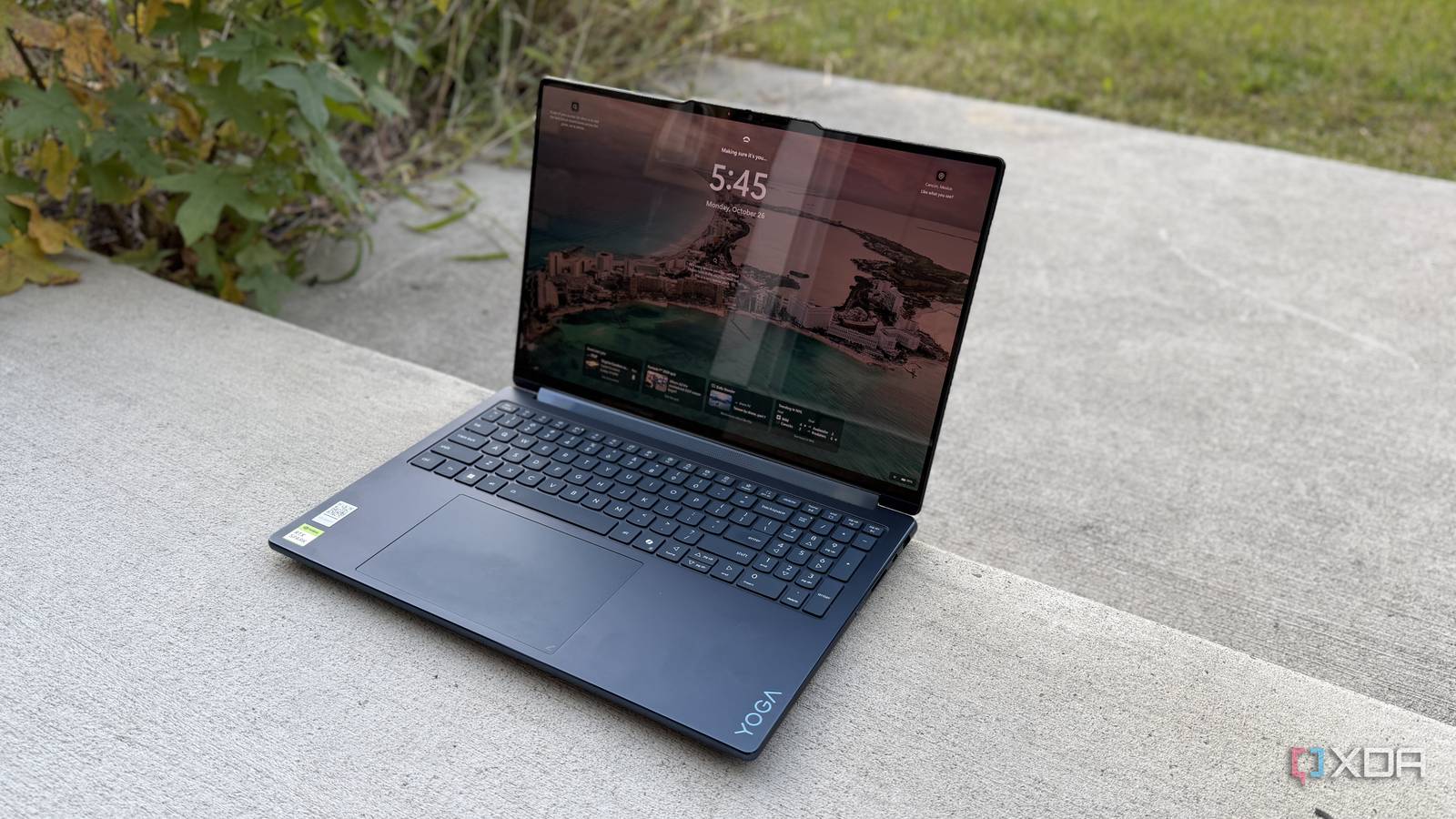
Published Oct 28, 2026, 1:30 PM EDT Maker, meme-r, and unabashed geek, Joe has been writing about technology since starting his career in 2018 at KnowTechie. He's covered everything from Apple to apps and crowdfunding and loves getting to the bottom of complicated topics. In that time, he's also written for SlashGear and numerous corporate clients before finding his home at XDA in the spring of 2023. He was the kid who took apart every toy to see how it worked, even if it didn't exactly go back together afterward. That's given him a solid background for explaining how complex systems work together, and he promises he's gotten better at the putting things back together stage since then. Sign in to your XDA account Nvidia's RTX Spark platform is out, and we've been spending all our days putting it to the test. It's a powerhouse for local AI, but we've also been testing how well it handles emulating games, playing recent games, and letting a local LLM play Minecraft with us. All of this has been great fun, and could be the shape of our future coverage on new emerging hardware platforms. But none of this would be useful without the RTX Spark chips inside the laptops or mini PCs that are hitting the market. So, let's take a look at one of those, the new Lenovo Yoga 9n 2-in-1. It's not simply the old Yoga with a new chipset inside, and that makes all the difference. About this review: Lenovo provided the Yoga 9n 2-in-1 used in this review, and had no input into its contents. Lenovo Yoga 9n 2-in-1 9/10 Operating System Windows 11 for Arm CPU Nvidia RTX Spark N1X 18-Core or 20-core GPU Up to 6,144-core GPU RAM Up to 64 GB LPDDR5x unified memory The Lenovo Yoga 9n 2-in-1 is a gorgeous 16-inch convertible laptop powered by the Nvidia RTX Spark platform. It's a powerhouse of local LLM and creative use, and it's pretty good at everything else, too. Pros & Cons Gorgeous OLED touchscreen Stylus works on the screen and the touchpad Powerful performance even when forced into emulation Screen is very glossy Expensive 16-inch is unwieldy in tablet mode Price, specs, and availability The Lenovo Yoga 9n 2-in-1 starts from $3,000, which gets you the 18-core N1X variant with 5,120 Nvidia Blackwell RTX cores, 32GB of RAM and 512GB of SSD. There's also a 20-core N1X variant with 6,144 GPU cores, and you can get up to 64GB of RAM and 2TB of SSD. The RTX Spark platform can go up to 128GB of RAM, but it seems either Lenovo has decided to limit the amount of RAM or just that model is coming later. Our review model has the 20-core N1X with 6,144 CUDA cores, 64GB of RAM, and 1TB of SSD, which is $4,000 from Lenovo but slightly cheaper at $3,750 at Best Buy at the time of writing. Lenovo Yoga 9n 2-in-1 CPU Nvidia RTX Spark N1X 18-Core or 20-core GPU Up to 6,144-core GPU Display type OLED Display (Size, Resolution) 16-inch, 2880x1800, touch, HDR 1000 True Black, 100% DCI-P3, 500 nits, 120Hz, glass RAM Up to 64 GB LPDDR5x unified memory Storage Up to 2TB M.2 PCIe Gen 4 SSD Battery 4-cell 99.9 Wh Ports 2x USB-A 10 Gbps, HDMI 2.1, 3.5mm audio combo jack, SD card reader, 2x USB-C USB4 40 Gbps with PD 3.0 and DP 2.1 Operating System Windows 11 for Arm Webcam 9.2MP IR Wi-Fi connectivity Wi-Fi 7 2x2 Bluetooth Bluetooth 5.4 Form factor 2-in-1 Dimensions 0.69″ x 14.17″ x 9.57″ (17.5mm x 360mm x 243.1mm) Weight Starting at 4.28 lbs (1.94 kg) Speakers 2x 2W tweeters, 4x 2W woofers, Dolby Atmos Colors Cosmic Blue Pen compatibility Yes, both on screen and touchpad Stylus Yoga Pen Gen 2 The Lenovo Yoga 9n 2-in-1 gains a few new tricks The stylus was a standout for me The Lenovo Yoga 2-in-1 line hardly needs introduction, it's long been the gold standard for 2-in-1 convertible laptops and the 9n is no exception. It comes in Cosmic Blue, and while that's a fingerprint magnet, it really is eye-catching. Every aspect of this machine is super premium, from the keyboard to the haptic touchpad (hurray!), which is also pen-sensitive, so you can use it to write or sketch with the stylus. And yes, the stunning OLED screen is also touch and stylus sensitive, making this a versatile laptop for creation and also consumption of content. The screen covers 100% of sRGB and 100% of P3, although you will want to use Windows' Color Profile menu to switch between the installed profiles as they are tuned for the particular color space you'd want to use. It managed 489 nits of brightness in SDR, which is fantastic to see on an OLED, and the glass screen makes color pop. That does reflect lots of ambient light, so that's worth keeping in mind depending on where you'll use it. Oh, and it's rated for DisplayHDR True Black 1000, which really does make things look great in HDR. The 9.2MP webcam is impressively clear, and the six speakers (including two in the hinge so they move as you convert it) are loud without being unbalanced. The stylus charges over USB-C, although it comes with a magnetic silicone case that attaches to the rear of the lid. You get two USB4, two USB-A, HDMI 2.1, audio, and SD card reader, which makes it perfect for photographers who like to edit with a pen. Time for some benchmarks Synthetics only show part of the story but they're still important The Lenovo Yoga 9n 2-in-1 we tested had the higher tier 20-core N1X CPU with 6,144 CUDA cores. That's the same number of cores the desktop RTX 5070 has, although the power constraints of this laptop and the lower memory bandwidth from using LPDDR5x instead of GDDR7 pulls the performance down to what you'd expect from a laptop GPU. The Arm cores aren't quite as powerful as those in the Snapdragon X2 Elite Extreme, but make no mistake about it, this is a supremely capable laptop. You might not be buying it for gaming, but it's good at that, and being able to run large LLMs at the same time as games is genuinely impressive. Synthetic performance puts this system above most things I've tested this year. And really, at the cost, that's where it should be. You don't need 64GB of RAM for those tests but you do for the practical applications that's coming later. Lenovo Yoga 9n 2-in-1 (Nvidia N1X 20-core) HyperX OMEN 15 (Core Ultra 9 386H, RTX 5070 mobile) Dell 14S (Intel Core Ultra 7 355) Asus Zenbook A16 (Snapdragon X2 Elite Extreme X2E-94-100) Asus Zenbook 14 (Core Ultra 9 285H) Dell XPS 14 (2026) (Intel Core Ultra X7-358H) Geekbench 6 (single/multi) 3,009 / 19,679 2,734 / 15,353 2,720 / 11,318 3,521 / 22,978 2,807 / 15,390 2,835 / 16,358 Cinebench 2024 (single/multi) 115 /1,417 119 / 1,136 177 / 577 146 / 1,490 125 / 746 123 / 806 3DMark (Time Spy/Wild Life/Night Raid) 12,583 / 65,173 / 59,071 12,577 / 20,047 / 57,503 3,194 / 21,267 / 29,409 4,516 / 38,708 / 50,653 4,401 / - / 31,322 6,136 / 33,695 / 37,886 CrossMark (Overall) 1,722 1,958 1,969 2,091 2,032 1,905 Battery life is a little odd, because you don't seem to lose any performance even on the lower Windows power settings. The usual looped video test I do at 200 nits brightness lasted just over 11 hours, which is halfway between a gaming laptop on the low end and Panther Lake or a MacBook near the top end. But the trade here is that you can continue doing substantial work during that time. Sure, running heavy LLMs will drop that total down but that's true enough on any laptop. What about local LLM use? And we can't forget gaming, either I tested the RTX Spark against a Strix Halo convertible with 128GB of RAM, and the Spark won on every test that would fit on both devices. Yes, if you are working with larger models you'll want the larger RAM capacity, but that is available on other RTX Spark models and might be available from Lenovo in the future. This is the best platform I've used for local AI work. Sure, I can generate tokens faster on the RTX Pro 6000, but I could get multiple RTX Spark laptops for that price. And Nvidia's promise of every app working on the RTX Spark seems to hold so far. Every game I tried from 20 years of gaming history worked, even the ones I thought would struggle with Prism, the Windows on Arm translation layer that makes x86 programs run on the platform. It's around a RTX 5070 mobile in gaming, which is fine if you want a local LLM laptop that can play games afterward. If you play games primarily, go for a more powerful gaming laptop. Should you buy the Lenovo Yoga 9n 2-in-1? You should buy the Lenovo Yoga 9n 2-in-1 if: You want the RTX Spark platform in a 2-in-1 You use a stylus heavily and want the ability to use the touchpad as a drawing pad You want a gorgeous OLED display You should NOT buy the Lenovo Yoga 9n 2-in-1 if: You need more than 64GB of RAM for larger local LLMs You don't like glossy screens You want something more powerful for gaming The combination of RTX Spark and the Lenovo Yoga 9n 2-in-1 is hard to beat. The stylus and the choice to make the touchpad pen-sensitive makes it more versatile for creative users, and it also makes it easier to take notes or manipulate data. The 16-inch screen is a little on the large side for using as a tablet, but excels at every other use case. And it's a Lenovo, so you know the keyboard is a joy to type on. Lenovo Yoga 9n 2-in-1 9/10 CPU Nvidia RTX Spark N1X 18-Core or 20-core GPU Up to 6,144-core GPU Display type OLED Display (Size, Resolution) 16-inch, 2880x1800, touch, HDR 1000 True Black, 100% DCI-P3, 500 nits, 120Hz, glass The Lenovo Yoga 9n 2-in-1 is a gorgeous 16-inch convertible laptop powered by the Nvidia RTX Spark platform. It's a powerhouse of local LLM and creative use, and it's pretty good at everything else, too. RAM Up to 64 GB LPDDR5x unified memory Storage Up to 2TB M.2 PCIe Gen 4 SSD Battery 4-cell 99.9 Wh Ports 2x USB-A 10 Gbps, HDMI 2.1, 3.5mm audio combo jack, SD card reader, 2x USB-C USB4 40 Gbps with PD 3.0 and DP 2.1 Operating System Windows 11 for Arm Webcam 9.2MP IR Wi-Fi connectivity Wi-Fi 7 2x2 Bluetooth Bluetooth 5.4 Form factor 2-in-1 Dimensions 0.69″ x 14.17″ x 9.57″ (17.5mm x 360mm x 243.1mm) Weight Starting at 4.28 lbs (1.94 kg) Speakers 2x 2W tweeters, 4x 2W woofers, Dolby Atmos Colors Cosmic Blue Pen compatibility Yes, both on screen and touchpad Stylus Yoga Pen Gen 2
RTX Spark is here but it's the chassis it comes in that counts
Full Article
Original Source
Read the full article at Xda-developers →KhanList aggregates and links to publicly available news content. We do not host full articles from third-party sources. Always verify important information with original sources.