
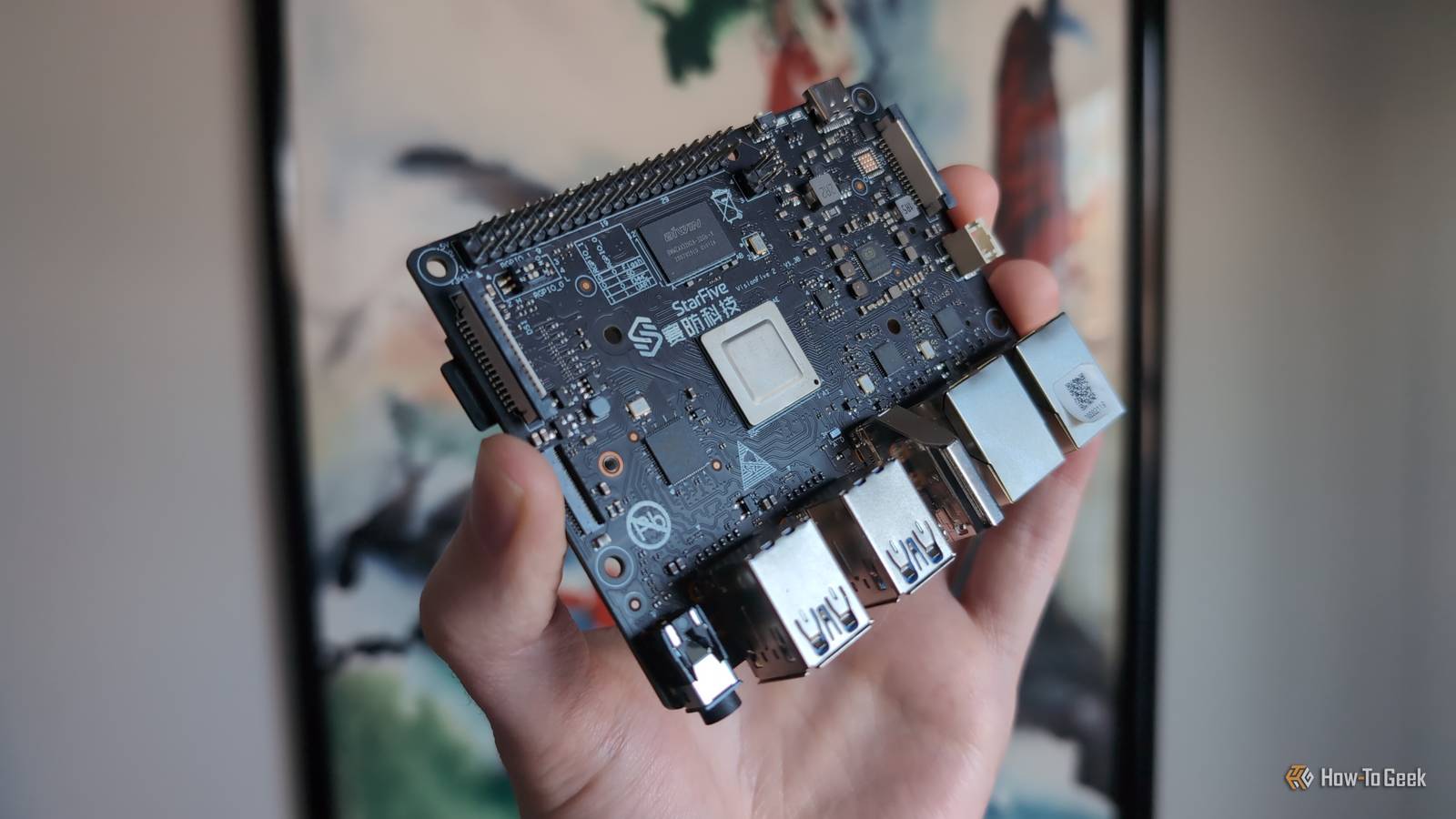
Published Nov 15, 2026, 6:00 AM EST Umair Khurshid is a technology writer and developer with a strong focus on Linux, FreeBSD, cloud infrastructure, and automation. Before focusing on writing, Umair worked as a developer and DevOps engineer building and automating cloud-native systems. At $385, the 16GB Raspberry Pi 5 is a board I can only admire from a distance. Raspberry Pi raised its price by another $80 in November, which got me looking at RISC-V boards. The comparison that caught my attention, though, was at the cheaper end of the lineup. You can get a 4GB RISC-V board for less than a 4GB Pi 5. The difference is enough to buy something else for the project, but the closer I looked at the jobs I normally give a Pi, the more that price difference depended on what I planned to run. The 4GB StarFive is cheaper than the 4GB Pi 5 You save at least $20 before adding storage Credit: Jordan Gloor / How-To Geek As of the time of writing, a 4GB StarFive VisionFive 2 Lite with Wi-Fi is selling for $90. The 4GB Raspberry Pi 5 has an official list price of $110, and goes for around $130. That puts the StarFive $40 below the Pi’s price on paper (the amount you actually save depends on where you buy the boards). You need to bring your own storage for either board. StarFive has a microSD slot and an onboard M.2 slot. The Pi also takes a microSD card, but you need an adapter or HAT to connect an NVMe SSD. If you have a compatible drive sitting in a drawer, you can plug it directly into the StarFive. If you are starting with a microSD card, the onboard M.2 slot gives you an upgrade path without another adapter purchase. VisionFive2 RISC-V SBC Starter Kit Storage SD card slot CPU StarFive JH7110 Memory 8GB Operating System Debian, Fedora, Ubuntu, openSUSE The StarFive makes sense on paper if you want a board for a light job. A small DNS server or uptime monitor can run comfortably within 4GB. In my homelab, those are the kinds of services I sometimes want on a separate machine, so they stay available while I work on the rest of the setup. If the software you use is available for RISC-V and the board spends most of its time waiting for the next request, saving $22 or more is a reasonable reason to pick it. The Pi 5 still has the faster CPU You are more likely to notice the gap on a build machine The Pi 5 uses four Arm Cortex-A76 cores at 2.4GHz. The VisionFive 2 Lite uses a quad-core StarFive JH7110S at up to 1.25GHz. Clock speeds alone tell you little about how two different CPU designs perform. A benchmark gives you a better idea of what happens when both boards have to get through the same work. In SBC Compare’s multicore 7-Zip results, the 4GB Pi 5 scored 10,898 MIPS, compared with 4,081 MIPS for the 4GB StarFive VisionFive 2. That is roughly a 3x difference in that test, but you are unlikely to care about that score on a box that spends all day answering DNS queries. If you use the board to build software, you are more likely to notice the difference. Waiting for a dependency to compile is fine when it happens once. It starts to matter when you change something, rebuild it, discover you missed a flag, and go around again. The same goes for a scheduled job that compresses a lot of data. One slow run might be easy to live with, but a job that takes longer every night has more time to get in the way of something else. That’s only half of it. There is also a limit to what a faster CPU can do for you. If your current workload regularly pushes a 4GB board into heavy swapping, either of these models could leave you with the same problem. I would suggest checking memory and swapping activity while the database is busy or a scheduled job is running. If everything fits and the CPU is what you spend time waiting on, the Pi has a stronger case. However, the StarFive’s lower price makes more sense when you already know the work is light. Your software has to make the move too Getting Linux to boot is the easy part Canonical publishes an Ubuntu Server 24.04 LTS image for the VisionFive 2 Lite, and Debian 13 officially supports riscv64. You have a familiar starting point if you want to set up a Linux server. What matters next is whether the project you bought the board for has a supported installation path of its own. Home Assistant is a good example. On the Pi 5, you can flash an official Home Assistant OS image and install apps from Home Assistant itself. Home Assistant does not officially support RISC-V, and the VisionFive 2 Lite has no official Home Assistant OS image, though people have gotten Home Assistant running in RISC-V containers by building the missing Python packages from source. If you rely on apps in Home Assistant OS, switching to Home Assistant Container means running and maintaining those services yourself. That changes what you have to do the first time you install it and what you have to maintain afterward. Similarly, if you are migrating a Docker Compose stack, check the exact image tags in your Compose file. PostgreSQL publishes official images for riscv64, so the database is the easy part. The real snag is often a small nightly backup container that lacks multi-arch support. While you can build a missing image yourself, provided its dependencies support the architecture, you then have to factor that custom build into every future update or recovery after a drive failure. I spend enough time troubleshooting deployments at work that at home, I just want to restore a service by pulling the exact same image I used before. The savings are worth it for some jobs If you are buying a board for a small DNS server or an uptime monitor, going for RISC-V can make sense. Check that the software you plan to run has a RISC-V build. If it does and the board will spend most of its time idle, you can save $22 against the Pi 5’s official price and get the same 4GB of RAM. For the jobs I buy a Pi 5 for, I would still pay the extra $22. If you want to run Home Assistant OS, that premium buys you a board with an official image and support for apps. If you compile software regularly, it buys you a faster CPU. The price hike makes the StarFive worth considering, but I would switch only for a project where I know I can keep the savings without taking on extra work.
Raspberry Pi price hikes still don't justify switching to RISC-V boards
Full Article
Original Source
Read the full article at Howtogeek →KhanList aggregates and links to publicly available news content. We do not host full articles from third-party sources. Always verify important information with original sources.