
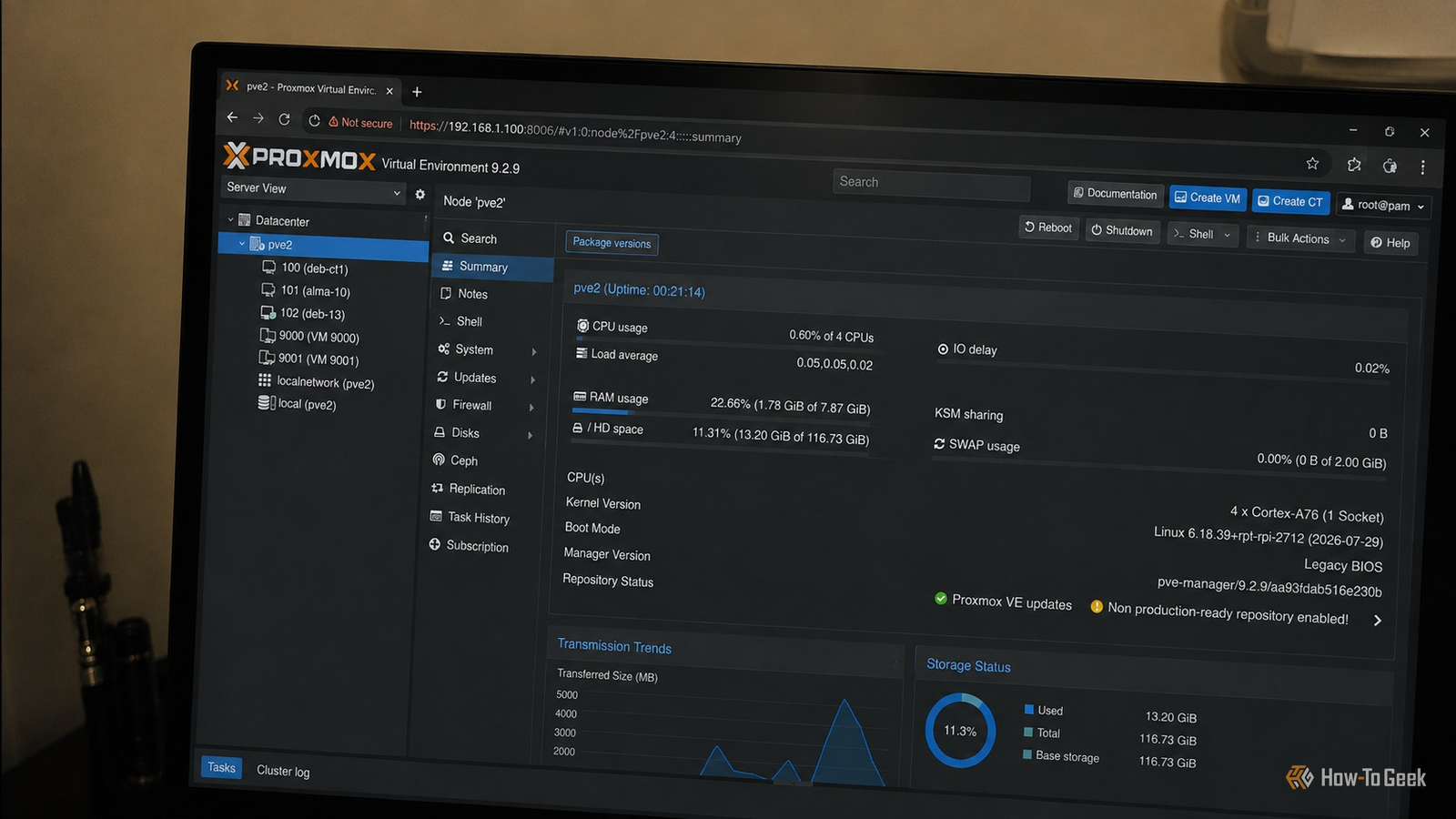
Published Sep 1, 2026, 8:00 AM EDT Umair Khurshid is a technology writer and developer with a strong focus on Linux, FreeBSD, cloud infrastructure, and automation. Before focusing on writing, Umair worked as a developer and DevOps engineer building and automating cloud-native systems. I had a Raspberry Pi 5 lying around and I was not doing much with it. Then Proxmox VE recently announced ARM64 support on 5th of August and that immediately made me think about my Raspberry Pi. Proxmox now provides Proxmox VE for 64-bit ARM platforms, although the Raspberry Pi devices are not officially supported because of their boot and hardware-description architecture. I decided to experiment anyway and installed Proxmox VE on top of Debian on my Raspberry Pi 5. The Pi became my little virtualization lab Small hardware is much more useful when the workloads are isolated The main reason I like this experiment is isolation. When I was using the Pi as a normal Linux machine, anything I installed was part of the host. That is fine for a simple server, but it becomes less attractive when you want to experiment. With Proxmox, I can create a VM or LXC container for a particular task and keep it separate from everything else. If I want to test something on Debian, I can create a Debian guest, run an AlmaLinux environment alongside it, or isolate experimental services that might destroy their own configuration in separate guests. This is where the Raspberry Pi starts punching above its weight. It does not have enough CPU or memory to run large enterprise workloads, but the workloads I actually want to run in a homelab are often small enough that the hardware is perfectly adequate. It can run a small Linux VM with a modest amount of memory. I have also tried several lightweight services and LXC containers really help to keep resource usage low. Just be sure to use the ARM64 versions of the containers. A normal Raspberry Pi server tends to accumulate services over time, with every experiment modifying the same host. I can create a guest for an experiment, give it the resources it needs, take a snapshot before making risky changes, and delete the guest when I am finished. Those lucky enough to own multiple Raspberry Pis might even be able to experiment in a cluster. It is useful precisely because it is small The Pi fills a role that larger machines cannot One not so unexpected advantage of the Raspberry Pi is that it is cheap enough to dedicate to experiments. If I want to try a new Proxmox feature, test an ARM64 image, or build a temporary environment, the Pi gives me somewhere to do it. That makes it a useful complement to a larger homelab server. The bigger machine can handle workloads that need substantial CPU, memory, or storage, while the Pi can remain available for small experiments and services that benefit from being isolated. It also gives you an ARM64 environment that you would otherwise have to emulate or borrow another machine to obtain. There is also something appealing about having a virtualization host that draws very little power and takes up almost no space. You can leave the Pi running continuously without treating it like a full-sized server, while Proxmox gives me the same basic workflow for creating and managing guests that I would expect from a larger virtualization system. There are some big caveats This is a homelab experiment, not a production server There is a reason I keep calling this an experiment. The Raspberry Pi 5 is not officially supported hardware for Proxmox VE. The recent ARM64 support is significant, but Proxmox’s officially supported ARM64 deployment requires UEFI and ACPI. My installation is running on top of Debian, and that is enough for what I want to do with it. I would not build production infrastructure around this setup. Even though Pi 5 is surprisingly fast and powerful for its size, it remains a small ARM machine. Running several guests will eventually consume its CPU and memory. You need to choose workloads that make sense for the hardware. Also, if you are running this kind of setup from an SD card, I would be particularly cautious. A virtualization host constantly performs storage operations, and I would not want to put an SD card through that workload for an extended period. SD cards are convenient for booting Raspberry Pis, but they are not what I would choose as the primary storage for a Proxmox server. An M.2 NVMe setup makes much more sense, it gives the machine considerably better storage performance and is a more appropriate foundation for virtual machine and container storage. If you are going to experiment with Proxmox on a Raspberry Pi for more than a quick test, storage is one of the first things I would improve. Raspberry Pi M.2 HAT+ Compatibilty Raspberry Pi Case for Raspberry Pi 5 There is also an interesting middle ground for people who want to experiment with a more conventional Proxmox installation on Raspberry Pi hardware. UEFI projects exist for the Raspberry Pi 4 and Raspberry Pi 5. That makes it worth experimenting with the official ARM64 Proxmox environment and seeing how far you can get with a UEFI-based setup. Just because the Raspberry Pi itself is not an officially supported Proxmox platform does not mean there is nothing interesting to learn from it. Proxmox made the hardware more interesting My Raspberry Pi was sitting around with 8 GB of RAM and around 120 GB of storage, and I was not getting much use out of it. The arrival of ARM64 support in Proxmox VE gave me a reason to see what I could do with it. For roughly $35 worth of hardware that was otherwise sitting idle, I suddenly had a small virtualization host capable of running multiple operating systems and isolated services at the same time. The setup also shows something I have found repeatedly in homelabs that the most useful hardware is not always the most powerful hardware you own. Sometimes the machine sitting in a drawer is enough. In my case, I already had the Raspberry Pi. Proxmox simply gave me a reason to put it back to work.
Proxmox VE turned a $35 Raspberry Pi into my homelab's most powerful machine
Full Article
Original Source
Read the full article at Howtogeek →KhanList aggregates and links to publicly available news content. We do not host full articles from third-party sources. Always verify important information with original sources.