
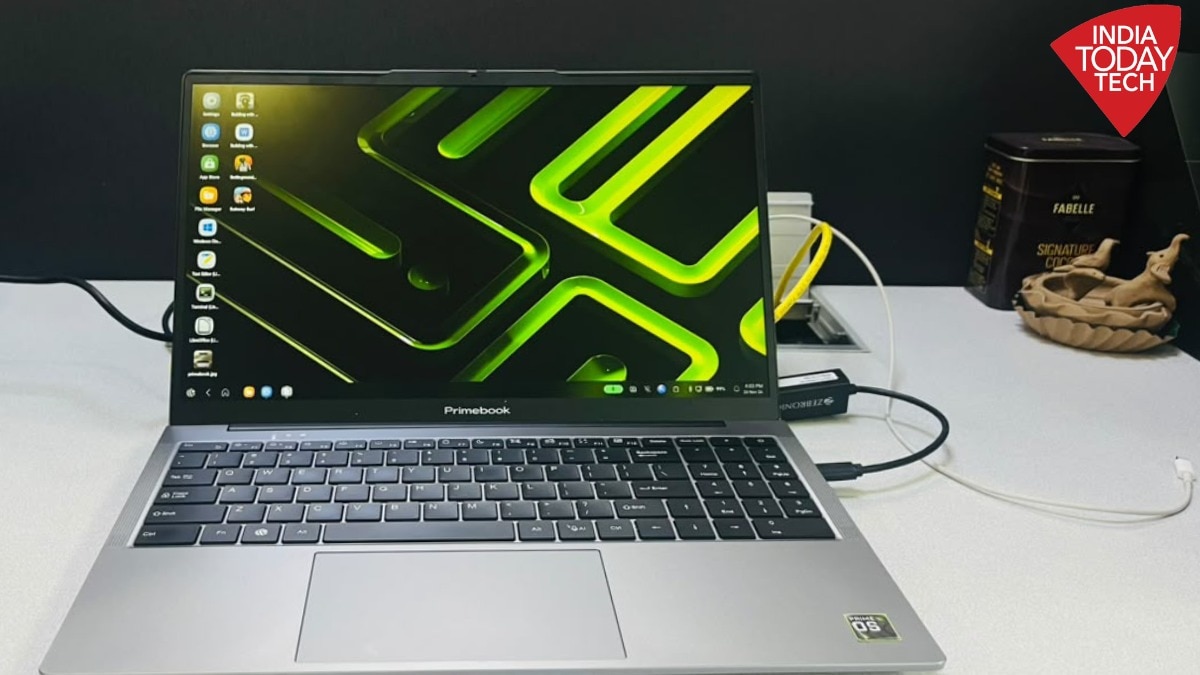
Buying a budget laptop in India is rarely exciting. Most of the time, you are forced to choose between an entry-level Windows laptop that slows down within months or a basic Chromebook that feels too limiting without internet.Primebook, the Shark Tank India-funded startup, has been trying to offer a practical third option with its Android-based laptops for some time. Its latest, Primebook 3 Max, is the most high-end laptop it has ever made. It is currently selling for Rs 35,990. Despite the seemingly low price, the laptop offers an interesting mix of specs and feature.I used the Primebook 3 Max as my primary laptop for daily office work, including writing stories, juggling multiple browser tabs, and attending calls, before winding down with shows and casual games at the end of the day. Here is how the laptop fared in day-to-day use.Design and buildAt first glance, the Primebook 3 Max looks far more polished than what you usually see at this price point. Instead of going with an all-plastic body, the Primebook has paired a metal lid with a plastic interior. The matte finish also does a great job of keeping smudges and fingerprints away during regular daily use. The hinge feels reassuringly sturdy and opens completely flat up to 180 degrees. I found this genuinely handy when adjusting the screen angle at my desk or simply propping the laptop up while watching a show in bed.At nearly 1.6 kg, it is not an ultra-lightweight machine, and you will feel it in your bag, though it sits right alongside most 15.6-inch budget laptops and slips into a standard backpack without any fuss. Port selection is another area where Primebook has kept things simple and practical. You get two standard USB ports, two USB-C ports – one of which handles charging, external drives, and connecting an external monitor –, a 3.5mm headphone jack, and a MicroSD card slot that lets you expand storage by up to 1TB.Wireless connectivity is handled by Wi-Fi 6 and Bluetooth 5.3, both of which stayed stable throughout my workday.Keyboard and touchpadTyping on the Primebook 3 Max turned out to be one of the most pleasant surprises during my review. You get a full-size keyboard complete with a dedicated number pad and three-level backlighting. The keys offer decent travel and feel comfortable under the fingers, which made long writing sessions and late-night work in dimly lit rooms feel effortless.The touchpad, however, is where the experience falls apart. It is easily my biggest complaint with this laptop. During my daily office work, it lagged and hung far too often. Simple, everyday actions like scrolling through long articles, dragging windows across the screen, or trying to click precisely would randomly stutter or freeze for a moment.DisplayThe Primebook 3 Max comes with a large 15.6-inch Full HD screen featuring an anti-glare matte finish. For my daily workflow, having this much screen space was a genuine relief. I could comfortably keep a document open on one side and my browser on the other without having to squint, and the matte coating did a good job of cutting down harsh reflections from overhead office lights.Brightness, however, is where the laptop shows its budget credentials. With peak brightness topping out at 250 nits, the display looks clean and comfortable indoors, and watching shows in a dimly lit room is completely fine. The moment I moved near a sunlit window or tried using it outdoors, though, the screen started looking washed out.PerformanceUnder the hood, the Primebook 3 Max is powered by an eight-core MediaTek Genio 720 chip paired with 8GB of RAM and 128GB of storage. In day-to-day usage, the laptop handled my routine office tasks without much issue.Browsing across multiple tabs, writing stories, switching between apps, and streaming Full HD shows was mostly smooth. Android games also work quite well on this machine, especially with the built-in keymapping feature that lets you easily use the keyboard and mouse to play mobile titles on the big screen.Software-wise, you get PrimeOS, which is built on Android. If you are coming from a Windows laptop, expect a two-to-three-day learning curve, and be prepared for a few mobile apps that still do not stretch neatly to a 15.6-inch screen.Once you settle in, though, the built-in software is surprisingly thoughtful. PrimeOffice gives you a free, offline-first suite—PrimeDocs, PrimeSheets, and PrimePresent—that easily covers over 90 per cent of everyday Microsoft Office tasks without nagging ads or subscriptions.For students and developers, PrimeLinux unlocks a native Linux environment with access to popular desktop tools like VS Code, GIMP, LibreOffice, Firefox, Arduino IDE, DBeaver CE, TablePlus, and Postman. You also get handy everyday utilities like PrimeBrowser, PrimeFiles, PrimeSecurity, a Task Manager to keep an eye on system usage, and the Prime App Store.Primebook is also leaning heavily into AI. Alongside AI-powered Global Search and an AI Companion, you get PrimeAGNT—an in-built AI assistant designed to understand what you want and execute tasks across apps.I tried out the newly launched Sarvam AI integration on PrimeAGNT, and getting it running was simple enough: I clicked the PrimeAGNT icon on the taskbar and hit Update. Once live, it let me issue voice commands in Hindi, English, and Hinglish.Being able to speak naturally in Hinglish to get tasks done felt genuinely built for Indian users and made the AI approachable. Just keep in mind that PrimeAGNT includes an initial set of free tokens, after which you will have to pay for extra usage.Similarly, if your work strictly depends on native desktop Windows software, PrimeOS cannot run them out of the box. You will have to rely on PrimeX Cloud PC to stream a virtual Windows or Linux desktop, which requires both a paid subscription and a steady internet connection.Camera and speakersOne area where the Primebook 3 Max punches well above its weight is the webcam. Sitting above the display is a sharp 5-megapixel camera capable of recording high-resolution video, paired with dual microphones featuring background noise cancellation.During my office calls, it looked noticeably clearer than the grainy webcams that still plague budget laptops.The dual stereo downward-facing speakers, on the other hand, are strictly functional. They get loud enough to fill a small room and keep dialogue clear during meetings and casual YouTube watching. However, the sound profile is flat and lacks bass. When I sat down for late-night streaming, I almost always ended up plugging in earphones or connecting my Bluetooth earbuds.Battery lifeBattery life is easily one of the biggest reasons to consider the Primebook 3 Max.Primebook has packed a 60.3Wh battery inside, rated for up to 12 hours of usage. In my mixed workday of writing, browsing, attending calls, and catching up on shows in the evening, it consistently lasted a full day, delivering around 8 to 10 hours depending on screen brightness and workload.Even with continuous video streaming, it held on for close to 7.5 hours, which is very solid for a 15.6-inch machine. When you do eventually run low, the bundled 36W USB-C charger tops the battery back up quickly, so you are not stuck sitting next to a wall socket for half the day.Should you buy it?At Rs 35,990, the Primebook 3 Max feels like a thoughtful, well-built laptop that gets the essentials right—provided you know what you are signing up for. It offers a large matte display, a comfortable backlit keyboard, a surprisingly sharp webcam, dependable all-day battery life, free offline office tools, smooth Android gaming support, and clever Hinglish AI voice controls that actually feel useful.At the same time, it is not without compromises. The lagging and hanging touchpad is a genuine daily frustration that practically forces you to carry an external mouse. Add to that a screen that struggles in bright light, tight 128GB internal storage, and the extra recurring cost if you need PrimeX Cloud PC for Windows apps or more PrimeAGNT tokens down the line.If you are a student, a first-time laptop buyer, a writer, or an everyday office user whose day revolves around browsers, documents, online classes, Android apps and games, light Linux coding, and indoor streaming, the Primebook 3 Max makes a lot of sense.Anyone who relies heavily on native Windows software, heavy video editing, or hardcore PC gaming—or simply refuses to carry a mouse—should look elsewhere. Pair it with a basic wireless mouse, though, and the Primebook 3 Max delivers solid value for the money.- Ends
Primebook 3 Max review: Smart budget laptop with one catch
Full Article
Original Source
Read the full article at Indiatoday →KhanList aggregates and links to publicly available news content. We do not host full articles from third-party sources. Always verify important information with original sources.