
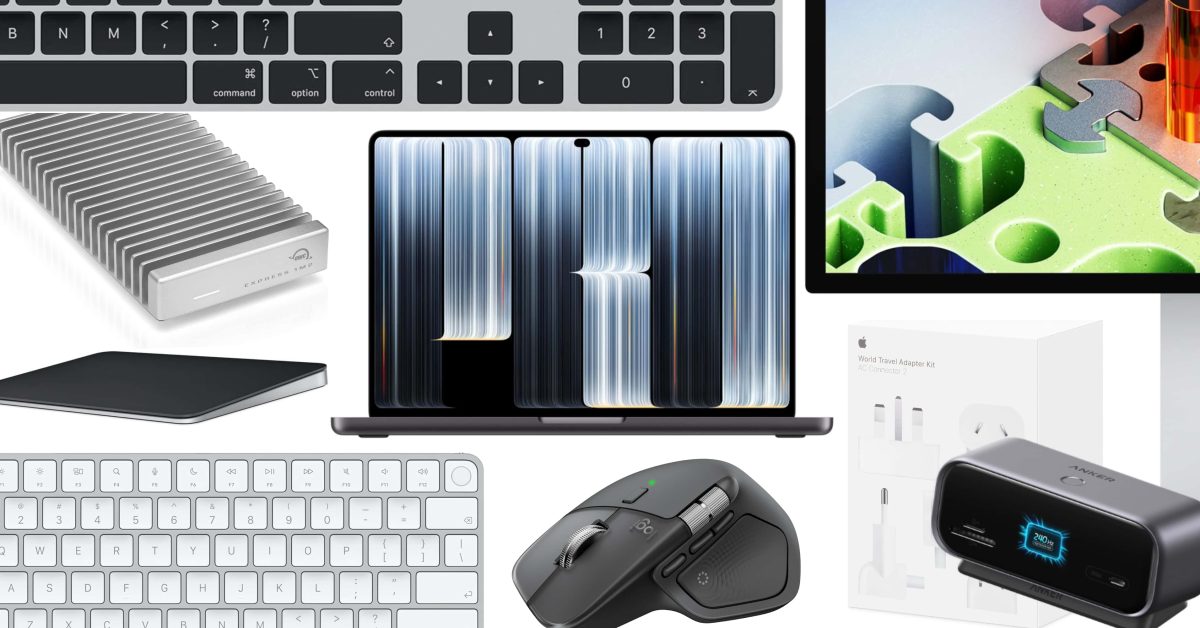
The all-new M6 MacBook and the touch display PROLED XDR have now arrived, and we are taking a look at some of our favorite accessories to upgrade the experience. From the latest Apple Magic Keyboard and Trackpad, as well as its World Travel kit, we also have MacBook stands to tidy up your workstation, expandable storage, charging stations for your desktop, and our favorite mouse solutions. The gear collected below might give you some good ideas on how to elevate your new MacBook rig, just be sure to score the 2026 Apple Polishing Cloth at $9 before it sells out again – the only way to clean a MacBook display properly. Chance – Magic Keyboard + Trackpad I use my MacBook Pro docked at my desk, so an external keyboard and trackpad are must-haves. I’ve used Apple’s Magic Keyboard and Magic Trackpad for as long as I can remember (alongside a Logitech MX Master mouse, as Ben recommends below). I think using Apple’s own peripherals provides a consistent experience whether I’m using my MacBook Pro docked or out on the go. Buy Magic Keyboard (All-time low) Buy Magic Keyboard with Numeric Keypad Buy Magic Keyboard with Touch ID Buy Magic Keyboard with Touch ID and Numeric Keypad Buy Magic Trackpad Apple World Travel Adapter Kit $39 Apple 70W USB-C Power Adapter $59 Apple 140W USB-C Power Adapter $99 Apple AC Connector 2 Power Adapter Extension Cable $19 Ben – Logitech MX Master 4 wireless mouse While I’m personally a trackpad guy through and through, I know plenty of people who prefer a mouse, and the power users among them all agree on which one. The device effectively combines the best of both worlds, with a gesture pad and side scroll wheel emulating a trackpad while you get the ergonomics and programmable controls of a mouse. The MX Master 3 or 3S used to be the king of mice, and the Master 4 adds a better feel, haptic feedback, and a third mappable button. Buy the Logitech MX Master 4 Karthik – Anker Nano 10-in-1 Smart Display USB-C hub If you’re planning to use the new MacBook Pro as part of a desk setup, I’d pair it with Anker’s 10-in-1 Smart Display hub. It gives you a much wider port selection for accessories and external displays, alongside a built-in screen to show transfer speeds, charging status, and more. Its compact design also makes it a nice fit for turning the new touchscreen MacBook Pro into a more complete workstation without taking too much space on the desk. A height-adjustable laptop stand like this one from Native Union can round out the setup nicely if you already have, or plan to add, an external keyboard and mouse. Buy the Anker Nano 10-in-1 Smart Display hub Justin – Macbook Stands If you’re anything like, you’ll want to have a neat and tidy place to stow your MacBook when at home, at your desk. While I prefer to have it right on the table top surface when in use, if I’m docking up to a multi-display setup with a mouse and keyboard, or working another system at my desk, I like to have a nice stand option to have it up on display and visible. Twelve South makes some great models, and there are some ultra-affordable variants I have used in the past from Nulaxy that have stood the test of time and work great. Twelve South Curve black metal MacBook Stand Twelve South Curve Flex, Adjustable MacBook Stand HumanCentric Vertical MacBook Stand (multiple colors) Nulaxy Full Aluminum MacBook Stand (multiple colors) Zac – OWC Express 1M2 80G external SSD A fast external SSD is one of my favorite accessories for a new MacBook Pro. I use the original OWC Express 1M2 and really like its aluminum heat sink design and silent operation. The newer Express 1M2 80G keeps that same appeal while taking advantage of Thunderbolt 5, with OWC advertising speeds over 6,000MB/s. It’s the version I’d pick for a new MacBook Pro, especially for working with large video projects, offloading photo libraries, or backing up files without filling up the Mac’s internal storage. Buy the OWC Express 1M2 80G external SSD More MacBook Pro accessories we have our eyes on: Apple 140W USB-C Power Adapter Apple Studio Display XDR CalDigit TS5 Thunderbolt 5 Dock HyperDrive Next Thunderbolt 5 Dock with SSD Enclosure Satechi Thunderbolt 5 CubeDock with Built-in NVMe SSD Enclosure tomtoc 360 Protective Laptop Sleeve Satechi SM1 75% wireless mechanical keyboard BenQ MA270U 27-inch 4K monitor with 90W USB-C Anker 165W 25,000mAh power bank with built-in USB-C cables Bellroy 16-inhc laptop backpack FTC: We use income earning auto affiliate links. More.
Our favorite gear to elevate your new MacBook Pro setup
Full Article
Original Source
Read the full article at 9to5mac →KhanList aggregates and links to publicly available news content. We do not host full articles from third-party sources. Always verify important information with original sources.