
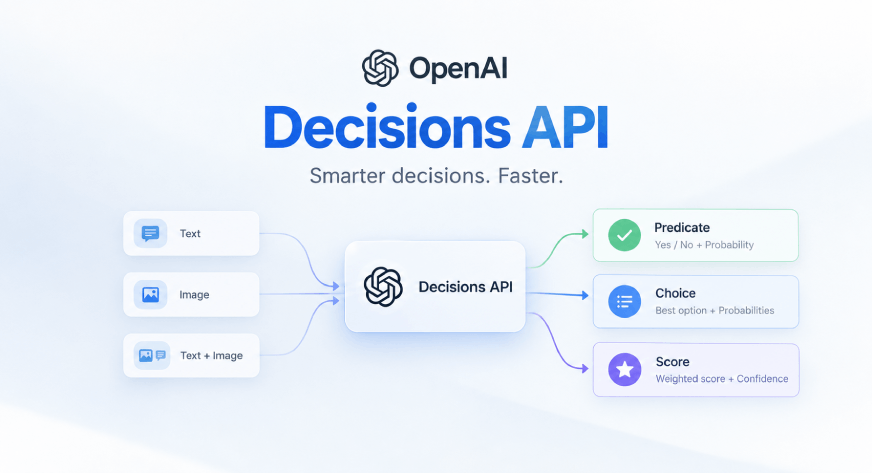
Imagine building an AI agent that has to decide whether a customer complaint needs human intervention, which department should handle a query, or whether a submitted delivery photo is valid. Getting these decisions right matters. A false positive can trigger an unnecessary escalation, while a false negative can let a genuine issue slip through. Traditionally, developers have had to build classification rules, confidence thresholds, and evaluation pipelines around their LLMs to handle such decisions reliably. Newer approaches, like Jev, focus on making model decisions more structured by returning fixed answers with confidence scores instead of open-ended responses. OpenAI is now bringing a similar idea to its API with the Decisions API. Rather than using a general-purpose response for every task, developers can define what the model needs to evaluate and whether it should return a probability, choose from predefined options, or assign a score against ordered levels. It also supports text and image inputs. In this article, we’ll explore how the Decisions API works and test all three decision types with practical examples. Table of contentsWhat is OpenAI’s Decisions API?Hands-On: Building Decision AgentsPre-requisitesInstallationsImports and Initialization Predicate: Verify Delivery Proof with an ImageChoice: Classify a News HeadlineScore: Evaluate an Answer Against a RubricConclusionFrequently Asked Questions What is OpenAI’s Decisions API? The Decisions API from OpenAI can be used via the POST endpoint: /v1/decisions. It’s an alternative to the OpenAI Responses API but only 10x faster and it’s built specifically for this to evaluate text, images, or a combination and returns an answer. It can give a probability or select a choice or give a score for a defined rubric. Currently only the latest gpt-6-luna is supported and it costs $0.10 per 1M tokens for the input. No output or cache charges but the cost increases for long-context inputs. The API has three input parameters: ‘model’, ‘input’ and ‘questions’. ‘questions’ is a like a system prompt here, to tell the model on what to evaluate, and to mention fixed sets of choices or allowed thresholds. Note that, we have to specify the ‘type’ in ‘questions’: predicate: To check a condition and return the probability choice: To return probabilities of each choice and return a choice score: To return a probabilities of ordered levels and calculate a weighted average Also Read: JEV vs LLM as a Judge: The AI Evaluation Comparison Hands-On: Building Decision Agents Let’s now dive into the API usage to test all the three types of questions and also use text and image to check the decisions. I’ll be using Jupyter Notebook for the demo. Pre-requisites Ensure you have an OpenAI key, you can get one from OpenAI platform: https://platform.openai.com/api-keys Installations %pip install openai==3.26.0 Install 3.26.0 or later version of OpenAI python SDK Imports and Initialization from getpass import getpass from openai import OpenAI openai_api_key = getpass("OpenAI API key: ") # Add your OpenAI API key when prompted. import base64 from pathlib import Path client = OpenAI(api_key=openai_api_key) Great! Client has been initialized now. Predicate: Verify Delivery Proof with an Image The task for the model is to find the proof of delivery at doorstep submitted by the delivery agent. We will use a helper for the URL conversation. Make sure to save the below image as delivery_image.jpg to follow the demo. def to_data_url(path: str, mime: str = "image/jpeg") -> str: encoded = base64.b64encode(Path(path).read_bytes()).decode("ascii") return f"data:{mime};base64,{encoded}" decision = client.decisions.create( model="gpt-6-luna", input=[ { "role": "user", "content": [ { "type": "input_text", "text": "Proof-of-delivery photo submitted by the driver.", }, { "type": "input_image", "image_url": to_data_url("delivery_photo.jpg"), }, ], } ], questions=[ { "type": "predicate", "name": "package_at_door", "instructions": ( "Does the photo clearly show a package placed at a residential or office " "entrance, such as a doorstep, porch, or mailroom? Answer false if the package " "is still inside a vehicle, held in someone's hands, or not visible." ), } ], ) answer = decision.answers[0] if answer.type == "refusal": print(f"Refused: {answer.name}") elif answer.type == "predicate": if answer.probability >= 0.85: print("Delivery confirmed automatically.") else: print(f"Sent for manual review (Probability={answer.probability:.2f})") Sent for manual review (Probability=0.00) The model has flagged the image for manual review as it should, the task was to check if the package is placed at the doorstep or not (which can’t be confirmed in the image). Choice: Classify a News Headline We use choices when the options are not ordered/levelled, I have used a complex case where the model can’t be 100% on the choice selection. decision = client.decisions.create( model="gpt-6-luna", input="Apple shares fall after EU fines company over App Store rules", questions=[ { "type": "choice", "name": "topic", "instructions": "What is this headline about?", "choices": [ { "value": "sports", "description": "Games, players, tournaments.", }, { "value": "regulations", "description": "Government and regulation.", }, { "value": "tech", "description": "Technology and science.", }, { "value": "markets", "description": "Markets and companies.", }, { "value": "other", "description": "None of the above.", }, ], } ], ) answer = decision.answers[0] if answer.type == "refusal": print(f"Refused: {answer.name}") elif answer.type == "choice": print(f"Top pick: {answer.choice} (confidence: {answer.confidence:.2f})") for option in answer.probabilities: print(f" {option.value}: {option.probability:.2f}") Top pick: markets (confidence: 0.52) sports: 0.00 regulations: 0.36 tech: 0.02 markets: 0.62 other: 0.00 Since the query was related to both markets and regulations that model returned the choice markets with a 52% confidence. Score: Evaluate an Answer Against a Rubric Score parameter gives a weighted average of the scores. It uses ordered choices like Grades: [S, A , B, C], [Low, Medium High] ..etc. It scores increase in ascending order and a weighted average is calculated by multiplying with the probabilities. decision = client.decisions.create( model="gpt-6-luna", input=( "Question: What's an AI agent?\n" "Answer: An AI agent is a system where an LLM works toward a goal by " "deciding its own next steps, calling tools, and using the results " "in a loop until the task is done." ), questions=[ { "type": "score", "name": "grade", "instructions": "Grade the answer.", "levels": [ { "label": "Incorrect", "description": "Wrong or no attempt.", }, { "label": "Partial", "description": "Some correct ideas.", }, { "label": "Correct", "description": "Fully correct.", }, ], } ], ) answer = decision.answers[0] print(answer) AnswerAnswerResourceScore(confidence=1.0, name='grade', probabilities=[AnswerAnswerResourceScoreProbability(label='Incorrect', probability=0.0, value=0), AnswerAnswerResourceScoreProbability(label='Partial', probability=0.0, value=1), AnswerAnswerResourceScoreProbability(label='Correct', probability=1.0, value=2)], score=2.0, type='score') The weighted is hence 0 x 0 + 1 x 0 + 2 x 1 = 2 out of 2 since the answer is correct. Conclusion Day by day the LLMs are getting better, the Decisions API makes it easy to build faster and cheaper decision agents. The decision agents perform well and were consistent in my testing. We saw all three question types in action: predicate, choice and score. The latter approach can be particularly useful for descriptive answer correction, as it grades answers on ordered levels and gives a weighted score. Decision agents with type ‘choices’ can be the really useful in escalation agents. Give it a try for your own use cases. Frequently Asked Questions Q1. Can I use gpt-6-astra instead of gpt-6-luna for better performance? A. No, currently the Decisions API only supports the latest gpt-6-luna model. Other models like gpt-6-astra are not supported for decisions yet. Q2. What are the three question types available in the Decisions API? A. The three types are predicate, choice and score. They check conditions, pick from options and grade on ordered levels respectively. Q3. Can the Decisions API evaluate both text and images in a single request? A. Yes, the Decisions API can evaluate text, images or a combination of both. You can pass them together in the input parameter. Passionate about technology and innovation, a graduate of Vellore Institute of Technology. Currently working as a Data Science Trainee, focusing on Data Science. Deeply interested in Deep Learning and Generative AI, eager to explore cutting-edge techniques to solve complex problems and create impactful solutions.
OpenAI Decisions API: What it is and how to use it?
Full Article
Original Source
Read the full article at Analyticsvidhya →KhanList aggregates and links to publicly available news content. We do not host full articles from third-party sources. Always verify important information with original sources.