
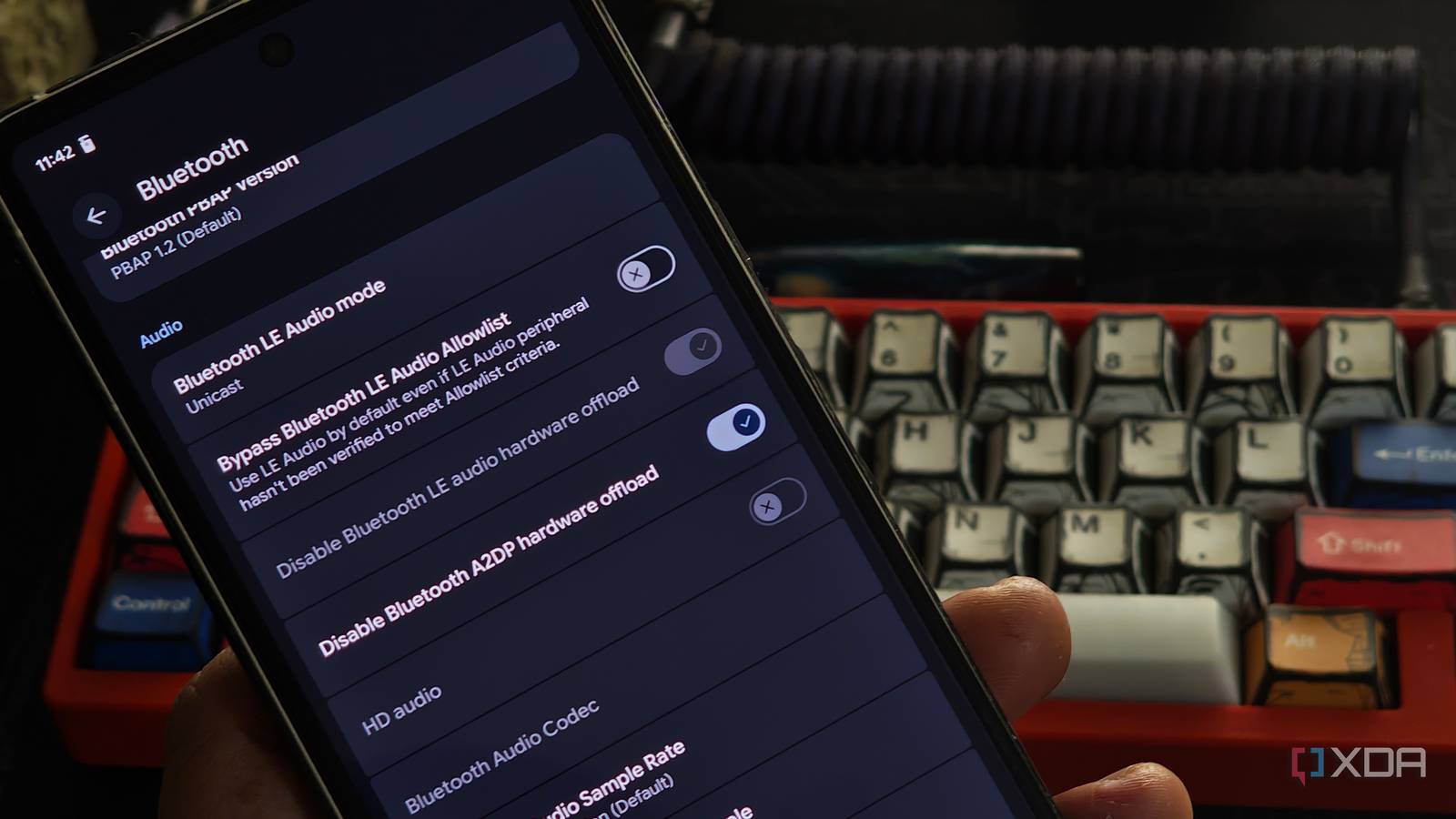
Published Nov 15, 2026, 3:00 PM EST A seasoned mechanical design engineer turned tech reporter and reviewer, Chandraveer brings more than four years of consumer tech journalism experience to the table, with bylines at Android Police and iPhoneHacks. He's written about everything from UI and UX changes across various apps to emerging software and AI trends. At XDA, he showcases his versatility in the tech reporting space with articles rooted in personal experiences and frustrations. Chandraveer's passion for consumer tech spills over into hobbies such as mechanical keyboards, photography, and 3D printing. With an academic background in design and manufacturing, his insatiable curiosity spans beyond the digital domain. Chandraveer's downtime is an eclectic mix of reading fiction, practicing calligraphy, conceptualizing new products, and enjoying an expansive FLAC audio library. I spend hours inside my car every week, and I consider it my primary listening space when I'm not using personal audio gear like earbuds or headphones. It all makes sense because the cabin is well isolated from ambient noise, and the speakers are placed all around you, just like in a home theater setup. I expected brilliant sound quality on my daily commute, but my stereo kept delivering a lifeless, hollow acoustic experience. I blamed the vehicle's speakers for years before realizing the source- my smartphone- actively ruined the audio stream. I currently connect my Google Pixel 7 wirelessly to my car using a Carlinkit 2 Air wireless Android Auto adapter. It pushes the audio stream over Bluetooth after the initial Wi-Fi handshake. So, while the adapter handles streaming Android Auto's display and capturing input, the audio stream is purely between my phone and the car. After plenty of scouring, I finally found that one setting in Developer Options changes how your phone processes audio, and can eke out that final 10% in quality and connection stability before the wireless interface compression becomes the next obvious bottleneck. Audio handling sure isn't your car's strong suit You might think that, a decade after deleting the headphone jack from consumer smartphones, the onboard DAP chip would've received adequate attention to compensate. Sadly, that's seldom the case. The car has an even smaller role to play here unless it's running Android Automotive, where it'd stream music directly from the internet. In most other cases, the headunit only amplifies the signal and splits the signal to tweeters, door speakers, and the center channel. I noticed a cavernous delta between how songs sounded in my home theater versus the car. To eliminate the Bluetooth compression variable from the comparison, I played Dracula by Tame Impala and a dozen other test tracks on bookshelf speakers via Bluetooth, and they seemed on par with the car. This meant something in the Bluetooth connection was preventing the audio from reaching its full potential, even with high-res codecs in the mix. I ultimately found the fix hiding deep inside the Android Developer Options menu. I discovered a specific setting called Disable Bluetooth A2DP Hardware Offload sitting right in the middle of the Bluetooth section. I toggled this switch to ON, which forces the smartphone to stop using its built-in hardware processor for audio handling. Turning this toggle ON effectively turns the underlying hardware offload feature OFF. You tell the Android system to ignore the dedicated audio chip and use the main CPU for audio processing. Why does this one toggle work It's not magic, after all You must tap the build number in your device settings seven times to unlock Developer Options before the A2DP Hardware Offload toggle shows up. Interestingly, it wasn't a developer option on my Nothing Phone 3, and remained visible in plain sight in the Bluetooth connection menu. However, it was also permanently greyed out, and my findings lined up with other Nothing users on Reddit, suggesting your device OEM may lock this feature in their ROM. You'll also need to restart the device after flipping this switch. That said, the default smartphone processing pipeline actively sabotages our premium acoustic experience inside the isolated space our cars provide. Phone manufacturers default to handing your music to a low-power digital signal processor (DSP) chip to conserve battery. This chip processes the audio stream for optimal transmission before the signal even leaves your device. Generic DACs that aren't built for discerning audiophiles tend to strip audio of depth and richness. The modern car head unit then receives this compromised stream and applies its own EQ and tuning, creating a disastrous double-processing loop that hollows out what little detail the Bluetooth compression may have spared. For starters, turn off the built-in EQ settings on your car's head. Eliminating these unfamiliar variables ensures the stereo system plays exactly what the phone transmits, preventing additional manipulation. Flipping the offload toggle forces the phone's primary CPU to execute the audio encoding in software. This direct software route beams a clean, unadulterated signal straight to the speakers. Software encoding promises better quality There are tradeoffs with this approach too Returning to Dracula and my test playlist after making this change was a breath of fresh air. My car instantly delivered the tight, articulate bass response that the hardware DSP previously swallowed. Before the audiophiles reached for their pitchforks, yes the quality was nowhere close to a wired IEM yet. Also, we cannot definitively claim that CPU software encoding universally beats dedicated hardware audio chips across all devices. However, Android deserves high praise for letting enthusiasts bypass default limitations. You should also expect a minor physical trade-off. Moving the encoding workload to the CPU generates slightly more heat on my Pixel 7 during extended road trips. If the toggle is greyed out on your device, there are workarounds that have helped in isolated cases, such as toggling Developer Options on and then off again. Their permanence and efficacy largely depend on how your device's Android skin is coded and updated. Reclaim audio fidelity over Bluetooth Taking ownership of your device's audio transmission path transforms an average daily drive into an engaging acoustic session. You simply navigate into your system settings, flip one hidden switch, and let your car speakers finally perform to their true potential. Yes, it still isn't the best quality audio possible (like on wired), it may not work on some devices at all, and there are trade-offs when it does work. It is still just a switch you flip to make audio sound noticeably better without sacrificing all the conveniences afforded by Bluetooth. At the very least, switching to CPU processing could give you a more stable connection.
One hidden Developer Options switch made my car's Bluetooth audio sound dramatically better
Full Article
Original Source
Read the full article at Xda-developers →KhanList aggregates and links to publicly available news content. We do not host full articles from third-party sources. Always verify important information with original sources.