
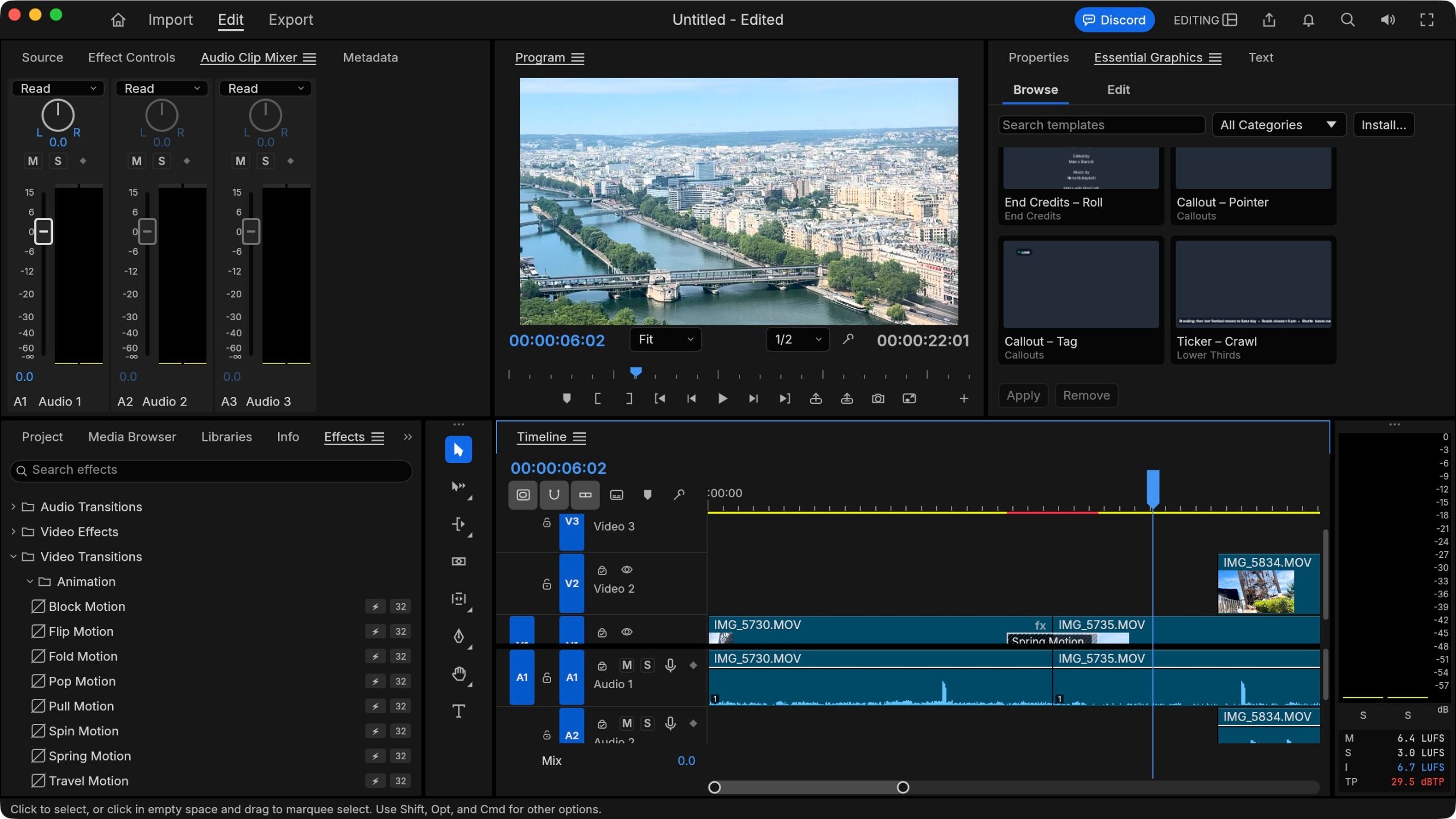
(Image credit: ArtCraft // Future) An AI developer has taken on Adobe, the undisputed 800-lbs gorilla of the creative software space. Announcing the 'launch' over on Reddit, the "a 15-year industry veteran" explained that he used Opus 5.5 to help "recreate 7 of the top Adobe apps in 100% pure native Rust".Adobe's all-consuming subscriptions seems to be the main reason for recreating Photoshop, Premiere Pro, Lightroom, Illustrator, Acrobat Pro, After Effects, and InDesign using the modern programming language.That's something I can fully appreciate. After all, what if you’re not a fan of their business practices, like charging you a fair chunk of change every month to be able to use their software, and the moment you stop paying, you can no longer work on your files and projects?So, of course, I just had to check out how it compares to Adobe's own creative suite.ArtCraft: New apps for the same jobThe ArtCraft names are pretty self-explanatory: PhotoCraft is for images, LightCraft for image cataloguing, VectorCraft for vectors, DesignCraft for desktop publishing, FilmCraft for filmmaking, EffectCraft for creating special effects, and PrintCraft is for working with PDFs.These apps aren't only free, they’re also multi-platform, available for PCs, Macs, and Linux systems, and there are even web-based versions, would you believe it. If you’re curious yourself, you can download them all from the Get ArtCraft website here.Sound too good to be true? I know what you mean. Plus, is it even legal? I’m not a lawyer, so I haven’t got a clue, but the developer claims it’s all clean code and nothing copyrighted was copied. Make of that what you will (I’m sure I can hear lawyers scurrying through that code like ants at a picnic). But I know what would be a crime: if I didn’t check this software out, and compared it with the original.Sign up to the TechRadar Pro newsletter to get all the top news, opinion, features and guidance your business needs to succeed!I thought I’d look at two packages I use regularly, image editing and filmmaking, and get a feel for how they square up against Photoshop and Premiere Pro. I’ll be using my trusty 16” Intel-based MacBook Pro to check how the software runs on a computer that’s been around the block a few times. (Image credit: ArtCraft // Future)Installing ArtCraftInstalling the software could hardly be simpler. You select the app you’re after, click on ‘Download’, and run the installer, which in my case simply involved dragging the app’s icon into my Applications folder.Now first things first, you may be as surprised as I was by the software’s size. On my machine, Adobe Photoshop eats up 6.4GB of storage space. Premiere Pro is a little hungrier, coming in at 6.8GB.I guess that’s what you should expect for modern software, right? After all, Apple’s Final Cut Pro is 7.7GB, DaVinci Resolve is 9.29GB, Canva Affinity is 3.51GB, and Pixelmator Pro is a svelte 814MB.But these Craft apps? They’re positively anaemic. PhotoCraft is 80MB, while FilmCraft, 90MB. How can they be so small yet still claim to offer the same features as their… gargantuan counterparts?PhotoCraft vs Photoshop (Image credit: ArtCraft // Future)Let’s highlight the positive first, shall we? You don’t need an account to run PhotoCraft, nor do you need to be online for it to work. Just double-click on the icon and you’re good to go (I’m assuming that’s the case for each of the other 6 apps on offer). You’ll also be pleased to see it kinda looks Photoshop-y.But it’s not all sunshine and rainbows, and in fact, PhotoCraft failed for me at the very first hurdle: it can’t read the HEIC format.Now that’s a problem for me as I carry an iPhone, and Apple have used that format by default for all photos taken with such devices since 2017. I guess 9 years is just too short a time to write software that can handle that format.To be fair to PhotoCraft, many apps and services still have an issue with HEIC… but Photoshop doesn’t.After having transformed some shots to JPG (necessitating the use of a different image editor - oh the irony), I tried again.My subsequent experience afterwards was relatively uneventful. I was able to work with various objects, apply colour correction to one or multiple layers, select items, move them around, add a title… all pretty basic stuff, yet admittedly, what Photoshop is most often used for. (Image credit: ArtCraft // Future)But it wasn’t a slick experience. For one thing, the software isn’t optimised for Macs - I can’t tell you how much I miss my menu bar at the top of the screen.More crucially, when trying to select part of an object - especially when using the ellipse tool - the selection wouldn’t hold, and I had to repeat the process multiple times until it did. Moving an object around moved its outline, until I released the mouse button, and then the whole object was shunted to its new location. How very 80s.And what’s perhaps the most damning thing of all, when I decided to save my project, PhotoCraft saved it… as a JPG. There was no file format option and the only one available destroys any possibility of going back to your project and continuing your work.If PhotoCraft doesn’t yet have its own file format, why is there no option to save your work as a PSD document instead? Other competitors like Pixelmator Pro let you do that. But not PhotoCraft. That’s, for lack of a better word, bad.FilmCraft vs Premiere Pro (Image credit: ArtCraft // Future)Launching FilmCraft is lightning fast, and I was greeted with a demo project featuring multiple layers, and some transitions. But that won’t help me understand how the software works, so I created a fresh new one and added my own footage.First off, the interface has a very familiar look to it which is very welcoming. I also definitely appreciated the menu bar being where it’s supposed to be this time. Creating a new project, importing clips, adding them to a new sequence, working with multiple layers, everything was as expected. (Image credit: ArtCraft // Future)So far so good, right? Well except that the rest felt a little clunky to be honest. Like I couldn’t manually trim a clip in my sequence. I could use the blade tool for sure, but mousing to the end of the clip and dragging its edge inwards? Sorry, no can do. I’d view that as the absolute most basic action you should be able to perform on a clip.Aside from that, I could access color correction, apply transitions and other effects… but just like PhotoCraft, it’s crazy slow. I know I purposefully chose an old machine to run this on, but the latest versions of Photoshop and Premiere Pro run rings around these apps on the same hardware.And then there’s the killing blow: for whatever reason, the audio from the clips I was using were completely unusable. All I got when I tried playing the footage back was static. Very loud static. It’s bound to be a lack of a specific codec again, but frankly, in this day and age, codec support for a vast array of media should be baked in from the start.Final thoughts (Image credit: ArtCraft // Future)Alright. Here’s the good news: these apps look good, feel very familiar, and provide some of the tools that are used most often. It’s impressive what has been achieved, but truth be told, there’s a heck of a lot of overpromising and a huge amount of underdelivering, I’m afraid. These apps are slow, some crucial features are missing, and there are some big bugs that haven’t been dealt with yet.But part of the reason is these software packages are not even full version releases. PhotoCraft is at 0.20, while FilmCraft’s on 0.2.1. They’re far from ready for prime time. So, I have hopes that they're only going to get better once the time comes.If you’re looking for free alternatives to the Adobe hegemony, these are not the apps you’re looking for. At least not yet. Let the developer cook a little longer, but if you just can’t wait for your independence, there already are some free alternatives out there I recommend.Sure, you’ll have to familiarise yourself with new interfaces, but these apps have been delivering the goods for years now and are well worth exploring. I’m thinking of Canva Affinity, and DaVinci Resolve. Personally, I'd check those out until ArtCraft is ready for primetime (and the coast is clear of lawyers).Read more: The best Adobe Photoshop alternatives and the best Premiere Pro alternatives. Steve has been writing about technology since 2003. Starting with Digital Creative Arts, he's since added his tech expertise at titles such as iCreate, MacFormat, MacWorld, MacLife, and TechRadar. His focus is on the creative arts, like website builders, image manipulation, and filmmaking software, but he hasn’t shied away from more business-oriented software either. He uses many of the apps he writes about in his personal and professional life. Steve loves how computers have enabled everyone to delve into creative possibilities, and is always delighted to share his knowledge, expertise, and experience with readers.
One dev is recreating 7 Adobe apps in Rust for free — so I tested it out
Full Article
Original Source
Read the full article at Techradar →KhanList aggregates and links to publicly available news content. We do not host full articles from third-party sources. Always verify important information with original sources.