
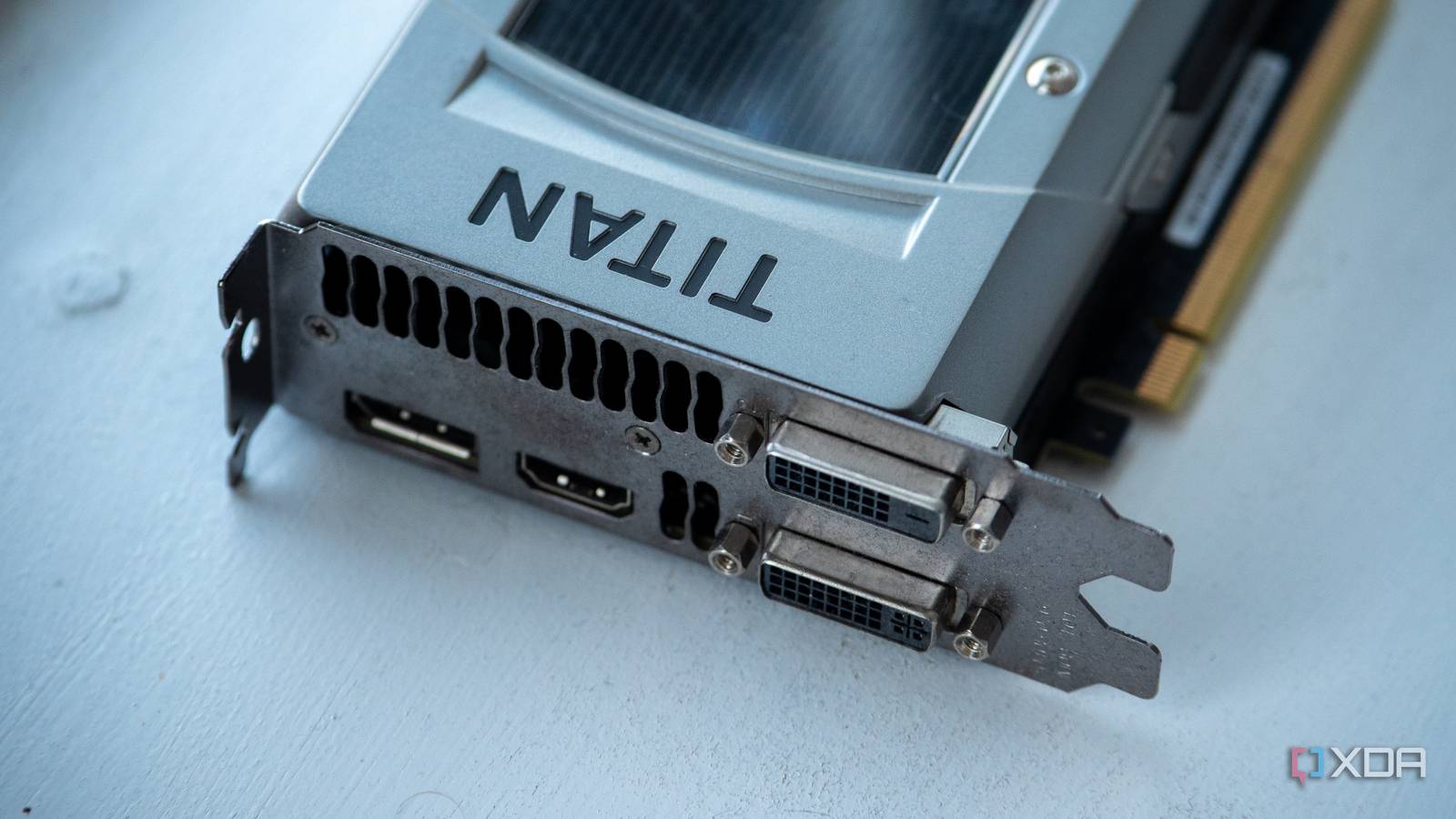
Published Sep 23, 2026, 4:30 PM EDT Hamlin has been in the tech field for over nine years. Since 2017, his work has appeared on MakeUseOf, Android Police, OSXDaily, Beebom, and more. He served as the Senior Editor at Valnet's MakeUseOf for over two years before joining XDA. He uses a high-end gaming rig for desktop use and a MacBook for traveling, but dislikes some of the quirks of macOS. You're more likely to catch him at the gym or on a flight than anywhere else. I still remember how normal it used to be for GPUs to have at least one DVI port on the back. The first graphics card I ever bought, the GTX 680, actually had two of them. Even the GTX 1070 I upgraded to years later had one DVI-D port. This port started disappearing from GPUs with the RTX 20-series, mostly sticking around on lower-end and mid-range models. And by the time I upgraded to the RTX 3090 in 2020, I had already gotten used to seeing nothing but DisplayPort and HDMI. Even though these ports are obviously an upgrade, there's one thing the old setup did better. And that's connecting to older monitors without making you think about the connection at all. For instance, if you still have a 120Hz or 144Hz monitor from the 2010s that requires DVI to run at higher refresh rates, using it with a modern GPU isn't exactly straightforward. You can usually make it work with the right adapter, but "the right adapter" is doing a lot of work here. GPUs with DVI ports are perfect for old monitors Native dual-link DVI avoids a compatibility headache The use case I'm talking about is an older high-refresh-rate monitor that relies on dual-link DVI. The BenQ XL2411, which was a popular esports monitor in the mid-2010s, is a perfect example. This monitor can run at 1080p/144Hz, but BenQ specifically tells you to use a dual-link DVI connection to get there. That was never a problem a decade ago, when GPUs shipped with dual-link DVI as standard. You connected the cable, selected 144Hz in Windows, and that was basically it. Now, you need an adapter to get the job done, but it's not as straightforward as converting DisplayPort to HDMI. Passive DisplayPort-to-DVI adapters, which you can find for cheap, only give you single-link DVI bandwidth, meaning you'll be limited to 1080p or 1200p at 60Hz. For 1080p/144Hz or even 1440p/60Hz, you need an adapter with an active converter that can output dual-link DVI, and those are expensive, sometimes costing $50 or more. These adapters typically also need a separate USB connection for power. Even the right adapter can cause problems Dual-link DVI support alone doesn't guarantee everything will work Credit: StarTech When you use an active adapter, you have to worry about more than resolution and refresh rate. The adapter itself becomes another device in the chain, and it has to correctly handle things like your monitor's display timings, EDID information, and HDCP. You'll find active DisplayPort-to-DVI adapters with and without HDCP support. So if you get one without HDCP, you could run into a black screen or playback error when trying to watch DRM-protected content. Then there's the possibility that the adapter simply doesn't play nicely with your monitor. I've seen XL2411 owners complain about dual-link DVI adapters not working properly after a cold boot, with the monitor showing a black screen. You could also have issues with the adapter not passing your monitor's EDID information correctly, which can cause Windows not to detect all the resolutions and refresh rates it supports. Back when older GPUs had DVI ports, this wasn't something you even had to think about. We've moved on for a reason DP and HDMI unlock higher resolutions and refresh rates, but niche cases matter I'm not saying Nvidia and AMD should bring back DVI to their GPUs because there's a good reason we've moved on from it. Dual-link DVI doesn't have anywhere near the bandwidth of even older DisplayPort 1.4 and HDMI 2.0 standards, let alone the newer versions we have today. To be clear, it doesn't have enough bandwidth to run a 1440p monitor at 144Hz. And let's not forget that DVI can't carry audio, unlike DisplayPort and HDMI. But that doesn't change the fact that some people still have older monitors that rely on dual-link DVI. Of course, I wouldn't buy an RTX 2070 or GTX 1660 Ti just to get native DVI, but if you still have one lying around, I would think twice before selling it off. That could save you from spending $50 or more on an active adapter that can still have compatibility issues if you're unlucky. The last thing I'd want is more cable mess behind my desk just because the adapter needs a separate USB connection for power. The transition away from DVI hasn't been completely seamless This may not be a concern for the vast majority of you gaming on 1440p and 4K monitors today, but it's a good example of what happens when an older standard disappears before all the hardware that relies on it does. I'll admit I didn't care that my RTX 3090 didn't have a DVI port because I purchased new monitors when I built my PC, but not everyone upgrades their entire setup at once. Gaming monitors like the XL2411 were good enough to outlive multiple GPU upgrades back then, and losing native DVI only made it more complicated to keep using them as intended. It's funny that motherboards still find room for ancient PS/2 ports while DVI disappeared from GPUs completely.
Older GPUs with native DVI ports solve what modern cards broke
Full Article
Original Source
Read the full article at Xda-developers →KhanList aggregates and links to publicly available news content. We do not host full articles from third-party sources. Always verify important information with original sources.