
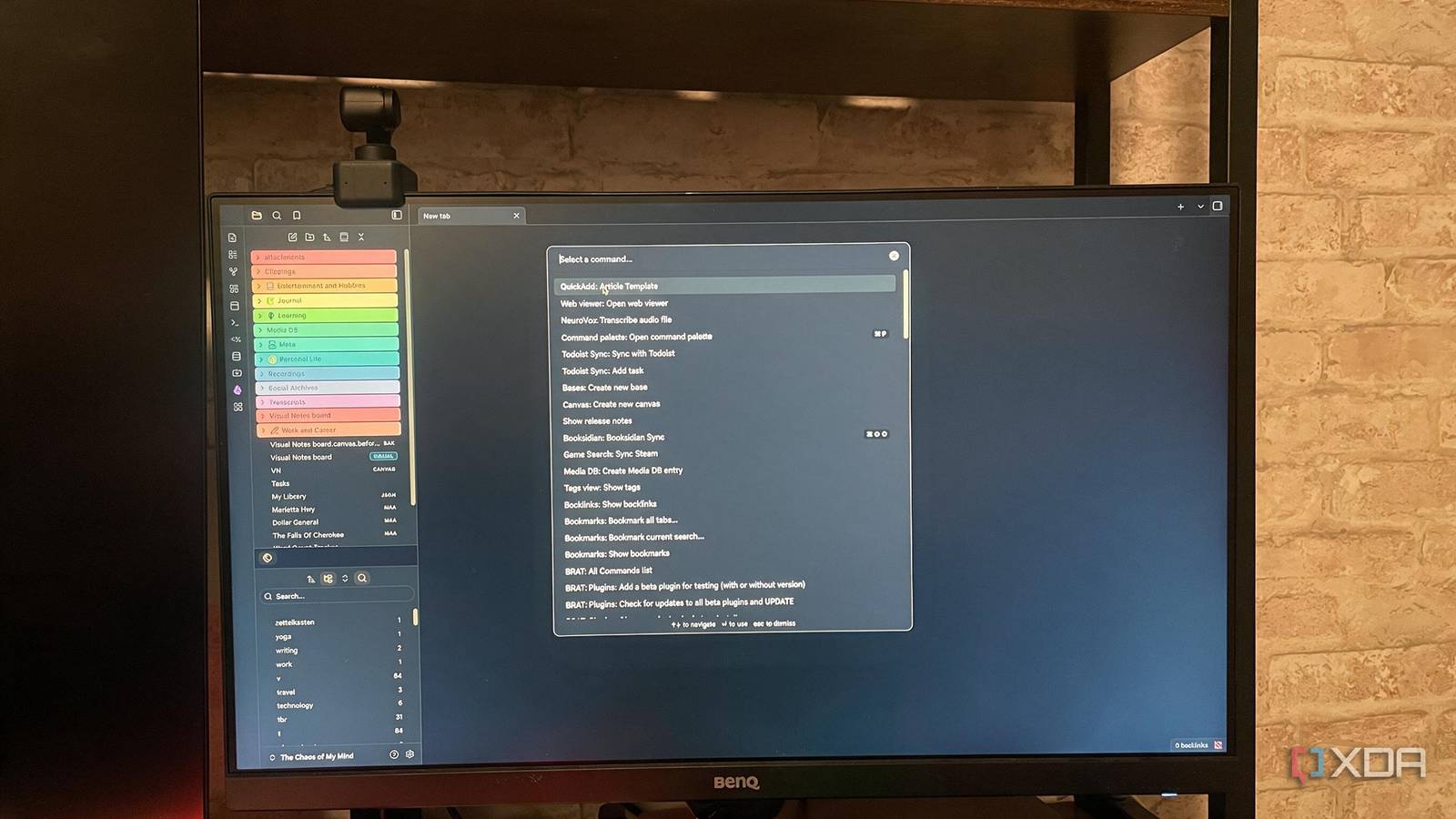
Published Sep 6, 2026, 7:00 PM EDT Patrick is a seasoned writer with more than a decade of experience, specializing in any and all things tech. His work has been featured on platforms like CNET, Yahoo, Xfinity, and many other outlets. When not typing away, he can be found with his nose in a book. I first dipped my toe into Notion over a year ago, and its functionality was impressive — but it didn't quite work the way I wanted. As I kept exploring software, I found Obsidian, then its massive plugin library and the variety of automation options available to me. It didn't take long for Obsidian to completely replace the rudimentary workflows I'd built in Notion, and I can't see myself ever going back; Obsidian does more of what I want than Notion. It's more than just a database, and as useful as Notion is, it didn't click the way Obsidian did. QuickAdd and Templater automate my workflow I stopped doing the same work over and over If you frequently work with the same formats, the QuickAdd and Templater combination is a godsend. With Templater, I can define exactly what an article template will look like; for example, I have a template for new articles that creates a new note in a predefined folder, then asks me for the publication name, article title, author, and expected URL. After I click Enter with that information, it generates a new note with everything already set in the front matter. QuickAdd powers article placement on the backend. All I do is open the command palette and type "Quick," and then I select "Article Template" from the options that appear. Then I just enter the information. I could streamline things even further by binding it to a specific hotkey, but I don't feel like it's worth it in my scenario. I write a lot. I don't write that much, though. Dataview and Bases replaces the database part I think they're better than Notion Notion originally won out over Obsidian for managing databases. Obsidian didn't have a native way to create a database, so the Dataview plugin was created to compensate. It worked well and offered tremendously useful features that gave users a lot of flexibility in what they created. If you've ever seen some of the custom dashboards Obsidian users have made, Dataview was likely involved. That said, Bases now offers a native database feature that's more intuitive to use than Dataview and doesn't require you to learn a programming language (even if Dataview Query Language is relatively simple overall). That's not to say Dataview is irrelevant; it can still do a fair bit that Bases cannot, like supporting inline queries, custom JavaScript, and more advanced grouping features. Bases is steadily receiving updates, though, so I wouldn't be surprised if its capabilities matched those of Dataview soon. Linter handles the housekeeping Obsidian cleans up after me Here's the thing about Obsidian: I didn't know as much about it when I first started as I do now. The frontmatter in those early notes is a chaotic mess. I thought about going back and organizing it, but going one-by-one through hundreds of notes isn't my idea of a good time. I figured my vault might just be a bit messy, and then I discovered the Linter plugin. This plugin makes it easy to apply standardized formatting across multiple notes at once. You can tweak tags, properties, and frontmatter data in one fell swoop. You can "lint" your entire vault at once, or apply the changes only to specific folders. You can also exclude certain folders from Linter entirely. All of these options are available through the plugin's settings menu. It's possible I spend too much time automating Obsidian Obsidian gives me almost too much freedom After I discovered Obsidian, its over-the-top plugin library, and how much automation potential is available, I started exploring. I was twenty-some-odd tabs deep before I realized I was procrastinating on work by automating things that didn't really need to be automated. It's an easy trap to fall into; for many users, Obsidian itself becomes something to tinker with and modify, rather than a platform for actually getting work done. I understand the temptation. I've spent too much time browsing the plugin library. I've wasted hours improving a workflow that saved maybe twenty seconds at best. Am I ever going to use it enough to make up that time? Absolutely not. That's the potential downside of an application with Obsidian's level of flexibility. The plugin library makes it easy to find ways to "improve" your workflow (especially since the number of available plugins has tripled in the past few months), but sometimes the best automation is just leaving things alone. Notion is great, but it's not for me I have many colleagues who use Notion at a level I can't even conceive of. The application is immensely powerful, but I found it didn't fit my workflow — and between Bases and Dataview, Obsidian can handle all of my database needs. Obsidian OS Windows, macOS, Linux, iOS, iPadOS, Android Individual pricing Free normally; $4/month for Obsidian Sync Obsidian is a feature-rich note-taking app that's available on different platforms and offers a neat and clean interface. It's also free-to-use for individuals.
Obsidian's automation plugins replaced my entire Notion workflow setup
Full Article
Original Source
Read the full article at Xda-developers →KhanList aggregates and links to publicly available news content. We do not host full articles from third-party sources. Always verify important information with original sources.