
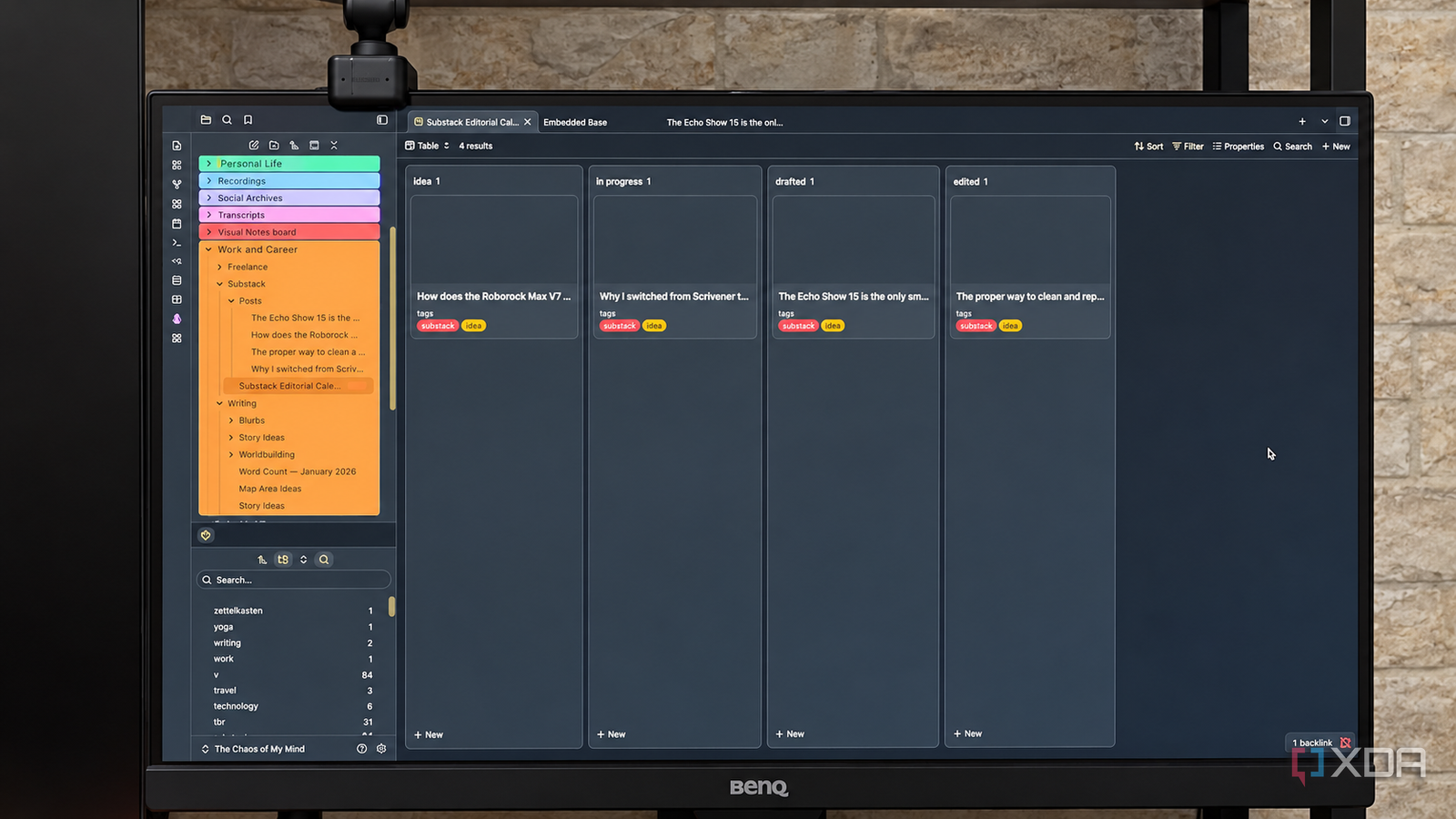
Published Sep 19, 2026, 3:30 PM EDT Patrick is a seasoned writer with more than a decade of experience, specializing in any and all things tech. His work has been featured on platforms like CNET, Yahoo, Xfinity, and many other outlets. When not typing away, he can be found with his nose in a book. Obsidian was a powerhouse application before the introduction of Bases, but that single feature put it on par with — and in my opinion, far beyond — anything Notion could hope to offer. Instead of trying to keep a database up to date, Bases lets you build a database from your existing notes. You can filter by properties, tags, and more, and the features keep rolling in. As of this writing, Bases can natively show tables, cards, lists, and a Kanban board. If you look in the community plugin library, there's a slew of options for enhancing Bases even further. I've tested quite a few of these, and some of Notion's most popular designs are available as plugins. For some applications, Obsidian might not be the best tool — I've written about times when a lightweight database app outperformed Bases — but I have also found many uses for Bases that streamline my workflow. Bases turns your notes into a project board You can construct a database out of your existing notes Every project management tool I've used in the past was just a visual representation of my progress on other files. Bases is different. It can be built out of the files in question, which means I can do more than just check whether an article is in progress. I can open the article itself right from the database. I created a database to manage my Substack publications using the Kanban feature, where notes are sorted by their "status" property. Every note has frontmatter with a property that designates it as an idea, in progress, drafted, or edited, and listing that property guarantees the note automatically appears in the Base. Better yet, dragging notes between columns updates that property automatically; if I move a story from "drafted" back to "in progress," it updates the progress. Unfortunately, if there are no other stories with the "drafted" status, that column disappears (and I haven't found a workaround for that yet). My base can live alongside my actual work No jumping between apps I've traditionally used tools like Trello or Asana to manage my work. Under those circumstances, my workflow was usually "open Trello, find what needs to be done, switch to Obsidian and write, then go back to Trello." Not the most efficient use of my time. By building a home for my projects in Bases, things become more centralized. I open the proper Base, find the next article I need to write, and click it to open the note. Sure, I might still have to transfer it to whatever CMS it goes live in, but the original version lives on my machine. I can also embed a base inside another note or as part of my homepage. That way, as soon as I open Obsidian, I can get an overview of exactly what my work is going to look like for that day. Some plugins, like Hearth, make it easy to create a homepage and embed a base. Fair warning, though: for some reason, I couldn't get Hearth to play nicely with my Kanban board, although every other Base I tested worked without a hitch. One set of notes powers my entire workflow It's more than just a Kanban board One of the greatest aspects of the Bases feature is that I can sort and divide notes across multiple views depending on what I need. While a Kanban board is great for tracking workflow, I can also switch to a table that shows key information at a glance. Imagine one view that shows if the article is in progress, while another shows its word count, working title, estimated publication date, etc. I don't need separate notes for that, either. As long as all of those data points are defined in the front matter, I can create a view for it. And like I said earlier: it's a two-way street, so if I change the estimated publication date in a table view, it will appear not only in the note itself, but also in other views. For example, I might have a calendar view that lets me drag articles to different publication dates. Doing so would change the information across any other base I have set up. But Bases isn't a replacement for a dedicated project-management app There are quality-of-life issues that bog things down What Obsidian does well, it does very well — but there are still instances where a dedicated tool is better. I experienced that when I needed to create a database with individual data points, all too minor to warrant an entire note. I found an Excel-style tool like Grist worked much better for that need. A good way to look at it is like this: a project management tool like Trello designs a workflow and asks your process to live inside it, while Bases looks at your information and builds a workflow around it. The disappearing Kanban column I dealt with is one example. Bases only works with the information it currently has, so if there's no "status" property with a particular value, it won't show an empty field. There are workarounds, yes, but it just feels clunky. Bases can save a lot of time When updating a note, it updates in all relevant databases; I don't have to worry about maintaining them. I don't necessarily want Bases to be Asana or Trello, but I do want a way to manage my progress without maintaining a separate app alongside the work itself. The less time I spend updating my project-management system, the more time I spend working on the actual projects it manages. Obsidian OS Windows, macOS, Linux, iOS, iPadOS, Android Individual pricing Free normally; $4/month for Obsidian Sync Obsidian is a feature-rich note-taking app that's available on different platforms and offers a neat and clean interface. It's also free-to-use for individuals.
Obsidian Bases can put project boards beside your notes, making it one less task app to keep updated
Full Article
Original Source
Read the full article at Xda-developers →KhanList aggregates and links to publicly available news content. We do not host full articles from third-party sources. Always verify important information with original sources.