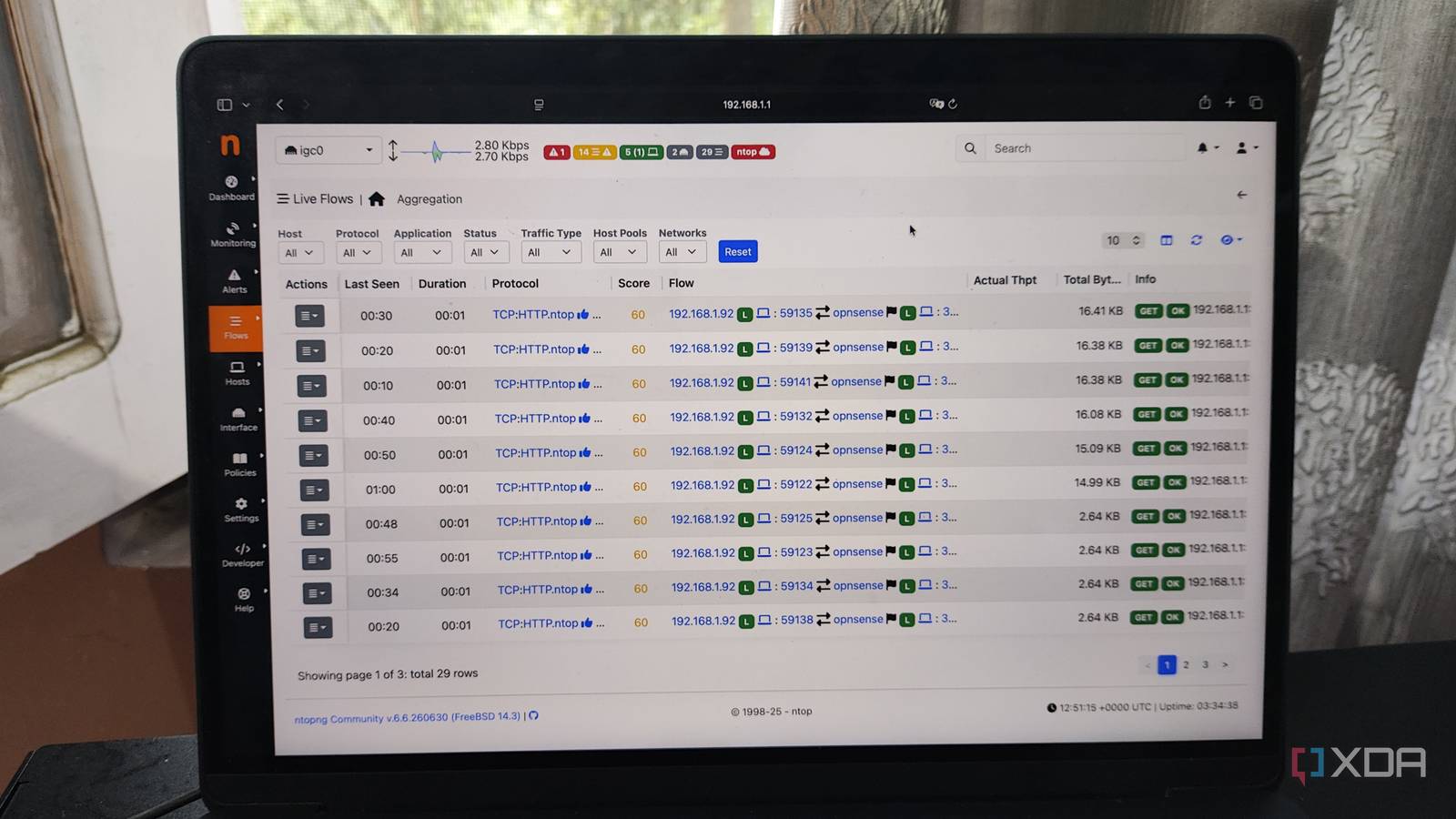
Published Jul 29, 2026, 1:30 PM EDT Ayush Pande is a PC hardware and gaming writer. When he's not working on a new article, you can find him with his head stuck inside a PC or tinkering with a server operating system. Besides computing, his interests include spending hours in long RPGs, yelling at his friends in co-op games, and practicing guitar. I’ve always been fond of visualizing the metrics of my everyday devices and home server hardware. When it comes to monitoring the performance and resource utilization statistics of my paraphernalia, I’ve got a Pulse LXC keeping an eye on my home lab. On the networking front, I’ve got a few utilities that generate neat dashboards for my LAN devices, but ntopng is the only one I rely on for detailed analysis. Sure, AdGuard and NetAlertX can provide cool graphs detailing my network records, but the former is only concerned with DNS requests. Meanwhile, the latter’s responsibilities include scanning my LAN for the connection of my devices and creating a topology map. However, ntopng is the one that single-handedly fixed my network monitoring woes by bringing full-fledged deep-packet analysis capabilities to my DIY OPNsense router. The nDPI toolkit can even detect app-specific traffic One of my biggest issues with enterprise-grade network analysis tools, especially the ones on Kali Linux, is that they’re a bit too unintuitive for everyday use. Ntopng, however, sidesteps this problem entirely by letting me track detailed network stats of every device connected to my LAN. The main dashboard alone shows neat graphs depicting the overall traffic, network performance, protocol usage, and other statistics, and it only gets better once I head to the other tabs. The live flows section, for example, depicts bi-directional channels between my LAN devices and the target destinations. On top of that, it lets me check the throughput and data exchanged between my local systems and external devices/websites as well as the protocol stack that my inbound and outbound traffic uses. Likewise, the Host tab lets me check detailed statistics of the IPs that all the devices in my home network tried to access, and these records include everything from the traffic breakdown and active flows to active peers and the MAC addresses of the systems that tried to access them. Better yet, ntopng automatically creates VirusTotal and AbuseIPDB links for each host, so I can double-check the links via these security intelligence platforms. I’ve also configured active monitoring to run scheduled ICMP pings for essential devices and detect outages in my home lab, while the network discovery utility scans my LAN frequently to pull traffic records from newly-added devices and virtual guests. However, the real game-changer in ntopng is the nDPI toolkit, which can easily spot the protocols used by my home lab paraphernalia even when they’ve got inbound/outbound traffic on non-standard ports. It can also analyze the metadata elements on specific flows to correctly identify the application that’s generating specific traffic data. Ntopng also ships with cool security features If we were going by the technical definition, ntopng doesn’t qualify as a proper intrusion detection/prevention system. That said, it still includes some security provisions. For example, it can identify malicious patterns in real-time traffic and generate alerts upon detecting anything out of the ordinary. It can also run vulnerability scans on the open ports, which is especially useful for hardening the security on my mission-critical home lab devices and virtual guests. Since I tend to experiment with different tools in my home lab, I can modify ntopng’s app policies to harden the alert thresholds for specific utilities. Since malware tends to evolve practically every day, ntopng updates its threat profile by pulling up-to-date records from Stratosphere Lab, IPsum Threat Intelligence Feed, ThreatFox, and other cybersecurity platforms frequently. I’ve paired my ntopng instance with OPNsense But it’s also pretty useful as a simple Docker container Considering ntopng is a self-hosted application, there are a bunch of ways to get it up and running in my home lab, including a good ol’ Docker container. That said, I’ve configured mine on a custom router I built with a ZimaBoard 2, as it has enough horsepower to drive my DIY firewall as well as Tailscale, AdGuard, ntopng, and other network services I wish to run 24/7. Specifically, I’ve got OPNsense on my router, though it’s also possible to configure it on pfSense. That said, the OPNsense community plugin can’t function on its own, as it still needs a Redis database. So, I had to install both the os-ntopng and os-redis plugins on my OPNsense host. I left the Redis plugin at the default settings before enabling it, though I had to tweak the port number for my ntopng instance since I’d already configured Unbound to run on port 3000. But it’s not the only self-hosted network tool that’s vital to my setup As much as I adore somewhat obscure tools such as ntopng, I’ve also got some mainstream FOSS utilities in my OPNsense network stack. As you may have already caught on by now, AdGuard provides ad-blocking capabilities to my OPNsense router, while Unbound serves as the recursive resolver for my AdGuard instance. Then there’s Tailscale, which I’ve armed with subnet router privileges to access every device in my home lab when I’m away from my tinkering cave. Ntopng
Ntopng turned my home network into something I could actually understand
Full Article
Original Source
Read the full article at Xda-developers →KhanList aggregates and links to publicly available news content. We do not host full articles from third-party sources. Always verify important information with original sources.