
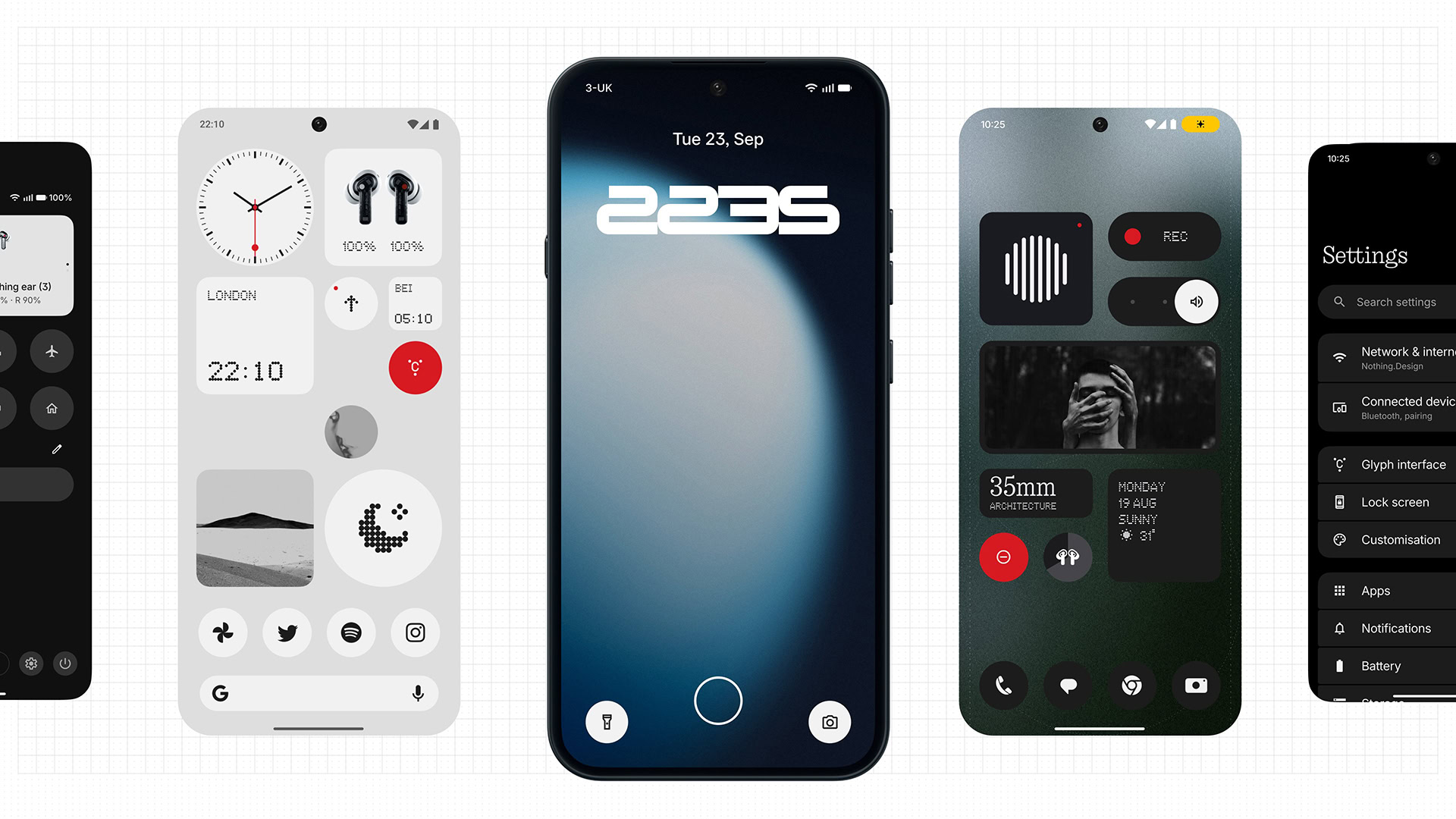
TL;DR Nothing has announced Nothing OS 5.0, bringing a massive overhaul featuring the Geist typeface, translucent software layering, dynamic wallpaper-tinted adaptive themes, and dedicated apps for both the Glyph Interface and Essential Apps Builder. The update also introduces Android 17 platform features such as split notification and Quick Settings panels, cross-platform Quick Share with iOS, enhanced privacy indicators, and more. Open Beta testing for the Nothing Phone 3 starts tomorrow, with a full stable release expected in mid-October. However, Phone 1, Phone 2, and CMF Phone 1 will not receive the update. Nothing has officially revealed Nothing OS 5.0, detailing the next major evolution of its custom Android skin. Built on top of Android 17, the platform update brings a visual design overhaul, expanded lock screen personalization, new first-party widgets, and tighter system-level integration with the Glyph Interface.Following an announcement teased on X, Nothing published a detailed breakdown of the new features and the design evolution on its community forums. Nothing OS 5.0 brings a major design refresh, a more adaptive home screen, new ways to use widgets, faster and smoother animations, improved Essential AI tools and the best of Android 17. Visually, the update shifts to Geist as the primary system typeface and adopts a new frosted, translucent software material to provide better visual layering across the UI. The brand’s signature dot-matrix typography has been dialed back (thankfully!) to specific accent areas to improve everyday legibility.Nothing OS 5.0 introduces a redesigned home screen, available as an additional theme alongside the existing Nothing OS style. Nothing is also adopting a new adaptive color system to draw from your wallpaper’s primary color to tint icons, widgets, and even 1×1 Quick Settings widgets, updating whenever your wallpaper changes.The company is also updating the status bar, Settings, Camera, and Gallery apps with updated icons, spacing, and animations. The Gallery also has new sorting options and a redesigned album view to help people find photos faster.Nothing has added two new lock screen clock faces with Nothing OS 5.0. There’s Gooey, which uses bold, fluid shapes to make the time stand out. Then there’s Micrographics, a clean, hardware-inspired design that surfaces the date, time, weather, and upcoming meetings at a glance. Additionally, clock face colours can now be customised to match your wallpaper too. Nothing OS 5.0 also introduces two new widgets: Collector: Lets users build a growing visual collection of favourite objects captured via the Camera or Gallery, and display it on their home and lock screens. Away Time: Tracks how long a person has stayed off their phone, their longest break, and how their screen-free time changes across the week. Home screen editing has also been improved, allowing users to select and move multiple apps and widgets simultaneously.The Glyph Interface is the signature highlight of Nothing Phones, and the feature now has its own dedicated app. This brings all Glyph Interface-related features, sounds, ringtones, and schedules together in one place. A new Glyph Timer widget also lets users start a timer from our home screen, while the Glyph on the back displays the remaining time.Nothing says that Nothing OS 5.0 also improves touch response, background app retention, and system resource management, helping prioritise the app in use and reduce interruptions when memory is under pressure. On-device intelligence learns which apps are used most and keeps them ready to launch, while overnight maintenance optimises memory to help sustain performance over time. System animations have been expanded and refined across apps, folders, widgets, multitasking, and shortcuts.Bluetooth controls have been redesigned in Quick Settings, making it easier to find, connect to, and disconnect nearby devices with fewer taps. The camera also keeps detected QR codes fixed on screen, making them easier to tap without rescanning.Essential AI tools are also getting some love with the Nothing OS 5.0 update: Essential Voice is now faster and delivers cleaner, better-formatted transcriptions. It better determines when to turn speech into a list or keep it as a paragraph, reducing missed points and inconsistent formatting while preserving the original meaning. Real-time transcription now shows words as you speak, and users can now also capture audio directly from the Ear 3 case with SuperMic. Essential Space: It gets Smart Collections, which organise scattered memories by recommending content for new and existing collections. It also gains Model Context Protocol (MCP) support, enabling other AI tools to search and read selected Essential Space data. Using the Essential Key to capture content is now simpler and more consistent across the lock screen, home screen, and apps. Essential Apps Builder is now available as an app on Nothing phones, letting users describe, build, and deploy AI-powered apps directly from their device without coding, then use them straight from their home screen. Since Nothing OS 5.0 is built on top of Android 17, it also carries over several new platform features: Separate Notifications and Quick Settings panels: Swipe down from the left to open Notifications and from the right to open Quick Settings, making it quicker to reach the panel you need. Cross-platform Quick Share: Allowing files to be shared with iPhone and Android devices via a simple QR code with no additional apps required. New privacy enhancements now show when an app is using the camera, microphone or location. Clearer screen recording controls. Updated location permission settings. Noto 3D emojis. Expanded Dark Theme support. Separate Assistant volume control. Higher-brightness HDR viewing. Redesigned Recents screen. Nothing OS 5.0 release scheduleNothing OS 5.0 open beta begins rolling out from tomorrow, starting with the Nothing Phone 3, with a general stable release on the cards for the middle of October. More devices are expected to follow, but Nothing does note that Nothing Phone 1, Nothing Phone 2, and CMF Phone 1 have reached the end of their promised software update window and hence, will not receive Nothing OS 5.0.Thank you for being part of our community. Read our Comment Policy before posting.
Nothing unveils Nothing OS 5.0 built on Android 17, but there’s bad news for older phones
Full Article
Original Source
Read the full article at Androidauthority →KhanList aggregates and links to publicly available news content. We do not host full articles from third-party sources. Always verify important information with original sources.