
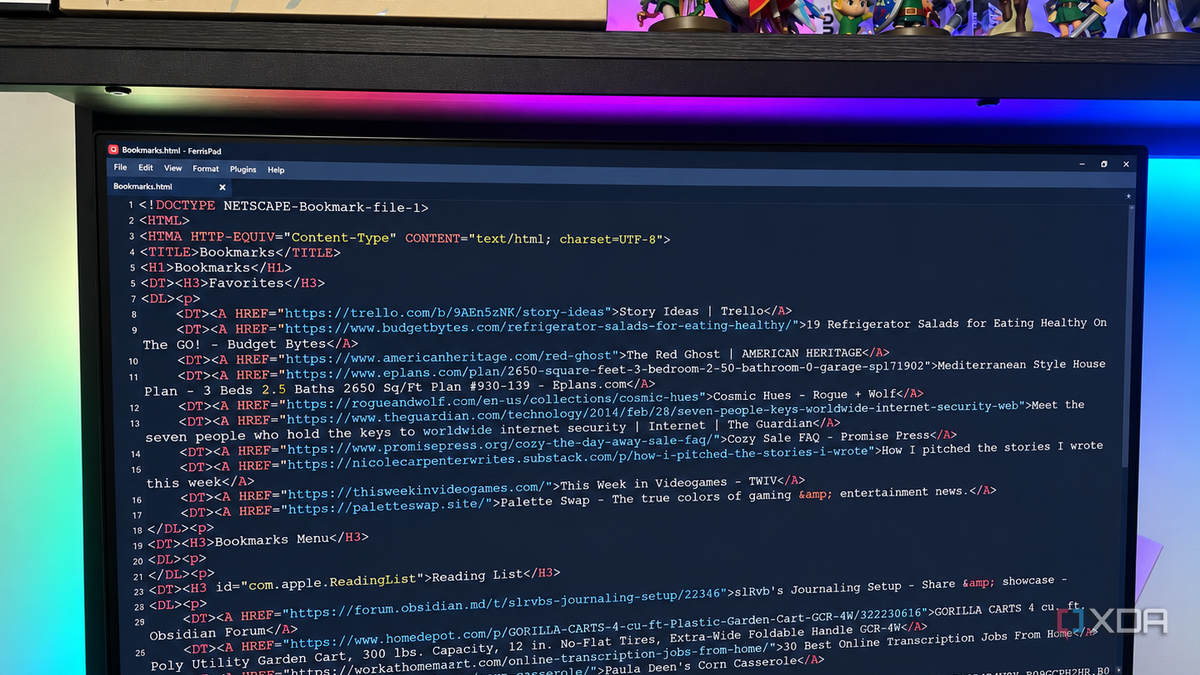
Published Oct 6, 2026, 2:00 PM EDT Patrick is a seasoned writer with more than a decade of experience, specializing in any and all things tech. His work has been featured on platforms like CNET, Yahoo, Xfinity, and many other outlets. When not typing away, he can be found with his nose in a book. Notepad is an application that everyone knows, if only because it has been around since the earliest days of Windows. That's not an exaggeration, either; it first launched as Multi-Tool Notepad in 1983. It's the default pick for opening log files on Windows, and for years, I never questioned that. Notepad is fast, convenient, and intuitive, although it does have features people often overlook. Then I found FerrisPad, an open-source alternative to Notepad that offers a wider range of features. I've spent some time using it and exploring its features, and I have to admit that I'm impressed. I feel a bit like I'm cheating on Notepad, having used it for more than thirty years, but FerrisPad might just be worth making the switch. FerrisPad handles large files without pretending they're normal Instead of freezing or crashing, it gives me options FerrisPad isn't the only application I've tested as a Notepad replacement. I tried Geany and Klogg both, but they crashed or froze when I tried to open a 2GB file. It's not a RAM issue, either; I have 32GB to spare, and nothing else was running in the background when I ran the test. FerrisPad doesn't open the file outright, but it warns me that it's too large for normal editing and offers alternative options. FerrisPad has an editable limit of 150MB. When you try to open a file that exceeds that, it lets you browse the entire file in read-only mode, open only the last 10,000 lines, or load a specific range of lines within the log itself. That's useful. Most of the time, I don't need to edit the log file; I just need to open it to find an error or take a closer look at a specific section. Once I know the line numbers, I can use FerrisPad to open that specific bunch without loading the entire file into memory. It feels like the Notepad I know, but with features it lacks Syntax highlighting has spoiled me Between Docker and Obsidian, I spend a lot of time editing YAML and JSON files (and Markdown, too). Normally, I'd fire these up in Notepad, but FerrisPad has several quality-of-life improvements that make it the preferable choice. It strikes a nice middle ground between Notepad's speed and utility and the advanced features of a tool like VS Code. When I'm making a quick edit, it's nice to have an app that opens faster than a more powerful IDE. On top of that, automatic syntax highlighting makes config files much easier to read. While Notepad opens them without an issue, it's a wall of text. FerrisPad differentiates variables by purpose, which makes files easier to scan. It can grow beyond a basic text editor Plugins give FerrisPad even more utility Any application that offers plugins will get my attention. The ability to grow functionality around my workflow and needs immediately elevates an application above the competition. With official and community plugins, FerrisPad can become a unique tool that does what I need it to without turning into a fully featured IDE. It stays fast without sacrificing utility. FerrisPad is an excellent text editor for everyday use, and its plugin functionality gives it room to grow. There's a built-in plugin browser, but you can also download them simply by pasting a GitHub URL into the Plugin Manager. FerrisPad also restricts how much access plugins have, making it a great choice for privacy-conscious users. FerrisPad still has some rough edges I'm not totally ditching Notepad yet I've enjoyed my experience using FerrisPad, and it will likely remain a part of my toolkit. That said, it's not quite there in terms of being my only text editor. I've encountered a few strange errors and bugs that need to be polished out before FerrisPad is ready to stand entirely on its own. The first is how it handles large files. Yes, it can open them (quite quickly) for easy browsing, but it also locked up and became unresponsive. It was barely using more than 13MB of RAM, but the GUI had failed. It wouldn't respond to mouse input, but I could exit the locked window with the ESC key. I was able to recreate the error several times over, and that's why I'm keeping Notepad around for now: plain old boring reliability. FerrisPad is more powerful than Notepad, but it's not a full replacement yet FerrisPad is an interesting application that I'm excited to see grow, and I'll likely continue to use it for day-to-day work. I'm not kidding about the visual component; being able to scan over config files is wildly helpful. But with that in mind, the bugs and glitches tell me FerrisPad still needs a bit more polish before it's ready for the limelight. FerrisPad FerrisPad is a lightweight, fast text editor.
Notepad can't handle large files, but this lightweight alternative handles them instantly
Full Article
Original Source
Read the full article at Xda-developers →KhanList aggregates and links to publicly available news content. We do not host full articles from third-party sources. Always verify important information with original sources.